導入
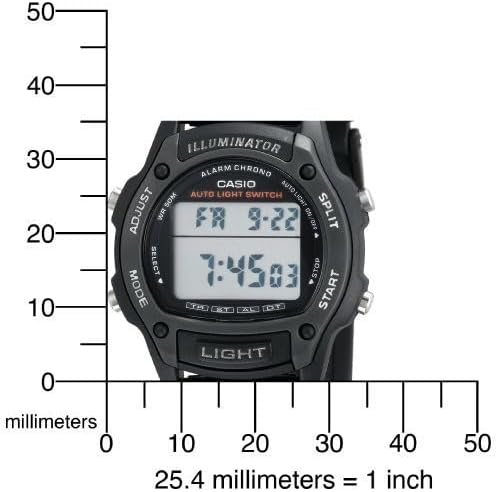
This manual provides detailed instructions for the setup, operation, maintenance, and troubleshooting of your Casio W93H-1AV Multifunction Sport Watch. Designed for durability and functionality, this digital watch is water-resistant and features a resin case, polyurethane band, and mineral dial window. It includes a digital display with day and date calendars, and a quartz movement for precise timekeeping.

設定
初期時刻と日付の設定
- タイムキーピングモードでは、 調整する button (top left) until the seconds digits start to flash. This indicates the setting mode.
- を押す モード button (bottom left) to cycle through the settings: Seconds → Hour → Minutes → Year → Month → Day.
- 使用 始める button (bottom right) to increase the flashing value. Use the SPLIT button (top right) to decrease the flashing value (for time and date settings).
- すべての設定が完了したら、 調整する もう一度ボタンを押すと設定モードが終了します。
12/24時間形式
タイムキーピングモードで、 12/24時間 button (top left, labeled ADJUST) to toggle between 12-hour and 24-hour time formats.

開封と初期設定view
ビデオ1: 開封と初期設定view of the Casio W93H-1AV watch, demonstrating its appearance and basic functions right out of the box.
操作手順
モードナビゲーション
を押す モード button (bottom left) to cycle through the different modes: Timekeeping, Stopwatch, Alarm, and Dual Time.
ライト機能
を押す ライト button (bottom center) to illuminate the display for easy viewing in low-light conditions. The watch features an Auto EL Backlight with Afterglow.
ストップウォッチモード
- ストップウォッチモードに移動するには、 モード ボタン。
- プレス 始める (bottom right) to begin timing.
- プレス SPLIT (top right) to record lap times without stopping the main timer.
- プレス 始める again to pause the timer. Press 始める 再開します。
- プレス 調整する (top left) to reset the stopwatch to zero.
アラームモード
- アラームモードに移動するには、 モード ボタン。
- を押す 調整する アラーム時間の数字が点滅するまでボタンを押します。
- 使用 モード 時間と分の設定を選択するボタン。
- 使用 始める アラーム時間を調整するボタン。
- プレス 調整する 確認して終了します。
- プレス 始める to toggle the alarm on/off. An alarm indicator will appear on the display when active.
デュアルタイムモード
This mode allows you to keep track of a second time zone. Navigate to the Dual Time Mode using the モード ボタン。 押したまま 調整する to enter setting mode, then use 始める そして モード 2番目のタイムゾーンを設定します。
メンテナンス
バッテリー交換
The Casio W93H-1AV uses one Lithium Metal battery (CR1616). To replace the battery, carefully remove the four screws on the stainless steel back cover using a small screwdriver. Replace the battery, ensuring correct polarity, and then reattach the back cover securely. It is recommended to have the water resistance seal checked by a professional after battery replacement to maintain its integrity.
耐水性ケア
This watch is water resistant to 165 feet (50 meters). This means it is suitable for short periods of recreational swimming, but not for diving or snorkeling. Avoid operating buttons while the watch is wet or submerged to prevent water intrusion.
クリーニング
時計は定期的に柔らかく乾いた布で拭いてください。頑固な汚れには、軽く湿らせた布で拭いてください。amp cloth can be used, followed by drying. Avoid using harsh chemicals or abrasive cleaners.
トラブルシューティング
- ディスプレイが空白または暗い場合: The battery may be low or depleted. Refer to the "Battery Replacement" section.
- 時間が間違っています: Ensure the time and date settings are correctly configured as per the "Initial Time and Date Setting" section. Check if the 12/24 hour format is set as desired.
- ライト機能が動作しない: This could indicate a low battery. If the battery has been recently replaced and the issue persists, contact customer support.
- ボタンが反応しない: Ensure the watch is not in a locked mode (if applicable, though this model does not feature a lock). If the watch is wet, dry it thoroughly before attempting to use buttons. If the issue persists, a reset may be necessary.
- To perform a full reset: In some cases, removing and reinserting the battery can perform a hard reset. Note that this will erase all settings, and you will need to reconfigure the time and date.
仕様
| 特徴 | 仕様 |
|---|---|
| モデル番号 | W93H-1AV (930102) |
| 表示タイプ | デジタル |
| 動き | 日本のクォーツ |
| 耐水性 | 165 フィート (50 メートル) |
| ケース素材 | 樹脂 |
| バンド素材 | 樹脂 |
| 電池のタイプ | リチウム金属電池(CR1616)1個 |
| ケース直径 | 36ミリメートル |
| ケースの厚さ | 10ミリメートル |
| アイテム重量 | 95グラム |

保証とサポート
メーカー保証
This Casio watch is covered by a manufacturer's warranty. Please refer to the warranty card included with your purchase for specific terms, conditions, and duration. Keep your proof of purchase for warranty claims.
カスタマーサポート
さらなるサポート、技術サポート、またはサービスに関するお問い合わせは、カシオの公式ウェブサイトをご覧ください。 web公式サイトをご覧いただくか、カスタマーサービスまでお問い合わせください。 Amazonのカシオストア 製品情報およびリソースについては、こちらをご覧ください。
Casio Brand Overview
Video 2: A brief brand video from Casio, highlighting their commitment to innovation and quality in timepieces.


