1. はじめに
The Sony SAL-20TC 2.0x Teleconverter Lens is designed to extend the focal length of compatible primary lenses by a factor of 2x. This accessory allows photographers to achieve greater reach for distant subjects without the need to carry additional large lenses. It maintains optical performance to preserve image quality when used with specified lenses.

画像1.1:正面 view of the Sony SAL-20TC 2.0x Teleconverter Lens. The lens features a white barrel with 'SONY' and '2x TELE CONVERTER' text.
2. 互換性
Important: The SAL-20TC teleconverter is compatible with a limited number of Sony Alpha lenses. Please verify your lens model before attempting attachment.
This teleconverter is specifically designed for use with the following Sony Alpha lenses:
- Sony G series 70-200mm f/2.8 G telephoto zoom (Model: SAL70200G)
- Sony G series 300mm f/2.8 G telephoto lens (Model: SAL300F28G)
- Sony 135mm f/2.8 STF (Smooth Transition Focus) lens
The teleconverter features a Sony/Minolta Alpha mount. Attempting to attach this teleconverter to incompatible lenses may result in damage to the teleconverter, the lens, or the camera body.
3. セットアップとインストール
Follow these steps to properly attach the SAL-20TC teleconverter to your camera and compatible lens:
- Prepare the Camera and Lens: Ensure your camera is powered off. Remove the rear lens cap from your primary lens and the body cap from your camera.
- レンズにテレコンバーターを取り付ける: Align the mounting index (usually a red dot) on the teleconverter with the mounting index on your primary lens. Gently twist the teleconverter clockwise until it clicks into place. Do not force the attachment.
- レンズアセンブリをカメラに取り付けます。 Align the mounting index on the teleconverter (now attached to your primary lens) with the mounting index on your camera body. Gently twist the entire lens assembly clockwise until it clicks into place.
- Remove Teleconverter: To remove, press the lens release button on the camera body, then twist the lens assembly counter-clockwise. To separate the teleconverter from the lens, press the teleconverter release button (if present) and twist counter-clockwise.
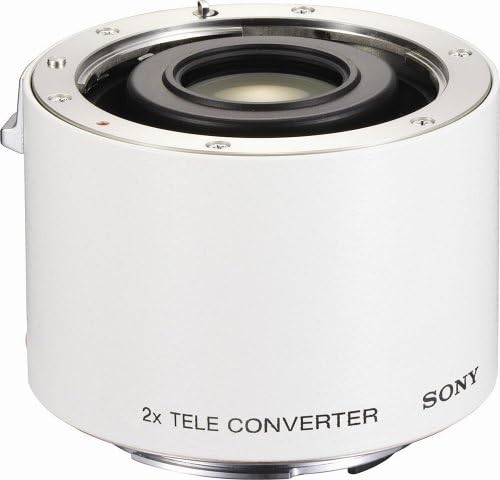
画像3.1: View of the Sony SAL-20TC teleconverter, highlighting the mounting points and electrical contacts for communication with the camera and lens.
4. 操作手順
When using the SAL-20TC teleconverter, consider the following operational aspects:
- Focal Length Extension: The teleconverter doubles the focal length of the attached lens. For exampつまり、70-200mm レンズは 140-400mm レンズになります。
- 光透過率: The 2x teleconverter reduces light transmission by two f-stops. You will need to compensate for this by adjusting your camera's aperture or ISO settings accordingly. For instance, an f/2.8 lens will effectively become an f/5.6 lens.
- Autofocus Performance: Autofocus speed and accuracy may be affected, especially in low-light conditions or with lenses that have a slower maximum aperture after conversion. Manual focus may be required in some situations.
- Distance Encoder: The integrated distance encoder plays a role in ADI (Advanced Distance Integration) flash metering. This system uses distance information from the lens to achieve precise flash exposure, unaffected by subject or background reflectivity.
- 画質: While designed to preserve image quality, some minor degradation in sharpness or contrast may be observed, particularly at the edges of the frame or when shooting wide open.
5. メンテナンス
Proper care and maintenance will ensure the longevity and performance of your teleconverter:
- レンズ要素のクリーニング: Use a soft, lint-free cloth or a lens brush to remove dust. For smudges or fingerprints, use a specialized lens cleaning solution applied to a microfiber cloth, not directly to the lens.
- 本体のクリーニング: Wipe the exterior of the teleconverter with a soft, dry cloth. Avoid using harsh chemicals or solvents.
- ストレージ: When not in use, attach the front and rear caps to protect the lens elements. Store the teleconverter in a cool, dry place, away from direct sunlight and extreme temperatures. The included soft case provides additional protection.
- 湿気を避ける: Keep the teleconverter away from water and high humidity. If it gets wet, wipe it dry immediately.
6。 トラブルシューティング
If you encounter issues while using your SAL-20TC teleconverter, refer to the following common problems and solutions:
- Teleconverter Does Not Attach to Lens/Camera:
解決: Double-check the compatibility list in Section 2. This teleconverter only works with specific Sony G series and STF lenses. Ensure the mounting indexes are aligned correctly and do not force the attachment. - Camera Displays "F--" or No Aperture Information:
解決: This can occur if the teleconverter is not fully seated or if there is a communication issue between the camera, teleconverter, and lens. Power off the camera, detach and reattach the teleconverter and lens carefully. Ensure all electrical contacts are clean. If the issue persists, verify compatibility again. - Autofocus is Slow or Inaccurate:
解決: This is a common characteristic when using teleconverters due to reduced light transmission. Try focusing manually, especially in low light. Ensure your camera's firmware is up to date. - Image Quality Appears Degraded:
解決: While the teleconverter is designed for optical performance, a slight reduction in sharpness or contrast can occur. Ensure proper focus and use appropriate aperture settings. Using a tripod can help minimize camera shake, which becomes more pronounced with extended focal lengths.
7. 仕様
| 特徴 | 仕様 |
|---|---|
| モデル番号 | SAL20TC |
| 倍率 | 2.0倍 |
| レンズ構成 | 5グループ、6要素 |
| Aspheric Elements | いいえ |
| レンズタイプ | テレコンバータ |
| Distance Encoder | はい |
| 互換性のある取り付け | ソニー/ミノルタ アルファ |
| 寸法(直径×長さ) | 2.52 x 1.73インチ(64 x 44 mm) |
| 重さ | 7.1オンス(201グラム) |
| ASIN | B000G2BHTU |
| 初回利用可能日 | 6年2006月XNUMX日 |
8. 箱の中身
The following items are typically included with your Sony SAL-20TC 2.0x Teleconverter Lens:
- ソニー SAL-20TC 2.0倍テレコンバーターレンズ
- フロントレンズキャップ
- リアレンズキャップ
- ソフトケース
9. 保証とサポート
This product is covered by a Sony 1-Year Limited Warranty. For detailed warranty terms and conditions, please refer to the documentation included with your purchase or visit the official Sony support webサイト。
For technical support, service, or further inquiries, please contact Sony customer service or visit their official support portal.


