1. はじめに
The Samson S-com 4 is a versatile single-rack space audio device designed for dynamics processing. It features four independent channels, each equipped with an Expander/Gate and a Compressor/Limiter. This unit is engineered to provide high-quality audio control for various applications, from studio recording to live sound reinforcement. The channels can operate independently or be linked in stereo pairs, offering flexibility for different audio setups.
Key features include multi-segment LED metering for input/output levels and gain reduction, continuously variable Threshold controls for both expander/gate and compressor/limiter sections, and an Enhancer switch to restore high frequencies that may be reduced during heavy compression. The S-com 4 also incorporates a Smart Knee Detector circuit, which automatically adjusts compression characteristics based on the input signal level.
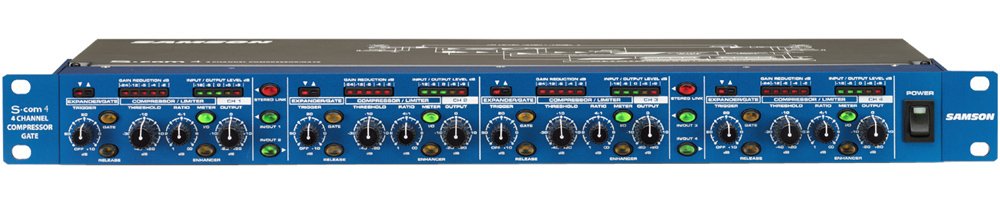
Image: Front panel view of the Samson S-com 4 Four Channel Compressor/Gate, showing controls and metering for all four channels.
2. 安全情報
Please read and adhere to the following safety guidelines to ensure safe operation and prevent damage to the unit or injury to yourself.
- 電源: Connect the unit only to the specified power supply (9V DC, 500mA). Ensure the power outlet matches the required voltage.
- 換気: Do not block any ventilation openings. Ensure adequate airflow around the unit, especially if rack-mounted, to prevent overheating.
- 水と湿気: Do not expose this unit to rain, moisture, dripping, or splashing liquids. Never place objects filled with liquids on the unit.
- 熱源: ユニットをラジエーター、暖房口、ストーブ、その他の機器(電気を含む)などの熱源から遠ざけてください。 amp熱を発生する装置。
- クリーニング: Unplug the unit from the power outlet before cleaning. Use only a dry cloth.
- サービス: Do not attempt to service this unit yourself. Refer all servicing to qualified service personnel. Servicing is required when the apparatus has been damaged in any way, such as power-supply cord or plug is damaged, liquid has been spilled or objects have fallen into the apparatus, the apparatus has been exposed to rain or moisture, does not operate normally, or has been dropped.
3. セットアップ
3.1 開梱と検査
Carefully unpack your S-com 4 and inspect it for any signs of damage that may have occurred during shipping. If damage is present, contact your dealer immediately. Retain the packing materials for future use if you need to transport the unit.
3.2ラックへの取り付け
The S-com 4 is designed as a single-rack space unit. It can be mounted into any standard 19-inch equipment rack. Ensure there is sufficient ventilation around the unit, especially if other heat-generating equipment is mounted nearby.
3.3電源接続
Connect the supplied 9V DC, 500mA power adapter to the power input jack on the rear panel of the S-com 4. Plug the adapter into a suitable AC power outlet. Always ensure the unit is powered off before making or breaking power connections.
3.4オーディオ接続
The S-com 4 provides balanced XLR and 1/4" TRS input and output connectors for each of its four channels. These connections allow for flexible integration into various audio systems.
- 入力接続: Connect the audio source (e.g., mixer insert send, microphone preamplifier output) to the desired channel's input. Use balanced XLR or 1/4" TRS cables for optimal signal integrity.
- 出力接続: Connect the output of the S-com 4 channel to the next device in your signal chain (e.g., mixer insert return, power ampリファイアー入力)。
- ステレオリンク: Channels can be linked in stereo pairs (1/2 and 3/4). When linked, the controls of the odd-numbered channel (1 or 3) will control both channels in the pair, and the processing will be applied equally to maintain the stereo image.
4. 操作手順
Each of the four channels on the S-com 4 features independent controls for its Expander/Gate and Compressor/Limiter sections.
4.1 エキスパンダー/ゲートセクション
- しきい値: This control sets the level below which the gate will attenuate the signal. Adjust it to eliminate unwanted noise or bleed between signals. Signals above the threshold pass through unaffected.
- Release (Fast/Slow Switch): This switch determines how quickly the gate closes once the signal falls below the threshold. 'Fast' is suitable for percussive sounds, while 'Slow' can be used for smoother transitions or sustained instruments.
4.2 コンプレッサー/リミッターセクション
- しきい値: This control sets the level above which compression begins. Signals exceeding this threshold will be compressed according to the Ratio setting.
- 比率: This control determines the amount of compression applied. A ratio of 2:1 means that for every 2dB the input signal goes above the threshold, the output will only increase by 1dB. Higher ratios result in more aggressive compression.
- 出力レベル: This control adjusts the overall output level of the channel after compression. Use it to compensate for any gain reduction caused by compression.
- Enhancer Switch: Engaging this switch restores high frequencies that can sometimes be diminished during heavy compression, helping to maintain clarity and presence in the audio signal.
- Smart Knee Detector: The S-com 4 features an automatic Smart Knee Detector circuit. This circuit intelligently switches between soft-knee and hard-knee compression characteristics based on the input signal level, providing smooth and musical dynamics processing without requiring manual adjustment.
4.3メータリング
Each channel is equipped with multi-segment LED meters that display both input/output signal levels and gain reduction. Monitor these meters to observe the effect of your dynamics processing and ensure optimal signal levels.
5. メンテナンス
The Samson S-com 4 is designed for reliable operation with minimal maintenance. Follow these guidelines to ensure its longevity:
- クリーニング: Regularly wipe the unit with a soft, dry cloth to remove dust and grime. Do not use liquid cleaners or solvents, as they may damage the finish or internal components.
- 換気: Ensure that the ventilation slots are clear of obstructions to prevent overheating.
- ストレージ: 長期間使用しない場合は、乾燥したほこりのない環境に保管してください。
6。 トラブルシューティング
If you encounter issues with your S-com 4, refer to the following common problems and solutions:
- 音が出ない:
- Check that the unit is powered on and the power adapter is securely connected.
- Verify all audio cables are correctly connected to the inputs and outputs.
- Ensure input and output levels on the S-com 4 and connected devices are appropriately set.
- Check the Expander/Gate Threshold; if set too high, it may be gating out the entire signal.
- Bypass the S-com 4 (if your system allows) to determine if the issue lies with the unit or other equipment.
- 歪んだ音:
- Reduce the input level to the S-com 4 to prevent clipping.
- Check the Compressor/Limiter Ratio; very high ratios can lead to noticeable distortion if not managed carefully.
- Ensure the output level is not too high, causing clipping in subsequent devices.
- 過度の騒音:
- Adjust the Expander/Gate Threshold to effectively remove unwanted background noise.
- Verify proper gain staging throughout your audio chain.
- すべてのケーブルが良好な状態であり、適切にシールドされていることを確認します。
- ユニットが熱い:
- It is normal for electronic equipment to generate some heat during operation. Ensure adequate ventilation around the unit, especially if rack-mounted. If the unit becomes excessively hot or exhibits unusual behavior, discontinue use and contact support.
If these steps do not resolve your issue, please contact Samson customer support for further assistance.
7. 仕様
| 特徴 | 仕様 |
|---|---|
| モデル番号 | SA-SCOM4 |
| 製品寸法 | 23.5 x 11 x 4.25インチ |
| 信号フォーマット | アナログ |
| 巻tage | 9ボルト |
| Amp怒る | 500ミリamps |
| チャンネル | 4 (independent or stereo linkable) |
| コネクタ | Balanced XLR & 1/4" Inputs/Outputs |
8. 保証とサポート
Samson Technologiesは、製品に対して限定保証を提供しています。具体的な保証条件については、製品に付属の保証書を参照するか、Samsonの公式ウェブサイトをご覧ください。 webサイトでご確認ください。保証請求に備えて購入証明書を保管してください。
For technical support, service, or questions regarding your Samson S-com 4, please contact Samson customer support through their official website or the contact information provided in your product documentation. When contacting support, please have your model number (SA-SCOM4) and purchase date available.


