導入
ご購入ありがとうございますasing the Spectra 58-MBWR Undercounter Mountable 5" Black & White TV with AM/FM Radio. This versatile unit is designed for convenient placement in various environments, offering television and radio entertainment. This manual provides detailed instructions for proper setup, operation, and maintenance to ensure optimal performance and longevity of your device.
パッケージ内容
下記のすべての品目がパッケージに含まれていることをご確認ください。不足品や破損品がある場合は、販売店までご連絡ください。
- Spectra 58-MBWR TV Unit
- AC 120V/60Hz Adapter
- 12V DC Car Cord
- 取り付けブラケット
- Detachable Mounting Head
- ロータリー伸縮アンテナ
- 300/75 Ohm External Antenna Connector
- イヤホンジャック
- リモートコントロール
- 立つ
主な特徴
- 5-inch Monochrome "Shortneck" Picture Tube
- Full Channel VHF/UHF Receiver
- Integrated AM/FM Radio
- Rotary Telescopic Antenna for improved reception
- 300/75 Ohm External Antenna Connector for alternative antenna options
- Earphone Jack for private listening
- Built-in Carry Handle for portability
- Mounting Bracket and Detachable Mounting Head for undercounter installation
- Versatile 3-way Power: AC 120V/60Hz, 12V DC Car Cord, or 10 x 'D' batteries (not included)
- Compact Dimensions: 6" (H) x 6-1/8" (W) x 8" (D)
セットアップとインストール
ユニットの電源供給
The Spectra 58-MBWR offers three power options:
- AC電源: Connect the supplied AC 120V/60Hz adapter to the AC input jack on the unit and plug it into a standard wall outlet.
- DC Car Power: For use in vehicles, boats, or RVs, connect the supplied 12V DC car cord to the DC input jack on the unit and plug it into your vehicle's 12V accessory outlet.
- バッテリー電源: For portable use, insert 10 'D' (UM-2) size batteries (not included) into the battery compartment, observing correct polarity.
アンテナ接続
The unit features a built-in rotary telescopic antenna. Extend and rotate this antenna for optimal reception. For areas with weak signals or for connecting to a home antenna system, use the included 300/75 Ohm external antenna connector.
Undercounter Mounting
To mount the unit under a cabinet or shelf:
- Attach the mounting bracket to the desired surface using appropriate screws (not included), ensuring it is securely fastened.
- Align the detachable mounting head with the bracket and secure it.
- Slide the TV unit onto the detachable mounting head until it clicks into place. Ensure the unit is firmly seated before releasing.
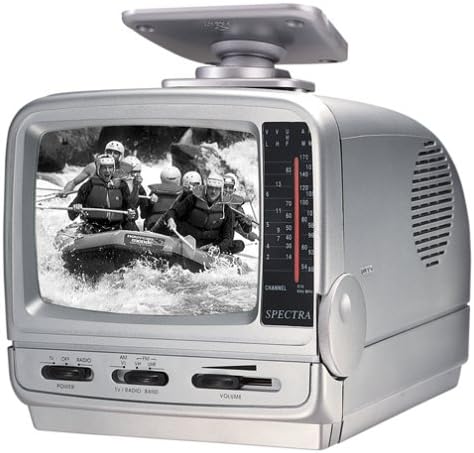
Image: Spectra 58-MBWR Undercounter Mountable 5" Black & White TV with Radio, featuring its compact design and undercounter mounting capability.
操作手順
電源オン/オフ
Locate the POWER switch on the front panel. Slide it to the 'ON' position to power on the unit. Slide it to 'OFF' to power off.
テレビの操作
- ユニットの電源がオンになっていることを確認してください。
- Select 'TV' mode using the TV/RADIO BAND switch.
- Use the CHANNEL dial to scan for available VHF/UHF channels. Adjust the telescopic antenna for best picture quality.
- VOLUMEコントロールを希望のリスニングレベルに調整します。
無線操作
- ユニットの電源がオンになっていることを確認してください。
- Select 'RADIO' mode using the TV/RADIO BAND switch. Choose between 'AM' or 'FM' bands.
- Use the TUNING dial to find your desired radio station.
- VOLUMEコントロールを希望のリスニングレベルに調整します。
イヤホンの使用
For private listening, plug standard 3.5mm earphones (not included) into the EARPHONE JACK. The internal speaker will automatically mute when earphones are connected.
メンテナンス
- クリーニング: Use a soft, dry cloth to clean the exterior of the unit. For stubborn marks, slightly damp布に水を含ませて拭いてください。研磨剤や溶剤は使用しないでください。
- バッテリー交換: If using battery power, replace all 10 'D' batteries when the unit's performance diminishes. Ensure correct polarity when inserting new batteries.
- ストレージ: If storing the unit for an extended period, remove all batteries to prevent leakage and corrosion. Store in a cool, dry place.
トラブルシューティング
| 問題 | 考えられる原因 | 解決 |
|---|---|---|
| 電源なし | Power cord not connected; Batteries depleted or incorrectly inserted; Power switch off. | Check power connections; Replace batteries; Ensure power switch is ON. |
| No picture/sound (TV) | Incorrect channel selected; Antenna not extended/positioned; Weak signal. | Scan channels; Extend and adjust telescopic antenna; Try external antenna. |
| Poor picture/sound (TV) | 信号が弱い; 干渉。 | Adjust antenna position; Try external antenna; Check for nearby electronic interference. |
| No sound (Radio) | Volume too low; Incorrect band selected; Earphones connected. | Increase volume; Select correct AM/FM band; Disconnect earphones. |
仕様
| 特徴 | 仕様 |
|---|---|
| モデル番号 | 58-MBWR |
| 画面サイズ | 5インチ |
| ディスプレイ技術 | CRT (Monochrome) |
| 解決 | 480i |
| リフレッシュレート | 60Hz |
| アスペクト比 | 4:3 |
| 電源 | AC 120V/60Hz, 12V DC Car Cord, 10 x 'D' Batteries |
| 製品寸法(高さ x 幅 x 奥行き) | 6インチ x 6.13インチ x 8インチ (15.24 cm x 15.57 cm x 20.32 cm) |
| アイテム重量 | 5.34ポンド(2.42kg) |
| 含まれるコンポーネント | TV, Remote, Stand, AC Adapter, DC Car Cord, Mounting Bracket, Detachable Mounting Head, External Antenna Connector |
保証とサポート
重要なお知らせ:
Please be aware that the seller assumes no warranty for this product. Additionally, this product is subject to a no-return policy. For any operational questions or issues not covered in this manual, please refer to the troubleshooting section or contact your point of purchase for further assistance, if available.


