導入
This manual provides essential instructions for the setup, operation, maintenance, and troubleshooting of your Trust Soundwave 1000P PC Speaker system. Please read this manual thoroughly before using the product to ensure proper functionality and longevity.
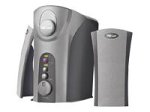
Image: The Trust Soundwave 1000P PC Speaker system, featuring a central subwoofer unit and two compact satellite speakers, designed for computer audio. The subwoofer is typically placed on the floor, while the satellite speakers are positioned on a desk.
セットアップ手順
Follow these steps to correctly set up your Trust Soundwave 1000P PC Speaker system.
- 開梱: Carefully remove all components from the packaging. Ensure you have the subwoofer, two satellite speakers, and all necessary cables.
- スピーカーの配置:
- Place the subwoofer on the floor, preferably near your computer desk, to optimize bass response. The vertical bass reflex design benefits from clear space around it.
- Position the two satellite speakers on your desk, equidistant from your listening position, for optimal stereo sound.
- サテライトスピーカーの接続: Connect the cables from the satellite speakers to the corresponding output ports on the subwoofer unit. Ensure a secure connection.
- Connecting to Audio Source (PC): Connect the 3.5mm audio jack cable from the subwoofer to the audio output port (usually green) on your computer's sound card.
- 電源接続: サブウーファーの電源ケーブルを標準の電源コンセントに差し込みます。
- 初回電源オン: Turn on the speaker system using the power control, typically located on the subwoofer or a wired remote.
スピーカーを操作する
Once set up, you can begin using your Soundwave 1000P speakers.
- 電源オン/オフ: Use the main power switch or button to turn the system on or off. An indicator light may confirm the power status.
- 音量コントロール: Adjust the overall volume using the dedicated volume knob or controls. Start with a low volume and gradually increase it.
- 低音調整: The subwoofer features an adjustable bass control. Rotate the bass knob to achieve your desired level of deep bass.
- 3D Sound Switch: Activate or deactivate the 3D sound feature using the designated switch. Experiment with this setting to find your preferred audio experience for different content.
- オーディオ入力: The system primarily uses an AUX connection. Ensure your audio source is playing sound through its 3.5mm audio output.
メンテナンスとケア
適切なメンテナンスを行うことで、スピーカー システムの寿命が長くなり、最適なパフォーマンスが確保されます。
- クリーニング:
- 掃除する前に電源を切ってください。
- Use a soft, dry cloth to wipe down the speaker surfaces.
- Do not use liquid cleaners, aerosols, or abrasive materials, as these can damage the finish or internal components.
- 配置: スピーカーは直射日光の当たる場所、熱源の近く、湿度の高い場所に置かないでください。サブウーファーの周囲には十分な換気を確保してください。
- ケーブル管理 Keep cables tidy and avoid sharp bends or kinks to prevent damage.
- ストレージ: If storing the speakers for an extended period, disconnect them from power, clean them, and store them in a dry, cool place, preferably in their original packaging.
トラブルシューティングガイド
If you encounter issues with your Trust Soundwave 1000P speakers, refer to the following common problems and solutions.
| 問題 | 考えられる原因 | 解決 |
|---|---|---|
| スピーカーから音が出ない。 |
|
|
| 音が歪んだり不明瞭になったりする。 |
|
|
| サブウーファーが低音を出さない。 |
|
|
製品仕様
Key technical details for the Trust Soundwave 1000P PC Speaker system.
- モデル番号: 12616
- ブランド: 信頼
- スピーカータイプ: サブウーファー(2.1システム)
- 最大ピーク出力電力: 1000ワット
- RMSワットtage: 7 Watt (5 + 2 x 1 Watt RMS)
- 接続技術: AUX(3.5mmジャック)
- オーディオ出力モード: ステレオ
- 電源: 有線電気
- 商品の重量: 10グラム
- 取り付けタイプ: Tabletop Mount (for satellites), Floor (for subwoofer)
- 制御方法: 触る
保証情報
この製品には、 限定保証. For specific terms and conditions, including warranty duration and claim procedures, please refer to the warranty card included with your purchase or visit the official Trust webサイトでご確認ください。保証請求に備えて購入証明書を保管してください。
カスタマーサポート
For further assistance, technical support, or inquiries not covered in this manual, please visit the official Trust support webメーカーのウェブサイトをご覧いただくか、カスタマーサービス部門にお問い合わせください。連絡先は通常、メーカーのウェブサイトに記載されています。 webサイトまたは製品のパッケージ。
公式信頼 Webサイト: www.trust.com