
1. はじめに
Thank you for choosing the OTTOCAST ScreenFlow 11.4" Wireless Apple CarPlay & Android Auto Screen. This device is designed to enhance your driving experience by providing seamless integration of your smartphone's features, navigation, entertainment, and a reliable backup camera system. This manual provides detailed instructions for installation, operation, maintenance, and troubleshooting to ensure optimal performance and safety.
2. 安全情報
- 安全運転: 常に安全運転を最優先してください。運転中の注意を逸らすような方法でデバイスを操作しないでください。
- インストール: Ensure the device is securely mounted and all cables are properly routed to avoid obstructing your view or vehicle controls. If unsure, seek professional installation.
- 電源: Use only the provided car charger and cables. Incorrect power sources can damage the device or vehicle.
- 温度: デバイスを極端な温度、長時間の直射日光、高湿度にさらさないでください。
- クリーニング: 清掃には柔らかく乾いた布を使用してください。研磨剤や溶剤は使用しないでください。
- 分解: Do not attempt to disassemble or repair the device yourself. This will void the warranty and may cause damage.
3. パッケージ内容
パッケージに以下の項目が含まれているか確認してください。
- OTTOCAST ScreenFlow 11.4" Carplay Screen
- 3M Adhesive Mounting Bracket
- カーチャージャー
- AUXケーブル
- Backup Camera with 19.69 ft (6m) Cable
4.製品オーバーview
The OTTOCAST ScreenFlow is an advanced automotive smart display designed for universal compatibility and ease of use. It features a high-definition touchscreen and robust connectivity options.
4.1 主な特徴
- 画面: 11.4" 1920x720 HD IPS Touchscreen with 60fps ultra-smooth refresh rate.
- 接続性: Wireless Apple CarPlay & Android Auto, Dual-Band WiFi (2.4G+5G), Dual Bluetooth (BT4.2+BT5.0).
- オペレーティング·システム: Curated Android OS with pre-installed apps like Netflix, YouTube, Disney+, Prime Video. (Note: Additional apps available via built-in app store only.)
- マルチタスク: Split-Screen Mode for running two applications simultaneously.
- バックアップカメラ: Bundled 1080P Night-Vision Backup Camera (IP67 waterproof) with dynamic parking guidelines.
- 利便性: 2-Second Instant Wake, Voice Control, Lifetime Free OTA Updates.
- ハードウェア: 4-Core Processor, 2GB RAM, 32GB ROM.
4.2 デバイスコンポーネント

図4.1: フロント view of the OTTOCAST ScreenFlow display, illustrating its Android OS capabilities with pre-installed video applications such as Prime Video, YouTube, Disney+, Spotify, and Netflix. The image also highlights internal specifications including a 4-Core processor, 2GB RAM, 32GB ROM, and OTA upgrade support.

図4.2: The 11.4-inch massive screen of the OTTOCAST ScreenFlow, demonstrating its large display size and instant boot feature. Key display specifications such as 11.4 inches, 60fps refresh rate, 2-second instant boot, 550 cd/m² brightness, and 1920x720 HD resolution are highlighted.
5. セットアップとインストール
The OTTOCAST ScreenFlow is designed for quick and tool-free installation, typically taking only 3 minutes.
5.1 スクリーンの取り付け
- 場所を選択してください: Select a suitable flat surface on your dashboard or windshield that does not obstruct your view またはエアバッグに干渉します。
- きれいな表面: Ensure the chosen surface is clean and dry for optimal adhesion of the 3M adhesive bracket.
- ブラケットを取り付ける: Peel the protective film from the 3M adhesive bracket and firmly press it onto the desired location. Hold for 30 seconds to ensure a strong bond.
- マウントスクリーン: Securely attach the ScreenFlow display unit to the mounted bracket. The design allows for easy detachment for security when parked.
5.2電源接続
- Insert the provided car charger into your vehicle's 12V power outlet (cigarette lighter socket).
- Connect the other end of the car charger cable to the power input port on the ScreenFlow unit.
- The screen will automatically power on when the vehicle ignition is started, thanks to its 2-second instant wake technology.
5.3 バックアップカメラの取り付け
The included 1080P backup camera provides enhanced safety when reversing.
- カメラマウント: Install the backup camera at the rear of your vehicle, typically above the license plate. Ensure it has a clear view. The IP67 rating ensures water resistance.
- ケーブルの配線: Carefully route the 19.69 ft (6m) camera cable from the rear of the vehicle to the ScreenFlow unit, ensuring it is tucked away and not exposed to damage.
- カメラを接続: Plug the camera cable into the designated camera input port on the ScreenFlow unit.
- Power Camera: Connect the camera's power wire to your vehicle's reverse light circuit. This will automatically activate the camera display on the ScreenFlow when you shift into reverse.
6. 操作手順
6.1 ワイヤレス Apple CarPlay & Android Auto
ナビゲーション、音楽、通話などのためにスマートフォンをワイヤレスで接続します。
- 初期ペアリング: On the ScreenFlow, navigate to the CarPlay or Android Auto icon. Follow the on-screen instructions to pair your iPhone or Android phone via Bluetooth.
- 自動再接続: After the initial pairing, your phone will automatically reconnect to the ScreenFlow every time you start your car.
- 機能性: Once connected, you can access compatible apps, make hands-free calls, send messages, and use voice assistants directly from the ScreenFlow display.
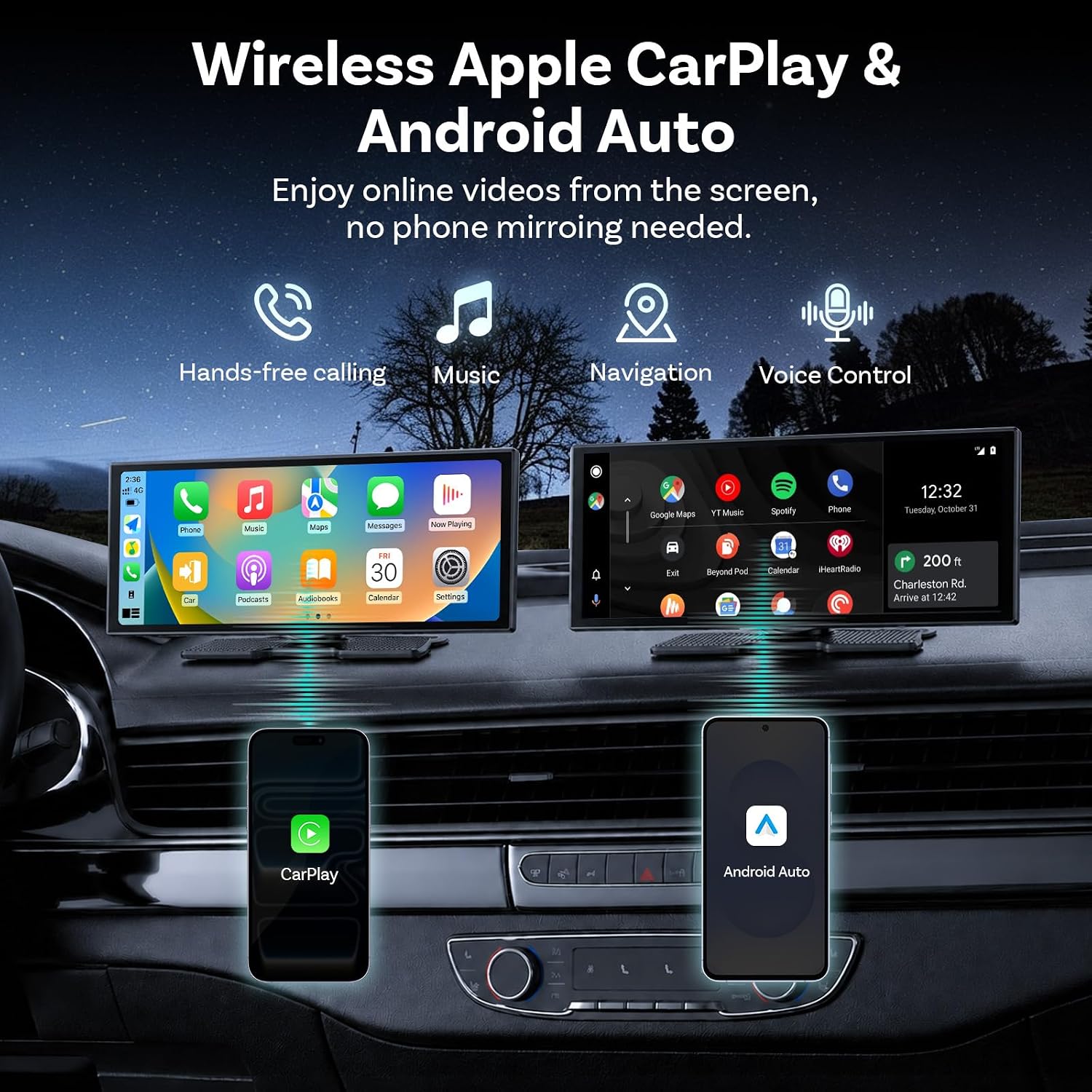
図6.1: The OTTOCAST ScreenFlow demonstrating wireless Apple CarPlay and Android Auto functionality, with icons for hands-free calling, music, navigation, and voice control. Both interfaces are shown on the screen, connected to respective smartphones.
6.2 分割画面マルチタスク
The Split-Screen Mode allows you to run two applications simultaneously on the 11.4-inch display.
- Activate Split-Screen: While an app is open, look for a split-screen icon (often two rectangles side-by-side) or long-press the recent apps button.
- 2番目のアプリを選択: Choose another compatible app from the list to occupy the second half of the screen.
- 使用法: 例えばample, the driver can use Google Maps for navigation on one side, while a passenger streams YouTube or Spotify on the other.

図6.2: The OTTOCAST ScreenFlow in flexible split-screen mode, perfectly adapted for multitasking. The image shows a navigation map on the left side of the screen and a video playing on the right, illustrating how the driver can navigate while a passenger enjoys videos simultaneously.
6.3 Streaming Pre-installed Apps
The ScreenFlow comes with pre-installed streaming applications.
- ホットスポットに接続します。 To use streaming apps like Netflix, YouTube, Disney+, or Prime Video, connect the ScreenFlow to your phone's mobile hotspot via Wi-Fi.
- アプリを起動: Select the desired streaming app from the main menu.
- コンテンツをお楽しみください: Stream videos directly on the big screen without needing phone mirroring.
6.4 Dual-Band WiFi & Dual Bluetooth
The device features advanced connectivity for seamless operation.
- デュアル Bluetooth: Allows wireless CarPlay/Android Auto to run while your car's original sound system remains connected, ensuring full audio through your factory speakers without compromise.
- デュアルバンド WiFi: Provides stable and fast internet connectivity for HD video streaming without buffering, especially when connected to a mobile hotspot.

図6.3: Illustration of Dual WiFi & Dual Bluetooth capabilities. The ScreenFlow displays navigation and video content, while accompanying phone screens show active Bluetooth connections (e.g., to OTTOCAST and headphones) and Wi-Fi network lists, emphasizing simultaneous streaming and navigation without audio conflict.
6.5 音声制御
Utilize voice commands for safe and convenient operation while driving.
- 音声アシスタントを有効にする: Depending on your connected phone, say "Hey Siri" or "Hi Google" to activate the voice assistant.
- コマンドを発行します: You can use voice commands for tasks such as making calls ("Call Mom"), playing music ("Play Music"), or navigating ("Navigate home").

図6.4: The OTTOCAST ScreenFlow demonstrating voice control for safe driving. The screen shows a calling interface and a backup camera view、元彼とamples of voice commands such as "Hey Siri, Call Mom," "Hi Google, Message to Linda," "Hey Siri, Play Music," and "Hi Google, Navigate home."
7. バックアップカメラの操作
The included 1080P HD backup camera activates automatically when you shift your vehicle into reverse.
- 自動表示: When reverse gear is engaged, the ScreenFlow will automatically switch to the camera view, providing a clear, wide-angle image of the area behind your vehicle.
- ダイナミックパーキングガイドライン: The display features dynamic parking guidelines that adjust with your steering wheel, assisting you in parking maneuvers.
- ナイトビジョン: The camera is equipped with night vision capabilities, ensuring clear visibility even in low-light conditions.
- 画像反転: The camera supports vertical and horizontal image flip options, allowing for correct orientation regardless of mounting position.

図7.1: The 1080P HD Backup Camera in action, allowing confident parking day or night. The image shows the reverse camera view on the ScreenFlow with dynamic reference lines, highlighting features such as high definition, waterproof design, and image flipping capabilities.
8. メンテナンス
- 画面のクリーニング: 柔らかく糸くずの出ない布で画面を優しく拭いてください。頑固な汚れには、軽くamp布を水またはスクリーンに安全なクリーナーで拭いてください。刺激の強い化学薬品は避けてください。
- 一般的な清掃: Keep the device free from dust and debris. Use a soft brush or compressed air to clean vents and ports.
- ケーブル管理 すべてのケーブルに摩耗や損傷がないか定期的に点検してください。しっかりと接続され、挟まれていないことを確認してください。
- ソフトウェアアップデート: The device supports Lifetime Free OTA (Over-The-Air) updates. Ensure your device is connected to Wi-Fi periodically to receive the latest firmware, which improves performance and adds features.
9。 トラブルシューティング
If you encounter issues with your OTTOCAST ScreenFlow, please refer to the following common solutions:
| 問題 | 考えられる原因 | 解決 |
|---|---|---|
| デバイスの電源が入りません。 | No power from car charger; faulty cable; vehicle's 12V outlet is off. | Check car charger connection. Ensure vehicle ignition is on. Test 12V outlet with another device. Try a different car charger if available. |
| ワイヤレス CarPlay/Android Auto が接続されません。 | Bluetooth not enabled on phone; incorrect pairing; Wi-Fi interference. | Ensure Bluetooth is on and visible on your phone. Forget the device in your phone's Bluetooth settings and re-pair. Disable other Wi-Fi networks temporarily. |
| 音声が出ない、または音質が悪い。 | Incorrect audio output setting; loose AUX cable; car's audio input not selected. | Check audio settings on ScreenFlow and your car's stereo. Ensure AUX cable is fully inserted. Select correct AUX input on your car's stereo. |
| バックアップカメラが表示されません。 | Camera cable loose; camera power not connected to reverse light; faulty camera. | Check camera cable connection to ScreenFlow. Verify camera power connection to reverse light. Ensure vehicle is in reverse gear. |
| 画面が反応しないかフリーズしています。 | ソフトウェアの不具合。 | Perform a soft reset by disconnecting and reconnecting the power cable. If issue persists, contact support. |
If these solutions do not resolve your issue, please contact OTTOCAST customer support for further assistance.
10. 仕様
| 特徴 | 詳細 |
|---|---|
| ブランド | オットキャスト |
| モデル名 | スクリーンフロー |
| 画面サイズ | 11.4インチ |
| 解決 | 1920x720 HD IPS |
| リフレッシュレート | 60fps |
| オペレーティング·システム | Curated Android OS |
| プロセッサ | 4コア |
| メモリ(RAM) | 2ギガバイト |
| ストレージ (ROM) | 32ギガバイト |
| 接続性 | Wireless CarPlay, Android Auto, Dual-Band Wi-Fi (2.4G+5G), Dual Bluetooth (BT4.2+BT5.0) |
| バックアップカメラ | 1080P Night-Vision, IP67 Waterproof |
| 取り付けタイプ | Dashboard Mount or Windshield Mount (3M Adhesive) |
| 製品寸法 | 長さ10.43インチ x 幅4.13インチ x 高さ0.94インチ |
| 車両サービスタイプ | Cars, SUVs, Pickups, RVs, Trucks |
11. 保証とサポート
- 保証: The OTTOCAST ScreenFlow comes with a 1-year manufacturer's warranty from the date of purchase, covering defects in materials and workmanship.
- ソフトウェアアップデート: Enjoy lifetime free Over-The-Air (OTA) updates, ensuring your device continuously receives performance improvements, bug fixes, and new features.
- カスタマーサポート: For any setup guidance, troubleshooting, or other inquiries, professional tech support is available and responds within 24 hours. Please refer to the contact information provided with your product or visit the official OTTOCAST webサポート詳細のサイト。