
1. はじめに
This manual provides essential information for the safe and efficient use of your LG 43NU850B6LA Smart TV. This 43-inch Nano 4K UHD television is designed to deliver exceptional picture quality with its Nano Cell technology, powered by the α7 AI Processor 4K Gen9, and enhanced by HDR10 Pro. It also features webOS 26 AI for smart functionality and immersive Virtual 9.1.2 ChAI Sound.
Please read this manual thoroughly before operating your TV and keep it for future reference.
2.製品オーバーview および寸法
The LG 43NU850B6LA is a 43-inch Smart TV featuring a sleek design and advanced display technologies. Understanding its physical characteristics is important for proper placement and installation.

画像2.1: 前面と側面 view of the LG 43NU850B6LA Smart TV with key dimensions. The TV measures approximately 95.9 cm (37.7 inches) in width, 56.3 cm (22.2 inches) in height without stand, and 7.08 cm (2.8 inches) in depth. With the stand, the height is 61.8 cm (24.3 inches) and depth is 20 cm (7.9 inches).
3. セットアップ
3.1 開梱とスタンドの取り付け
Carefully remove the TV from its packaging. Place the TV face down on a soft, flat surface to avoid screen damage. Attach the included stands to the designated slots on the bottom of the TV using the provided screws. Ensure the stands are securely fastened.
3.2 壁面への取り付け
The LG 43NU850B6LA is compatible with VESA wall mounts. The recommended VESA mounting pattern is 300x200 mm. Consult a professional for wall mount installation to ensure safety and proper setup.
3.3 外部機器の接続
Refer to the rear panel image below for port locations. Connect your devices as follows:
- アンテナ/ケーブル: Connect your antenna or cable TV signal to the 'Sintonizador antena' port.
- HDMIデバイス: Use the 3x HDMI 2.1 ports for high-definition devices like Blu-ray players, game consoles, or set-top boxes.
- USB デバイス: The 1x USB 2.0 port can be used for connecting USB storage devices to play media or for software updates.
- ネットワーク(LAN): Connect an Ethernet cable to the 'Ethernet LAN' port for a wired internet connection.
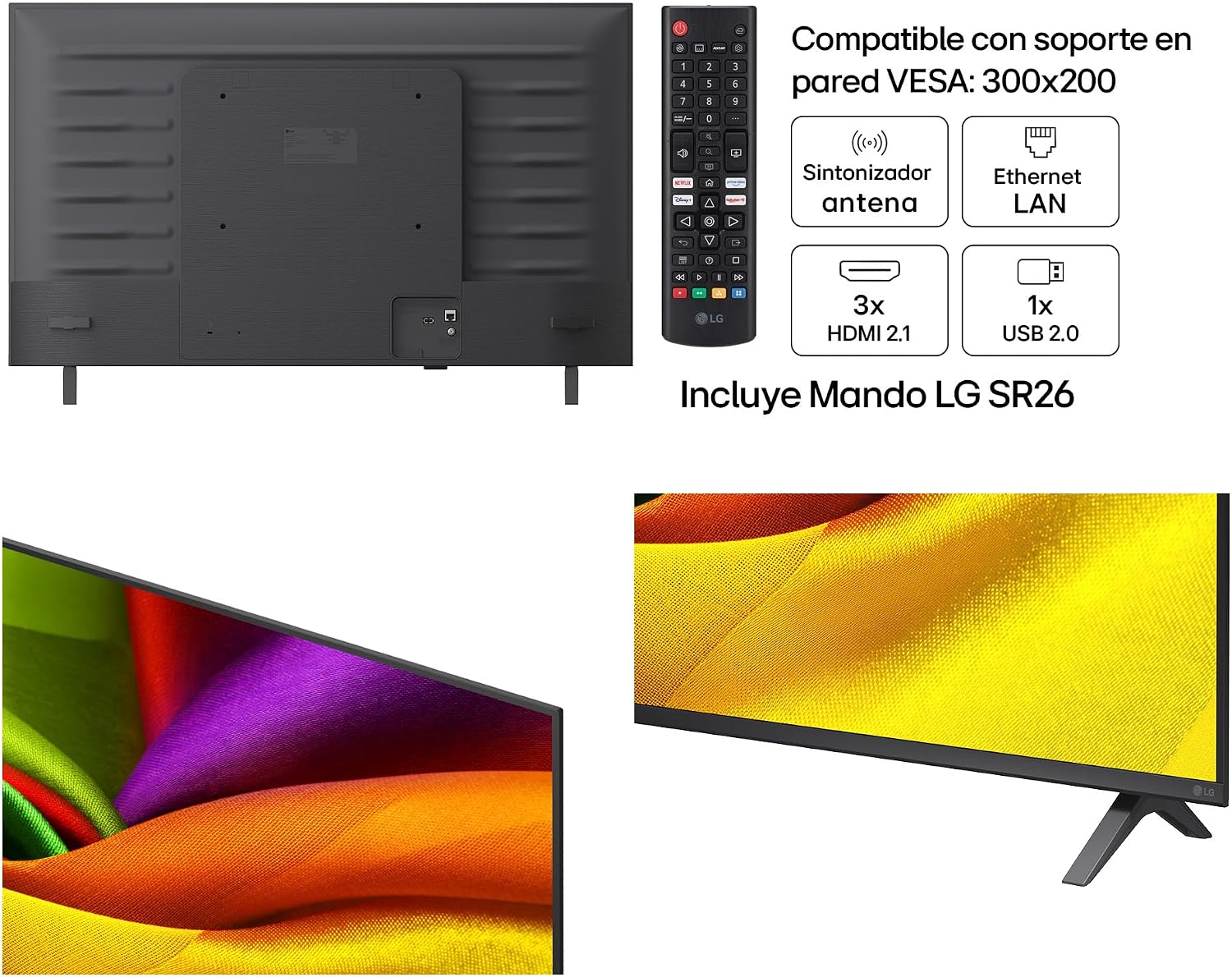
画像3.1: 後方 view of the LG 43NU850B6LA Smart TV, illustrating the location of the antenna tuner, Ethernet LAN port, 3 HDMI 2.1 ports, and 1 USB 2.0 port. The included LG SR26 remote control is also shown.
3.4 初回電源投入
After connecting all necessary cables, plug the power cord into an electrical outlet. Press the power button on the remote control or on the TV itself. Follow the on-screen instructions to complete the initial setup, including language selection, network connection, and channel scanning.
4. テレビの操作
4.1リモコン
The included LG SR26 remote control allows you to navigate the TV's features. It typically includes buttons for power, volume, channel, input selection, smart home access, and navigation.
4.2 webOS 26 AI Smart Features
テレビは webOS 26 AI, providing an intuitive interface for accessing streaming services, apps, and other smart features. Use the remote's navigation buttons to browse the home screen and launch applications. The AI functionality can offer personalized recommendations and voice control options.
4.3 画像とサウンドの設定
Access the TV's settings menu to customize picture and sound. You can adjust brightness, contrast, color, and sharpness. For sound, select from various modes or fine-tune equalizer settings. The α7 AI Processor 4K Gen9 automatically optimizes both picture and sound for an enhanced viewing の経験。
5. 主な機能とテクノロジー
5.1 Nano Cell Technology
LG Nano Cell technology uses nanoparticles to filter and refine colors, enhancing the purity of the RGB spectrum. This results in more accurate and vibrant colors, even when viewed from wide angles. The Nano Detail Enhancer analyzes each frame to optimize contrast, detail, and brightness at a nanometric level, providing a 180% superior definition.

画像5.1: 詳細な view of the screen demonstrating the enhanced clarity and color precision provided by LG's Nano Cell technology, which offers 180% more sharpness.
5.2 HDR10 プロ
HDR10 Pro enhances the dynamic range of content, delivering brighter highlights and deeper shadows. This technology optimizes the display's resolution across 2,040 independent zones, resulting in a more immersive and detailed visual experience with greater contrast.

画像5.2: A visual comparison showing the difference between Standard Dynamic Range (SDR) and HDR10 Pro, highlighting the improved brightness, contrast, and color detail in the HDR10 Pro image.
5.3 α7 AI Processor 4K Gen9
The α7 AI Processor 4K Gen9 is the intelligent core of your TV. It utilizes advanced AI algorithms to analyze and optimize both picture and sound in real-time. This processor performs nano-scale image optimization across 2,040 independent zones, enhancing clarity, contrast, and creating a three-dimensional depth effect. It also improves audio quality by creating an immersive virtual surround sound experience.

画像5.3: A close-up illustration of the α7 AI Processor 4K Gen9 chip, emphasizing its role as the high-power processor that maximizes image and sound quality through Artificial Intelligence.
5.4 4K Super Upscaling
The 4K Super Upscaling feature enhances lower-resolution content to near 4K quality. Sophisticated algorithms analyze and upscale every frame, improving clarity and detail so you can enjoy non-4K content with improved visual fidelity.
5.5 AI Sound (Virtual 9.1.2 Ch)
AI Sound uses advanced algorithms to analyze and enhance audio, creating an immersive virtual 9.1.2 channel surround sound experience. This technology optimizes sound without the need for additional external speakers, providing a richer and more engaging audio landscape.
5.6 Dynamic Tone Mapping
Dynamic Tone Mapping intelligently analyzes 2,040 independent zones on the screen to optimize brightness and contrast. This process ensures that every scene is displayed with optimal visual impact, revealing fine details in both bright and dark areas.

画像5.4: An image demonstrating Dynamic Tone Mapping, showing how intelligent analysis of 2,040 independent zones enhances brightness and contrast for a more vivid picture.
6. 仕様
| 特徴 | 仕様 |
|---|---|
| モデル番号 | 43NU850B6LA |
| 画面サイズ | 43インチ(108 cm) |
| ディスプレイ技術 | Nano Cell, 4K UHD |
| プロセッサ | α7 AIプロセッサー 4K Gen9 |
| HDRフォーマットのサポート | HDR10プロ |
| オペレーティング·システム | webOS 26 AI |
| オーディオチャンネル | Virtual 9.1.2 ChAI Sound |
| 寸法(スタンド付き) | 105 x 65 x 25 cm(幅 x 高さ x 奥行き) |
| 寸法(スタンドなし) | 95.9 x 56.3 x 7.08 cm(幅 x 高さ x 奥行き) |
| 製品重量 | 18キロ |
| モデル年 | 2026 |
| 接続性 | 3x HDMI 2.1, 1x USB 2.0, Ethernet LAN, Antenna Tuner |
| VESA ウォールマウント | 300x200ミリメートル |

画像6.1: The energy label for the LG 43NU850B6LA, indicating an energy efficiency class G. It shows an energy consumption of 54 kWh/1000h for SDR and 77 kWh/1000h for HDR. More details can be found at the official EPREL database: https://eprel.ec.europa.eu/qr/2577086
7. メンテナンス
7.1 画面のクリーニング
柔らかく乾いた、糸くずの出ない布で画面を優しく拭いてください。頑固な汚れには、軽くamp布に水または専用のスクリーンクリーナーを含ませてください。絶対に液体をスクリーンに直接吹きかけないでください。
7.2 テレビ本体の掃除
Use a soft, dry cloth to wipe the TV's frame and stand. Avoid using abrasive cleaners or solvents that could damage the finish.
7.3ソフトウェアアップデート
Your TV may receive software updates to improve performance and add new features. Ensure your TV is connected to the internet and check for updates periodically through the settings menu. Follow on-screen prompts for installation.
8。 トラブルシューティング
テレビで問題が発生した場合は、次の一般的な問題と解決策を参照してください。
- 電源なし: 電源コードがテレビとコンセントの両方にしっかりと差し込まれていることを確認してください。別のコンセントで試してみてください。
- 画像/音声なし: 正しい入力ソースが選択されていることを確認してください。すべてのケーブル(HDMI、アンテナ)が正しく接続されていることを確認してください。
- リモコンが動作しない: リモコンの電池を交換してください。リモコンとテレビのセンサーの間に障害物がないことを確認してください。
- ネットワーク接続の問題: For Wi-Fi, check your router and TV's network settings. For wired connections, ensure the Ethernet cable is properly connected. Try restarting your router.
- 画質が悪い: 画像設定(明るさ、コントラスト、シャープネス)を調整します。入力ソースが高品質の信号を提供していることを確認してください。
For more complex issues, consult the full electronic manual available through your TV's help menu or contact LG customer support.
9. 保証とサポート
9.1 保証情報
Your LG 43NU850B6LA Smart TV comes with a three-year limited warranty against manufacturing defects. Please retain your proof of purchase for warranty claims. The warranty type is limited.
9.2 カスタマーサポート
For technical assistance, troubleshooting beyond this manual, or warranty service, please contact LG customer support. Refer to the official LG webお住まいの地域に固有の連絡先の詳細については、サイトをご覧ください。


