
1. はじめに
This manual provides detailed instructions for the safe and effective use of your DIGIERA DGW100BL 5K Digital Camera. Please read this manual thoroughly before operating the camera and retain it for future reference.
The DIGIERA DGW100BL is a versatile digital camera designed for high-quality photography and videography, featuring 5K video recording, 80MP photo resolution, a 3.0-inch IPS LCD flip screen, and advanced autofocus capabilities.
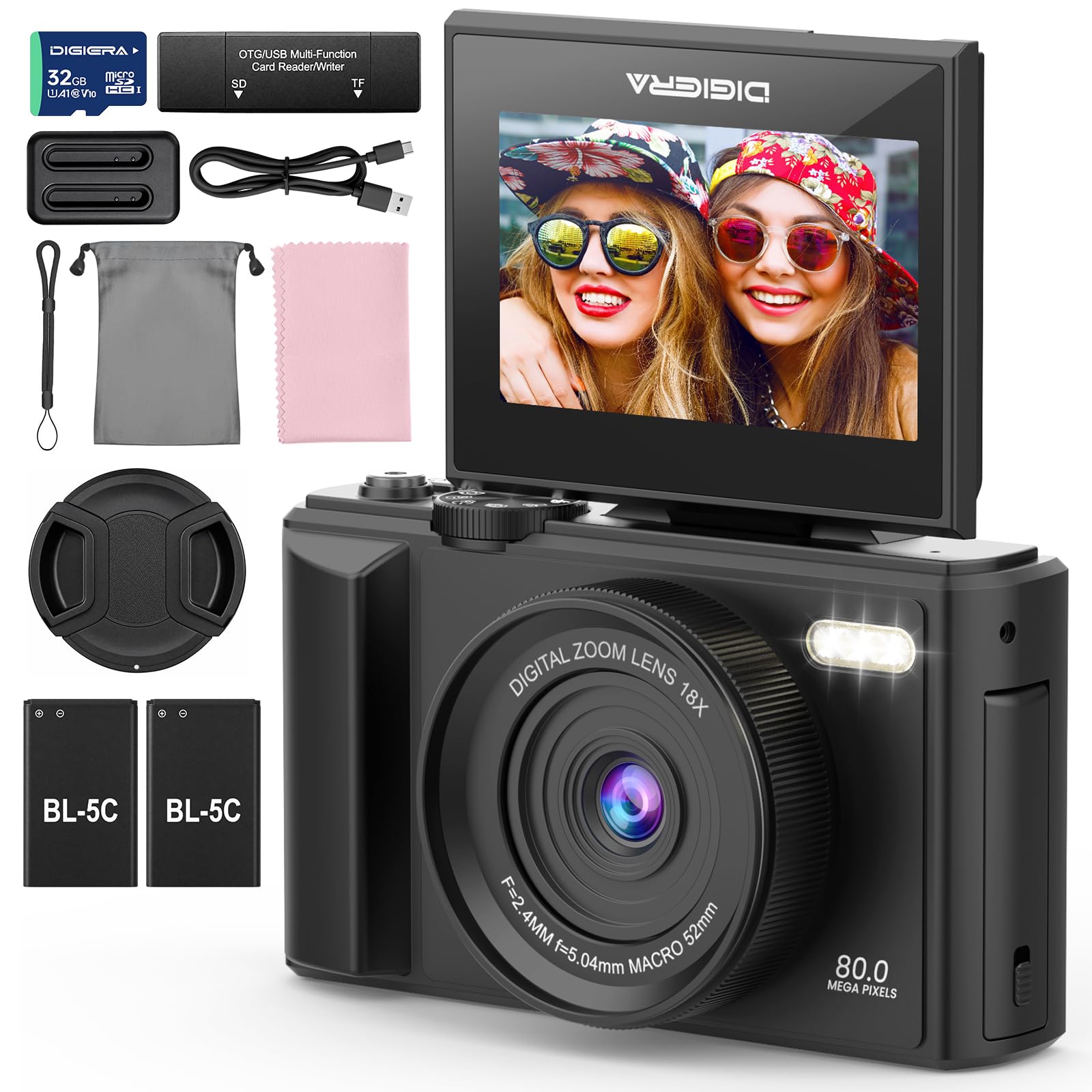
Image 1.1: The DIGIERA DGW100BL 5K Digital Camera.
2. パッケージ内容
パッケージにすべてのアイテムが含まれていることを確認します。
- DIGIERA DGW100BL Camera Body
- 2 x Detachable Rechargeable Lithium-ion Batteries
- バッテリー充電器
- 32GB SDカード
- USBケーブル
- ユーザーマニュアル
- リストストラップ
3. セットアップ
3.1. バッテリーの取り付けと充電
- カメラの下部にある電池ケースのカバーを開きます。
- Insert a rechargeable lithium-ion battery, ensuring the contacts align correctly. Close the cover.
- To charge the battery, insert it into the provided external charger. Connect the charger to a power source using the USB cable. The indicator light on the charger will show charging status.
- A fully charged battery provides approximately 80 minutes of 4K video recording.
3.2. SDカードのインストール
- SD カード スロットを見つけます。通常はカメラの側面または底面にあります。
- Insert the included 32GB SD card with the metal contacts facing the correct direction (refer to the diagram near the slot). Push until it clicks into place.
- 取り外すには、SD カードが飛び出すまでゆっくりと押し込みます。
3.3.電源のオン/オフ
- 電源をオンにするには、画面が点灯するまで電源ボタンを押し続けます。
- 電源を切るには、画面が消えるまで電源ボタンをもう一度押し続けます。
3.4. 初期設定
Upon first power-on, you may be prompted to set the date, time, and language. Use the navigation buttons to select and confirm your preferences.
4. カメラの操作
4.1. 基本的な写真撮影とビデオ録画
The camera supports 80MP still images and 5K video recording.

Image 4.1: Demonstrating 5K video and 80MP photo capabilities.
- スイッチングモード: Use the mode dial or menu options to switch between photo, video, and playback modes.
- 写真を撮る: In photo mode, frame your shot and press the Shutter button halfway to focus, then fully to capture the image.
- ビデオの録画: In video mode, press the Record button to start and stop recording.
- Snapshot While Recording: You can capture still photos during video recording by pressing the Shutter button.
4.2. フォーカスモード
The camera offers flexible focusing options:
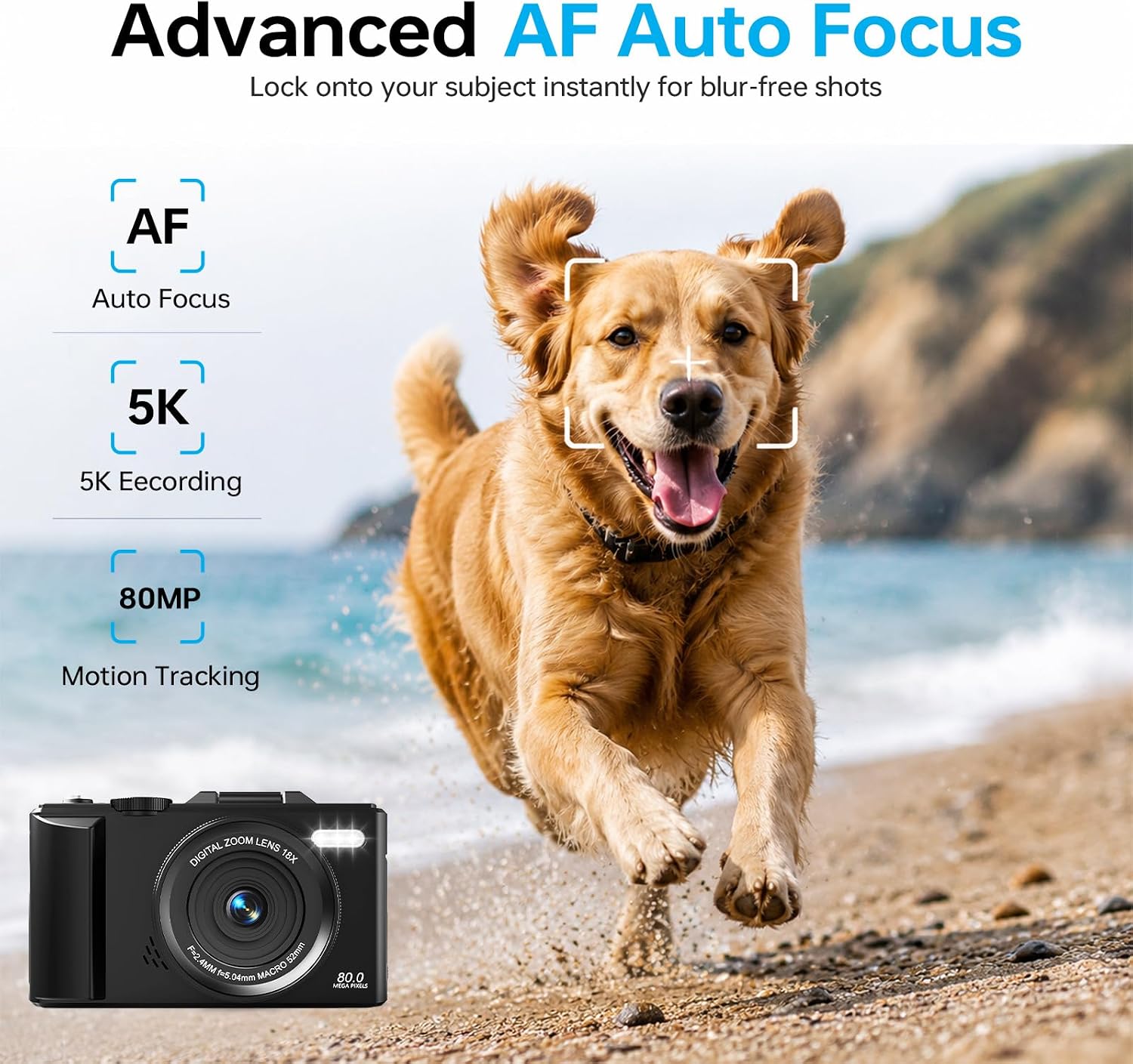
Image 4.2: Advanced Autofocus for sharp images.
- オートフォーカス(AF): The camera automatically detects and focuses on subjects. This is ideal for most situations, including moving subjects.
- 固定フォーカス: Maintains a fixed focus distance, suitable for specific scenarios where manual adjustment is not desired.
- マニュアルフォーカス(MF): Allows you to manually adjust the focus for precise control.
4.3. Using the Flip Screen and Digital Zoom

Image 4.3: The 180° flip screen for easy selfies and vlogging.
- フリップスクリーン: The 3.0-inch IPS LCD screen can be flipped 180 degrees, making it convenient for self-portraits, vlogging, and monitoring your shots from various angles.
- 18倍デジタルズーム: Use the zoom controls (usually 'W' for wide and 'T' for telephoto) to digitally zoom in or out on your subject. Note that digital zoom may reduce image quality compared to optical zoom.
4.4. 手ぶれ補正技術
The built-in anti-shake technology helps to stabilize your footage and photos, reducing blur caused by camera movement, especially useful during handheld shooting or when using digital zoom.
4.5. 特別な機能
- タイムラプス: Capture sequences of images over time to create time-lapse videos. Access this feature through the camera's menu. For extended sessions, consider connecting a power bank.
- スローモーション: Record videos at a higher frame rate to play back in slow motion.
- クリエイティブフィルター: Apply various artistic filters and effects directly to your photos and videos.

図4.4: 例amples of built-in creative filters.
4.6. Wi-Fi接続とアプリ制御

Image 4.5: Wi-Fi transfer for instant sharing.
The camera features built-in Wi-Fi for seamless transfer of photos and videos to your smartphone via a dedicated mobile app. This also enables remote control for convenient selfies and group shots.
- Download the official DIGIERA camera app from your device's app store.
- Enable Wi-Fi on your camera and connect your smartphone to the camera's Wi-Fi network.
- Use the app to browse, transfer, and share your media, or to control the camera remotely.
4.7. External Lens Support

Image 4.6: The camera supports external 52mm wide-angle lenses (sold separately).
The camera supports external 52mm wide-angle lenses (not included) to expand your field of view, ideal for capturing landscapes or group photos.
5. メンテナンス
5.1. カメラのクリーニング
- レンズ: 柔らかく糸くずの出ない布かレンズブラシを使って、優しく埃を取り除いてください。汚れには、レンズに直接拭き取らず、専用のレンズクリーニング液を布につけてご使用ください。
- 画面: Wipe the LCD screen with a soft, dry microfiber cloth. Avoid harsh chemicals.
- 体: Use a dry, soft cloth to clean the camera body. Do not use water or cleaning solvents.
5.2. バッテリーのお手入れ
- バッテリーを使用しないときは、涼しく乾燥した場所に保管してください。
- バッテリーの寿命を延ばすために、バッテリーを頻繁に完全に放電することは避けてください。
- バッテリーを極端な温度にさらさないでください。
5.3. ストレージ
When storing the camera for extended periods, remove the battery and SD card. Store the camera in a protective case in a dry, dust-free environment.
6。 トラブルシューティング
カメラに問題が発生した場合は、次の一般的な問題と解決策を参照してください。
| 問題 | 考えられる原因 | 解決 |
|---|---|---|
| カメラの電源が入りません。 | 電池が消耗しているか、正しく挿入されていません。 | Ensure battery is fully charged and correctly inserted. Try a different charged battery. |
| 写真やビデオを撮影できません。 | SD カードがいっぱいか、ロックされているか、挿入されていません。 | Check SD card status. Ensure it is unlocked, has sufficient space, and is inserted correctly. Format the SD card if necessary (this will erase all data). |
| 画像がぼやけてしまいます。 | 焦点が正しくない、カメラが揺れている、またはレンズが汚れている。 | Check focus mode. Ensure anti-shake is enabled. Clean the lens. Hold the camera steady. |
| Wi-Fi接続の問題。 | Wi-Fi 設定が正しくないか、アプリに問題があります。 | Ensure Wi-Fi is enabled on both camera and phone. Reconnect to the camera's Wi-Fi network. Restart the camera and the app. |
| バッテリー寿命が短い。 | Frequent use of power-intensive features or old battery. | Reduce screen brightness, limit continuous recording. Ensure batteries are fully charged. Consider replacing old batteries. |
これらの解決策を試しても問題が解決しない場合は、カスタマー サポートにお問い合わせください。
7. 仕様
| 特徴 | 詳細 |
|---|---|
| モデル名 | DGW100BL |
| フォトセンサー技術 | シーモス |
| 最大 Webカム画像解像度 | 80 MP |
| ビデオ解像度 | 5K |
| デジタルズーム | 18X |
| 画面サイズ | 3.0インチ |
| 表示タイプ | IPS LCD (Flip Screen) |
| 画像安定化 | デジタル(手ぶれ補正) |
| フォーカスモード | Autofocus, Fixed Focus, Manual Focus |
| サポート File 形式 | JPEG(写真) |
| メモリストレージ容量 | 32 GB(SDカード付属) |
| Compatible Flash Memory Type | マイクロSD |
| 接続技術 | USB、Wi-Fi |
| 電池のタイプ | Detachable Rechargeable Lithium-ion |
| バッテリーの平均寿命 | Approx. 80 minutes (4K recording) |
| 特集 | Anti-Shake, Slow Motion, Wi-Fi Control, Time-Lapse, Snapshot While Recording, 5K Ultra-HD |
| メーカー | Shenzhen Kerun E-commerce Co.,Ltd |
8. 保証情報
This DIGIERA DGW100BL camera comes with a 1年間のメーカー保証 ご購入日から1年間有効です。本保証は、通常の使用における製造上の欠陥および仕上がりの品質を保証するものであり、誤用、事故、不正な改造、または自然災害による損傷は保証の対象外となります。
保証請求のために購入証明書を保管してください。
9. カスタマーサポート
For technical assistance, troubleshooting not covered in this manual, or warranty inquiries, please contact DIGIERA customer support. We offer 4/7 after-sale support to assist you.
- メールアドレス: Refer to your product packaging or the official DIGIERA web連絡先の詳細についてはサイト。
- Webサイト: Visit the DIGIERA Store on Amazon
