
1. はじめに
This manual provides essential information and instructions for using your realme 16T 5G Smartphone. Please read this manual thoroughly before using your device to ensure proper operation and to maximize its performance and longevity. Keep this manual for future reference.
2. 箱の中身
製品パッケージにすべてのアイテムが揃っていることを確認します。
- realme 16T Smartphone
- USBデータケーブル
- 携帯ケース
- クイックスタートガイド
3.デバイスオーバーview
Familiarize yourself with the physical components of your realme 16T 5G Smartphone.
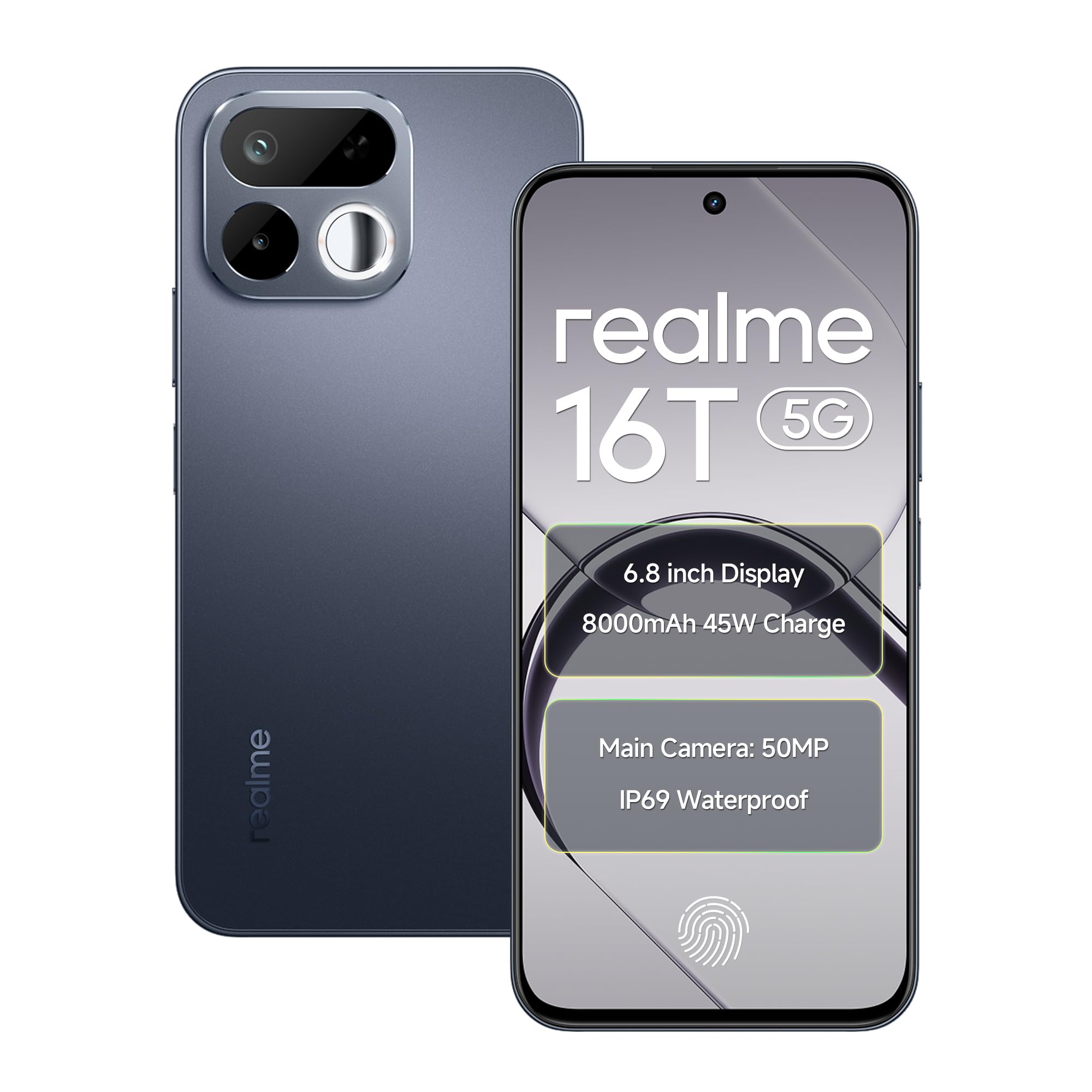
画像: 前面と背面 view of the realme 16T 5G Smartphone, showcasinデザインとカメラモジュール。
主な特徴:
- 画面: 6.8-inch HD+ LCD with 144Hz refresh rate and 1200 nits peak brightness.
- プロセッサ: MediaTek Dimensity 6300 Octa-core chipset.
- バッテリー: 8000mAh capacity with 45W SUPERVOOC flash charging.
- カメラ: 50MP AI main camera with selfie mirror functionality.
- 耐久性: IP69 Pro dust and water resistance, MIL-STD-810H military-grade reliability.
- オペレーティング·システム: Android 16 with realme UI 7.0.
4. セットアップ
4.1 SIMカードとMicroSDカードの挿入
- デバイスの側面にある SIM トレイを見つけます。
- 付属の SIM イジェクタ ツールを使用して SIM トレイを開きます。
- Carefully place your Nano-SIM cards (supports dual 5G SIM) and a microSD card (for expandable storage up to 2TB) into the designated slots. Ensure the gold contacts are facing down.
- Gently push the SIM tray back into the device until it is flush with the side.
4.2 初回電源投入と基本設定
- realme ロゴが表示されるまで電源ボタンを押し続けます。
- 画面上の指示に従って言語と地域を選択し、Wi-Fi ネットワークに接続します。
- Google サービスと Play ストアにアクセスするには、Google アカウントでログインするか、新しいアカウントを作成してください。
- 優先する画面ロック方法(PIN、パターン、パスワード、指紋、または顔認証)を設定します。
5. 操作手順
5.1 電源管理
- 電源オン: Press and hold the Power button until the device vibrates and the realme logo appears.
- 電源を切る: 電源ボタンを長押しし、画面上の「電源を切る」をタップします。
- 再起動: 電源ボタンを長押しし、画面上の「再起動」をタップします。
5.2 表示設定
Your realme 16T features a 6.8-inch HD+ LCD with a 144Hz refresh rate for smooth visuals and a 180Hz touch sampling rate for responsive interaction. The display offers up to 1200 nits peak brightness for clear visibility in various lighting conditions.

Image: The realme 16T 5G Smartphone display showcasing a game, highlighting the 144Hz refresh rate and bright visuals.
- To adjust refresh rate: Go to 設定 > ディスプレイ > 画面のリフレッシュレート.
- To adjust brightness: Go to 設定 > ディスプレイ > 明るさレベル or use the quick settings panel.
5.3バッテリーと充電
The device is equipped with an 8000mAh battery and supports 45W SUPERVOOC flash charging.

Image: An illustration of the realme 16T 5G Smartphone's 8000mAh battery capacity and 45W charging capability, with usage estimates for WhatsApp, Instagram, gaming, and YouTube.
- Use the provided 45W SUPERVOOC charger and USB Data Cable for optimal charging speed.
- Avoid using non-certified chargers or cables to prevent damage to the device.
5.4 カメラ機能
The realme 16T features a 50MP AI main camera. It also includes a selfie mirror function, allowing you to use the rear camera for high-quality selfies.

Image: A person taking a selfie using the realme 16T 5G Smartphone's selfie mirror feature, highlighting the 50MP camera.

Image: A collage demonstrating the AI image editing capabilities of the realme 16T 5G Smartphone, including original, modeling photoshoot, 3D emoji, and cartoon shot options.
- ホーム画面またはアプリドロワーからカメラ アプリを開きます。
- 写真、ビデオ、ポートレート、その他のモードを切り替えます。
- Utilize the AI features for enhanced image processing and editing.
5.5セキュリティ機能
The device supports side fingerprint recognition and face recognition for secure and quick unlocking.
- To set up fingerprint unlock: Go to 設定>セキュリティ>指紋 指示に従ってください。
- To set up face unlock: Go to 設定 > セキュリティ > 顔認証 指示に従ってください。
5.6 接続性
The realme 16T supports 5G dual-SIM dual-standby, Wi-Fi, Bluetooth, and USB OTG.
- 5Gネットワーク: Ensure your SIM cards are 5G enabled and you are in a 5G coverage area.
- Wi-Fi: Wi-Fiネットワークに接続するには 設定 > Wi-Fi.
- ブルートゥース: Bluetoothデバイスとペアリングするには 設定 > Bluetooth.
- USB OTG: Connect USB devices (e.g., flash drives) using a USB OTG adapter.
5.7 オーディオ
Experience studio-quality sound with Hi-Res high-resolution audio certification. The device also features 400% Ultra Volume for enhanced audio output.

Image: A person holding the realme 16T 5G Smartphone while playing a game, illustrating the 400% Ultra Volume feature with sound waves emanating from the device.
6. メンテナンス
6.1 デバイスのクリーニング
- 柔らかく糸くずの出ない布を使用して、携帯電話の画面と本体を清掃してください。
- 強力な化学薬品や研磨材の使用は避けてください。
6.2ソフトウェアアップデート
デバイスに最新の機能、セキュリティ パッチ、パフォーマンスの改善が適用されていることを確認するために、ソフトウェア アップデートを定期的に確認してインストールしてください。
- へ移動 設定 > 端末情報 > realme UI バージョン 更新を確認します。
6.3 ストレージ管理
Manage your device's storage to maintain optimal performance. The device supports microSD card expansion up to 2TB.
- へ移動 設定 > ストレージ に view ストレージ使用量を減らし、スペースを解放します。
- 重要なデータをクラウド ストレージまたは外部デバイスに定期的にバックアップします。
6.4 Durability and Resistance
The realme 16T is designed with IP69 Pro dust and water resistance and MIL-STD-810H military-grade environmental reliability.

Image: The realme 16T 5G Smartphone on a wooden surface with spilled coffee, demonstrating its IP69 Pro dust and water resistance.
Image: A person running with the realme 16T 5G Smartphone, which is shown with debris around it, illustrating its military-grade shock resistance.
While resistant, avoid intentional exposure to water or dust, and do not submerge the device. Damage caused by liquid or dust ingress may not be covered under warranty if proper care is not taken.
7。 トラブルシューティング
This section addresses common issues you might encounter with your realme 16T 5G Smartphone.
| 問題 | 考えられる解決策 |
|---|---|
| デバイスの電源が入らない | Ensure the battery is charged. Connect the device to the charger for at least 10 minutes, then try powering on again. If it still doesn't work, perform a force restart by holding the Power button for 10-15 seconds. |
| バッテリーの消耗が早い | Check for apps running in the background. Reduce screen brightness, disable unnecessary features like GPS or Bluetooth when not in use. Go to 設定>バッテリー 電力を消費するアプリを特定します。 |
| ネットワーク接続の問題(5G/Wi-Fi) | Restart the device. Check if Airplane Mode is off. For mobile data, ensure your SIM card is properly inserted and has an active plan. For Wi-Fi, try forgetting the network and reconnecting, or restart your router. |
| アプリがクラッシュしたりフリーズしたりする | 問題のあるアプリのキャッシュをクリアします(設定 > アプリ > [アプリ名] > ストレージ > キャッシュを消去). If the issue persists, try reinstalling the app. Ensure your device software is up to date. |
| 指紋/顔認証が機能しない | Ensure your finger/face is clean and dry. Re-register your fingerprint/face in 設定 > セキュリティ. Check for any physical obstructions on the sensor or camera. |
If you encounter issues not listed here or if the suggested solutions do not resolve your problem, please contact realme customer support.
8. 仕様
Detailed technical specifications for the realme 16T 5G Smartphone:
| 特徴 | 仕様 |
|---|---|
| ブランド | リアルミー |
| モデル | 16T |
| オペレーティング·システム | Android 16 (with realme UI 7.0) |
| プロセッサ | MediaTek Dimensity 6300 オクタコア (2.4 GHz) |
| ラム | 6 GB(8 GBも利用可能) |
| 内部ストレージ | 128 GB(256 GBも利用可能) |
| 拡張可能なストレージ | microSD経由で最大2TB |
| 画面 | 6.8-inch HD+ LCD, 144Hz Refresh Rate, 1200 nits Peak Brightness |
| リアカメラ | 50MP AIメインカメラ |
| バッテリー | 8000mAh |
| 充電 | 45W SUPERVOOC フラッシュチャージ |
| 接続性 | 5G Dual SIM, Wi-Fi, Bluetooth, USB Type-C, USB OTG |
| 耐水性 | IP69プロ |
| 耐久性 | MIL-STD-810H Military-Grade |
| 寸法 | 16.6 x 7.8 x 0.8 センチメートル |
| 重さ | 192グラム |
9. 保証情報
Your realme 16T 5G Smartphone comes with a 1-year official manufacturer warranty ご購入日から1年間有効です。本保証は、通常の使用における製造上の欠陥を対象としています。保証請求の際は、購入証明書を保管してください。
以下のものは保証の対象外となります:
- Damage caused by improper use, accidents, or unauthorized repairs.
- 通常の消耗。
- Damage caused by liquid or dust ingress if not handled according to IP69 Pro guidelines.
For detailed warranty terms and conditions, please refer to the warranty card included in your product package or visit the official realme webサイト。
10. Support & Safety Information
10.1 カスタマーサポート
For further assistance, technical support, or service inquiries, please contact realme customer service:
- 公式Realmeサポートにアクセスしてください webサイト: realme Support (India)
- Refer to the contact information provided in your Quick Start Guide.
10.2安全ガイドライン
To ensure safe operation of your device, please observe the following:
- 運転中は携帯電話を使用しないでください。
- デバイスを極端な温度にさらさないでください。
- Use only realme-approved accessories.
- デバイスを自分で分解または修理しようとしないでください。
- デバイスとそのバッテリーは、地域の規制に従って責任を持って廃棄してください。


