
1. はじめに
The Thinkcar Thinkscan 689BT is a professional OE-level automotive diagnostic scanner designed for mechanics and enthusiasts. It provides fast, accurate, and comprehensive diagnostics for a wide range of vehicles. This device integrates advanced scanner functions into a compact and powerful form factor, offering extensive coverage for all vehicle electronic systems.
Key features include complete system diagnostics, support for modern CANFD and DOIP protocols, 35 professional reset functions, bidirectional control, and ECU coding capabilities. The scanner operates on an Android system with a high-resolution touchscreen and offers Bluetooth and Wi-Fi connectivity for convenience and updates.
2. 主な特徴
- Complete System Diagnostics: Professional OBD2 scanner with support for modern CANFD and DOIP protocols for comprehensive diagnosis of all vehicle systems.
- 35 リセット機能: Includes essential resets such as Oil Reset, EPB, SAS, Airbag, ABS Bleed, TPMS, IMMO Key Matching, Gearbox Reset, and many more for daily repairs.
- Bidirectional Control and Bluetooth: Bidirectional diagnostic tool with wireless connection, allowing active tests and component control directly from the device.
- ECUコーディング: Advanced support for ECU coding and adaptations, compatible with a wide range of global vehicles from different makes and models.
- 生涯無料アップデート: Receive continuous updates at no additional cost, ensuring support for new vehicles and expanding maintenance functions.
3.製品オーバーview
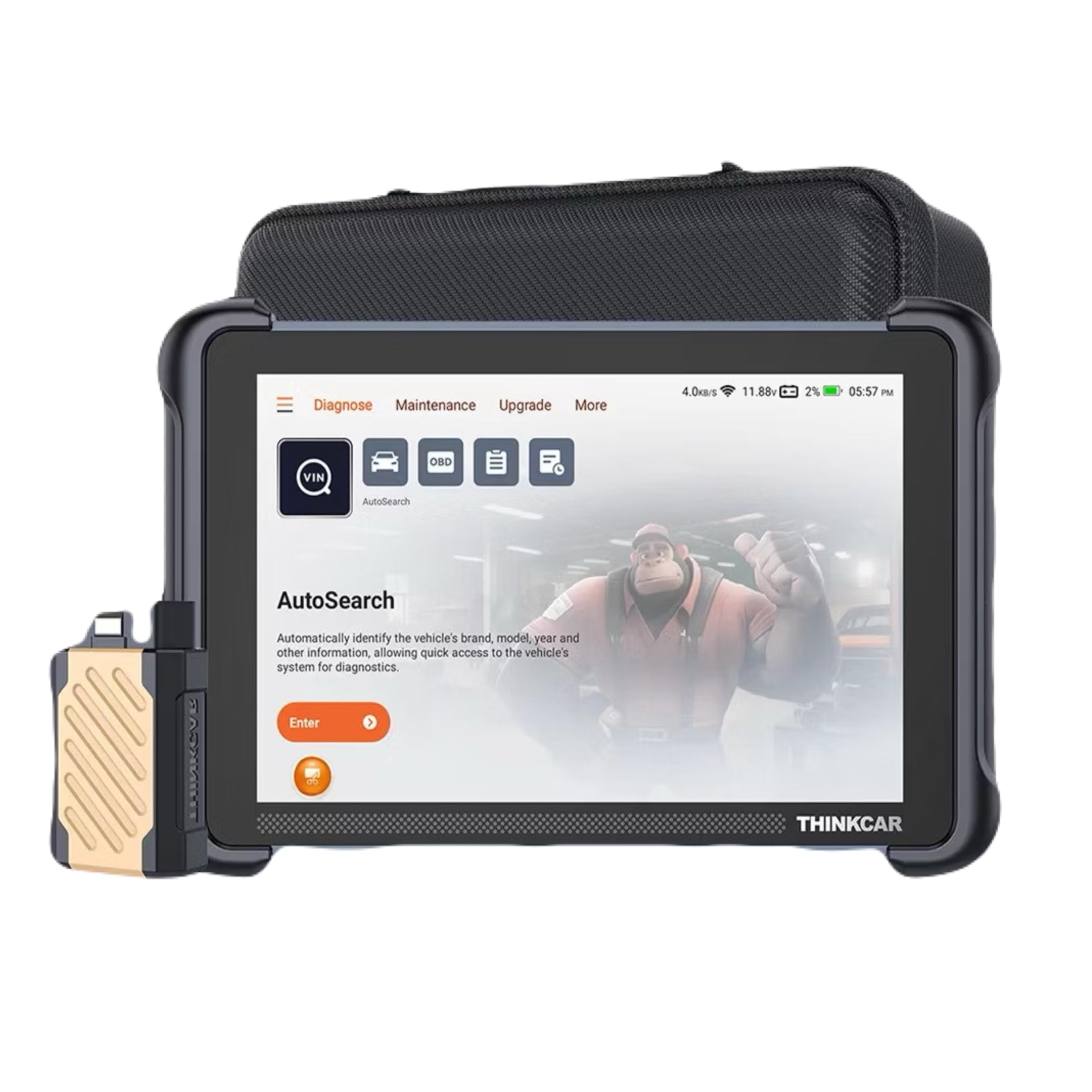
Image: The Thinkcar Thinkscan 689BT diagnostic device, showcasing its compact design and the included VCI (Vehicle Communication Interface) connector.

Image: A summary of the Thinkscan 689BT's upgraded features for 2025, highlighting full bidirectional controls, 3000+ active tests, 34+ service resets, and global vehicle coverage.
4. セットアップ
- 電源オン: Connect the Thinkscan 689BT to a power source using the provided AC/DC adapter or via the vehicle's OBD2 port. The device will automatically power on.
- 初期設定: Follow the on-screen prompts to select your preferred language (supports 28 languages), set the time zone, and connect to a Wi-Fi network for updates.
- VCI 接続: Plug the VCI (Vehicle Communication Interface) dongle into the vehicle's OBD2 port. Ensure a secure connection. The VCI will communicate wirelessly with the Thinkscan 689BT via Bluetooth.
- 登録: Register your device on the Thinkcar official website or through the device's interface to activate lifetime free updates and access full functionalities.
5. 操作手順
5.1 Basic Diagnostics
- 車両に接続: Ensure the VCI is properly connected to the vehicle's OBD2 port and the Thinkscan 689BT is powered on and connected to the VCI via Bluetooth.
- 車両を選択: From the main menu, select 'Diagnose'. The system may automatically detect the vehicle's VIN (Vehicle Identification Number) or prompt you to manually select the vehicle make, model, and year.
- システムスキャン: Choose 'Full System Scan' to perform a comprehensive diagnostic check of all available electronic control units (ECUs) in the vehicle.
- View/Clear DTCs: スキャン後、view the Diagnostic Trouble Codes (DTCs) and their descriptions. You can then choose to clear the DTCs if the underlying issue has been resolved.
- ライブデータストリーム: Access real-time data from various sensors and components to monitor vehicle performance and identify potential issues.
5.2 Maintenance Service Functions (35+ Resets)
The Thinkscan 689BT offers over 35 essential maintenance and reset functions. These functions allow you to perform common service tasks without needing specialized dealer tools.

Image: A visual representation of over 34 maintenance service functions available on the Thinkscan 689BT, including Oil Reset, EPB Reset, SAS Calibration, Airbag Reset, ABS Bleed, TPMS Reset, IMMO Key Matching, and Gearbox Reset.
To access these functions, navigate to the 'Maintenance' section on the device. Select the desired reset function and follow the on-screen instructions. Examp含まれるもの:
- オイルリセット: オイル交換後にオイル寿命リマインダーをリセットします。
- EPBリセット: ブレーキパッドの交換後に電子パーキングブレーキシステムをリセットします。
- SAS キャリブレーション: ステアリング角度センサーをキャリブレーションします。
- ABS ブリード: ABS ブレーキのブリーディング手順を実行します。
- IMMOキーマッチング: Programs new keys or remote controls.
- DPF再生: ディーゼル微粒子フィルターの再生を開始します。
5.3 双方向制御(アクティブテスト)
Bidirectional control allows the scanner to send commands to vehicle components and systems to test their working status. This is crucial for pinpointing specific issues.
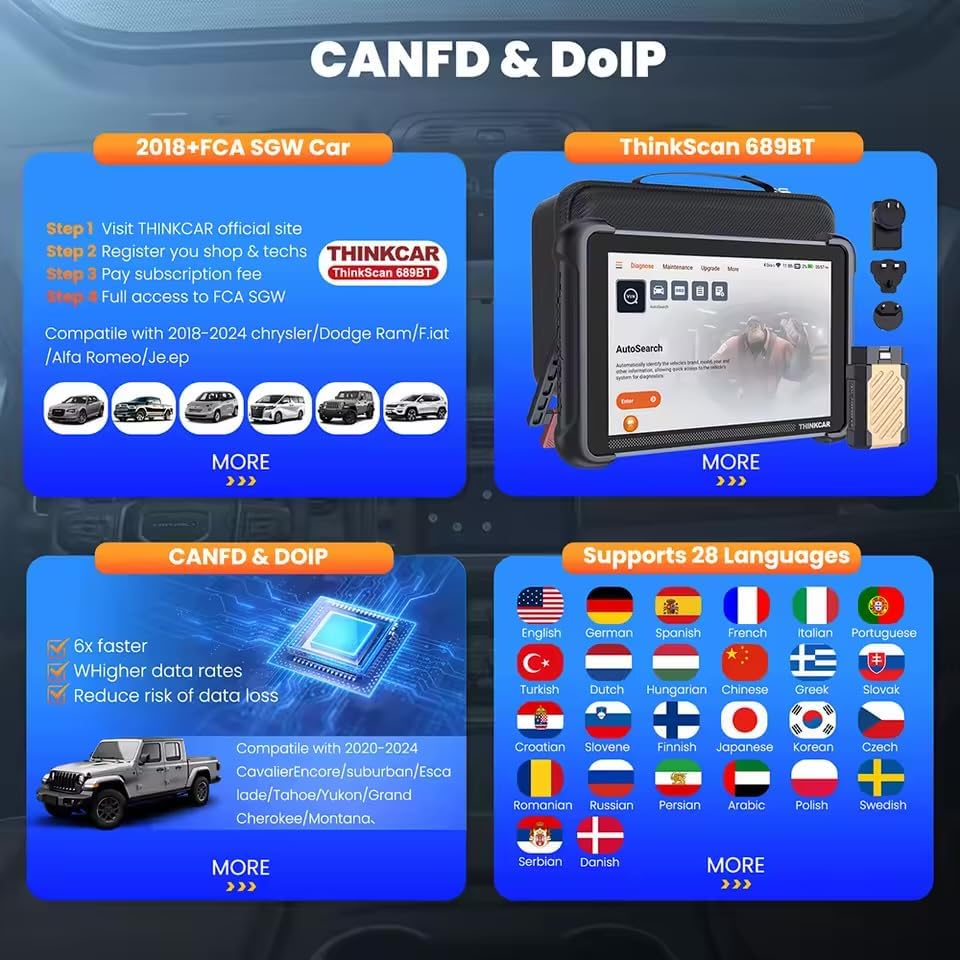
Image: An illustration of the Active Test (Bidirectional Control) feature, showing various components that can be tested, such as windows, mirrors, headlights, horns, wipers, fuel injectors, and A/C compressor.
アクティブ テストを実行するには:
- Navigate to the 'Active Test' or 'Bidirectional Control' section.
- Select the system or component you wish to test (e.g., turn on the radiator fan, modulate the throttle, open/close windows, operate mirrors, turn lights on/off).
- Observe the component's response to verify its functionality.
5.4 高度なECUコーディング
The Thinkscan 689BT supports advanced ECU coding and adaptations, enabling you to customize vehicle settings and optimize performance.

Image: A depiction of Advanced ECU Coding capabilities, including unfolding hidden features, optimizing vehicle performance, disabling annoying functions, and customizing OE-settings. Note: Coding functions vary by vehicle model.
ECU coding functions include:
- Unfolding hidden features.
- Optimizing vehicle performance.
- Disabling specific functions.
- Customizing OE-settings.
注記: ECU coding functions vary significantly by vehicle make and model. Always ensure you understand the implications before making changes. Refer to the vehicle's service manual or consult a professional if unsure.
5.5 CANFD & DOIP Protocols
The Thinkscan 689BT is equipped with native support for CANFD (Controller Area Network Flexible Data-Rate) and DOIP (Diagnostics over Internet Protocol), ensuring compatibility with newer vehicles from brands like GM, BMW, and Land Rover.

Image: Details on CANFD and DOIP compatibility, showing support for 2018+ FCA SGW cars and 2020-2024 GM vehicles. It also highlights support for 28 languages, including English, Spanish, French, Portuguese, and German.
These protocols enable faster data transfer and more efficient diagnostics for modern vehicle architectures.
6. ソフトウェアの更新
The Thinkcar Thinkscan 689BT comes with lifetime free software updates. These updates ensure continuous support for new vehicle models, expanded diagnostic functions, and improved performance.
ソフトウェアを更新するには:
- デバイスが安定した Wi-Fi ネットワークに接続されていることを確認します。
- Navigate to the 'Upgrade' or 'Update' section in the device's menu.
- 利用可能なアップデートを選択し、画面の指示に従ってダウンロードしてインストールします。
- 更新プロセス中はデバイスの電源をオフにしないでください。
7。 トラブルシューティング
- デバイスの電源が入らない: Ensure the device is properly connected to a power source (vehicle OBD2 port or AC/DC adapter). Check for any loose connections.
- VCI not connecting via Bluetooth: Ensure the VCI dongle is securely plugged into the vehicle's OBD2 port and the vehicle's ignition is on. Restart both the Thinkscan 689BT and the VCI. Check Bluetooth settings on the scanner.
- 車両に接続できません: Verify the vehicle's ignition is on. Ensure the VCI is correctly installed. Check if the vehicle's OBD2 port is functional. Try a different vehicle to rule out scanner issues.
- Diagnostic functions not working: Ensure the software is up to date. Verify vehicle compatibility for the specific function. Some advanced functions may require specific vehicle conditions (e.g., engine off, ignition on).
- 動作が遅い: Ensure sufficient storage space on the device. Close unnecessary applications. A stable Wi-Fi connection is recommended for updates.
8. 仕様
| 特徴 | 説明 |
|---|---|
| ブランド | シンクカー |
| モデル | Thinkscan 689BT |
| オペレーティング·システム | アンドロイド10.0 |
| 画面サイズ | 5インチ(タッチスクリーン) |
| 接続性 | Bluetooth (VCI), Wi-Fi (2.4 & 5GHz) |
| 電源 | AC/DC |
| 製品寸法 | 長さ41 x 幅13 x 高さ31センチメートル |
| 部品番号 | Obd2-canfd-doip-bt |
| 含まれるコンポーネント | 完全なセット |
| 自動車適合タイプ | ユニバーサルフィット |
9. 保証情報
This product comes with a 90-day warranty from the date of purchase. The warranty covers manufacturing defects and malfunctions under normal use. Please retain your proof of purchase for warranty claims.
保証は、誤用、事故、不正な改造、不適切なメンテナンスによって生じた損傷には適用されません。
10. カスタマーサポート
For technical assistance, troubleshooting, or warranty inquiries, please contact your retailer or the official Thinkcar support channels. Refer to the packaging or the Thinkcar official web連絡先の詳細についてはサイト。
When contacting support, please have your product model (Thinkscan 689BT) and proof of purchase readily available.


