
1。 オーバーview
The Philips TAZ2200 is a versatile portable sound machine designed for enjoying various audio formats. It features a top-loading CD player, a front-loading cassette player, FM radio, Bluetooth 6.0 connectivity, USB playback, and a 3.5mm audio input. Equipped with dynamic bass boost and 6W stereo speakers, it delivers rich sound. The unit can be powered by AC mains or batteries and includes a carrying handle for portability.
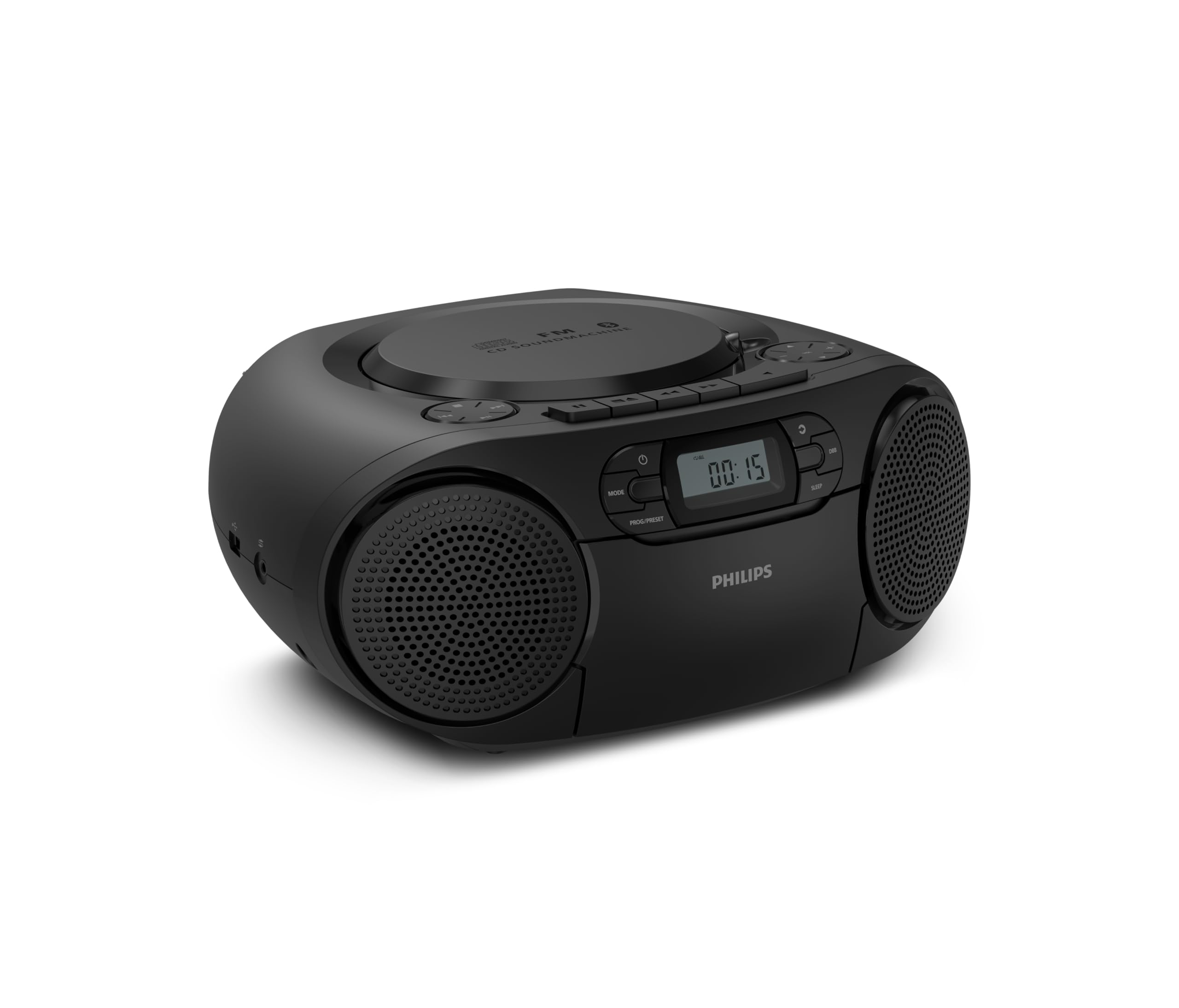
フロント view of the Philips TAZ2200 CD Soundmachine, showing the main display and control buttons.
2. 安全情報
Please read these safety instructions carefully before using your device and keep them for future reference. Incorrect use may result in hazards.
- 電源: 指定された電源アダプターまたは電池のみを使用してください。tageはユニットの要件を満たしています。
- 水と湿気: 本製品を雨、湿気、水滴、水しぶきにさらさないでください。花瓶など、液体の入った物を本製品の上に置かないでください。
- 換気: 十分な換気を確保してください。通気口を塞がないでください。十分な換気を確保するため、ユニットの周囲に最低限の距離を保ってください。
- 熱: ラジエーター、暖房口、ストーブ、その他の機器(電気製品を含む)などの熱源の近くに本製品を置かないでください。 amp熱を発生する装置。
- 電池: Follow correct polarity when inserting batteries. Do not mix old and new batteries, or different types of batteries. Remove batteries if the unit is not used for a long period.
- クリーニング: 清掃する前に、本体の電源プラグをコンセントから抜いてください。柔らかく乾いた布を使用してください。液体洗剤やエアゾール洗剤は使用しないでください。
- サービス: この製品を自分で修理しようとしないでください。 すべてのサービスを資格のあるサービス担当者に依頼してください。
3. 箱の中身
開梱の際には、以下に挙げる品目がすべて揃っていることを確認してください。
- Philips TAZ2200 CD Soundmachine
- 電源ケーブル
- クイックスタートガイド
- 保証書
- 安全シート
4. コントロールと接続
フロントパネルコントロール
The front panel features the main display, power button, mode selection, program/preset buttons, and dynamic bass boost (DBB) control. Playback controls for CD and USB are also located here.

詳細なフロント view showing the display, power, mode, program/preset, and DBB buttons.
側面と背面の接続
The side of the unit provides a USB port for digital audio playback and a 3.5mm audio input jack for connecting external devices.

側 view illustrating the USB port and Audio Input jack.
The top of the unit houses the CD compartment and additional playback controls, while the rear features the AC power input and the FM antenna.

トップ view showing the CD compartment and associated controls.

後方 view displaying the AC power input and the telescopic FM antenna.
5. セットアップ
5.1 電源
AC電源
- ユニットの電源がオフになっていることを確認してください。
- Connect the supplied power cable to the AC IN socket on the rear of the sound machine.
- Plug the other end of the power cable into a wall power outlet.
バッテリー電源
For portable use, the unit can operate on 6 x C-type batteries (not included).
- ユニットの下部にあるバッテリーコンパートメントカバーを開きます。
- Insert 6 C-type batteries, ensuring correct polarity (+/-) as indicated inside the compartment.
- 電池カバーをしっかりと閉じてください。
5.2 アンテナ調整
For optimal FM radio reception, fully extend the telescopic antenna located at the rear of the unit. Adjust its position and angle to achieve the clearest signal.
6. 操作手順
6.1 一般的な操作
- 電源オン/オフ: を押す 力 ユニットの電源をオンまたはオフにするボタン。
- 音量コントロール: 使用 VOL+ or 巻 - 音量レベルを調整するボタン。
- ダイナミックベースブースト(DBB): を押す DBB button to activate or deactivate the dynamic bass boost feature for enhanced bass sound.
- モード選択: を押す モード button repeatedly to switch between CD, Cassette, FM Radio, Bluetooth, USB, and Audio Input modes.
6.2 CD再生
- 本体上部のCDコンパートメントカバーを開きます。
- Place a CD (CD, CD-R, or CD-RW) with the label side facing up onto the spindle.
- CDコンパートメントカバーを閉じます。
- を押す モード ボタンをクリックしてCDモードを選択します。
- を押す 再生/一時停止 ボタンをクリックして再生を開始します。
- 使用 スキップ ボタン(|< or >> |)をクリックするとトラックをスキップできます。
- 押し続ける |< or >> | トラック内を検索します。
- を押す 停止 再生を停止するボタン。
6.3 カセットの再生
- Open the cassette compartment door on the front of the unit.
- カセットテープを、開いた端を上に向けて挿入します。
- カセットコンパートメントのドアを閉じます。
- を押す モード カセットモードを選択するボタン。
- を押す 遊ぶ ボタンをクリックして再生を開始します。
- 使用 早送り or 巻き戻し テープを素早く進めたり巻き戻したりするためのボタン。
- を押す 停止 再生を停止するボタン。
6.4FMラジオ
- を押す モード ボタンを押して FM ラジオ モードを選択します。
- 自動スキャン: を押し続けます PROG/PRESET 利用可能な FM 局を自動的にスキャンして保存するボタン。
- 手動チューニング: を押す チューニング ボタン(|< or >> |)を使用して、希望の周波数に手動でチューニングします。
- プリセットの保存: After tuning to a station, press PROG/PRESET 一度使用してから |< or >> | プリセット番号を選択し、 PROG/PRESET 再度確認します。
- プリセットの呼び出し: FMモードでは、を押します PROG/PRESET repeatedly to cycle through saved preset stations.
6.5 Bluetooth再生
- を押す モード button to select Bluetooth mode. The display will show 'BT' and flash, indicating it's in pairing mode.
- Bluetooth 対応デバイス (スマートフォン、タブレット) で Bluetooth を有効にし、利用可能なデバイスを検索します。
- Select "Philips TAZ2200" from the list of devices.
- Once paired, the unit will emit a confirmation sound, and 'BT' will stop flashing.
- Start playing audio on your connected device. The sound will be streamed to the sound machine.
6.6 USB再生
- Insert a USB flash drive into the USB port on the side of the unit.
- を押す モード ボタンを押して USB モードを選択します。
- ユニットは自動的に互換性のあるオーディオを検出し、再生を開始します。 files (MP3, WAV, WMA).
- 再生コントロール(再生/一時停止, スキップ, 停止) as you would for CD playback.
6.7 オーディオ入力(AUX)
- Connect one end of a 3.5mm audio cable (not included) to the AUDIO IN jack on the side of the sound machine.
- Connect the other end of the audio cable to the headphone jack or audio output of your external device (e.g., MP3 player, turntable).
- を押す モード button to select Audio Input mode.
- Start playing audio on your external device. The sound will be played through the sound machine.
7. メンテナンス
- ユニットのクリーニング: ユニットの外側を柔らかく、少し硬めの布で拭いてください。amp 布で拭いてください。研磨剤や溶剤は使用しないでください。
- CDプレーヤーのお手入れ: Keep the CD compartment clean. If the lens is dirty, use a specialized CD lens cleaner. Avoid touching the lens.
- カセットプレーヤーのお手入れ: 定期的にテープヘッドとピンチローラーを綿棒で軽く拭いてください。ampイソプロピルアルコールで消毒しました。
- バッテリー交換: If using batteries, replace all 6 C-type batteries when the unit's performance diminishes or if the unit will not be used for an extended period.
- ストレージ: 使用していないときは、直射日光や極端な温度を避け、清潔で乾燥した場所に保管してください。
8。 トラブルシューティング
If you encounter any issues with your Philips TAZ2200, please refer to the table below for common problems and solutions.
| 問題 | 考えられる原因 | 解決 |
|---|---|---|
| 電源なし | 電源ケーブルが接続されていない、電池が消耗しているか正しく挿入されていない。 | AC 電源の接続を確認してください。電池を交換するか、極性が正しいことを確認してください。 |
| 音が出ない | 音量が低すぎます。選択したモードが間違っています。ヘッドフォンが接続されています。 | Increase volume; Select the correct source mode (CD, FM, BT, etc.); Disconnect headphones. |
| CDが再生されない | CD が正しく挿入されていない、CD が汚れているか傷がついている、CD フォーマットがサポートされていない。 | Insert CD with label side up; Clean or replace CD; Ensure CD is CD-R/RW compatible. |
| カセットが再生されない | Cassette inserted incorrectly; Tape is damaged. | Insert cassette correctly; Try a different cassette. |
| FM受信状態が悪い | アンテナが正しく伸びていないか、正しく配置されていないため、信号が弱いです。 | 伸縮アンテナを完全に伸ばして調整し、ユニットを別の場所に移動してみてください。 |
| Bluetoothが接続されない | Unit not in pairing mode; Bluetooth device too far; Device already paired with another unit. | Ensure unit is in Bluetooth mode and flashing; Move device closer; Disconnect from other devices. |
| USB再生の問題 | USBドライブが正しく挿入されていません。互換性がありません。 file フォーマット; USB ドライブが破損しています。 | USBドライブを再度挿入し、 files are MP3, WAV, or WMA; Try a different USB drive. |
9. 仕様
| 特徴 | 仕様 |
|---|---|
| ブランド | フィリップス |
| モデル番号 | TAZ2200/10 |
| 接続技術 | Bluetooth 6.0, USB, Audio Input (3.5mm) |
| スピーカータイプ | Stereo (2 speakers) |
| 出力電力 | 6ワット(最大) |
| サポートされているメディア | CD, CD-R, CD-RW, Cassette, USB (MP3, WAV, WMA) |
| ラジオチューナー | Digital FM with 20 presets |
| 電源 | AC (wired), 6 x C-type batteries (not included) |
| 寸法(長さx幅x高さ) | 24.5 x 28.5 x 12.5 cm |
| 重さ | 1.35キログラム |
| 色 | 銀 |
10. 保証とサポート
10.1製品保証
This Philips TAZ2200 CD Soundmachine comes with a 2年間保証 ご購入日から1年間有効です。保証請求の際は、購入証明書を保管してください。保証は、通常の使用条件下での製造上の欠陥および故障を対象としています。
10.2 カスタマーサポート
For technical assistance, troubleshooting beyond this manual, or warranty service, please refer to the contact information provided in the warranty booklet included with your product. You can also visit the official Philips support website for your region for further assistance and FAQs.