
1. 重要なお知らせ
Please carefully check the store name and ensure you are purchasing products sold by "LUZHAN." We have received customer feedback stating that products received did not match the description and were of poor quality. Upon investigation, we found that these customers did not purchase the products from us. To prevent such incidents from happening again in the future and to avoid unnecessary misunderstandings, please carefully verify the store name LUZHAN.

Image: Important notice to verify seller name LUZHAN for authentic products.
2。 オーバーview
The XIAOMI POCO X8 Pro Max 5G is a high-performance smartphone designed for advanced users. It features a powerful Mediatek Dimensity 9500s processor, a vibrant 1.5K 120Hz AMOLED display, a large 8500mAh battery with 100W HyperCharge, and a 50 MP Light Fusion 600 camera system with OIS. This manual provides essential information for setting up and operating your device.
画像: 前面と背面 view of the POCO X8 Pro Max 5G smartphone.
ビデオ: オーバーview of the POCO X8 Pro Series, highlighting key features and design.
3. セットアップ
3.1 箱の中身
- XIAOMI POCO X8 Pro Max 5G Smartphone
- 充電器
- スクリーンプロテクター(貼り付け済みまたは付属)
3.2 デバイスの初期設定
- 電源オン: Press and hold the power button located on the side of the device until the XIAOMI logo appears.
- 言語と地域: 画面上の指示に従って、希望する言語と地域を選択してください。
- Wi-Fiに接続します: Select your Wi-Fi network and enter the password to connect to the internet. This is necessary for initial setup and software updates.
- Google アカウント: Googleアカウントでログインするか、新しいアカウントを作成してください。これは、Google Playストアやその他のGoogleサービスにアクセスするために不可欠です。
- データ転送: If you are upgrading from another device, you may have the option to transfer your data (apps, photos, contacts) during this stage.
- セキュリティ設定: Set up your preferred security method, such as a PIN, pattern, password, or fingerprint. The device supports an ultrasonic fingerprint sensor.
- セットアップを完了します: 残りのプロンプトに従ってセットアッププロセスを完了します。
3.3 SIMカードとeSIMの設定
The POCO X8 Pro Max 5G supports physical SIM cards and eSIM functionality.
- Physical SIM: Use the provided SIM ejector tool to open the SIM tray. Insert your Nano-SIM card(s) into the tray, ensuring proper orientation. Close the tray securely.
- SIMカード: eSIMの有効化については、 設定 > ネットワークとインターネット > SIM 指示に従ってeSIMプロを追加してくださいfile provided by your carrier.
4. 操作手順
4.1 表示機能
Your device features a 6.83-inch 1.5K ultra-bright AMOLED display with a 120Hz refresh rate for smooth visuals and a 24x super resolution touch for enhanced responsiveness. It also includes eye protection features and Corning Gorilla Glass 7i for durability.
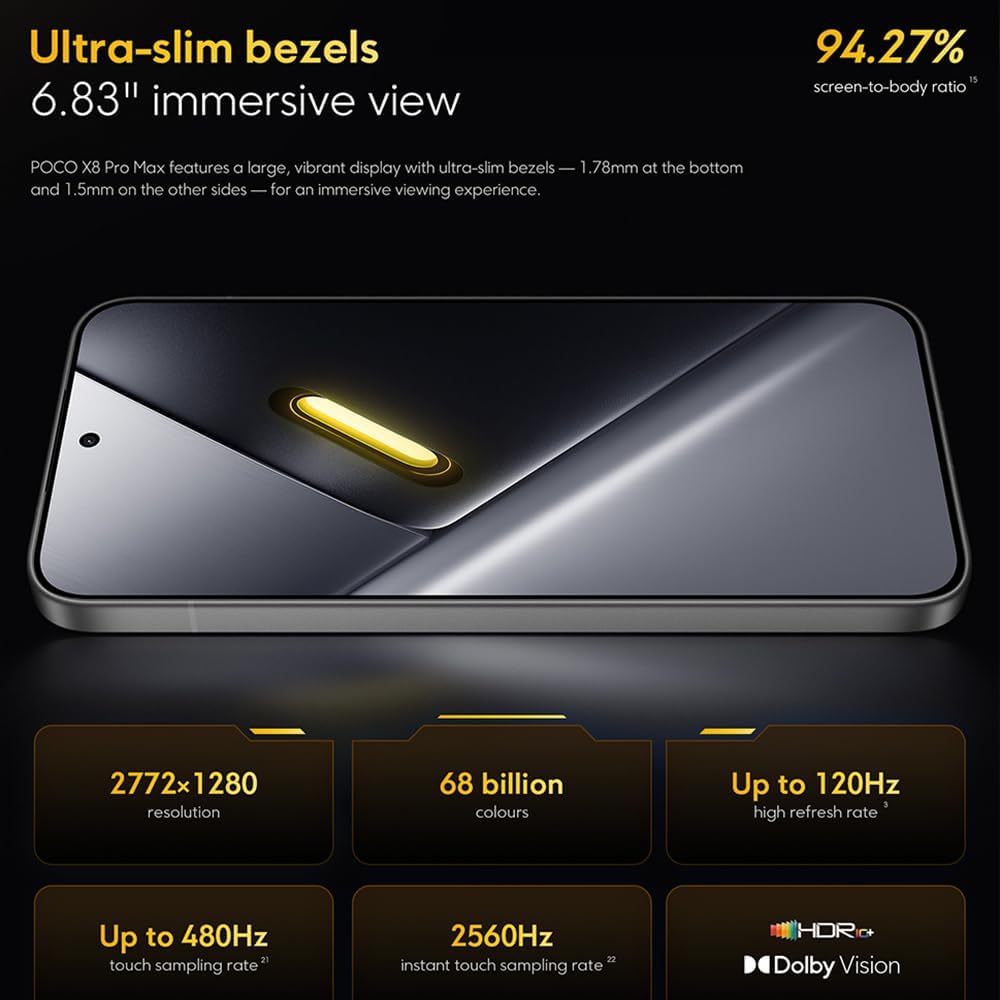
Image: The 6.83-inch 1.5K ultra-bright AMOLED display with minimal bezels.
4.2 パフォーマンス
Powered by the Mediatek Dimensity 9500s chipset (3nm, 4+4 All Big Core architecture, NPU890 AI processor), the POCO X8 Pro Max 5G delivers high performance. The POCO 3D IceLoop cooling system ensures efficient heat dissipation, maintaining optimal performance during intensive tasks like gaming.

Image: Diagram illustrating the Mediatek Dimensity 9500s flagship platform.

Image: Illustration of the 5800mm² ultra-large LHP area for cooling.
4.3カメラシステム
The device features a 50 MP Light Fusion 600 main camera with OIS (Optical Image Stabilization) and an 8 MP ultra-wide camera. It supports portrait mode with bokeh + HDR and dynamic video-to-still conversion.

Image: Close-up of the 50 MP main camera and 8 MP ultra-wide camera system.
4.4バッテリーと充電
Equipped with a massive 8500 mAh (typical) battery, the POCO X8 Pro Max 5G offers extended usage. It supports 100W HyperCharge, allowing for rapid recharging. A 16% ultra-high carbon-silicon content contributes to its high energy density.

Image: Illustration highlighting the massive 8500mAh battery capacity.

Image: Visual representation of the 100W HyperCharge technology.
4.5 オーディオ
The device features symmetrical dual stereo speakers (1115F) for a balanced and immersive audio experience.
4.6ソフトウェア
The POCO X8 Pro Max 5G comes with Xiaomi HyperOS 3 installed, offering an optimized and user-friendly interface based on Android 16.
5. メンテナンス
5.1 デバイスのクリーニング
- 柔らかく糸くずの出ない布を使用して、画面と背面パネルを拭きます。
- 強力な化学薬品、研磨材、エアゾールスプレーの使用は避けてください。
- 頑固な汚れには、軽くamp布に水または電子機器用のスクリーンクリーナーを含ませて拭いてください。
5.2 防塵・防水性能
The device is certified for IP68 dust and water resistance. This means it can withstand immersion in up to 2 meters of water for 30 minutes under specific laboratory conditions. However, water and dust resistance may deteriorate over time with normal wear and tear. The warranty does not cover liquid damage. Avoid exposing the device to hot water, saltwater, or other liquids.

Image: Visual representation of the IP68 dust and water resistance.
5.3ソフトウェアアップデート
定期的にソフトウェアアップデートを確認し、インストールして、デバイスに最新の機能、セキュリティパッチ、パフォーマンスの改善が適用されていることを確認してください。このオプションは通常、 設定 > 端末情報 > システムアップデート.
6。 トラブルシューティング
6.1 一般的な問題と解決策
- デバイスの電源が入らない: バッテリーが充電されていることを確認してください。デバイスを充電器に接続し、数分間待ってから再度電源を入れてください。
- 画面が反応しない: 電源ボタンを長時間(たとえば 10 ~ 15 秒)押してデバイスを再起動し、再起動してみてください。
- アプリがクラッシュする: 問題のあるアプリのキャッシュをクリアします(設定 > アプリ > [アプリ名] > ストレージ > キャッシュを消去) or reinstall the app. Ensure your device software is up to date.
- バッテリー寿命が短い: Check background app usage, reduce screen brightness, disable unnecessary features like GPS or Bluetooth when not in use, and ensure your software is updated.
- ネットワーク接続の問題: Restart your device. Check if your SIM card is properly inserted. Toggle Airplane Mode on and off. Reset network settings (設定 > システム > リセットオプション > Wi-Fi、モバイル、Bluetoothをリセット).
6.2 工場出荷時設定へのリセット
問題が解決しない場合は、工場出荷時の状態にリセットする必要がある場合があります。 警告: これにより、デバイス上のすべてのデータが消去されます。続行する前に重要なデータをバックアップしてください。 設定 > システム > リセット オプション > すべてのデータを消去 (工場出荷時設定にリセット) 画面の指示に従ってください。
7. 仕様
| 特徴 | 仕様 |
|---|---|
| ブランド | 小米 |
| モデル名 | POCO X8 Pro Max 5G |
| オペレーティング·システム | Android 16 (with Xiaomi HyperOS 3) |
| メモリストレージ容量 | 512ギガバイト |
| 画面サイズ | 6.83インチ |
| 表示タイプ | AMOLED, 1.5K, 120Hz refresh rate |
| セルラーテクノロジー | 5G |
| 色 | ノワール(黒) |
| コネクタタイプ | USBタイプC |
| 生体認証セキュリティ | Fingerprint Recognition (Ultrasonic) |
| バッテリー容量 | 8500 mAh(リチウムポリマー) |
| 充電 | 100Wハイパーチャージ |
| メインカメラ | 50 MP Light Fusion 600 with OIS |
| 超広角カメラ | 8 MP |
| プロセッサ | Mediatek Dimensity 9500s |
| 防塵・防水 | IP68 |
| モデルの年 | 2025 |
| 原産国 | 中国 |
8. 保証とサポート
For detailed warranty information and customer support, please refer to the warranty card included with your product or visit the official XIAOMI webサイトでご確認ください。保証請求に備えて購入証明書を保管してください。
Online resources and FAQs may also be available on the XIAOMI support portal.