
1. はじめに
The Senwa Vacuum V100 is an advanced robotic vacuum cleaner designed to provide efficient and effortless cleaning for your home. With powerful suction and intelligent navigation, it effectively cleans various surfaces, from hard floors to carpets, ensuring a spotless environment. Its compact design and user-friendly features make daily cleaning simple and convenient. The V100's effective filtration system captures dust and fine particles, contributing to improved air quality in your living space. This manual provides essential information for the safe and optimal use, maintenance, and troubleshooting of your Senwa Vacuum V100.
主な特徴:
- Powerful and Efficient Suction: Optimized motor ensures deep cleaning on floors, carpets, and difficult corners, removing dust and dirt in a single pass.
- Lightweight and Maneuverable Design: Easy to transport and use in any space, ideal for quick, effortless cleaning or frequent use.
- 多様な表面への対応力: Works perfectly on different types of surfaces, adapting to the needs of homes or offices.
- Effective Filtration System: Captures fine particles and helps maintain a cleaner environment, ideal for improving hygiene.
- Easy Maintenance and Durability: Accessible components for quick cleaning and long lifespan, designed for continuous and reliable use.
2. 安全情報
Please read all safety instructions carefully before using your Senwa Vacuum V100. Keep this manual for future reference.
- この機器は、機器の安全な使用に関する監督または指導を受けており、関連する危険性を理解している場合、8 歳以上の子供、および身体、感覚、精神能力が低下している人、または経験と知識が不足している人でも使用できます。
- 子供が機器で遊ばないように監督する必要があります。
- 清掃やユーザーメンテナンスは、監督なしで子供に行わせないでください。
- Do not use the vacuum cleaner in wet environments or on wet surfaces.
- Do not allow the vacuum cleaner to pick up large objects, liquids, burning or smoking objects (e.g., hot ashes, cigarettes).
- Use only the original charging adapter and charging dock provided by the manufacturer.
- Ensure the charging dock is placed against a wall on a level surface, free from obstacles.
- 掃除する前に、絡まりや損傷を防ぐために、緩んだケーブル、小さな物体、壊れやすい物を床から取り除いてください。
- Do not operate the vacuum cleaner if it is damaged. Contact customer support for assistance.
- Turn off the vacuum cleaner and unplug it from the charging dock before performing any maintenance or cleaning.
3. パッケージ内容
Carefully unpack your Senwa Vacuum V100 and check that all items are present and in good condition. If any items are missing or damaged, please contact customer support.
- Senwa Vacuum V100 Robot Vacuum Cleaner (Main Unit)
- 充電ドック
- 電源アダプター
- サイドブラシ(2組)
- メインブラシ(プリインストール)
- ゴミ箱(プリインストール)
- 高効率フィルター(プリインストール)
- クリーニングツール
- ユーザーマニュアル
4.製品オーバーview
Familiarize yourself with the components of your Senwa Vacuum V100.
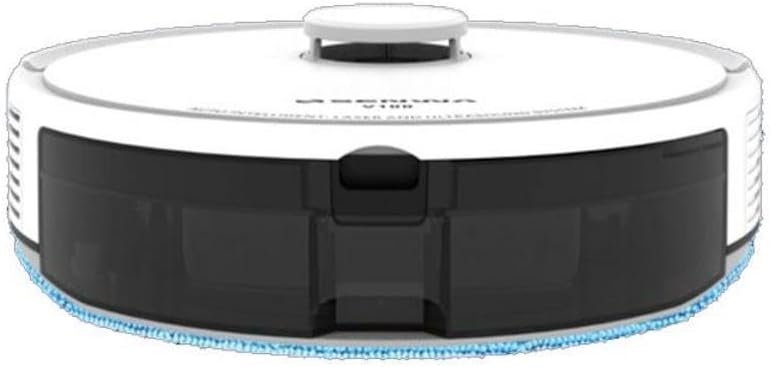
Figure 4.1: Top-Front View of Senwa Vacuum V100
This image shows the top and front of the robot vacuum, highlighting the main body, control button, and dustbin access panel.

図4.2:側面 View of Senwa Vacuum V100
This image displays a side profile of the robot vacuum, showing a driving wheel, a side brush, and a ventilation grille.

図4.3:側面 View of Senwa Vacuum V100 with Dustbin Area
This image illustrates another side view, focusing on the area where the dustbin is typically accessed or removed.
メインコンポーネント:
- トップカバー: 内部コンポーネントを保護します。
- コントロールボタン: Initiates or pauses cleaning, returns to charging dock.
- ごみ箱: 汚れやゴミを集めます。
- サイドブラシ: 端や隅に溜まったゴミを掃除機の通り道に掃き集めます。
- メインブラシ: Agitates and lifts dirt from floors.
- 駆動輪: ロボットがさまざまな表面上を移動できるようにします。
- 充電接点: Connect with the charging dock for power.
- センサー: Detect obstacles, cliffs, and walls for navigation.
- 充電ドック: ロボットを充電するための電力を供給します。
5. セットアップ
5.1 開梱と準備
- Remove the robot vacuum and all accessories from the packaging.
- ロボットと充電ドックから保護フィルムやステッカーを取り外します。
- サイドブラシをロボットの底部の四角い支柱にカチッと音がするまで押し付けて取り付けます。
5.2 充電ドックの設置
- 充電ドックを、固くて平らな面の壁に沿って置きます。
- ドックの両側に少なくとも 0.5 メートル (1.6 フィート)、ドックの前面に 1.5 メートル (4.9 フィート) の空きスペースがあることを確認してください。
- 電源アダプターを充電ドックに接続し、壁のコンセントに差し込みます。ドックの電源インジケーターが点灯していることを確認してください。
5.3 初期充電
- Place the robot vacuum onto the charging dock, ensuring the charging contacts on the robot align with those on the dock.
- The robot will begin charging. Allow it to fully charge before its first use (approximately 4-6 hours). The indicator light on the robot will change to indicate a full charge.
6. 操作手順
6.1 クリーニングサイクルの開始
- Ensure the robot is fully charged and clear any large obstacles from the cleaning area.
- Press the main control button on the top of the robot once to start an automatic cleaning cycle.
- The robot will automatically navigate and clean your floors.
6.2 クリーニングの一時停止/再開
- To pause cleaning, press the main control button once during operation.
- To resume cleaning, press the main control button again.
6.3 充電ドックへの復帰
- To send the robot back to its charging dock, press and hold the main control button for a few seconds until the robot indicates it is returning.
- The robot will automatically return to the charging dock when its battery is low or when a cleaning cycle is complete.
6.4 クリーニングモード(該当する場合)
Your Senwa Vacuum V100 may feature different cleaning modes for various needs:
- 自動クリーニング: The robot intelligently plans a cleaning path for comprehensive coverage.
- スポットクリーニング: 特定の汚れた場所を集中的に掃除します。
- エッジクリーニング: 壁や家具の端に沿って掃除します。
Refer to the specific instructions for your model on how to activate these modes, typically via a mobile app or remote control (if included).
7. メンテナンス
Regular maintenance ensures optimal performance and extends the lifespan of your Senwa Vacuum V100.
7.1 ゴミ箱を空にする
Empty the dustbin after each cleaning cycle or when it is full.
- ダストビンリリースボタンを押してダストビンを引き出します。
- ゴミ箱の蓋を開けて、中身をゴミ箱に捨てます。
7.2フィルターの清掃
Clean the filter weekly or as needed. Replace every 3-6 months.
- ゴミ箱からフィルターを取り出します。
- Tap the filter gently to remove dust. Do not wash the high-efficiency filter with water.
- Rinse the primary filter (if applicable) with water and let it air dry completely before reinserting.
7.3 メインブラシの清掃
Clean the main brush weekly.
- メインブラシカバーを取り外し、メインブラシを持ち上げて取り出します。
- クリーニングツールを使用して、ブラシに絡まった髪の毛やゴミを取り除きます。
- メインブラシとカバーを再度取り付けます。
7.4 サイドブラシの清掃
Check side brushes regularly for wear and tear. Replace if damaged.
- サイドブラシをポストから引き抜きます。
- 髪の毛やゴミを取り除きます。
- ブラシを再度取り付け、カチッと音がして所定の位置に収まっていることを確認します。
7.5 センサーと充電接点のクリーニング
Wipe sensors and charging contacts monthly with a dry cloth.
- Gently wipe the cliff sensors (located on the bottom of the robot) and wall sensors (on the front bumper).
- Clean the charging contacts on both the robot and the charging dock.
8。 トラブルシューティング
If you encounter issues with your Senwa Vacuum V100, refer to the following common problems and solutions.
| 問題 | 考えられる原因 | 解決 |
|---|---|---|
| ロボットがオンにならない、または充電されません。 | Battery is completely depleted; charging contacts are dirty; power adapter not connected. | Ensure the charging dock is powered. Clean charging contacts on both robot and dock. Place robot directly on dock. |
| ロボットが頻繁に動けなくなります。 | 障害物が多すぎます。崖センサーが汚れています。 | Clear loose cables, rugs, and small objects. Clean cliff sensors. |
| 吸引性能が悪い。 | Dustbin is full; filter is clogged; main brush is tangled. | ダストビンを空にしてください。フィルターを清掃または交換してください。メインブラシを清掃してください。 |
| 動作中に異常な音がする。 | Main brush or side brushes are tangled; foreign object inside. | Clean main brush and side brushes. Check for and remove any foreign objects. |
| ロボットが充電ドックに戻りません。 | Charging dock is blocked or out of range; charging contacts are dirty. | Ensure charging dock has clear space. Clean charging contacts. Manually place robot on dock. |
If the problem persists after trying these solutions, please contact Senwa customer support.
9. 仕様
| 特徴 | 詳細 |
|---|---|
| ブランド | Senwa |
| モデル | バージョン100 |
| フォームファクター | ロボット |
| 色 | 白 |
| ASIN | B0GTY5J56M |
| 電源 | 充電式バッテリー |
| 充電時間 | 約4~6時間 |
| 濾過システム | 高効率フィルター |
| クリーニングモード | Auto, Spot, Edge (may vary by specific model features) |
10. 保証とサポート
The Senwa Vacuum V100 comes with a standard manufacturer's warranty. Please refer to the warranty card included in your package for specific terms and conditions, including the warranty period and coverage details.
For technical support, service, or any questions regarding your product, please contact Senwa customer service through the contact information provided on your warranty card or the official Senwa website. When contacting support, please have your product model (V100) and ASIN (B0GTY5J56M) ready.