
導入
This manual provides essential information for the safe and efficient use of your Xiaomi 55-inch 4K UHD Smart Quantum MagiQ S Mini LED Google TV. Please read these instructions thoroughly before operating the device and retain them for future reference.
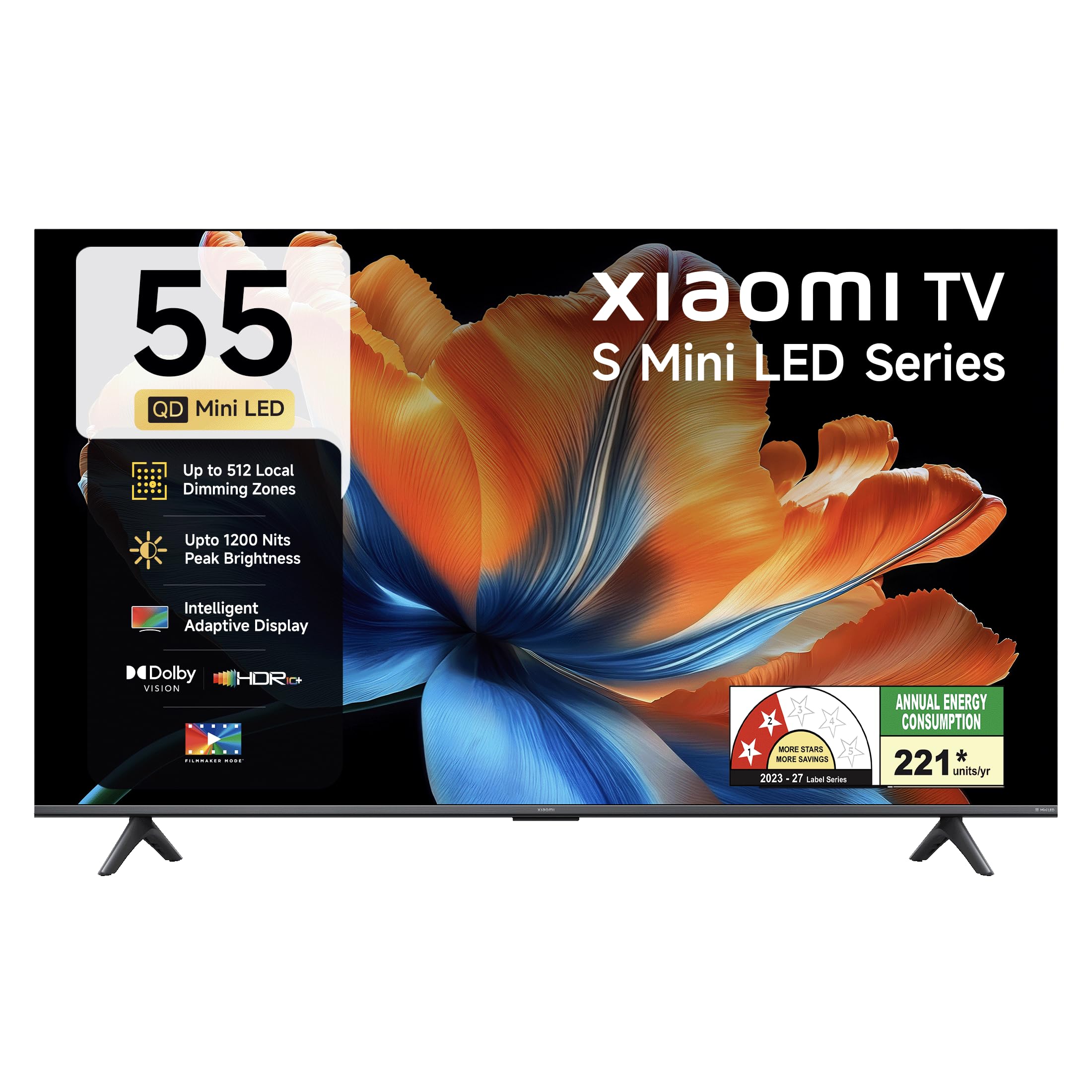
画像: 正面 view of the Xiaomi 55-inch 4K UHD Smart Quantum MagiQ S Mini LED Google TV, showcasinスリムなベゼルデザインが特徴です。
セットアップガイド
1. 開梱と同梱コンポーネント
Carefully remove all items from the packaging. Ensure all components listed below are present and undamaged.

Image: Contents of the product box, including the TV unit, remote control, user manual, two stand units, four screws, two AAA batteries, and a power cord.
- LEDテレビユニット1台
- 1リモコン
- 1 ユーザーマニュアル(本書)
- 2 Stand Units
- 4 Screws for stand installation
- 単4電池2本(リモコン用)
- 電源コード1本
2. スタンド設置または壁掛け
Your television supports both table-top stand installation and wall mounting. Choose the method suitable for your environment.
- スタンドの取り付け: Attach the two provided stand units to the bottom of the TV using the four screws. Ensure they are securely fastened.
- 壁取り付けの場合: Use a compatible VESA wall mount (sold separately). Follow the instructions provided with your wall mount kit. Ensure the wall can support the TV's weight.
3. 外部機器の接続
Connect your external devices such as set-top boxes, gaming consoles, or audio systems to the TV's ports.

画像: 背面 view of the TV highlighting connectivity ports: Optical, Earphone, AV In, 3 HDMI ports (one with eARC), 2 USB 2.0 ports, Antenna, and Ethernet.
- HDMIポート(x3): Connect gaming consoles, Blu-ray players, or set-top boxes. One port supports eARC for enhanced audio return channel functionality.
- USBポート(x2): メディアを再生するには、USB ストレージ デバイスを接続します。
- イーサネットポート: 有線インターネット接続用。
- 光出力: 外部オーディオシステムに接続します。
- AV入力: 複合ビデオとステレオオーディオを使用して古いデバイスを接続します。
- アンテナ: 地上波またはケーブルアンテナを接続します。
4. 初回電源投入とセットアップ
After connecting all necessary cables, plug the power cord into an electrical outlet. Press the power button on the remote control or the TV to turn it on. Follow the on-screen instructions for initial setup, which typically includes:
- 言語の選択
- ネットワーク接続(Wi-Fiまたはイーサネット)
- Googleアカウントのサインイン
- チャンネルスキャン
Operating Your Xiaomi Smart TV
1.リモコン機能
付属のリモコンでテレビのすべての機能を操作できます。単4電池2本を、極性に注意してリモコンに挿入してください。

Image: Xiaomi remote control, featuring dedicated quick access buttons for popular streaming services and Google Assistant voice control.
- 電源ボタン: テレビの電源をオンまたはオフにします。
- Google アシスタント ボタン: コンテンツの検索、スマートホームデバイスの制御などのための音声制御を有効にします。
- ナビゲーションパッド: メニューを移動したり項目を選択したりするのに使用します。
- 音量を上げる/下げる: オーディオの音量を調整します。
- チャンネルアップ/ダウン: テレビのチャンネルを変更します。
- クイック アクセス ボタン: Dedicated buttons for Netflix, Prime Video, YouTube, Disney+ Hotstar, SonyLIV, and Live TV.
- 消音ボタン: テレビの音声を消音します。
2. Google TV Interface and Applications
Your TV runs on the Android 14 OS with Google TV, offering a personalized content experience. Access a wide range of applications from the Google Play Store.

Image: The PatchWall interface, providing customized content recommendations and curation from various streaming platforms.
- コンテンツファーストUI: すべてのストリーミング サービスのコンテンツを 1 か所に整理します。
- パーソナルプロfiles: 個別のプロを作成するfileパーソナライズされた推奨事項を表示します。
- サポートされているアプリ: Pre-installed and downloadable apps include Netflix, Prime Video, YouTube, Zee5, JioCinema, SonyLiv, and more.
- Google アシスタント: Use voice commands for navigation, search, and smart home control.
3. 画像とサウンドの設定
最適化する viewさまざまな画像とサウンド モードを通じて、楽しい視聴体験を提供します。
画像設定:
- 映画製作者モード: Disables post-processing effects to display content as intended by the director.
- ドルビービジョン: Enhances HDR content with dynamic metadata for optimized image quality frame by frame.
- HDR10+: Uses dynamic data to enhance every frame, providing an immersive viewing の経験。
- 目の快適モード: ブルーライトとちらつきを軽減し、より快適に viewing の経験。
- MEMC Engine: 動きの速いシーンでよりスムーズな動きを実現する動き予測、動き補正テクノロジー。
- AI Picture Optimization Engine: Advanced AI algorithms analyze content in real-time to enhance clarity, contrast, and color reproduction.

Image: Filmmaker Mode, designed to preserve original colors, contrast, and motion for an authentic cinematic experience.

Image: Dolby Vision technology, optimizing image quality with deeper blacks and brighter highlights.

Image: HDR10+ dynamic frame-by-frame tuning, ensuring consistent detail across dark and bright scenes.

Image: Eye Care Mode, providing flicker-free visuals with DC Dimming and reduced blue light for comfortable viewing。
オーディオ設定:
- 34ワット出力: Powerful built-in box speakers.
- ドルビーオーディオ: 豊かでクリア、そしてパワフルなサウンドを実現します。
- DTS-X および DTS バーチャル:X: 没入感のある多次元オーディオを提供します。
- Xiaomiサウンド: Preset audio configurations developed for optimal sound quality.

Image: Xiaomi Sound, offering tailored audio experiences through expert-developed configurations.
4. Connectivity and Streaming
Your TV offers versatile connectivity options for seamless streaming and device integration.
- デュアルバンドWi-Fi: Connects to 2.4GHz and 5GHz wireless networks.
- ブルートゥース: ワイヤレスヘッドフォン、スピーカー、またはその他の Bluetooth アクセサリを接続します。
- Google Cast 内蔵: Stream content directly from compatible apps on your smartphone or tablet.
- Apple AirPlay 2: Apple デバイスからコンテンツをストリーミングします。
- ミラキャスト: Mirror your Android device's screen wirelessly.

Image: Stream content from your phone using Google Cast or Apple AirPlay 2.
お手入れとメンテナンス
適切な手入れを行うことで、テレビの寿命が長くなり、最適なパフォーマンスが確保されます。
- 画面のクリーニング: 柔らかく糸くずの出ない布で画面を優しく拭いてください。頑固な汚れには、画面に直接拭くのではなく、布に画面専用の洗浄液をつけてご使用ください。
- 本体の洗浄: Wipe the TV's frame and back panel with a soft, dry cloth. Avoid abrasive cleaners or solvents.
- 換気: テレビの周囲に十分な空気の流れを確保してください。通気口を塞がないでください。
- 電源を切る: 掃除をする前、または長期間使用しない場合は、必ずテレビの電源をオフにして、電源コンセントからプラグを抜いてください。
- ソフトウェアアップデート: 最適なパフォーマンスとセキュリティを確保するために、ソフトウェアの更新を定期的に確認してインストールしてください。
一般的な問題のトラブルシューティング
Refer to this section for solutions to common operational problems.
| 問題 | 解決 |
|---|---|
| テレビがつかない | Ensure the power cord is securely plugged into both the TV and a working electrical outlet. Check if the power outlet is active. Try pressing the power button on the TV itself. |
| 映像はないが、音声はある | Check the input source. Ensure the connected device (e.g., set-top box) is turned on and functioning. Try a different HDMI cable or port. |
| 音はないが、映像は表示される | Check the volume level and ensure the TV is not muted. Verify audio output settings (e.g., internal speakers, external sound system). Check audio cables for external devices. |
| リモコンが反応しない | Replace the AAA batteries in the remote control. Ensure there are no obstructions between the remote and the TV. Re-pair the Bluetooth remote if necessary (refer to TV settings). |
| Wi-Fiに接続できません | Ensure your Wi-Fi router is on and working. Re-enter the Wi-Fi password. Try restarting both the TV and the router. Check if other devices can connect to the Wi-Fi network. |
技術仕様
Detailed specifications for the Xiaomi 55-inch 4K UHD Smart Quantum MagiQ S Mini LED Google TV (Model L55MC-IN).

Image: Physical dimensions and weight of the Xiaomi 55-inch TV, both with and without the stand.
| 特徴 | 仕様 |
|---|---|
| モデル番号 | L55MC-IN |
| 画面サイズ | 55インチ(138 cm) |
| ディスプレイ技術 | ミニLED |
| 解決 | 4K ウルトラ HD (3840 x 2160) |
| リフレッシュレート | 60 Hz (DLG 120 Hz) |
| ピーク輝度 | 最大1200ニット |
| オペレーティング·システム | Android 14 OS with Google TV |
| ラム | 2GB |
| ROM(内部ストレージ) | 32ギガバイト |
| サウンド出力 | 34ワット |
| オーディオテクノロジー | ドルビーオーディオ、DTS-X、DTSバーチャル:X |
| 接続性 | Dual Band Wi-Fi, Bluetooth, 3 HDMI (1 eARC), 2 USB, Optical, Ethernet, AV In |
| スクリーンミラーリング | Google Cast, Apple AirPlay 2, Miracast |
| 特集 | Filmmaker Mode, MEMC, Eye Comfort Mode, AI Picture Optimization Engine |
| 製品寸法(奥行き×幅×高さ) | 31.2D x 31.2W x 76.9H Centimeters (with stand) |
| Item Weight Without Stand | 11.6キログラム |
| 消費電力 | 230ワット |
| 原産国 | インド |
保証情報
Your Xiaomi TV comes with a comprehensive warranty provided by the brand from the date of purchase.
- 標準保証: 3-year comprehensive warranty for non-prebook customers (purchases between April 22nd - May 31st).
- Pre-book Customer Warranty: 4-year comprehensive warranty for pre-book customers (purchases between April 22nd - April 30th).
Warranty claims can be made using your Amazon invoice as proof of purchase. For detailed terms and conditions, please refer to the official Xiaomi warranty policy or contact customer support.
カスタマーサポート
For any assistance, service requests, or queries regarding your Xiaomi TV, please contact Xiaomi customer support.

画像: 上view of Xiaomi's customer support commitments, including quick installation, prompt call-backs, and swift doorstep solutions.
- 設置サービス: New TV installations are typically completed within 3 hours of your appointment.
- Service Requests: あらゆるサービス リクエストに対して、サポート チームから 60 分以内に折り返しの電話がかかってきます。
- オンサイトサポート: Experts aim to arrive at your home within 24 hours of your service request.
Please visit the official Xiaomi India web最新のサポートの詳細については、サイトをご覧いただくか、製品パッケージに記載されている連絡先情報を参照してください。