
1.製品オーバーview
The Edifier CC300 is a professional Bluetooth 6.0 communicator headset designed for reliable and high-quality audio communication in various professional environments. It features AI-enhanced dual-microphone noise filtering, a 30mm dynamic driver for clear sound, and multiple connectivity options for versatile use.
2. パッケージ内容
- Edifier CC300 Headset
- USB-Cドングル
- USB-A - USB-C 充電ケーブル
- ユーザーマニュアル
3 製品の特徴
The Edifier CC300 headset is engineered for comfort and performance, featuring a lightweight design and a flexible microphone arm.

図3.1: Edifier CC300 Headset with included USB-C dongle and charging cable.

図3.2: 側 view of the Edifier CC300 Headset with the microphone arm extended.

図3.3: The microphone arm can rotate 240 degrees for flexible positioning on either the left or right side.
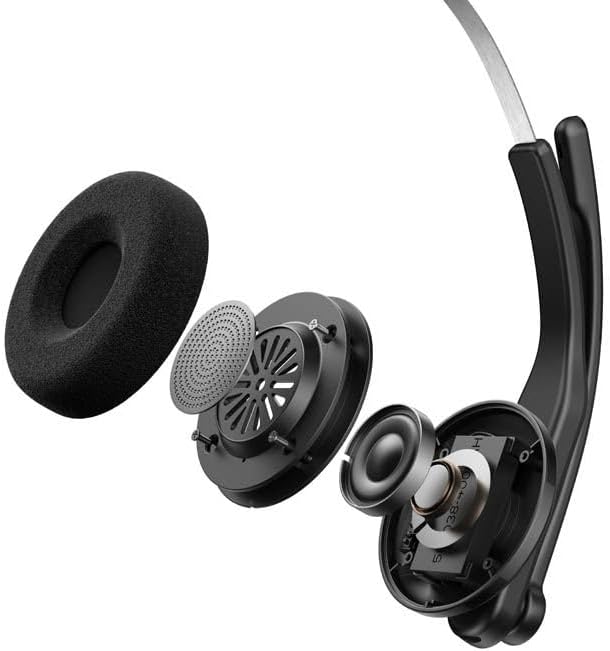
図3.4: 爆発した view showing the internal components of the earcup, including the 30mm dynamic driver.
4. セットアップ
4.1 初期充電
Before first use, fully charge the headset using the provided USB-A to USB-C cable. Connect the USB-C end to the headset and the USB-A end to a power source (e.g., computer USB port or wall adapter). The charging indicator light will show the charging status.
4.2 電源のオン/オフ
- 電源を入れるには: インジケーターライトが点灯するまで電源ボタンを押し続けます。
- 電源を切るには: インジケータ ライトが消えるまで電源ボタンを押し続けます。
4.3 ヘッドセットの装着
Adjust the headband for a comfortable fit. The microphone arm can be rotated 240 degrees to be positioned on either the left or right side of your face. Position the microphone approximately 2-3 cm from your mouth for optimal voice pickup.
5. 操作手順
The Edifier CC300 features intuitive controls for managing calls and audio playback.

図5.1: Diagram illustrating the control buttons and their functions on the Edifier CC300 Headset.
5.1 ボタンの機能
| アクション | 関数 |
|---|---|
| Press and hold (Power Button) | 電源オン/オフ |
| Press 1x (Mute Button) | Activate/Deactivate Mute (during calls) |
| Press 1x (Volume Up) | 音量を上げる |
| Press and hold (Volume Up) | 次のトラック |
| Press and hold (Volume Down) | 音量を下げる |
| Press 1x (Volume Down) | 前のトラック |
| Press 1x (Call Button) | Play/Pause Audio; Answer/End Call |
| Press and hold (Call Button) | 通話を拒否 |
| Press 2x (Call Button) | 最後の番号をリダイヤル |
6.接続オプション
The Edifier CC300 offers three versatile connection methods:
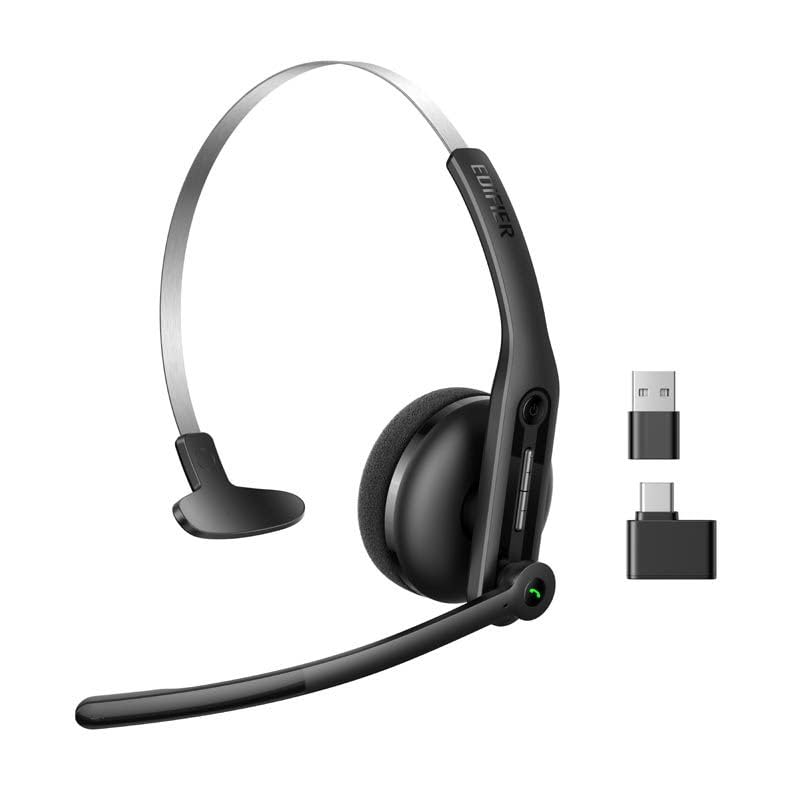
図6.1: Visual representation of the three connectivity options: Bluetooth, USB-C dongle, and wired USB-A.
6.1 Bluetooth接続
- ヘッドセットの電源がオンになっていて、ペアリング モードになっていることを確認します (インジケータ ライトが点滅)。
- On your device (smartphone, laptop), enable Bluetooth and search for "EDIFIER CC300".
- Select the headset to pair. Once connected, the indicator light will turn solid blue.
6.2 USB-C Dongle Connection
- Plug the provided USB-C dongle into an available USB-C port on your computer.
- Power on the headset. It will automatically connect to the dongle for a stable, low-latency connection.
6.3 Wired USB-A Connection
- Connect the headset to your computer using the provided USB-A to USB-C cable.
- The headset will function as a wired audio device, providing zero interference.
7. バッテリーと充電
The CC300 headset is designed for extended use with a long-lasting battery.
- バッテリー寿命: Up to 72 hours for audio playback, or 36 hours for talk time.
- 充電時間: フル充電には約1.5時間かかります。
- 充電インジケーター: Refer to the LED indicator on the headset for charging status.
To charge, connect the headset to a power source using the USB-A to USB-C cable.
8. メンテナンス
- クリーニング: ヘッドセットのクリーニングには、柔らかく乾いた布をご使用ください。液体クリーナーやエアゾールは使用しないでください。
- ストレージ: ヘッドセットは、直射日光や極端な温度を避け、涼しく乾燥した場所に保管してください。
- 湿気を避ける: Keep the headset away from water and high humidity to prevent damage.
- 取り扱いにはご注意ください: ヘッドセットを落としたり、強い衝撃を与えたりしないでください。
9。 トラブルシューティング
9.1 音が出ない、または音質が悪い
- Ensure the headset is powered on and properly connected (Bluetooth, dongle, or wired).
- ヘッドセットと接続されたデバイスの両方の音量レベルを確認します。
- If using Bluetooth, ensure the headset is within range of your device.
- ヘッドセットと接続されているデバイスの両方を再起動してみてください。
9.2 マイクが機能しない
- マイクがミュートされていないことを確認します(ミュート ボタンを確認します)。
- コンピュータまたはデバイスのサウンド設定で、ヘッドセットが入力デバイスとして選択されていることを確認します。
- マイクのアームが口の近くに正しく配置されていることを確認します。
9.3 ヘッドセットがBluetooth経由でペアリングされない
- ヘッドセットがペアリング モードになっていることを確認します (インジケータ ライトが点滅)。
- 干渉を避けるため、近くにある他のデバイスの Bluetooth をオフにしてください。
- デバイスの Bluetooth リストからデバイスを削除し、再度ペアリングを試みてください。
10. 仕様
| 特徴 | 詳細 |
|---|---|
| ブランド | 教旨 |
| モデル名 | CC300 |
| 色 | 黒 |
| 接続技術 | Wireless (Bluetooth), Wired (USB-A), USB-C Dongle |
| Bluetoothバージョン | 6.0 |
| Bluetoothプロトコル | A2DP、AVRCP、HFP |
| オーディオコーデック | SBC |
| ドライバータイプ | 30mmダイナミックドライバー |
| 周波数応答 | 20Hz - 20KHz |
| 音圧レベル | 94±3dB(A) |
| バッテリー容量 | 400mAh |
| 音楽再生時間 | 約72時間 |
| 通話時間 | 約36時間 |
| 充電時間 | 約1.5時間 |
| 電源入力 | 5V/500mAh |
| 重さ | 70グラム |
| 特集 | AI-enhanced Dual-Mic Noise Cancellation |
| 対応デバイス | Mobile Phones, Desktops, Laptops |
11. 保証とサポート
11.1 保証情報
The Edifier CC300 Headset comes with a 1年間保証 ご購入日から製造上の欠陥が対象となります。保証請求の際は、購入証明書を保管してください。誤用、事故、不正な改造、または通常の摩耗や損耗による損傷は保証の対象外となります。
11.2 カスタマーサポート
For technical assistance, troubleshooting, or warranty inquiries, please contact Edifier customer support through their official website or the contact information provided with your product packaging. You may also visit the AmazonのEdifierストア 詳細についてはこちらをご覧ください。