
1. はじめに
Thank you for choosing the Cillso GTR3 Fitness Smart Watch. This manual provides essential information for the proper setup, operation, and maintenance of your device. Please read it thoroughly to ensure optimal performance and a complete understanding of all features.
2. パッケージ内容
パッケージにすべてのアイテムが含まれていることを確認します。
- 1 x Cillso GTR3 Smart Watch
- 1 x磁気充電ケーブル
- 詳細なユーザーマニュアル (本書) x 1
3.セットアップガイド
3.1 スマートウォッチの充電
Before first use, fully charge your Cillso GTR3 Smart Watch. Connect the magnetic charging cable to the charging points on the back of the watch and plug the USB end into a standard USB power adapter (not included).

Image: The Cillso GTR3 Smart Watch connected to its magnetic charging cable, indicating a 350 mAh battery and 3ATM waterproof rating.
A full charge typically takes approximately 2 hours. The watch has a standby time of up to 45 days and can last up to 10 days with heavy usage.
3.2 アプリのダウンロードとペアリング
To unlock the full functionality of your smart watch, download the "Runmefit" application on your smartphone.
- アプリをダウンロード: 検索する "Runmefit" in your smartphone's app store (compatible with iOS 12.0+ and Android 7.0+).
- Bluetoothを有効にする: スマートフォンのBluetoothをオンにします。
- Open Runmefit App: Launch the app and follow the on-screen instructions to search for your device. Select "GTR3" from the list of available devices.
- ペアリングの確認: 携帯電話とスマートウォッチの両方でペアリング要求を確認します。

Image: Visual guide demonstrating the steps to download the "Runmefit" app, enable Bluetooth, and connect the GTR3 smart watch.
3.3 Bluetooth通話機能の有効化
For Bluetooth calling functionality, an additional connection is required:
- Ensure the watch is successfully bound to the "Runmefit" app.
- スマートフォンの Bluetooth 設定に移動します。
- Find and select "GTR3" (or a similar identifier) in the list of available devices and click to bind. This creates a separate audio connection.
- Once connected, you can use the watch to answer and make calls.
4. 操作手順
4.1 基本的なナビゲーション
The Cillso GTR3 features a 1.46-inch AMOLED Ultra-HD full touchscreen display. Swipe across the screen to navigate through menus and functions. Use the physical buttons for quick access or to return to the home screen.

Image: The 1.46-inch AMOLED display of the GTR3 Smart Watch showcasinさまざまなカスタマイズ可能なウォッチフェイス。
4.2 健康状態のモニタリング
時計はさまざまな健康指標を継続的に監視します。
- 心拍: 24時間7日、心拍数を追跡します。 View real-time data and historical trends in the Runmefit app.
- 血中酸素濃度(SpO2): Monitors blood oxygen levels to help ensure vital signs stay within a healthy range.
- 睡眠モニタリング: Automatically tracks sleep patterns, including deep sleep, light sleep, and awake times, providing insights into sleep quality.
- ストレスモニタリング: Analyzes stress levels throughout the day.
- 生理学的サイクルリマインダー: Provides reminders for women's health tracking when configured in the app.

画像: 上view of the GTR3's 24/7 health tracking capabilities, including heart rate, SpO2, body energy, and sleep monitoring.

画像: 詳細 view of the heart rate monitoring feature on the GTR3 Smart Watch and its companion app.

Image: The GTR3 Smart Watch showing continuous blood oxygen monitoring, with data also visible in the app.

Image: The GTR3 Smart Watch's sleep monitoring interface, showing duration of deep sleep, light sleep, and awake periods.
4.3種類のスポーツモード
The GTR3 supports over 110 sports modes, including walking, running, cycling, soccer, and hiking. Select your desired activity to track specific metrics such as steps, distance, calories burned, and exercise duration.

Image: The GTR3 Smart Watch highlighting its 110+ sports modes and detailed tracking of steps, calories, heart rate, blood oxygen, and stress.
4.4 Bluetooth通話と通知
Once the Bluetooth call function is enabled (see Section 3.3), you can answer, reject, or make calls directly from your watch. The watch also displays notifications from your smartphone, including messages and app alerts.
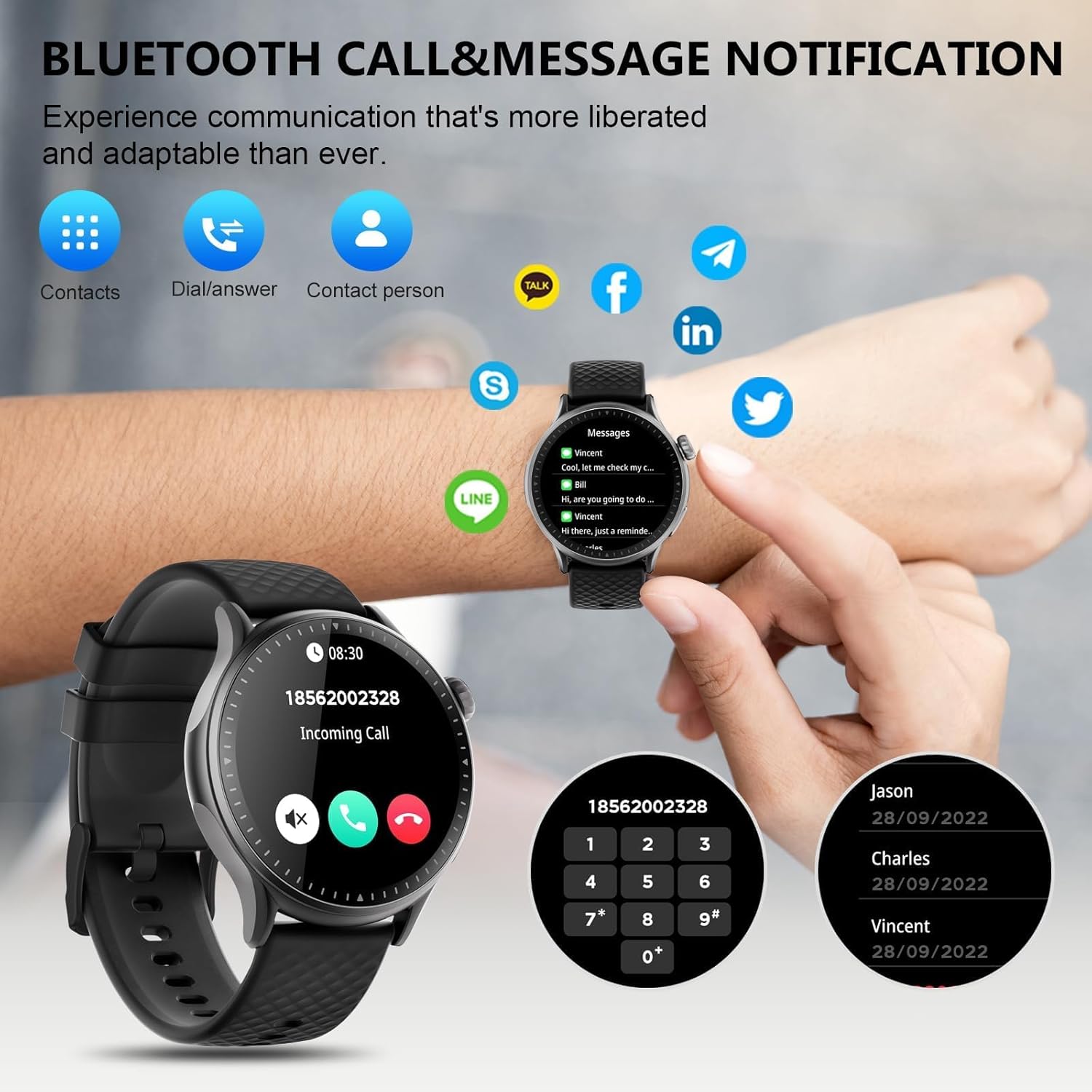
Image: The GTR3 Smart Watch displaying an incoming call and various message notification icons from social media and communication apps.
4.5 AI音声アシスタント
The built-in AI assistant allows for hands-free control. Use voice commands to check the weather, control music playback on your phone, set alarms, and more.

Image: The GTR3 Smart Watch's AI Voice Assistant interface, illustrating how to use voice commands for tasks like checking weather or setting alarms.
4.6追加機能
The Cillso GTR3 offers a range of other useful features:
- 天気予報
- 電話を見つける
- ストップウォッチとタイマー
- 電卓
- 目覚まし時計
- リモートカメラ制御
- Music Control (for your phone's music player)
- 呼吸法

Image: The GTR3 Smart Watch's app menu, showcasing icons for various functions including Find Phone, Weather, Calculator, Remote Camera Shutter, Breathing Exercises, Women's Health, and Alarm Clock.
4.7 ウォッチフェイスのカスタマイズ
Personalize your watch with a variety of watch faces. The "Runmefit" app offers over 200 watch faces to choose from. You can also upload your favorite photos to create custom watch faces.
5. メンテナンス
5.1 防水
The Cillso GTR3 has a 3ATM waterproof rating, meaning it is resistant to splashes, rain, and sweat. It is suitable for daily use and can withstand brief immersion in water. However, it is ない recommended for hot showers, saunas, diving, or high-speed water sports, as steam or high water pressure can compromise the seals.
5.2クリーニングとお手入れ
時計の外観と機能を維持するには:
- 画面とストラップを定期的に柔らかくて乾いた布で拭いてください。amp 布。
- 強力な化学薬品、研磨剤入りの洗剤、溶剤の使用は避けてください。
- 充電する前に、充電接点が清潔で乾燥していることを確認してください。
- 時計を極端な温度や直射日光に長時間さらさないでください。
5.3 バッテリー寿命
To maximize battery life, avoid fully discharging the watch frequently. Charge it when the battery level is low, and disconnect it once fully charged.
6。 トラブルシューティング
If you encounter issues with your Cillso GTR3 Smart Watch, refer to the following common problems and solutions:
| 問題 | 考えられる解決策 |
|---|---|
| Watch not connecting to phone via Bluetooth. | Ensure Bluetooth is enabled on your phone. Restart both the watch and phone. Make sure the "Runmefit" app is open and running in the background. Check if the watch is already paired with another device. |
| Bluetooth通話機能が動作しません。 | Verify that the watch is connected via Bluetooth in 両方 the "Runmefit" app and your phone's native Bluetooth settings (as a separate audio device). |
| Notifications or calls only vibrate, no sound. | Check the sound settings on your watch and in the "Runmefit" app. Ensure the watch's speaker volume is not muted or set too low. Note that the speaker volume may be limited in noisy environments. |
| Inaccurate step count or health data. | Ensure the watch is worn snugly on your wrist. Calibrate the watch in the "Runmefit" app if available. Keep the app connected to sync data regularly. |
| 天気情報が更新されません。 | Ensure your phone's location services are enabled and the "Runmefit" app has permission to access your location. The app must be connected and running in the background to sync weather data. |
| Watch disconnects frequently. | Maintain close proximity between your watch and smartphone. Avoid obstacles that may interfere with the Bluetooth signal. Ensure the "Runmefit" app is not being closed by your phone's power-saving features. |
| Cannot customize watch faces. | Ensure the watch is connected to the "Runmefit" app. Follow the app's instructions for selecting or uploading watch faces. Some watches may have limitations on the number of custom faces stored simultaneously. |
7. 仕様
| 特徴 | 詳細 |
|---|---|
| モデル名 | GTR3 |
| ブランド | シルソ |
| 表示タイプ | アモルファス |
| 画面サイズ | 1.46インチ |
| 解決 | 1.46" AMOLED Ultra-HD |
| オペレーティング·システム | iOS 12.0以降およびAndroid 7.0以降 |
| メモリストレージ容量 | 128MB |
| 接続技術 | ブルートゥース |
| 無線通信規格 | ブルートゥース |
| バッテリー容量 | 350 mAh (approximate, based on image) |
| バッテリーの平均寿命 | Up to 10 days (heavy usage), 45 days (standby) |
| 耐水性レベル | 3ATM(30メートル) |
| 測定された指標 | Heart Rate, Sleep Duration, Blood Oxygen Monitor |
| 特集 | 24/7 Activity Tracker, Heart Rate Monitor, Sleep Monitor, AI Voice Control, Message Notifications, Answer/Make Call, AMOLED Touchscreen, Cycle Tracking, Alarm Clock, Blood Oxygen Monitor, 110+ Sport Modes, Music Control, Distance Record/Pedometer/Calories, Distance Tracker |
| バンド素材タイプ | Silicone, Rubber, or Fluoroelastomer |
| GPS | スマートフォン経由のGPS |
| 対象読者 | ユニセックス大人 |
8. 保証情報
The Cillso GTR3 Smart Watch comes with a 1年間の標準保証 ご購入日から1年間有効です。本保証は、通常の使用における製造上の欠陥および故障を対象としています。誤用、事故、不正な改造、または本書の指示に従わなかったことに起因する損傷は保証の対象外となります。
保証請求のために購入証明書を保管してください。
9. カスタマーサポート
For further assistance, technical support, or warranty inquiries, please refer to the contact information provided with your purchase or visit the official Cillso website. Ensure you have your product model (GTR3) and proof of purchase ready when contacting support.