
導入
The RAINPOINT ITV156 Irrigation Timer with Rain Sensor is designed to automate your garden and lawn watering, ensuring efficient water usage and healthy plant growth. This system includes the ITV156 irrigation timer and a dedicated rain sensor for automatic detection. It stops irrigation during rainfall and resumes automatically when dry, preventing overwatering and conserving water.
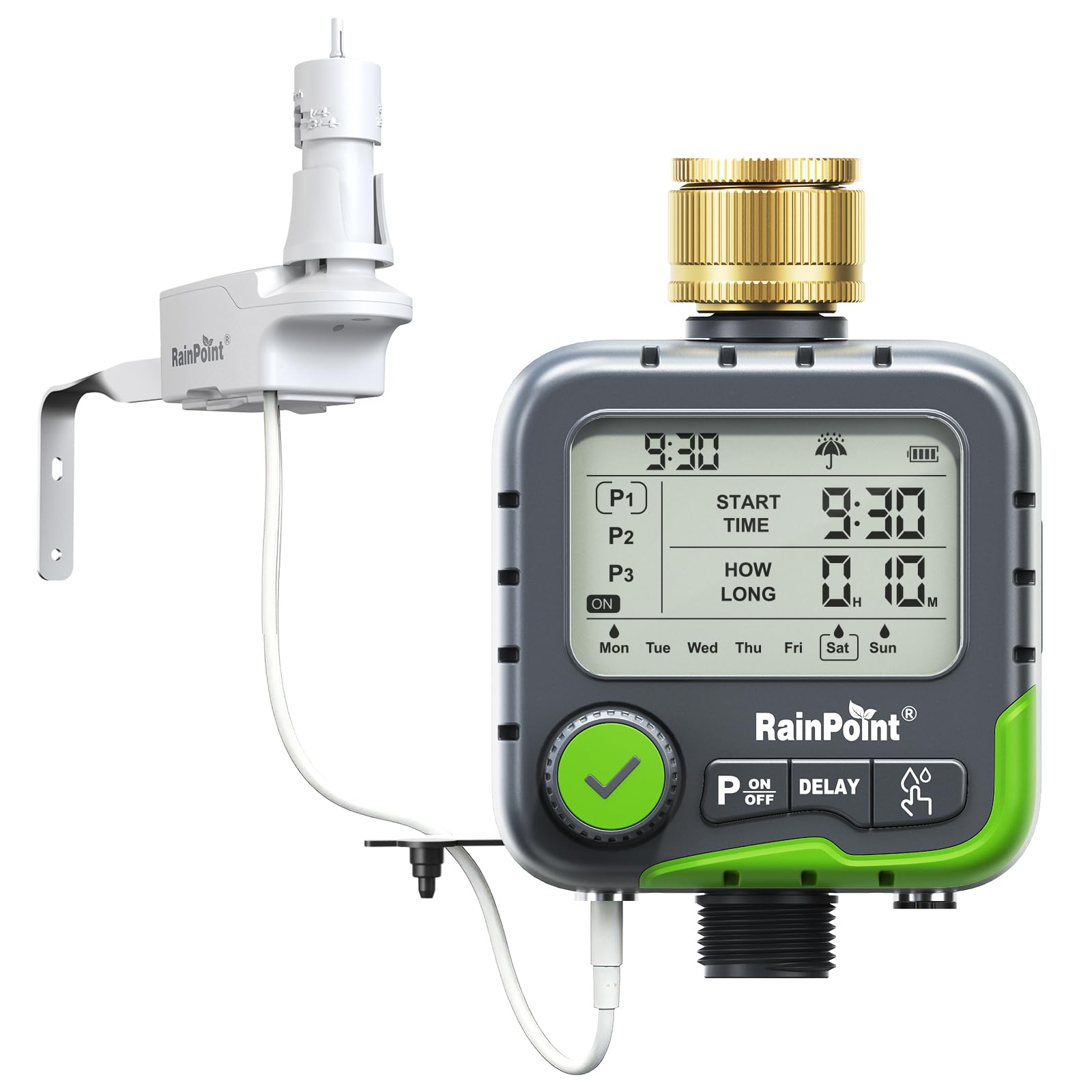
The RAINPOINT ITV156 Irrigation Timer with its rain sensor connected.
箱の中身
パッケージの内容をチェックして、すべてのアイテムが揃っていることを確認してください。
- 1x ITV156 Irrigation Timer
- 1x Rain Sensor
- 1x Faucet Adapter (EU 3/4")
- 1倍フィルター
- ユーザーマニュアル x 1
- 1x Teflon Tape

All components included in the RAINPOINT ITV156 Irrigation Timer with Rain Sensor kit.
設定
- バッテリーの取り付け: Open the battery compartment on the back of the timer and insert two AA alkaline batteries (not included). Ensure correct polarity.
- 蛇口に取り付ける: Connect the ITV156 irrigation timer to your outdoor faucet. Use the provided Teflon tape on the threads for a watertight seal. Ensure the brass inlet is securely tightened.
- Install Rain Sensor: The RAINPOINT rain sensor connects directly via a DC port on the timer. No additional tools are required for connection.
- Mount Rain Sensor: Install the rain sensor in an open area exposed to rain. It can be fixed with the provided bracket to a fence, gutter, or wall. Ensure it is level for accurate rain detection.

Installation steps for the rain sensor: 1. Install in an open area. 2. Fix with bracket and keep level. 3. Connect to ITV156/256 and press test lever until rain icon appears.

The rain sensor can be mounted on a fence, gutter, or wall to suit your garden's needs.
Once the rain sensor is connected and activated, a rain icon will be displayed on the timer's screen.
操作手順
プログラムの設定
The ITV156 timer allows for up to three independent irrigation programs per day. Each program can have a different start time, duration, and specific watering days.
- Access Program Settings: Use the central knob or menu button to navigate to the program settings (P1, P2, P3).
- 開始時刻の設定: Adjust the start time for each program (e.g., 06:00 AM).
- 期間の設定: Define the watering duration from 1 minute to 7 hours and 59 minutes.
- 日を選択: Choose the specific days of the week for each program to run (e.g., Mon-Sun).

The timer supports up to three independent programs with customizable start times, durations, and days.
手動散水
For immediate watering needs, such as new plants or quick washes, you can activate manual watering without altering your programmed schedules.
- Press the dedicated manual watering button (often labeled 'P' or 'ON/OFF').
- The water will flow immediately.
- Press the button again to stop manual watering.

Manual watering allows for immediate water delivery without affecting scheduled programs.
Rain Sensor Operation
The integrated rain sensor automatically detects rainfall and pauses irrigation, preventing overwatering and conserving water. The system resumes watering automatically once the sensor dries.
- 自動遮断: When rain is detected, the timer will automatically stop any active irrigation program.
- 調整可能な感度: You can set precise rain thresholds (3-19 mm or 1/8" to 3/4") to determine when irrigation should pause. This prevents unnecessary watering based on your garden's specific needs.
- 自動再開: The timer will automatically resume its scheduled programs once the rain sensor has dried, eliminating the need for manual resets. The ventilation ring on the sensor helps regulate the drying speed.

The ITV156 timer automatically pauses irrigation when rain is detected, protecting your garden and reducing waste.

Control rain sensitivity with four adjustable levels from 1/8" to 3/4" to match your garden's needs.

The timer automatically resumes irrigation once the rain sensor dries, with no manual reset required.
雨遅延機能
In addition to the automatic rain sensor, you can manually set a rain delay to skip watering for a specified period.
- Use the 'DELAY' button to activate this function.
- Select a delay period (e.g., 24, 48, or 72 hours).
- The timer will automatically skip watering for the chosen duration, and programs will resume afterward.

The rain delay function allows you to skip irrigation for 24, 48, or 72 hours, with programs resuming automatically.
メンテナンス
- バッテリー交換: 連続動作を確保するために、ディスプレイに電池残量低下インジケーターが表示されたら電池を交換してください。
- フィルターのクリーニング: Periodically check and clean the filter located at the water inlet to prevent blockages and maintain optimal water flow.
- 冬の保管: Before freezing temperatures, disconnect the timer and rain sensor from the faucet and store them indoors to prevent damage.
- Rain Sensor Cleaning: Ensure the rain sensor's detection area is free from debris (leaves, dirt) for accurate operation.
トラブルシューティング
| 問題 | 考えられる原因 | 解決 |
|---|---|---|
| タイマーが水をやらない | Low batteries; Rain sensor active; Program not set correctly; Water pressure too low. | Replace batteries; Check rain sensor for dryness or adjust sensitivity; Verify program settings; Ensure minimum water pressure of 0.5 bar. |
| 水漏れ | Loose connection; Damaged washer; Missing Teflon tape. | Tighten connections; Replace washer; Apply Teflon tape to threads. |
| 雨センサーが機能しない | Sensor not connected; Sensor blocked by debris; Sensor faulty. | Ensure sensor is securely plugged into the DC port; Clean sensor detection area; Contact support if faulty. |
| ディスプレイが機能しない | No batteries; Batteries inserted incorrectly; Faulty display. | Insert new batteries; Check battery polarity; Contact support. |
仕様
- モデル: ITV156-ICS044
- ブランド: レインポイント
- 材料: Brass (inlet connector)
- 色: 緑
- 寸法(DxWxH): 11 cm x 13 cm x 16.2 cm
- プログラム数: 3 independent programs
- 水やり時間: 1分~7時間59分
- Rain Sensor Thresholds: 3mm (1/8"), 6mm (1/4"), 13mm (1/2"), 19mm (3/4")
- 水圧: Minimum 0.5 bar (7.25 PSI)
- 防水等級: IP65
- 電源: 単3アルカリ電池2本(別売)
保証とサポート
RAINPOINT products are designed for reliability and performance. For warranty information, technical support, or any questions regarding your ITV156 Irrigation Timer, please refer to the contact details provided in the packaging or visit the official RAINPOINT webサイト。
We recommend registering your product to receive updates and support.