
1. はじめに
Thank you for choosing the Sharp 40HF2265E Full HD Google TV. This manual provides essential information for setting up, operating, and maintaining your television. Featuring integrated Google TV, HDR10 support, Dolby Digital audio, and Bluetooth connectivity, your new TV offers a rich entertainment experience. Please read this manual thoroughly before use to ensure proper operation and to maximize your view喜びを感じる。

画像1.1:正面 view of the Sharp 40HF2265E Full HD Google TV.
2. 箱の中身
テレビを慎重に開梱し、以下の品目がすべて含まれていることを確認してください。
- Sharp 40HF2265E Television
- 電源ケーブル
- リモコン(単4電池2本が必要ですが、付属していない場合もあります)
- ユーザーマニュアル(このドキュメント)
- 保証書
If any items are missing or damaged, please contact your retailer or Sharp customer support immediately.
3. セットアップ
3.1 スタンドの取り付け
To install the TV stand, place the TV screen-down on a soft, flat surface to prevent scratches. Align the stand feet with the corresponding slots on the bottom of the TV and secure them with the provided screws. Ensure the stand is firmly attached before placing the TV upright.

画像3.1:正面 view of the TV with stand feet attached.
3.2 壁面への取り付け
If you prefer to wall-mount your TV, you will need a VESA-compatible wall mount (not included). The Sharp 40HF2265E supports a VESA mounting standard of 200 x 200 mm. Refer to the wall mount's instructions for installation. Always ensure the wall can support the weight of the TV and the mount.

画像3.2:リア view of the TV, highlighting VESA mounting points and ports.
3.3 周辺機器の接続
Connect your external devices to the appropriate ports on the back and side of the TV. The TV features multiple HDMI, USB, and other connectivity options.
- HDMI ポート: ブルーレイプレーヤー、ゲーム機、セットトップボックスなどを接続します。
- USB ポート: USB ストレージ デバイスを接続してメディアを再生したり、ソフトウェアを更新したりします。
- イーサネットポート: 有線インターネット接続用。
- アンテナ/ケーブル入力: アンテナまたはケーブルテレビ信号を接続します。
- オーディオ出力: 外部オーディオシステムを接続します。
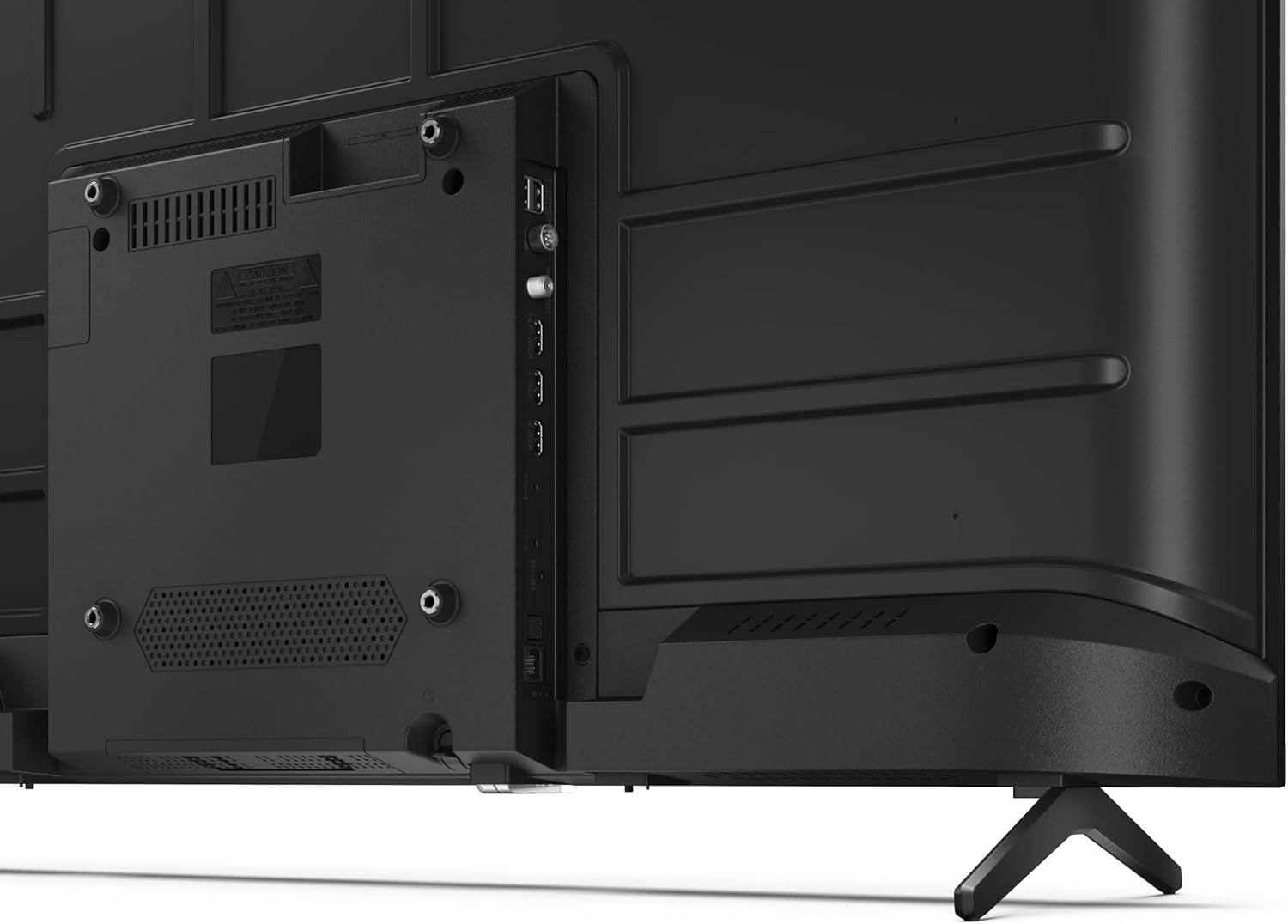
画像3.3: 詳細 view テレビの接続ポート。
3.4 初回電源オンとGoogle TVのセットアップ
After connecting all necessary cables, plug the power cable into an electrical outlet. Press the power button on the remote control or on the TV. Follow the on-screen instructions to complete the initial setup, including network connection, Google account login, and channel scanning.
4.運用
4.1リモコン機能
The remote control allows you to navigate the TV's features. Common buttons include Power, Volume Up/Down, Channel Up/Down, Input Source, Home (Google TV), Navigation (directional arrows, OK), Back, and Google Assistant.
4.2 Google TV インターフェース
Your Sharp TV runs on Google TV, providing a personalized home screen with content recommendations from your subscriptions. Use the remote's navigation buttons to browse movies, shows, apps, and your library.

Image 4.1: The Google TV home screen on the Sharp 40HF2265E.
4.3入力の選択
To switch between connected devices (e.g., HDMI 1, HDMI 2, TV tuner), press the 'Input' or 'Source' button on your remote control and select the desired input from the on-screen menu.
4.4 画像とサウンドの設定
Access the TV's settings menu to adjust picture modes (Standard, Vivid, Cinema, Game), brightness, contrast, color, and sound modes (Standard, Music, Movie, Speech). The TV supports HDR10 for enhanced contrast and color, and Dolby Digital for rich audio.

Image 4.2: Visual representation of HDR (High Dynamic Range) technology.
4.5 Google Assistant and Chromecast
Use the built-in Google Assistant for voice control. Press the Google Assistant button on your remote and speak your commands, such as searching for content, controlling smart home devices, or getting information. Chromecast allows you to cast content directly from compatible devices like smartphones or tablets to your TV.

Image 4.3: Google Assistant integration for voice commands.
4.6 Bluetooth接続
Pair Bluetooth-enabled devices such as headphones or soundbars with your TV for a wireless audio experience. Navigate to the TV's settings menu, select 'Remotes & Accessories', and then 'Pair new device' to connect.
5. メンテナンス
5.1 テレビの掃除
Always unplug the TV before cleaning. Use a soft, dry cloth to wipe the screen and TV body. For stubborn marks, lightly damp布に水または専用のスクリーンクリーナーを含ませて拭いてください。研磨剤入りのクリーナー、ワックス、溶剤は絶対に使用しないでください。
5.2ソフトウェアアップデート
Your Google TV may receive automatic software updates. Ensure your TV is connected to the internet to receive these updates, which can improve performance and add new features. You can also manually check for updates in the settings menu.
6。 トラブルシューティング
テレビで問題が発生した場合は、次の一般的な解決策を参照してください。
- 電源なし: 電源ケーブルがテレビと壁のコンセントにしっかりと差し込まれているか確認してください。コンセントが正常に機能していることを確認してください。
- 画像/音声なし: Verify that the correct input source is selected. Check all cable connections (HDMI, antenna). Try restarting the TV.
- リモコンが動作しない: 電池(単4電池2本)を交換してください。リモコンとテレビの赤外線センサーの間に障害物がないことを確認してください。
- ネットワーク接続の問題: For Wi-Fi, check your router and ensure the TV is within range. For wired connections, check the Ethernet cable. Try restarting your router and the TV.
- 画質の問題: 画像設定(明るさ、コントラスト、シャープネス)を調整します。入力ソースが高品質の信号を提供していることを確認してください。
For more complex issues, consult the comprehensive troubleshooting section in the full digital manual or contact Sharp customer support.
7. 仕様
Below are the technical specifications for the Sharp 40HF2265E Full HD Google TV:

Image 7.1: Dimensions of the Sharp 40HF2265E TV.
| 特徴 | 仕様 |
|---|---|
| ブランド | シャープ |
| モデル番号 | 40HF2265E |
| モデル名 | HFシリーズ |
| モデル年 | 2025 |
| 画面サイズ | 40インチ(81センチメートル) |
| ディスプレイ技術 | 導かれた |
| 解決 | 1080p(フルHD) |
| リフレッシュレート | 60Hz |
| アスペクト比 | 16:9 |
| コントラスト比 | 100000:1 |
| Screen Finish | マット |
| 応答時間 | 8ミリ秒 |
| バックライト技術 | 導かれた |
| Supported HDR Format | HDR10、HLG |
| 画質の向上 | Dynamic Contrast, HDR10, HLG |
| Motion Enhancement Technology | モーション補間 |
| オペレーティング·システム | Google TV |
| Internet Applications | Apple TV, Google TV, Hulu, Prime Video, YouTube |
| 特集 | Bluetooth, Chromecast, Dolby Digital, HD Tuner |
| 接続技術 | イーサネット、USB、Wi-Fi |
| ワイヤレステクノロジー | ブルートゥース |
| Bluetoothバージョン | 5.0 |
| Screen Mirroring Technology | Chromecast, Google Cast |
| 合計HDMIポート | 3 |
| Total USB 2.0 Ports | 2 |
| Number of Composite Video Inputs | 1 |
| オーディオ入力 | Mini composite/CVBS + audio input |
| Total Audio Output Ports | 2 |
| オーディオ出力モード | ステレオ |
| オーディオエンコーディング | DD |
| Integrated Surround Sound Format | Dolby AC-4, Dolby Digital, Dolby Digital Plus |
| 最大スピーカー出力 | 16ワット(2x8W) |
| オーディオチャンネルの数 | 2.0 |
| 放送システム | DVB-T2/C/S/S2 |
| ビデオエンコーディング | 動画 |
| 製品寸法 (奥行き×幅×高さ) | 幅8.4cm x 奥行89.2cm x 高さ50.9cm |
| アイテム重量 | 5.4キログラム |
| スタンドを含まない重量 | 5.4キログラム |
| ベース幅 | 765ミリメートル |
| VESAマウント規格 | 200×200ミリ |
| 消費電力 | 37ワット |
| 巻tage | 230ボルト |
| Remote Control Battery Size | AAA |
| Remote Control Battery Quantity | 2 |
| Parental Control Technology | Kindersicherung Über Google Tv |
| EUスペアパーツの入手可能性 | 7年 |
8. 保証とサポート
8.1製品保証
The Sharp 40HF2265E television comes with a 2-year manufacturer's warranty. Please refer to the included Warranty Card for detailed terms and conditions regarding coverage and service. Keep your proof of purchase for warranty claims.
8.2 カスタマーサポート
If you require further assistance, have questions not covered in this manual, or need technical support, please contact Sharp customer service. Contact information can typically be found on the Warranty Card or the official Sharp webサイト。