
導入
This manual provides detailed instructions for the operation and maintenance of your LAUNCH X431 PROS Elite diagnostic scanner and LAUNCH CR319 OBD2 check engine code reader. These devices are designed to assist in vehicle diagnostics, maintenance, and repair tasks, offering comprehensive system analysis and code reading capabilities.
製品終了view
The LAUNCH X431 PROS Elite is an advanced diagnostic tablet offering extensive vehicle coverage and functions, while the LAUNCH CR319 is a compact, user-friendly OBD2 code reader for basic engine diagnostics.
LAUNCH X431 PROS Elite Diagnostic Scanner

画像: The LAUNCH X431 PROS Elite main interface, displaying options such as Intelligent Diagnose, Local Diagnose, Service Function, Remote Diagnose, Software Update, and Diagnostic History.
The X431 PROS Elite features a robust tablet design with a user-friendly interface. It provides access to advanced diagnostic functions including online coding, personalization, V.A.G guided functions, and comprehensive all-system diagnosis. It supports modern vehicle protocols like CANFD and DoIP.
LAUNCH CR319 Check Engine Code Reader
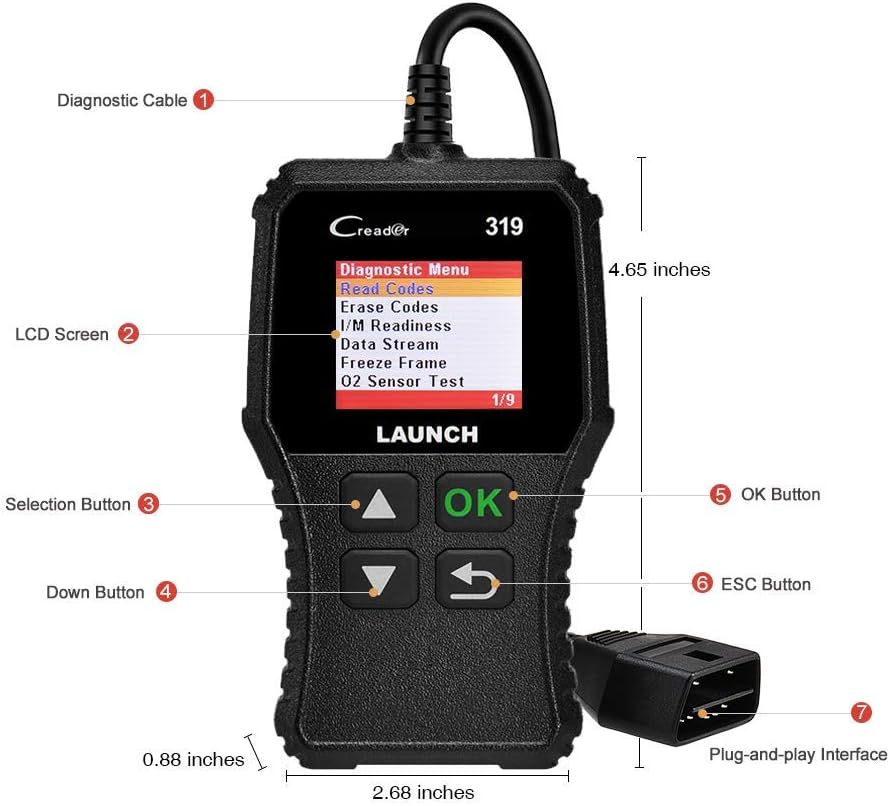
画像: The LAUNCH CR319 device, highlighting its diagnostic cable, LCD screen, selection buttons (Up, Down, OK, ESC), and plug-and-play interface. Dimensions are also indicated.
The CR319 is a compact, handheld device designed for quick and easy reading and clearing of OBD2 trouble codes. It features a clear LCD screen and intuitive buttons for navigation, making it suitable for basic engine diagnostics and checking emission readiness.
設定
ローンチ X431 プロ エリート
- デバイスを充電します。 Before first use, ensure the X431 PROS Elite tablet is fully charged using the provided power adapter.
- 電源オン: 電源ボタンを押したままにして、デバイスの電源を入れます。
- 初期設定: Follow the on-screen prompts to select language, connect to Wi-Fi, and register your device. This is crucial for software updates and online functions.
- 車両に接続: Locate the vehicle's OBD2 port (usually under the dashboard). Connect the diagnostic cable from the X431 PROS Elite to the vehicle's OBD2 port. Turn the vehicle's ignition to the ON position (engine off).
ローンチ CR319
- OBD2 ポートを見つけます: Find the vehicle's 16-pin OBD2 Data Link Connector (DLC), typically located under the dashboard on the driver's side.
- デバイスの接続: Plug the CR319's diagnostic cable directly into the vehicle's OBD2 port. The device will power on automatically.
- イグニッションオン: 車両のイグニッションをオンの位置(エンジンオフ)にします。
Operating the LAUNCH X431 PROS Elite
The X431 PROS Elite offers a wide range of diagnostic and service functions. Ensure the device is properly connected to the vehicle and powered on before proceeding.
全システム診断

画像: The X431 PROS Elite displaying various service functions like Brake Reset, Oil Reset, SAS Reset, and ABS Bleeding, alongside indicators for Auto VIN, Read ECU Information, Read/Clear DTCs, and View Live Data across systems like ABS, TPMS, Engine, AT, and SRS.
This function allows you to scan all available electronic control units (ECUs) in the vehicle, including Engine, Transmission, ABS, SRS, TPMS, and more. It can read and clear Diagnostic Trouble Codes (DTCs), view live data streams, and retrieve ECU information. Select "Intelligent Diagnose" or "Local Diagnose" from the main menu to begin.
高度なECUコーディング

画像: An illustration of the X431 PROS Elite performing ECU coding, with text indicating functions such as ECU Replacement, Component Matching, Personalization, Modification & Retrofit, and Programmable Module Installation. It also lists compatible brands for ECU Online Coding.
The X431 PROS Elite supports online and offline ECU coding. This allows for replacing or recoding new modules, performing component matching, personalization (e.g., flashing auto start-stop, folding mirrors), modifications, retrofits, and programmable module installations. This function is typically found under specific vehicle brand menus or advanced functions.
38+ Service Functions
Access common maintenance and reset functions directly from the "Service Functions" menu. These include, but are not limited to:
- オイルリセット
- ブレーキリセット(EPB)
- ステアリングアングルセンサー(SAS)リセット
- TPMSリセット
- バッテリーマッチング
- タイヤリセット
- ABS出血
- NOXセンサーリセット
- サンルーフのリセット
- 言語の変更
- And many more, accessible through specific vehicle brands and systems.
Bi-directional Control (Active Tests)

画像: An illustration showing the X431 PROS Elite sending commands to a vehicle and receiving feedback, with examples of controlled components like doors, windows, lights, and wipers. The image also highlights Diagnostic Feedback, Repair Information, 2-Year Free Updates, and 25+ Languages.
This function allows the diagnostic tool to send commands to vehicle systems and components to test their functionality. Examples include activating solenoids, relays, lights, wipers, or performing injector tests. This helps in pinpointing faulty components quickly.
Vehicle Coverage and Protocols

画像: A graphic detailing the wide vehicle coverage of the X431 PROS Elite, including 150+ main brands and 100,000+ models. It also specifies compatibility with CAN FD (GM models), DOIP (BMW E/F/G Chassis, Jaguar, Land Rover), FCA SGW Vehicle Access (Fiat, Chrysler, Dodge, Alfa Romeo), and VAG Guided Functions (VW, Audi, Skoda, Seat).
The X431 PROS Elite supports over 150 vehicle brands and 100,000 models from 1996 to 2026. It includes support for advanced protocols such as CANFD (compatible with GM models) and DoIP (compatible with BMW E/F/G Chassis, Jaguar, Land Rover). It also offers FCA SGW access for Fiat, Chrysler, Dodge, and Alfa Romeo vehicles, and V.A.G guided functions for VW, Audi, Skoda, and Seat.
Operating the LAUNCH CR319 Check Engine Code Reader
The CR319 is designed for quick and efficient OBD2 diagnostics. Once connected to the vehicle's OBD2 port and the ignition is on, the device will power up and display the main menu.
完全なOBD2機能

画像: A grid of nine images illustrating the CR319's full OBD2 functions: Read Codes, Erase Codes, Live Data, I/M Readiness, Freeze Frame, O2 Sensor Test, On-board Monitor Test, Vehicle Information, and EVAP System (Mode 8).
Navigate through the menu using the UP/DOWN buttons and confirm selections with the OK button. The CR319 supports all 10 OBD2 test modes:
- コードを読む: 現在の、保留中の、永続的な診断トラブル コード (DTC) を表示します。
- コードの消去: 車両のコンピューターから DTC をクリアし、チェック エンジン ライト (MIL) をオフにします。
- I / M準備: 排出監視システムの準備状況を確認します。
- ライブデータ: 車両のセンサーからのリアルタイム データを表示します。
- フリーズフレーム: Shows a snapshot of vehicle operating conditions at the time a DTC was set.
- O2センサーテスト: O2 センサー監視テストの結果を取得します。
- オンボードモニターテスト(モード6): 継続的に監視されていない排出関連のパワートレイン コンポーネントとシステムの結果を取得します。
- EVAP システム テスト (モード 8): 蒸発ガス排出制御システムのテストを開始します。
- 車両情報(モード9): VIN、Cal ID、CVN などの車両情報を取得します。
Turning Off the Check Engine Light
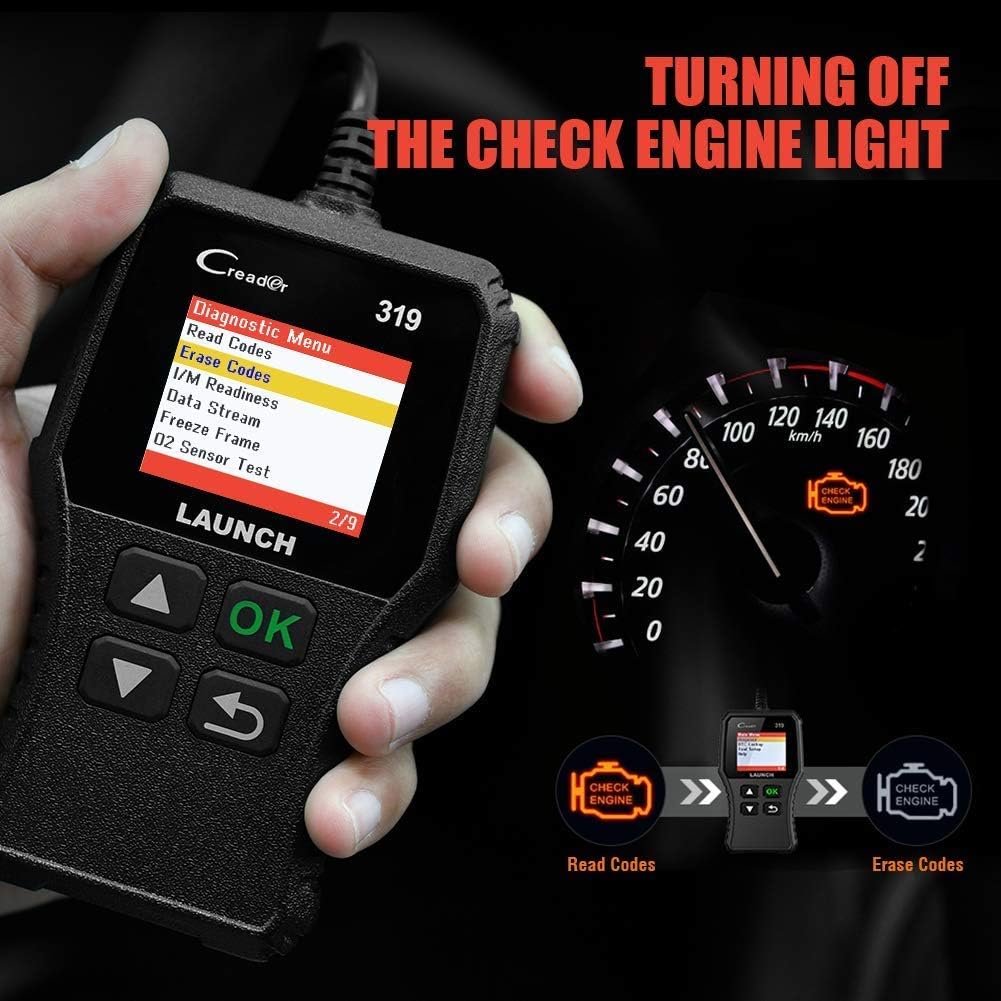
画像: The CR319 displaying "Erase Codes" on its screen, with an illustration showing the process of reading codes, then erasing them to turn off the Check Engine Light on the vehicle's dashboard.
After reading and understanding the trouble codes, you can use the "Erase Codes" function to clear the DTCs and turn off the Malfunction Indicator Lamp (MIL). Ensure the underlying issue has been resolved before clearing codes, as they may reappear if the problem persists.
メンテナンス
- クリーニング: Use a soft, dry cloth to clean the device screens and bodies. Avoid abrasive cleaners or solvents.
- ストレージ: Store the devices in a cool, dry place, away from direct sunlight and extreme temperatures. Keep them in their protective cases when not in use.
- Software Updates (X431 PROS Elite): Regularly check for and install software updates to ensure optimal performance, expanded vehicle coverage, and new features. Connect the device to Wi-Fi and use the "Software Update" function.
- ケーブルのお手入れ: Inspect diagnostic cables regularly for any signs of damage. Do not bend or crimp cables excessively.
トラブルシューティング
- デバイスの電源が入っていない:
- For X431 PROS Elite, ensure the battery is charged.
- For CR319, ensure it is securely plugged into the vehicle's OBD2 port and the vehicle ignition is ON.
- Check the vehicle's fuse for the OBD2 port.
- 通信エラー:
- Verify the diagnostic cable is securely connected to both the device and the vehicle.
- 車両のイグニッションがオンになっていることを確認します。
- Confirm the vehicle is OBD2 compliant (most vehicles 1996 and newer).
- 車両固有の問題を除外するために、別の車両を試してください。
- Software Freezes/Slow Performance (X431 PROS Elite):
- デバイスを再起動します。
- 十分な保管スペースを確保してください。
- ソフトウェアの更新を実行します。
- クリアされないコード:
- Ensure the underlying fault has been repaired. Some codes cannot be cleared if the fault is still present.
- Follow the specific clearing procedure for your vehicle model if applicable.
仕様
ローンチ X431 プロ エリート
- 車両カバレッジ: 1996-2026 models, 150+ brands
- サポートされているプロトコル: OBD2, CANFD, DoIP, and more
- 機能: All-System Diagnostics, ECU Coding (Online/Offline), 38+ Service Functions, Bi-directional Control, V.A.G Guided Functions, FCA SGW Access
- アップデート: 2-Year NO-fee software updates
- 保証: 5年間保証
ローンチ CR319
- 互換性: OBD2 compliant vehicles (1996 and newer)
- 機能: Read/Clear DTCs, I/M Readiness, Live Data, Freeze Frame, O2 Sensor Test, On-Board Monitor Test, EVAP System Test, Vehicle Information
- インタフェース: 16-pin OBD2 connector
- 力: Vehicle battery via OBD2 port
保証とサポート
Your LAUNCH X431 PROS Elite comes with a 5年間保証 そして含まれる 2-Year NO-fee software updates. For the LAUNCH CR319, standard manufacturer warranty applies.
技術サポート、保証請求、その他のサポートについては、公式のLAUNCHカスタマーサービスまでお問い合わせください。 website or the contact information provided with your product packaging. Ensure you have your product model and serial number ready when contacting support.
オンラインリソース: 公式LAUNCHをご覧ください website for FAQs, software downloads, and additional product information. AmazonでLAUNCHストア