
1. 安全情報
Please read all safety instructions carefully before using the NiPoGi Mini PC E3B. Failure to follow these instructions may result in electric shock, fire, or damage to the device.
- デバイスに付属の電源アダプターのみを使用してください。
- デバイスを水、湿気、または極端な温度にさらさないでください。
- デバイスを熱源の近くや直射日光の当たる場所に置かないでください。
- デバイスを開けないでくださいasing. すべての修理は資格を持った担当者に依頼してください。
- 過熱を防ぐために、デバイスの周囲に適切な換気を確保してください。
2. パッケージ内容
パッケージにすべてのアイテムが含まれていることを確認します。
- 1 x NiPoGi Mini PC E3B
- EU電源アダプター x 1
- HDMIケーブル x 1
- VESAマウント×1
- ユーザーマニュアル x 1
3.製品オーバーview
3.1 フロントパネルとリアパネル

The image above illustrates the various ports and buttons available on the front and rear of the NiPoGi Mini PC E3B.
フロントパネル:
- 電源ボタン: デバイスの電源をオンまたはオフにします。
- 3.5mmオーディオジャック: ヘッドフォンまたはマイク用。
- USB3.2 Gen2 Type-A Ports (x2): 周辺機器用の高速 USB ポート。
- USB3.2 Gen2 Type-C Port (x1): Supports data transfer and 4K@60Hz video output.
後面パネル:
- DC IN: 電源入力ポート。
- HDMI 2.0 ポート (x1): 4K@60Hzのビデオ出力をサポートします。
- DP1.4 Port (x1): 4K@60Hzのビデオ出力をサポートします。
- RJ45 ギガビット イーサネット ポート (x2): For wired network connection (10M/100M/1000Mbps).
- USB3.2 Gen1 Type-A Ports (x4): 周辺機器用の標準 USB ポート。
3.2 内部コンポーネントと拡張

The NiPoGi Mini PC E3B is designed for easy storage expansion. It features:
- 24GB LPDDR5 RAM: High-speed memory for efficient multitasking.
- 512GB M.2 SSD: Primary storage for the operating system and applications.
- Additional M.2 Slots: Supports M.2 NVMe PCIe 3.0 x4 or PCIe 4.0 x4 SSDs, expandable up to 4TB.
- 2.5-inch SSD/HDD Bay: Supports external 2.5-inch SSD/HDD expansion up to 2TB (drive not included).
4. セットアップ
4.1 周辺機器の接続
- ディスプレイを接続する: Use the HDMI, DisplayPort, or USB-C port to connect your monitor(s). The device supports up to three 4K displays simultaneously.
- キーボードとマウスを接続します。 USB キーボードとマウスを利用可能な USB-A ポートに接続します。
- 接続電源: Plug the EU power adapter into the DC IN port on the rear panel, then connect it to a power outlet.
- オプションのネットワーク接続: For a wired connection, connect an Ethernet cable to one of the RJ45 ports.
4.2 初回電源投入とWindowsのセットアップ
- フロントパネルの電源ボタンを押します。デバイスが起動します。
- Upon the first startup, you will be guided through the Windows 11 Pro setup process. Follow the on-screen instructions to select your language, region, and create a user account.
- Ensure you have an internet connection (wired or Wi-Fi) during setup for updates and account synchronization.
4.3 VESAマウントの取り付け
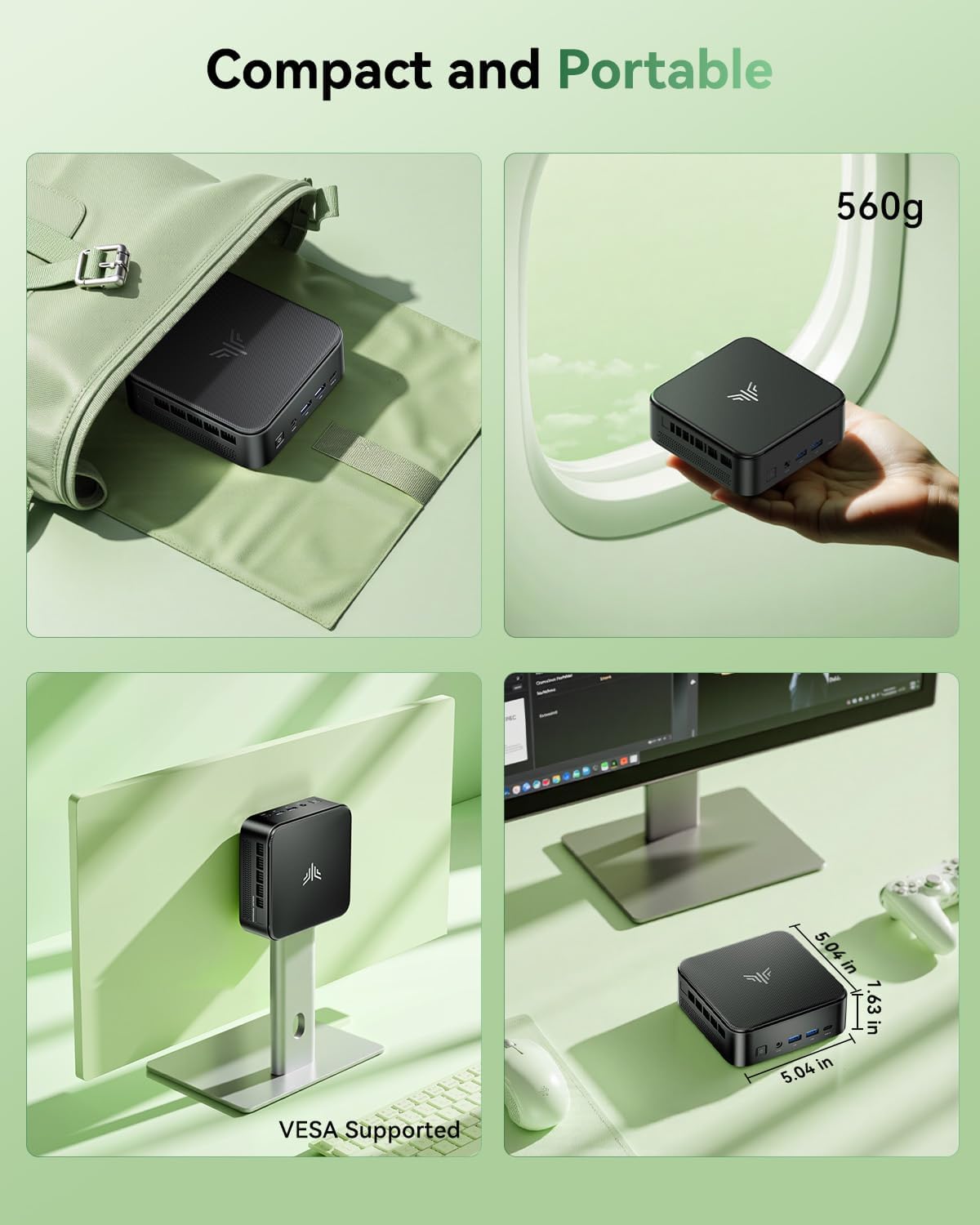
付属の VESA マウントを使用すると、Mini PC を互換性のあるモニターまたはテレビの背面に取り付けることができ、デスクのスペースを節約できます。
- Locate the VESA mounting holes on the back of your monitor (typically 75x75mm or 100x100mm).
- Attach the VESA bracket to the monitor using the provided screws.
- ミニ PC を VESA ブラケットにスライドさせて、カチッと音がしてしっかりと固定されるまで押し込みます。
5. 操作手順
5.1 電源オン/オフ
- 電源を入れるには: 電源ボタンを1回押します。
- シャットダウンするには: Click the Windows Start button, then select Power > Shut down. Alternatively, press and hold the power button for 4-5 seconds.
- 再起動します: Windows のスタート ボタンをクリックし、[電源] > [再起動] を選択します。
5.2 BIOS Settings (Automatic Power On)
Mini PCは停電後の自動電源投入をサポートしています。この機能を有効にするには、次の手順に従います。
- 起動中に、 ESC key to enter the BIOS setup utility.
- 「ブート」セクションに移動します。
- Locate and select "Enable Automatic Power On" (or similar option).
- 変更を保存して BIOS を終了します。
5.3 Display Configuration (Triple Display)

The NiPoGi Mini PC E3B supports connecting up to three 4K displays simultaneously via its HDMI, DisplayPort, and USB-C outputs. This allows for an extended desktop environment, enhancing productivity.
- Connect your monitors to the available HDMI, DP, and Type-C ports.
- Once connected, Windows will automatically detect the displays. You can configure display settings (extend, duplicate, etc.) by right-clicking on the desktop and selecting "Display settings."
5.4 ネットワーク接続

ミニ PC は、有線と無線の両方のネットワーク オプションを提供します。
- 有線接続: Connect an Ethernet cable to one of the two RJ45 Gigabit Ethernet ports.
- ワイヤレス接続(Wi-Fi 6): The device features integrated 802.11ax dual-band (2.4G/5G) Wi-Fi 6 for faster and more stable wireless connectivity. To connect, click the network icon in the Windows taskbar, select your Wi-Fi network, and enter the password.
5.5 Bluetooth接続
The Mini PC includes Bluetooth 5.2, allowing you to connect various wireless devices such as keyboards, mice, headphones, and speakers.
- Windows 設定 > デバイス > Bluetooth とその他のデバイスに移動します。
- Bluetoothがオンになっていることを確認します。
- Click "Add Bluetooth or other device" and follow the on-screen instructions to pair your device.
6. メンテナンス
- クリーニング: Use a soft, dry cloth to clean the exterior of the Mini PC. Do not use liquid cleaners or aerosols. Ensure ventilation openings are free from dust.
- ソフトウェアアップデート: Regularly check for and install Windows updates and driver updates for optimal performance and security. You can find driver updates on the NiPoGi official webサイトまたは Windows Update を通じて入手できます。
7。 トラブルシューティング
- 電源なし: 電源アダプタがミニPCと電源コンセントの両方にしっかりと接続されていることを確認してください。別のコンセントでお試しください。
- 表示なし: Check that the monitor is powered on and correctly connected to the Mini PC. Try a different video cable or monitor. Ensure the correct input source is selected on your monitor.
- パフォーマンスが遅い: Close unnecessary applications. Check for background processes. Ensure sufficient free storage space. Consider updating drivers or performing a system scan for malware.
- ネットワークの問題: For wired connections, check the Ethernet cable and router. For Wi-Fi, ensure the Wi-Fi adapter is enabled and you are connected to the correct network with the right password. Restart your router and the Mini PC.
- 周辺機器が動作しない: Ensure USB devices are properly connected. Try different USB ports. Update or reinstall device drivers if necessary.
8. 仕様
| 特徴 | 仕様 |
|---|---|
| プロセッサ | AMD Ryzen 7 7735HS(8コア/16スレッド、最大4.75GHz) |
| グラフィックス | AMD Radeon 680M (Integrated, 12 Cores, 2200MHz) |
| ラム | 24GB LPDDR5 (5500 MT/s) |
| ストレージ | 512GB M.2 SSD (Expandable up to 4TB via M.2 slots, 2.5-inch SSD/HDD up to 2TB) |
| オペレーティング·システム | Windows 11 Pro (64 ビット) |
| ワイヤレス接続 | Wi-Fi 6 (802.11ax, Dual Band 2.4G/5G), Bluetooth 5.2 |
| 有線接続 | 2 x RJ45 Gigabit Ethernet Ports |
| ビデオ出力 | 1 x HDMI 2.0, 1 x DisplayPort 1.4, 1 x USB-C (supports 4K@60Hz triple display) |
| USBポート | 2 x USB3.2 Gen2 Type-A (Front), 4 x USB3.2 Gen1 Type-A (Rear), 1 x USB3.2 Gen2 Type-C (Front) |
| オーディオポート | 1 x 3.5mm Headphone/Microphone Combo Jack |
| 寸法(長さ×幅×高さ) | 11.9 x 11.9 x 3.6 cm(4.69 x 4.69 x 1.42インチ) |
| 重さ | 1.36 kg (3 ポンド) |
| 消費電力 | 28ワット |
9. 保証とサポート
The NiPoGi Mini PC E3B comes with a 1-year warranty, providing peace of mind for your purchase. For technical support, troubleshooting assistance, or warranty claims, please refer to the contact information provided with your product packaging or visit the official NiPoGi webサイト。
NiPoGi is committed to providing high-quality customer service and professional support.