
1. はじめに
Thank you for choosing the BLUETTI Elite 300 Portable Power Station. This manual provides essential information for the safe and efficient use of your device. Please read it thoroughly before operation and retain it for future reference.
The BLUETTI Elite 300 is a compact 3 kWh portable power station designed for reliable energy supply in various scenarios, including home backup, camping, and RV travel. It features a LiFePO4 battery, high power output, and smart app control.

Image: The BLUETTI Elite 300, highlighted as the world's most compact 3 kWh portable power station, shown in an outdoor setting with a camper and tent at night.
2. 安全に関する注意事項
Your safety is our top priority. Please observe the following safety guidelines:
- ユニットを分解、修理、改造しないでください。
- 雨、湿気、直射日光に長時間さらさないでください。
- 熱源、火気、可燃性物質から遠ざけてください。
- BLUETTI認定のアクセサリと充電ケーブルのみを使用してください。
- 使用中および充電中は適切な換気を行ってください。
- お子様やペットの手の届かない場所に保管してください。
- 使用しないときは涼しく乾燥した場所に保管してください。
- The BLUETTI Elite 300 utilizes ultra-safe LiFePO4 battery cells and premium BMS technology for enhanced reliability and durability.
3. パッケージ内容
開梱したら、以下にリストされているすべてのアイテムが含まれていることを確認してください。
- BLUETTI Elite 300 ポータブル電源
- AC充電ケーブル
- 接地ネジ
- ユーザーマニュアル(このドキュメント)
If any items are missing or damaged, please contact BLUETTI customer support.
4.製品オーバーview
The BLUETTI Elite 300 is equipped with various ports and a clear display for intuitive operation. Familiarize yourself with the layout:
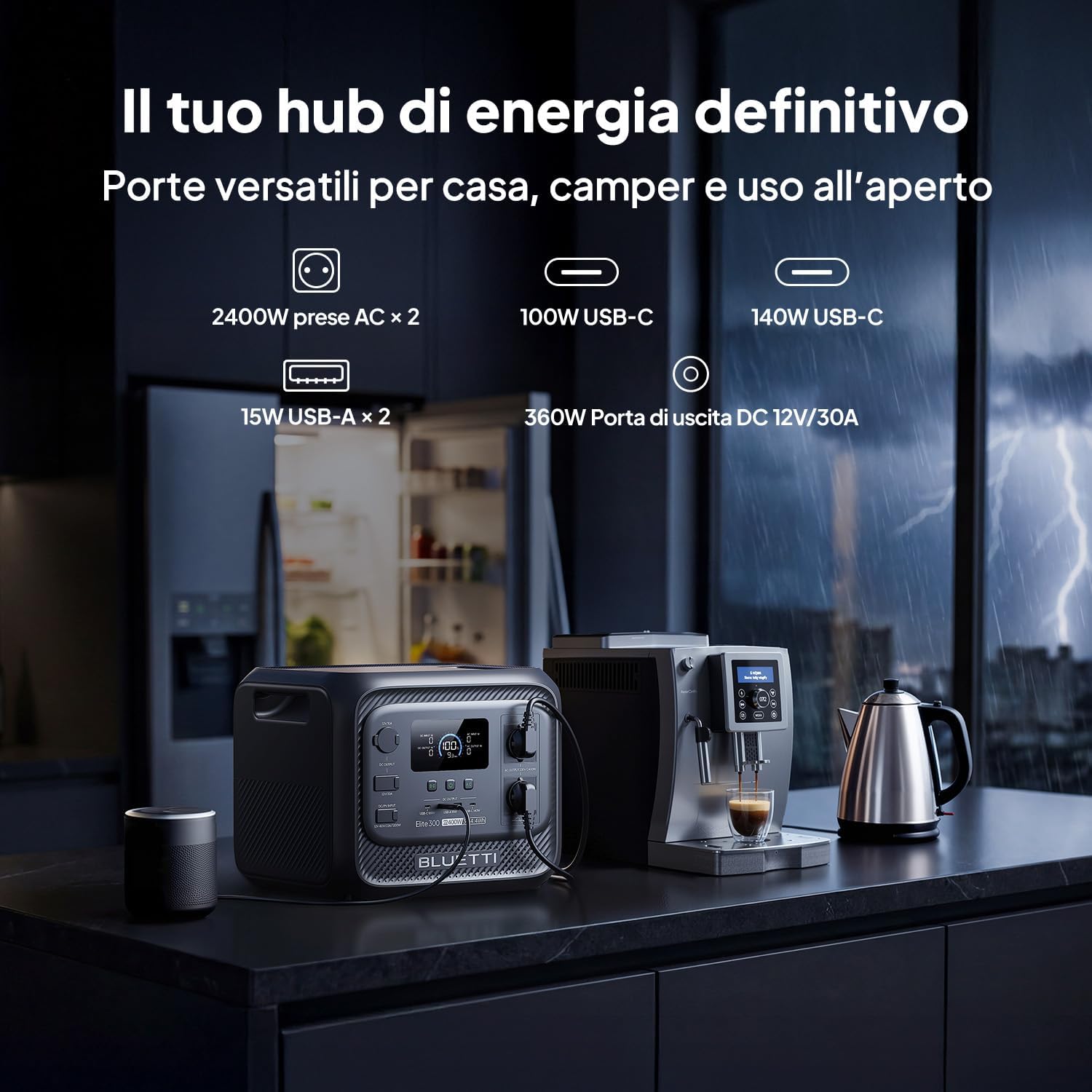
画像: 正面 view of the BLUETTI Elite 300, illustrating its versatile ports including AC outlets, USB-C, USB-A, and a 12V/30A DC output, alongside its digital display.
ポートと出力:
- ACコンセント(2個): 2400W continuous AC power, 4800W peak.
- USB-Cポート: 100W and 140W for fast charging compatible devices.
- USB-A ポート (x2): 15W total for standard USB devices.
- DC 12V/30A Output: 360W dedicated port for RV appliances and other essential outdoor gear.
The integrated display provides real-time information on battery level, input/output power, and operational status.
5. セットアップ
Before first use, ensure the power station is fully charged. Follow these steps:
- 開梱: Carefully remove the BLUETTI Elite 300 and all accessories from the packaging.
- 初期費用: Connect the AC charging cable to the power station and then to a wall outlet. The display will indicate charging status.
- フル充電: Allow the unit to charge completely before its first use. This typically takes approximately 1.8 hours for 0-80% AC charging.
6. 操作手順
6.1 パワーステーションの充電
The Elite 300 supports multiple charging methods:
- ACコンセント: AC充電ケーブルを標準の壁コンセントに接続します。最大入力は2300Wです。
- ソーラーパネル: Connect compatible solar panels (up to 1200W Max) to the solar input port.
- 車の充電: Charge the unit while driving using a compatible car charger (Max 1200W input, full charge in 3.2 hours).
- デュアル充電(AC + ソーラー): Combine AC and solar charging for faster recharge times (up to 2400W Max, 80% in 78 minutes).

Image: Visual representation of the BLUETTI Elite 300 being charged via AC wall outlet, a car charger, and solar panels, highlighting rapid charging capabilities.

Image: An illustration showing the BLUETTI Elite 300 being charged inside an RV while the vehicle is in motion, demonstrating the 'Charge while driving' feature.
6.2 Discharging and Powering Devices
デバイスに電源を供給するには:
- オンにする: 主電源ボタンを押してユニットの電源をオンにします。
- 出力を選択: Activate the desired output ports (AC, DC, USB) by pressing their respective buttons.
- デバイスを接続する: デバイスを適切なポートに接続します。
- モニター: The display will show the current output wattage および推定残り実行時間。
The Elite 300 delivers 2400W of continuous AC power with a 4800W peak, capable of running high-demand appliances like kettles, air conditioners, and power tools.

Image: The BLUETTI Elite 300 connected to and powering a refrigerator, oven, air conditioner, induction hob, chainsaw, and drill, indicating estimated runtimes for each.

Image: A person using a power saw outdoors, powered by the BLUETTI Elite 300, demonstrating its capability to run demanding tools with prolonged autonomy.

Image: The BLUETTI Elite 300 powering an air conditioner, microwave, refrigerator, and coffee machine in an RV kitchen, illustrating its use for off-grid comfort.
6.3 無停電電源装置(UPS)機能
The Elite 300 features a reliable UPS function with a <10ms switchover time. In the event of a power outage, it instantly switches to battery power, ensuring critical devices like routers, computers, and refrigerators remain operational without interruption.

Image: A BLUETTI Elite 300 connected to a computer setup, illustrating its instant power switchover (<10ms) during a power outage to prevent data loss or work interruption.

Image: A person working on a computer during a simulated blackout, with the BLUETTI Elite 300 powering the computer, router, and refrigerator, emphasizing continuous power supply.
6.4 スマートアプリコントロール
Manage your power remotely with the BLUETTI app. The app allows you to:
- Monitor power usage and battery status.
- 出力ポートを制御します。
- Set charging schedules.
- 通知を受け取ります。

Image: A hand holding a smartphone displaying the BLUETTI app interface, showing remote control and monitoring features for the power station in a kitchen setting.
7. メンテナンス
To ensure the longevity and optimal performance of your BLUETTI Elite 300, follow these maintenance guidelines:
- 定期清掃: 外側は乾いた柔らかい布で拭いてください。研磨剤入りの洗剤や溶剤は使用しないでください。
- ストレージ: If storing for extended periods, charge the unit to 50-80% every 3-6 months to preserve battery health. Store in a cool, dry environment.
- 換気: 通気口にほこりやごみが詰まっていないことを確認してください。
- バッテリーの状態: バッテリーの寿命が短くなる可能性があるため、頻繁にバッテリーを完全に放電することは避けてください。
8。 トラブルシューティング
If you encounter issues with your BLUETTI Elite 300, refer to the following common problems and solutions:
| 問題 | 考えられる原因 | 解決 |
|---|---|---|
| ユニットがオンにならない | バッテリーが完全に放電しています。電源ボタンが正しく押されていません。 | AC アダプターを使用してユニットを充電します。電源ボタンを 3 秒間押し続けます。 |
| AC出力が機能しない | AC output not enabled; Overload protection activated; Device power exceeds 2400W. | Press the AC output button; Reduce the load; Check device wattage. |
| 充電が遅い | Using a low-power charger; High ambient temperature; Solar input insufficient. | Use the provided AC charger or higher wattage solar panels; Ensure good ventilation; Check solar panel orientation. |
| アプリの接続の問題 | Bluetooth/Wi-Fi off; App not updated; Unit too far from phone. | Ensure Bluetooth/Wi-Fi is active on your phone; Update the BLUETTI app; Move closer to the unit. |
For further assistance, please contact BLUETTI customer support.
9. 仕様
Detailed technical specifications for the BLUETTI Elite 300 Portable Power Station:
| 特徴 | 仕様 |
|---|---|
| モデル名 | ブルーッティ エリート 300 |
| 電池のタイプ | リン酸鉄リチウム |
| 容量 | 3014.4 Watt-hours (3 kWh) |
| AC出力電力 | 2400W(連続)、4800W(ピーク) |
| AC出力Voltage | 230ボルト(AC) |
| USB-C出力 | 100W、140W |
| USB-A出力 | 15W(×2) |
| DC出力 | 12V/30A(360W) |
| 最大AC入力 | 2300W |
| 最大ソーラー入力 | 1200W |
| Max Combined Input (AC+Solar) | 2400W |
| UPS機能 | 切り替え時間 <10ms |
| 寸法(長さ×幅×高さ) | 36.5L×30.5W×29.5Hcm |
| 重さ | 26.3キロ |
| 原産国 | 中国 |
10. 保証とサポート
For warranty information, please refer to the warranty card included with your product or visit the official BLUETTI website. BLUETTI is committed to providing reliable power solutions and excellent customer service.
If you require technical support, have questions about your product, or need to claim warranty service, please contact BLUETTI customer support through their official channels. Contact details are typically found in the included user manual or on the BLUETTI webサイト。