
導入
Thank you for choosing the johgee Wi-Fi Smart Irrigation Computer. This device is designed to automate your garden watering system, offering convenient control via a smartphone application and voice commands. Featuring advanced RF technology for extended range and stable connectivity, this system ensures efficient and precise irrigation for your plants. Please read this manual carefully before installation and operation to ensure proper use and optimal performance.
製品終了view
The johgee Wi-Fi Smart Irrigation Computer system includes the following components:
- Smart Water Timers (x2): These units connect directly to your outdoor faucet and control water flow to your irrigation system.
- Wi-Fi Gateway (x1): This hub connects to your home's 2.4 GHz Wi-Fi network and communicates with the water timers using RF technology.
- 付属品: Includes 1/2" adapter, quick connector, raw tape, O-rings, and this user manual.

Image: System components including water timers, gateway, and accessories.
主な特徴:
- 300m RF Technology: Provides an extended and stable connection between the gateway and water timers, surpassing standard Bluetooth ranges.
- スマートライフアプリコントロール: Manage your irrigation system from anywhere, anytime, using the Smart Life application on your smartphone.
- 音声コントロール: Compatible with Alexa and Google Assistant for convenient hands-free operation.
- 柔軟な散水スケジュール: Set single or circular watering modes with adjustable start times, durations (1 second to 11 hours 59 minutes 59 seconds), and frequencies (Monday to Sunday).
- 雨天遅延機能: Automatically detects weather conditions or allows manual delay settings (24/48/72 hours) to prevent overwatering during rainfall.
- 複数の散水モード: Choose between 'irrigation' or 'spray' modes, supporting up to 5 watering plans and 1 spray plan per zone.
- 手動散水: Initiate immediate watering for emergency or temporary needs directly from the app.
- IPX5防水性: The water timer is designed to withstand various adverse weather conditions.
セットアップ手順
1. Install the Smart Life App:
- スマートフォンのアプリストア(iOS または Android)から「Smart Life」アプリをダウンロードします。
- Smart Life アカウントを登録またはログインします。
2. Connect the Wi-Fi Gateway:
- Plug the Wi-Fi Gateway into a power outlet indoors, within range of your 2.4 GHz Wi-Fi router.
- Open the Smart Life app, tap '+' to add a device, and follow the in-app instructions to connect the gateway to your 2.4 GHz Wi-Fi network. Ensure your Wi-Fi is 2.4 GHz, as 5 GHz networks are not supported.

Image: Remote control via app and gateway connection.
3. Install the Water Timers:
- Insert 4 AA batteries (not included) into each water timer.
- Attach the water timer to your outdoor faucet. Ensure a tight fit to prevent leaks. Use the provided raw tape and O-rings if necessary.
- Connect your garden hose or irrigation system to the outlet of the water timer.

Image: Water timer installation on an outdoor faucet.
4. Pair Water Timers with Gateway:
- In the Smart Life app, select your connected gateway.
- Follow the app's instructions to add the water timers. The gateway uses RF technology to communicate with the timers, offering a connection distance of up to 300 meters in open environments.

Image: RF technology range and wall penetration capability.
操作手順
1. App Control and Scheduling:
Once your water timers are paired, you can manage them through the Smart Life app. Each timer can be configured with independent watering zones and multiple customizable programs.
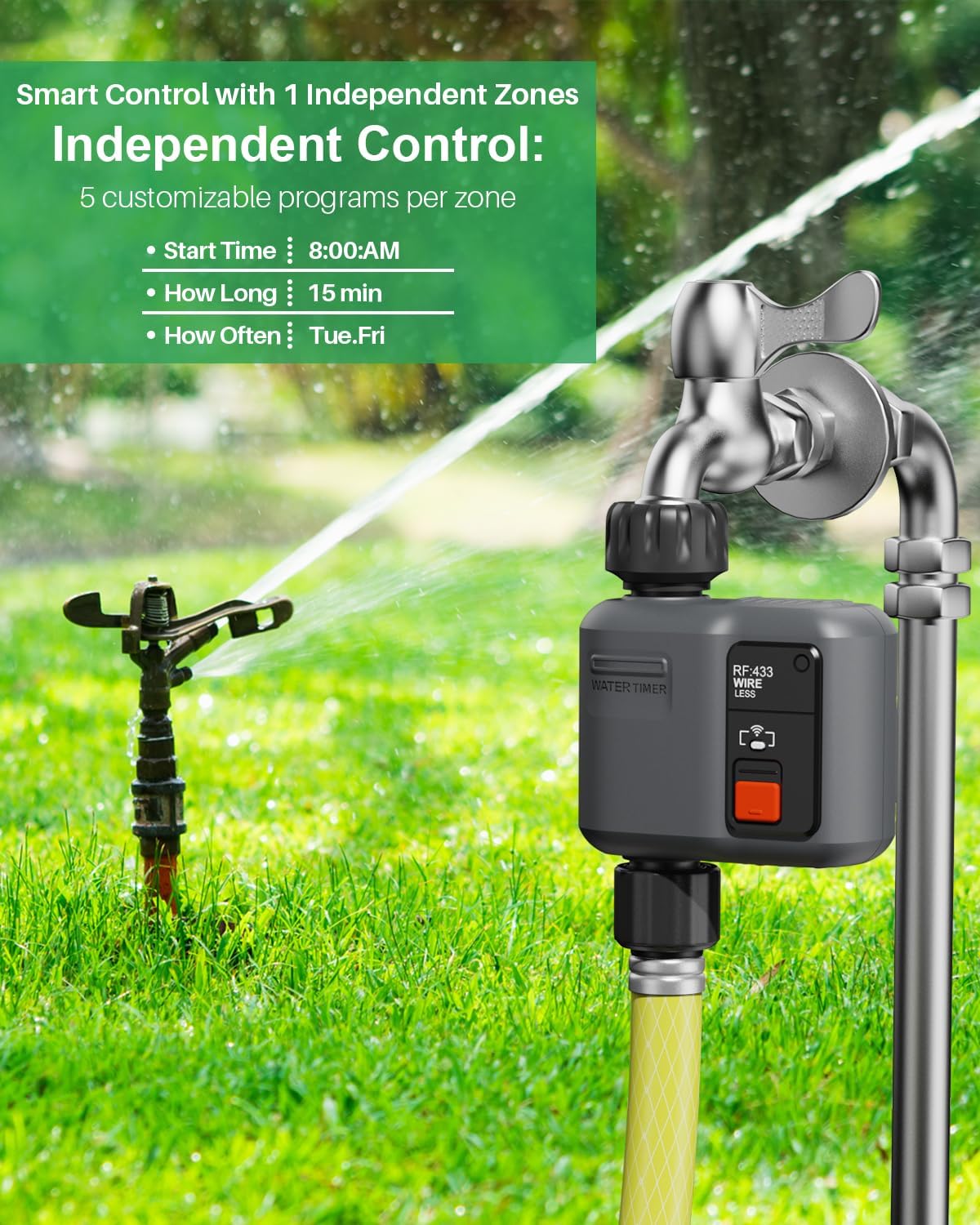
Image: Independent zone control and customizable programs.
スケジュールの設定:
- In the app, select the desired water timer.
- Choose between 'Single Watering Mode' or 'Circular Watering Mode'.
- 設定する 開始時間 for irrigation.
- 定義する 散水時間 (from 1 second up to 11 hours 59 minutes and 59 seconds).
- 選択してください 頻度 (specific days of the week, e.g., Monday to Sunday, or every few days).

Image: Scheduled irrigation setup via the app.
Flexible Watering (Irrigation/Spray Modes):
The system supports both standard irrigation and spray modes. You can configure up to 5 irrigation plans and 1 spray plan per zone.
- Select the desired mode ('Irrigation' or 'Spray') within the app.
- Adjust specific settings for each mode, such as spray duration and interval for spray mode.

Image: Spray irrigation mode settings in the app.
2. 降雨遅延機能:
The system can automatically detect rain and pause watering, or you can manually set a delay.
- Automatic Delay: Enable the intelligent weather detection feature in the app. Watering will be automatically stopped when rain is detected.
- Manual Delay: Access the 'Rain Delay' option in the app to manually set a delay for 24, 48, or 72 hours.

Image: Rain delay function interface.
3. 手動散水:
For immediate or temporary watering needs, use the manual watering function.
- In the app, select the desired water timer.
- Activate the 'Manual Watering' mode.
- 手動で散水する場合の希望の継続時間を設定します。

Image: Manual watering in progress and irrigation records in the app.
4.音声制御:
Integrate your johgee irrigation system with Alexa or Google Assistant for voice commands.
- Smart Life アカウントを Alexa または Google Home アプリにリンクします。
- Use simple voice commands such as "Alexa, turn on the smart water timer" to control your system.

Image: Smart voice control integration with Alexa and Google Assistant.
メンテナンス
- バッテリー交換: Replace the AA batteries in the water timers when the low battery indicator appears in the app or on the device. Ensure proper polarity.
- クリーニング: Periodically clean the water timers and gateway with a soft, damp cloth. Do not use abrasive cleaners or immerse the gateway in water.
- 冬季: Before freezing temperatures, disconnect the water timers from the faucets and store them indoors to prevent damage.
- 漏れがないか確認する: Regularly inspect connections for any leaks and tighten if necessary. Replace O-rings if they show signs of wear.
トラブルシューティング
- ゲートウェイに接続できません:
- Ensure the gateway is plugged in and within range of your 2.4 GHz Wi-Fi router.
- Wi-Fi ネットワークが 2.4 GHz であることを確認します。
- Restart the gateway and try pairing again.
- 水タイマーが応答しない:
- Check the batteries in the water timer and replace if necessary.
- Ensure the water timer is within the RF range of the gateway.
- Re-pair the water timer with the gateway via the Smart Life app.
- 水が流れない:
- 蛇口が完全に開いているか確認してください。
- 十分な水圧があることを確認してください。
- Verify that no rain delay is active.
- Check the schedule in the app to ensure it is correctly set and enabled.
- アプリの問題:
- スマートフォンのインターネット接続が安定していることを確認してください。
- Update the Smart Life app to the latest version.
- アプリまたはスマートフォンを再起動してください。
仕様
| ブランド | ジョギ |
| モデル | 1-Output Smart Irrigation Computer (2-Pack) |
| 色 | グレー |
| 接続性 | Wi-Fi (2.4 GHz only) for Gateway, RF (300m range) for Timers |
| アプリの互換性 | スマートライフアプリ |
| 音声アシスタントの互換性 | Amazon Alexa、Google アシスタント |
| 散水時間 | 1 second to 11 hours 59 minutes 59 seconds |
| 防水等級 | IPX5 (Water Timer) |
| Power Source (Timer) | 単三電池4本(別売) |
保証とサポート
For warranty information and technical support, please refer to the documentation included in your product packaging or contact johgee customer service through their official webサイト。 保証請求に備えて購入時のレシートを保管しておいてください。