
1. はじめに
The Yahboom Raspbot V2 is an open-source AI vision robot car designed for beginners, powered by the Raspberry Pi 5. It features a Mecanum wheel chassis, a high-resolution wide-angle camera, and integrates with the OpenCV image processing library and Media-Pipe machine learning framework. This robot car is capable of advanced functions such as color recognition, target tracking, license plate recognition, autonomous driving, face recognition, and gesture recognition.
The Raspberry Pi 5 brings significant breakthroughs in processor speed, multimedia performance, memory, and connectivity. This enhancement, combined with the robot drive expansion board, greatly boosts the AI capabilities of the Raspbot V2, providing smoother camera operation and more powerful AI functions.
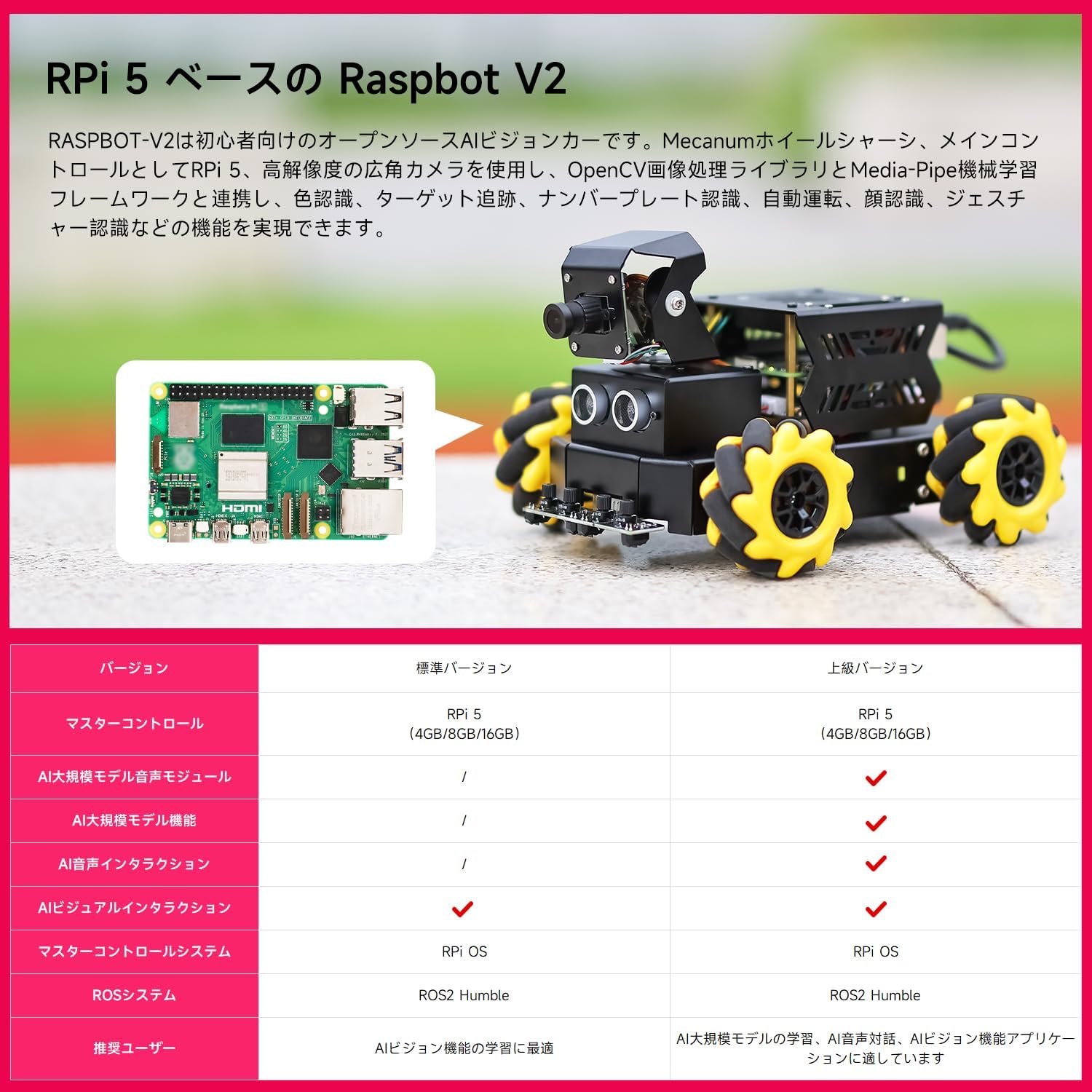
図1:以上view of the RPi 5 based Raspbot V2, highlighting its core components and capabilities.
バージョン比較
| 特徴 | 標準バージョン | アドバンスドバージョン |
|---|---|---|
| 主制御装置 | RPi 5 (4GB/8GB/16GB) | RPi 5 (4GB/8GB/16GB) |
| AI大規模モデル音声モジュール | / | ✓ |
| AI Large Model Features | / | ✓ |
| AI音声インタラクション | / | ✓ |
| AI Visual Interaction | / | ✓ |
| Master Control System | RPi OS | RPi OS |
| ROS System | ROS2 謙虚な | ROS2 謙虚な |
| Recommended User | Best for learning AI features | Best for learning AI large models, AI voice interaction, AI vision applications |
Table 1: Comparison of features between the Standard and Advanced versions of Raspbot V2.
2.製品コンポーネント
The Raspbot V2 comes with various components designed for its advanced functionalities. The chassis is pre-assembled for convenience. Key components include:
- Raspberry Pi 5 (main control)
- Robot Driver Board
- 2DOF Camera PTZ (Pan-Tilt-Zoom) with HD 110° Wide-Angle Camera
- Mecanum Wheels (x4)
- TT Geared Motors
- 超音波センサー
- 4-Channel Tracking Sensor
- 7.4Vバッテリーパック
- アダプターボード
- 冷却ファン
- OLEDディスプレイ
- RGB Colorful Light Bar
- Optional: AI Large Model Voice Module, Speaker
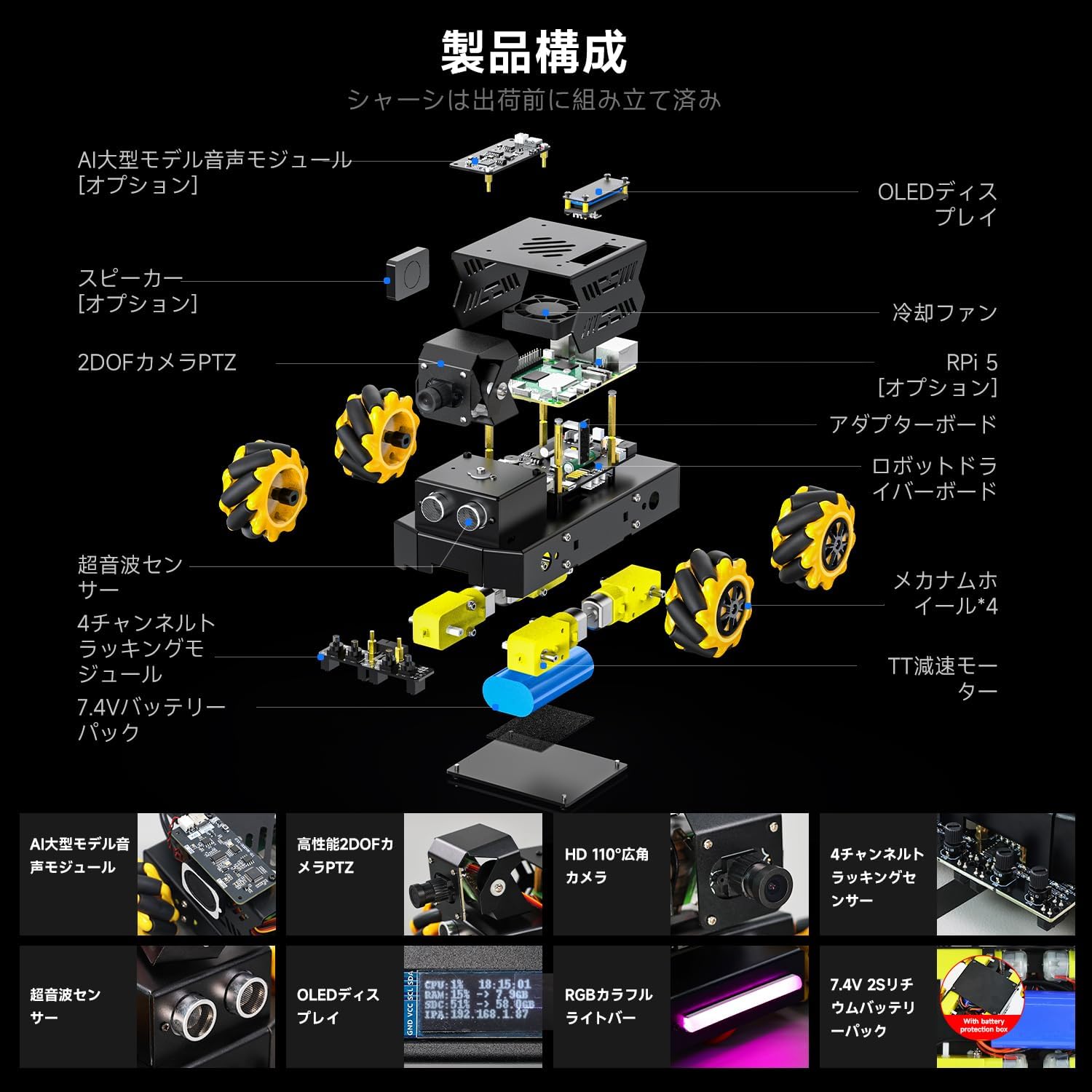
図 2: 分解 view illustrating the various components of the Raspbot V2, including the Raspberry Pi 5, camera, sensors, and drive system.
3.セットアップガイド
3.1. 組み立て
The main chassis of the Raspbot V2 is pre-assembled before shipment. You will need to attach the Raspberry Pi 5, camera module, and connect the various sensors and motors to the robot driver board. Refer to the detailed assembly instructions provided in the separate assembly guide or online resources for step-by-step visual guidance.
3.2. 電源接続
The Raspbot V2 requires a stable and sufficient power supply, especially with the enhanced performance of the Raspberry Pi 5. It is recommended to use a dedicated 5.1V/5A PD power supply that supports the Pi5 power protocol. This ensures optimal performance and provides enough power for USB peripherals.

Figure 3: Comparison of power supply options for Raspberry Pi 5, emphasizing the benefits of using a dedicated 5.1V/5A PD power supply for optimal performance.
3.3. ソフトウェアのインストールと設定
The Raspbot V2 operates on Raspberry Pi OS and utilizes ROS2 Humble for robotics control. Key libraries like OpenCV are used for image processing. Ensure your Raspberry Pi 5 is set up with the latest Raspberry Pi OS. Follow the official Yahboom documentation for installing ROS2 Humble, OpenCV, and any specific drivers or software packages required for the robot's functionalities. This typically involves flashing an SD card with the appropriate image and then performing software updates and installations via the command line.
4. 操作手順
4.1. 制御方法
The Raspbot V2 can be controlled through multiple interfaces:
- モバイルアプリ: Use the dedicated mobile application for remote control and monitoring.
- PCソフトウェア: Control the robot via a PC interface, often used for programming and advanced debugging.
- Remote Control/Handle: Utilize a physical remote control or game handle for intuitive manual operation.
All control methods support FPV (First Person View) image transmission from the HD camera, allowing real-time visual feedback.
4.2. Omnidirectional Movement
Equipped with Mecanum wheels, the Raspbot V2 can achieve 360° omnidirectional movement. This allows for complex maneuvers including forward, lateral (strafing), diagonal movement, and rotation, making it highly versatile in various environments.

図4:例amples of omnidirectional movement patterns achievable with Mecanum wheels, including polyline movement, circular drift, and lateral movement.
4.3. AI Vision Applications
The Raspbot V2 leverages its HD camera and AI capabilities to perform a range of intelligent applications:
- Visual Tracking/Following: Identify and track specific objects or colors.
- 自律航法: Navigate autonomously, avoiding obstacles and following predefined paths or waypoints.
- 物体認識: Detect and identify various objects, including 3D objects and specific items like trash.
- 顔検出と追跡: Identify human faces and track their movement.
- 人間の姿勢推定: Analyze and estimate human body postures.
- ジェスチャー認識: Interpret human gestures for interactive control.
- Scene Understanding: Analyze visual input to understand the environment and context.
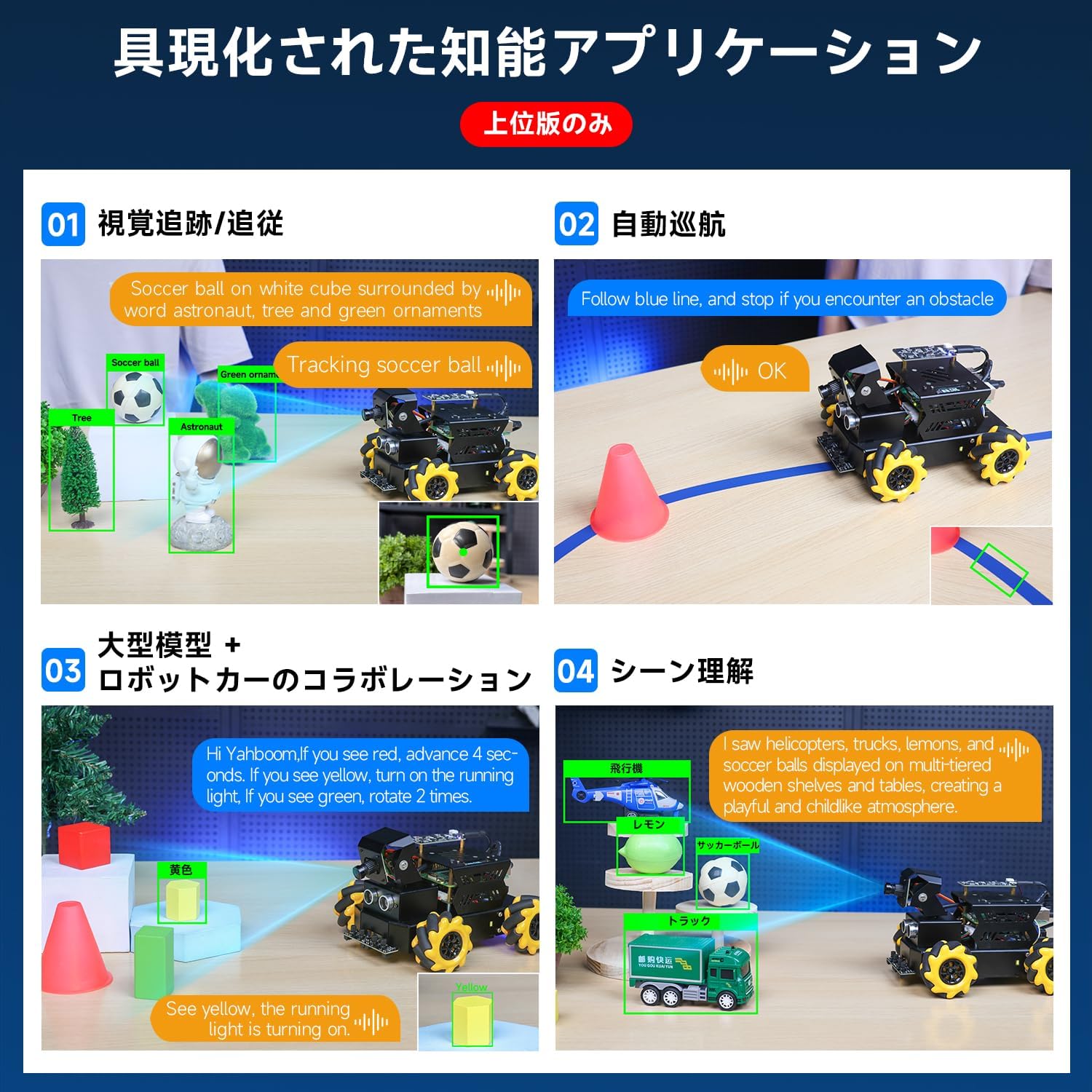
図5: 視覚的例amples of the Raspbot V2's intelligent applications, including visual tracking, autonomous navigation, large model collaboration, and scene understanding.
5. Performance Enhancements (Raspberry Pi 5)
The Raspberry Pi 5 significantly upgrades the robot's processing power and capabilities:
- CPU: Features a new Broadcom BCM2712 processor with 4 Cortex-A76 cores, upgraded from Pi 4B's Cortex-A72. The manufacturing process is reduced from 28nm to 16nm, and the frequency is increased from 1.5GHz to 2.4GHz.
- グラフィック: Boosted from Pi 4B's 600 MHz VideoCore VI(6) to 800 MHz VideoCore VII(7), supporting OpenGL ES 3.1 and Vulkan 1.2.
- メモリ: Upgraded to LPDDR4X-4267 for faster data access.
- Power & TF Card Slot: Type-C power supply upgraded to 5V5A with PD support. The protocol supports high-speed SDR104 mode Micro SD cards.
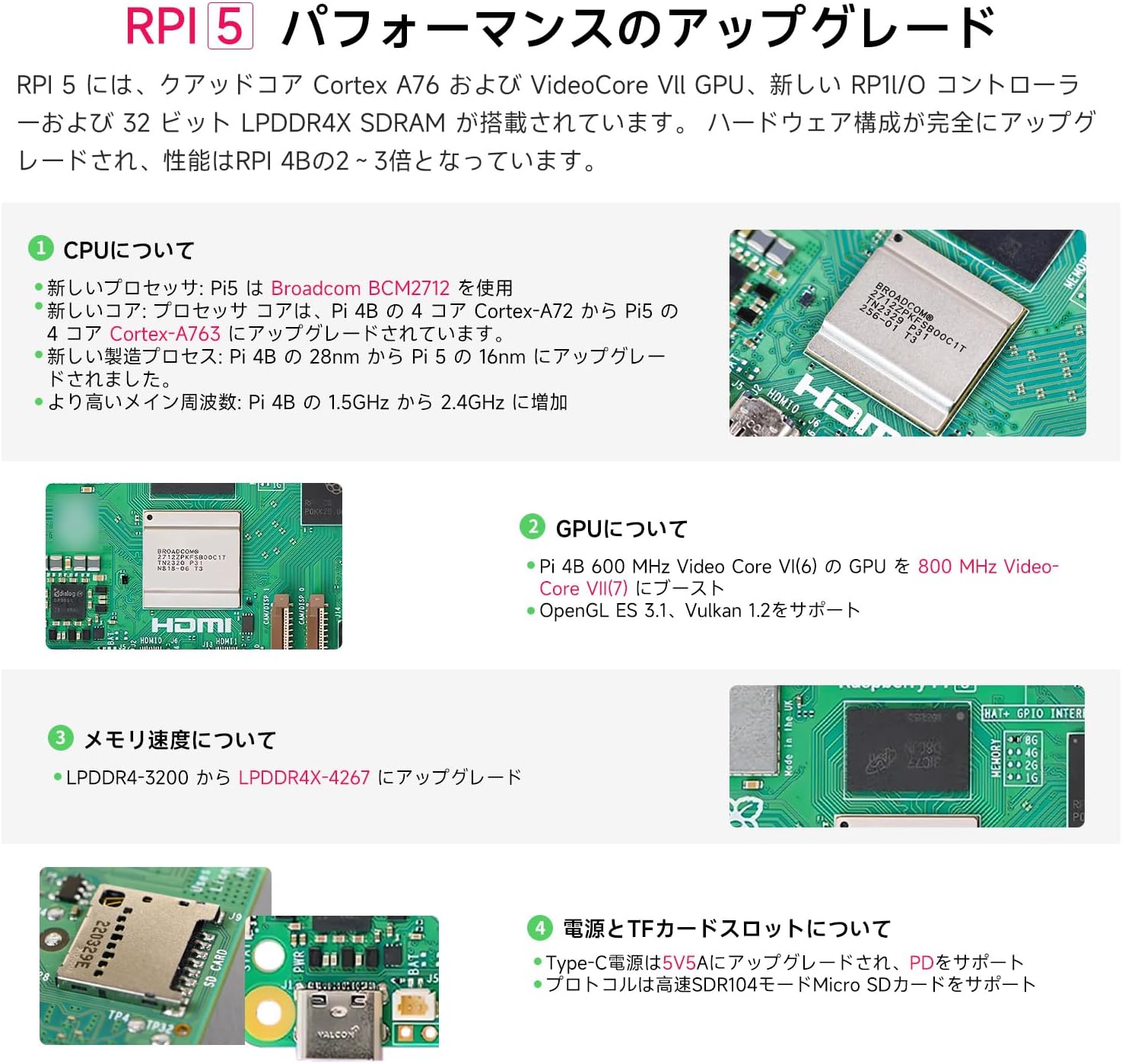
Figure 6: Detailed breakdown of the Raspberry Pi 5's performance upgrades, including CPU, GPU, memory, and power/TF card slot specifications.
6. 冷却ソリューション
Due to the increased performance of the Raspberry Pi 5, effective cooling is crucial for stable operation, especially under heavy loads. It is not recommended to use the RPi 5 without a cooling device or with only a heatsink, as this can negatively impact performance. Various cooling solutions are available:
- Pure Copper Heatsink Set: Can be used in conjunction with a cooling fan.
- アクリルケース: Features a removable top cover, includes a PWM cooling fan, and supports camera bracket installation.
- 金属ケース: Made of matte-painted metal and includes a PWM cooling fan.
- Silver ABS Case: Offers a quickly removable design, matte texture, and includes a PWM cooling fan.
- Active Radiator (e.g., Coolbra Pi50): Provides higher heat dissipation efficiency for prolonged full-load operation.
For most users engaged in daily development and learning, a fan-equipped case is recommended. For scenarios requiring the RPi 5 to operate under full load for extended periods, a kit with an active cooler is advisable.

Figure 7: Visual representation of various cooling solutions for the Raspberry Pi 5, including heatsinks and different case types with fans, along with a chart comparing their heat dissipation performance under idle and CPU load conditions.
7. メンテナンス
To ensure the longevity and optimal performance of your Raspbot V2, follow these maintenance guidelines:
- クリーニング: Regularly clean the robot's chassis, wheels, and sensors to prevent dust and debris buildup. Use a soft, dry cloth. For hard-to-reach areas, use compressed air.
- ソフトウェアアップデート: Keep the Raspberry Pi OS, ROS2, OpenCV, and any other installed software up to date. Regular updates can improve performance, add new features, and fix bugs.
- バッテリーのケア: Follow proper battery charging and storage procedures. Avoid overcharging or completely draining the battery. Store the robot in a cool, dry place when not in use.
- コンポーネントの検査: Periodically check all connections (wires, cables) to ensure they are secure. Inspect the Mecanum wheels for any wear or damage.
8。 トラブルシューティング
Raspbot V2 で問題が発生した場合は、次の一般的なトラブルシューティング手順を検討してください。
- ロボットの電源が入らない: Ensure the power supply is correctly connected and providing sufficient voltage (5.1V/5A). Check the battery level if using battery power.
- Connectivity Issues (APP/PC Control): Verify that the Raspberry Pi 5 is connected to the network (Wi-Fi) and that your control device is on the same network. Check IP addresses and firewall settings.
- カメラが動作しない: Ensure the camera module is securely connected to the Raspberry Pi 5. Check camera software settings and permissions.
- モーターが応答しない: Check motor connections to the robot driver board. Verify that the motor drivers are correctly configured in the software. Ensure the battery has enough charge.
- AI Features Not Functioning: Confirm that all necessary AI libraries (e.g., OpenCV, Media-Pipe) are installed and up to date. Check for any error messages in the console output. Ensure sufficient processing power and memory are available.
- 過熱: If the Raspberry Pi 5 feels excessively hot, ensure the cooling fan is operating correctly and that there is adequate airflow. Consider upgrading to a more robust cooling solution if operating under continuous heavy load.
For more detailed troubleshooting, refer to the official Yahboom support resources and community forums.
9. 仕様
- モデル: ラズボットV2
- メインコントロール: Raspberry Pi 5 (4GB/8GB/16GB options)
- プロセッサ: Broadcom BCM2712 (Quad-core Cortex-A76 @ 2.4GHz)
- グラフィック: VideoCore VII (800MHz)
- メモリ: LPDDR4X-4267 SDRAM
- シャーシ: Mecanum Wheel Chassis
- カメラ: 2DOF HD 110° Wide-Angle Camera
- センサー: Ultrasonic Sensor, 4-Channel Tracking Sensor
- モーター: TT Geared Motor
- 電源: Recommended 5.1V/5A PD (Type-C)
- バッテリー: 7.4Vバッテリーパック
- オペレーティング·システム: ラズベリーパイOS
- Robotics Framework: ROS2 謙虚な
- 画像処理: OpenCV, Media-Pipe
10. 保証とサポート
Yahboom products typically come with a standard manufacturer's warranty. Please refer to the warranty card included with your product or visit the official Yahboom web具体的な保証条件については、サイトをご覧ください。
For technical support, troubleshooting assistance, or to access additional resources such as detailed assembly guides, software tutorials, and community forums, please visit the official Yahboom support page or contact their customer service directly. Keep your purchase receipt and product model number (Raspbot V2) handy when seeking support.