
1. 安全情報
Read all instructions carefully before installation and operation. Failure to follow safety guidelines may result in injury or damage to the product.
- 専門家による取り付けを推奨: If you are unsure about any installation steps, seek assistance from a qualified bicycle mechanic.
- 安全装備を着用してください: Always wear a helmet and appropriate safety gear when riding an e-bike.
- 現地の規制: Adhere to all local laws and regulations regarding e-bike use, speed limits, and safety.
- バッテリーの取り扱い: Handle the battery with care. Do not puncture, expose to extreme temperatures, or immerse in water. Use only the provided charger.
- 電気接続: Ensure all electrical connections are secure and waterproofed to prevent short circuits and damage.
- ブレーキチェック: Before each ride, verify that your brakes are functioning correctly.
2. パッケージ内容
パッケージにすべてのコンポーネントが含まれていることを確認します。
- Pre-laced Front Wheel with 500W Hub Motor
- Intelligent Controller & Wiring Harness
- Pedal Assist (PAS) Sensor
- サムスロットル
- Brake Levers (for motor cutoff)
- EKD01 Display
- ヘッドライト
- Ebike Battery (Optional, specific capacity depends on order)
- Comprehensive Installation Manual

3.製品オーバーview
The Varstrom 48V 500W Ebike Conversion Kit transforms a standard bicycle into an electric bike. It features a front hub motor, an EKD01 TFT display, and various battery options, designed for commuter and leisure riding.
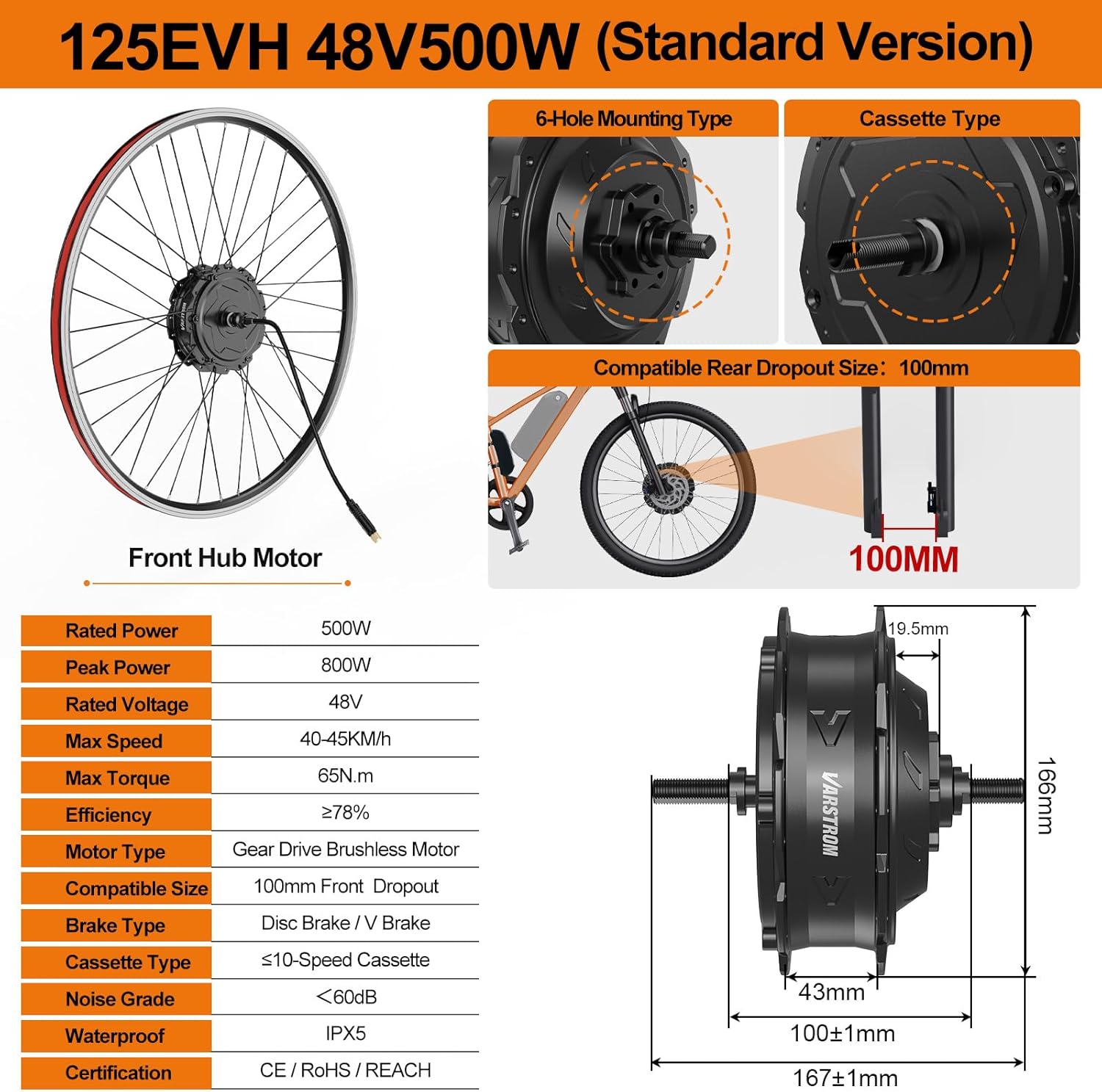
3.1. Front Hub Motor
- タイプ: Gear Drive Brushless Motor
- 定格電力: 500W
- 最大電力: 最大800W
- 最大トルク: 65N·m
- 最高速度: 40~45 km/h
- Dropout Size: 100mm Front Dropout
- 防水: IPX5定格
- 騒音レベル: 60dB以下
- ブレーキ互換性: Supports Disc and V-Brake systems

3.2. EKD01 TFT Display
- 画面サイズ: 2.4インチTFT
- 防水: IP67定格
- 特徴: Displays speed, battery level, assist mode. Supports one-key speed limiting and connection to the BIKEGO+ app for tracking and customization.

3.3. Battery Options (Optional)
The kit offers flexible 48V battery options, including bottom tube and rear rack types. All batteries include a charging adapter, compatible mount, XT60 connector, and intelligent BMS.

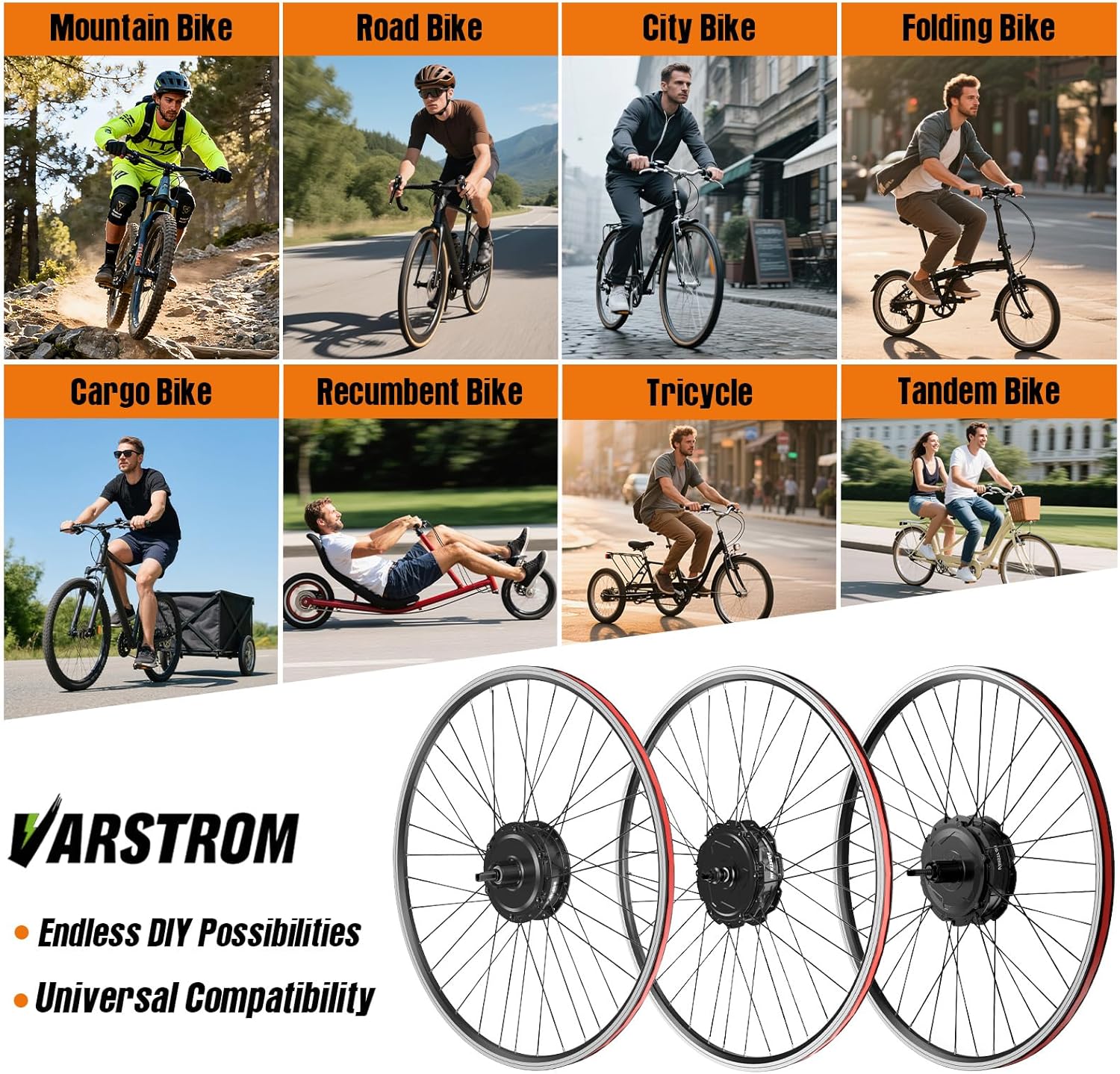
3.4. 互換性
- ホイールサイズ: 20", 26", 27.5", 700C (compatible with 28" and 29" tires)
- Fork Dropout: 100mm Front Fork Dropout

4. セットアップとインストール
This section provides general guidance for installing the Varstrom Ebike Conversion Kit. Refer to the detailed manual included in your package for specific instructions and diagrams.
4.1. 自転車を準備する
- Ensure your bicycle's front fork has a 100mm dropout.
- Remove the existing front wheel.
4.2. Install the Front Hub Motor Wheel
- Carefully install the pre-laced front wheel with the hub motor into your bicycle's front fork.
- Secure the wheel using the provided nuts and washers. Ensure the motor cable exits correctly and is not pinched.
- Install your disc brake rotor or ensure V-brake compatibility.
4.3. Mount Components
- コントローラ: Mount the intelligent controller securely to your bike frame, typically in a battery bag or a dedicated controller box area.
- 画面: Attach the EKD01 display to your handlebars in a visible and accessible position.
- Throttle & Brake Levers: Replace your existing brake levers with the provided ones (which include motor cutoff switches) and mount the thumb throttle next to the grip.
- PASセンサー: Install the pedal assist sensor on your bottom bracket, ensuring the magnet disc and sensor are properly aligned and spaced.
- ヘッドライト: Mount the headlight to the front of your bicycle.
4.4. 配線接続
- Connect the motor cable to the controller.
- Connect the display, throttle, brake levers, PAS sensor, and headlight to the intelligent controller using the wiring harness. Ensure all connections are firm and correctly oriented.
- Route all cables neatly and secure them with zip ties to prevent interference with moving parts.
4.5. Battery Installation (If Applicable)
- Mount the battery holder securely to your bike frame (for bottom tube batteries) or rear rack (for rear rack batteries).
- Slide the battery into its holder and lock it in place.
- Connect the battery to the controller using the XT60 connector.
5. 操作手順
5.1.電源のオン/オフ
- 電源を入れるには: Press and hold the power button on the EKD01 display for a few seconds.
- 電源を切るには: ディスプレイがオフになるまで、もう一度電源ボタンを押し続けます。
5.2. EKD01 Display Functions
The EKD01 display provides real-time riding data:
- スピード: 現在の速度(km/h または mph)。
- バッテリー残量: バッテリー残量表示。
- Assist Mode (PAS Level): Shows the current level of pedal assistance (typically 0-9 levels). Use the '+' and '-' buttons to adjust.
- 旅行データ: Displays trip distance, total distance, and other metrics.
- ヘッドライトコントロール: Often integrated with the display for turning the headlight on/off.
5.3. Pedal Assist System (PAS) and Throttle
- 理由: The motor provides assistance as you pedal. Increase the PAS level for more assistance.
- サムスロットル: Provides power on demand without pedaling. Use carefully, especially at higher assist levels.
5.4. Speed Limiting
To quick-switch to a 25 km/h street-legal mode, press and hold the "+" and "-" buttons on the display together.
5.5. BIKEGO+ App Connectivity
The EKD01 display supports connection to the "BIKEGO+ app" for detailed ride tracking, customization, and remote locking/unlocking features. Refer to the app's instructions for pairing and usage.
6. メンテナンス
Regular maintenance ensures the longevity and safe operation of your e-bike conversion kit.
6.1. 一般的なチェック
- 各ライドの前: Check tire pressure, brake function, and ensure all quick releases/axle nuts are tight.
- 定期的に: Inspect all electrical connections for corrosion or damage. Ensure cables are securely routed and not frayed.
- 留め具: Check all bolts and screws on the motor, controller, and other components for tightness.
6.2. バッテリーのお手入れ
- 充電: Charge the battery fully after each ride or when the charge level is low. Use only the charger provided.
- ストレージ: If storing the battery for an extended period, charge it to 50-70% and store in a cool, dry place. Recharge every 1-2 months to prevent deep discharge.
- クリーニング: バッテリーの接点を清潔で乾燥した状態に保ってください。
6.3. Motor and Controller Care
- Keep the motor and controller clean from dirt and debris.
- While the motor is IPX5 rated, avoid submerging it in water or using high-pressure washers directly on electrical components.
6.4. 清掃
Wipe down the display, motor, and controller with a damp 布。 刺激の強い化学物質や研磨材の使用は避けてください。
7。 トラブルシューティング
This section addresses common issues. For complex problems, contact customer support.
7.1. No Power to Display/Motor
- バッテリーを確認してください: Ensure the battery is fully charged and properly seated/connected.
- 接続を確認してください: Verify all electrical connections, especially between the battery, controller, and display, are secure.
- 電源ボタン: Ensure the power button on the display is pressed correctly.
7.2. Motor Not Assisting
- PASセンサー: Check if the PAS sensor and magnet disc are correctly installed and aligned.
- ブレーキレバー: Ensure the brake levers are not engaged, as they cut off motor power.
- エラーコードを表示します: Check the EKD01 display for any error codes and consult the detailed manual for their meaning.
- スロットル: If using the throttle, ensure it is functioning and connected.
7.3. Inaccurate Speed Reading
- ホイールサイズ設定: Verify the correct wheel size is set in the EKD01 display settings.
- 速度計: Check the speed sensor (if external) and its magnet for proper alignment.
8. 仕様
| 特徴 | 仕様 |
|---|---|
| ブランド | Varstrom |
| モデル番号 | FM 125EVH.48.500.100 |
| モータータイプ | Front Hub Gear Drive Brushless Motor |
| 定格出力 | 500W |
| 定格巻tage | 48V |
| ピークパワー | 800W |
| 最大トルク | 65N·m |
| 最高速度 | 40~45 km/h |
| Front Dropout Size | 100mm |
| ホイールサイズの互換性 | 20", 26", 27.5", 700C (28"/29" compatible) |
| ブレーキタイプの互換性 | Disc, V Brake |
| ノイズグレード | <60dB |
| 防水加工 | Motor: IPX5, Display: IP67 |
| 画面 | EKD01 2.4" TFT Display |
| Battery Options (48V) | 13Ah, 16Ah, 20Ah (bottom tube); 17.5Ah (rear rack) |
| 含まれるコンポーネント | Motor Wheel, Controller, PAS Sensor, Thumb Throttle, Brake Levers, EKD01 Display, Headlight, Battery (Optional) |
| 組み立てが必要 | はい |
9. 保証とサポート
9.1. 保証情報
This Varstrom Ebike Conversion Kit comes with the following warranty:
- 返品規則: 購入日から30日。
- 修理または交換: 365 days from the date of purchase for manufacturing defects.
保証請求のために購入証明書を保管してください。
9.2. カスタマーサポート
For technical assistance, troubleshooting beyond this manual, or warranty claims, please contact Varstrom customer support through the retailer where you purchased the product or visit the official Varstrom web連絡先の詳細についてはサイト。