
1. はじめに
Thank you for choosing the GRIFEMA GB1057-1 Selfie Stick Tripod with Fill Lights. This versatile device combines a selfie stick, a stable tripod, and integrated fill lights to enhance your photography and videography experience. It is designed for use with smartphones, offering adjustable height, multi-angle shooting capabilities, and a detachable Bluetooth remote control for convenient operation.
製品をご使用になる前に、このマニュアルをよくお読みになり、適切な設定、操作、メンテナンスを行ってください。このマニュアルは、今後の参考のために保管してください。
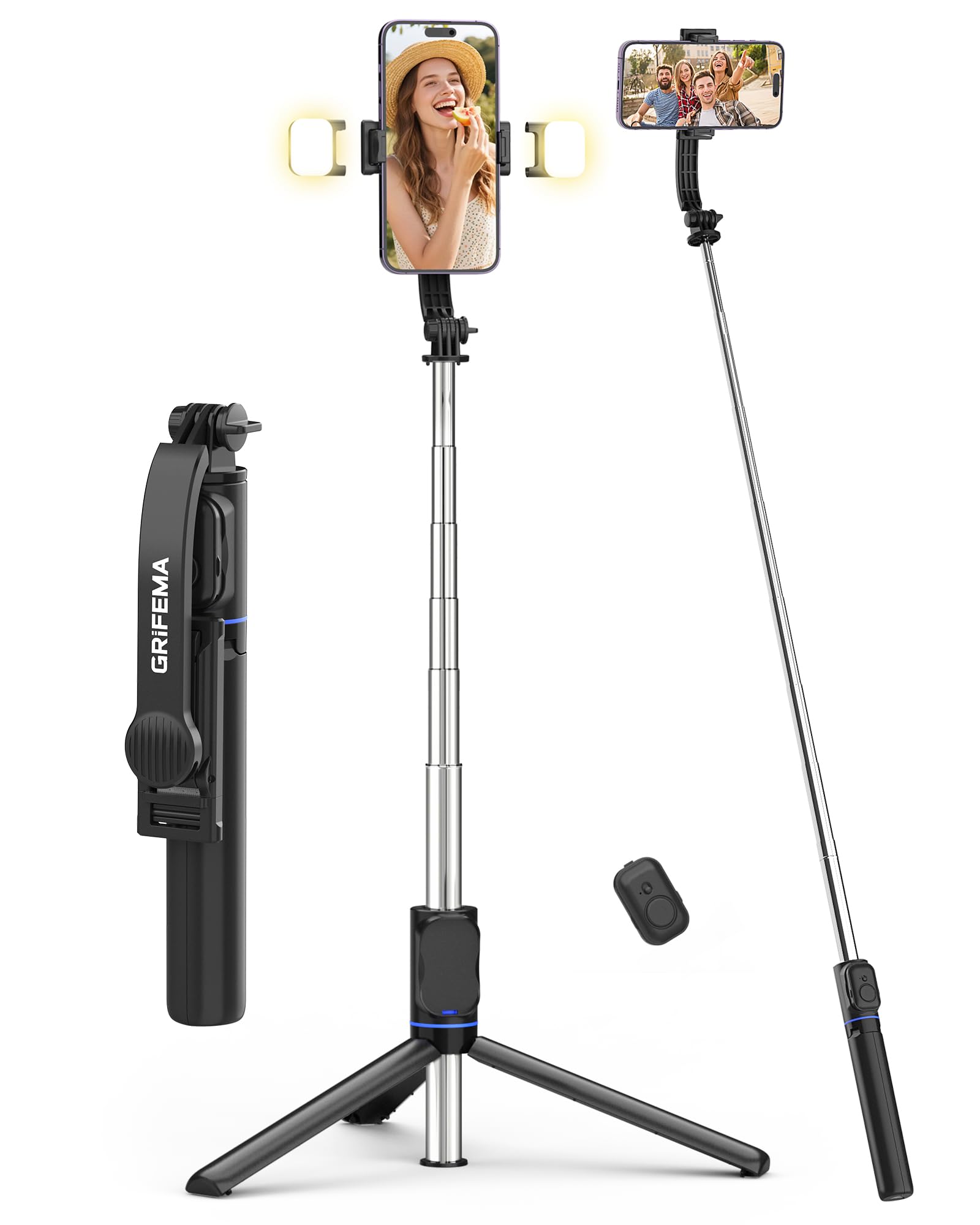
Image 1: GRIFEMA GB1057-1 Selfie Stick Tripod with Fill Lights. This image shows the product in its extended form, highlighting the phone clamp, fill lights, and extendable pole.
2.製品コンポーネント
The GRIFEMA GB1057-1 package includes the following components:
- Selfie Stick Tripod Body: The main unit, featuring an extendable pole and integrated tripod legs.
- 電話Clamp: 調整可能なclamp スマートフォンをしっかりと固定します。
- 取り外し可能なBluetoothリモコン: ワイヤレスで写真やビデオをキャプチャします。
- Dual Fill Lights (x2): Two detachable LED lights for adjustable illumination.
- USB-C 充電ケーブル: For recharging the fill lights.
3. セットアップ
Follow these steps to set up your GRIFEMA GB1057-1 Selfie Stick Tripod:
- デバイスを開梱します。 パッケージからすべてのコンポーネントを慎重に取り出します。
- Charge Fill Lights: Before first use, ensure the fill lights are fully charged using the provided USB-C cable. Connect the cable to the charging port on each light and a standard USB power source. The indicator light will change when charging is complete.
- 電話を接続: 電話のclを延長するamp and carefully insert your smartphone. Ensure the phone is centered and securely held by the non-slip silicone pads. The clamp supports phones between 65mm and 95mm in width.
- Bluetoothリモコンのペアリング:
- Remove the detachable remote control from the handle.
- Press and hold the button on the remote until the indicator light flashes, indicating it is in pairing mode.
- スマートフォンで Bluetooth 設定に移動し、利用可能なデバイスを検索します。
- Select "GRIFEMA Remote" (or similar name) to pair. The indicator light on the remote will stop flashing once successfully paired.
4. 操作手順
4.1. Extending and Retracting the Selfie Stick
- To extend: Hold the base and pull the phone clamp upwards. The stick extends in 7 stages up to 107cm.
- To retract: Push the phone clamp downwards until the stick is fully collapsed to 19.6cm.
4.2. Converting to Tripod Mode
- From the collapsed position, gently pull the bottom handle downwards to unfold the three tripod legs.
- 三脚を平らで安定した場所に設置します。
- Extend the pole to your desired height for stable hands-free shooting.
4.3. 携帯電話の角度を調整する
- 電話clamp features a dual-axis 360° rotation, allowing you to switch between portrait and landscape modes.
- The head of the tripod is 225° adjustable, enabling various shooting angles, including overhead and low-angle shots. Loosen the adjustment knob, set the desired angle, and tighten the knob to secure.
4.4. Using the Fill Lights
- Attach the two fill lights to the designated slots on the phone clamp.
- 各ライトの電源ボタンを押して点灯させます。
- Press the button repeatedly to cycle through the 3 color temperatures (Cold, Warm, Natural) and 2 brightness levels for each color, offering a total of 6 lighting options.
- ボタンを長押しするとライトが消えます。
4.5. リモコンの使用
- Once paired with your smartphone, open your phone's camera application.
- リモコンのボタンを押すと、カメラのシャッターが切れたり、ビデオ録画が開始/停止したりします。
- The remote operates wirelessly up to 10 meters (33 feet) away.
5. メンテナンス
- クリーニング: 柔らかく乾いた布で拭いてください。研磨剤入りの洗剤や溶剤は使用しないでください。
- ストレージ: Store the selfie stick tripod in a cool, dry place, away from direct sunlight and extreme temperatures. Ensure it is fully retracted and the tripod legs are folded.
- バッテリーのケア: Recharge the fill lights regularly, even if not in frequent use, to maintain battery health.
6。 トラブルシューティング
- リモコンが接続されない:
- Ensure the remote control has power (check battery if replaceable, or charge if rechargeable).
- スマートフォンで Bluetooth が有効になっていることを確認してください。
- 携帯電話の Bluetooth 設定でリモコンのペアリングを解除し、再度ペアリングします。
- リモコンが 10 メートルの動作範囲内にあることを確認します。
- Fill Lights Not Turning On:
- Check if the fill lights are charged. Connect them to the USB-C charging cable.
- 電源ボタンがしっかりと押されていることを確認してください。
- 三脚の安定性の問題:
- 三脚の脚が完全に伸びて、平らで安定した表面に固定されていることを確認します。
- 風が強いときや地形が不整地のときは、ポールを最大の高さまで伸ばさないでください。
- 携帯電話が安全に保管されていることを確認してくださいamped and balanced.
7. 仕様
| 特徴 | 仕様 |
|---|---|
| モデル番号 | GB1057-1 |
| ブランド | グリフェマ |
| 材料 | ステンレス、プラスチック |
| 最大高さ | 107 cm (42.1 インチ) |
| 最小高さ | 34 cm (13.4 インチ) |
| 折り畳み長さ | 19.6 cm (7.7 インチ) |
| Weight (excluding lights) | 182 g (6.4 オンス) |
| 電話Clamp 幅 | 65 mm - 95 mm (2.5 - 3.7 インチ) |
| フィルライトモード | 3 Colors (Cold, Warm, Natural), 2 Brightness Levels each (6 total) |
| リモコン範囲 | 最大10メートル(33フィート) |
| 特集 | Foldable, Lightweight, Detachable Remote Control, Telescopic, 360° Rotating Head |
| 対応デバイス | スマートフォン(iPhone、Android) |
8. 保証とサポート
For warranty information, technical support, or service inquiries, please refer to the warranty card included with your purchase or visit the official GRIFEMA webサイトでご確認ください。保証請求のために購入証明書を保管してください。
9. 安全情報
- デバイスを水や過度の湿気にさらさないでください。
- 落としたり、強い衝撃を与えないでください。
- お子様の手の届かない場所に保管してください。
- 本製品を分解または改造しないでください。保証が無効になります。
- デバイスとそのコンポーネントは、地域の規制に従って責任を持って廃棄してください。