
1. はじめに
Thank you for choosing the AULA G7 Pro Wireless Gaming Headset. This manual provides detailed instructions for setting up, operating, and maintaining your headset to ensure optimal performance and an immersive audio experience. Please read this manual thoroughly before using the product.
2.製品オーバーview
2.1 パッケージ内容
The AULA G7 Pro package includes the following items:
- AULA G7 Pro ワイヤレスゲーミングヘッドセット
- 取り外し可能なブームマイク
- USB-C-USB-A充電ケーブル
- 3.5mmオーディオケーブル
- 2.4G Wireless USB-A Receiver
- USB-C - USB-A アダプタ
- ユーザーマニュアル
2.2 ヘッドセットのコンポーネントとコントロール
Familiarize yourself with the various parts and controls of your AULA G7 Pro headset.
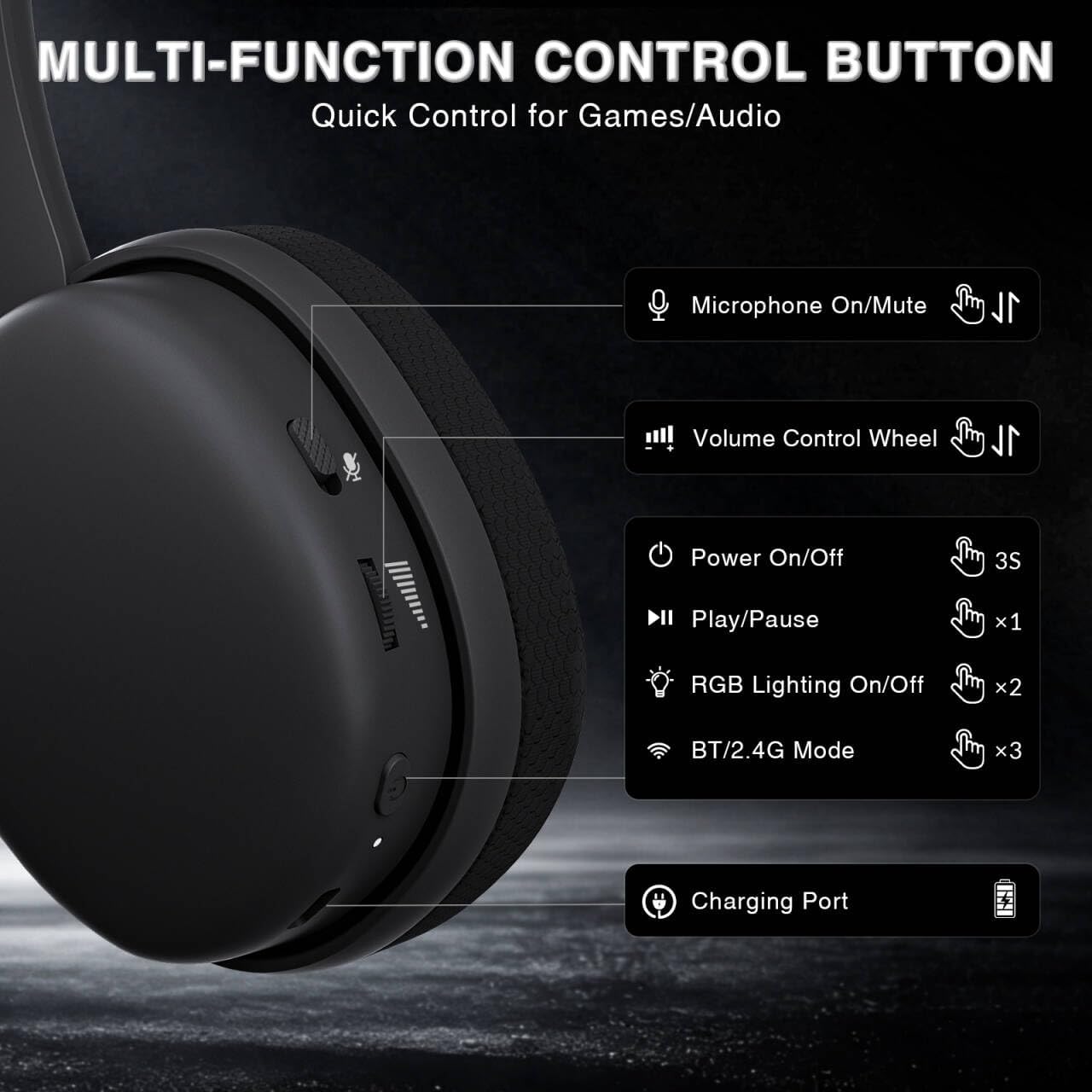
Image: Multi-function control buttons on the AULA G7 Pro headset, showing the microphone on/off toggle, volume control wheel, power switch, play/pause button, RGB lighting on/off button, BT/2.4G mode switch, and charging port.
- Microphone On/Off Toggle: スライドしてマイクをミュートまたはミュート解除します。
- ボリュームコントロールホイール: オーディオ出力音量を調整します。
- 電源スイッチ: 電源をオン/オフするには、3秒間押し続けます。
- 再生/一時停止ボタン: オーディオを再生または一時停止するには、XNUMX回押します。
- RGB照明のオン/オフ: Press twice to toggle RGB lighting.
- BT/2.4G Mode Switch: Press three times to switch between Bluetooth and 2.4G wireless modes.
- 充電ポート: ヘッドセットを充電するための USB-C ポート。
- 3.5mmオーディオジャック: 有線接続の場合。
- マイクポート: 取り外し可能なブームマイクを取り付けるためのものです。
ビデオ: オーバーview of the AULA G7 Pro Wireless Gaming Headset, showcasing its design, features, and different color options (black and pink).
3. セットアップと接続
3.1 2.4Gワイヤレス接続(PC、PS5、PS4、Switch)
For low-latency gaming, use the 2.4G wireless connection.
- Insert the 2.4G USB-A receiver into an available USB port on your PC, PS5, PS4, or Nintendo Switch dock. If your device only has USB-C ports, use the provided USB-C to USB-A adapter.
- Power on the AULA G7 Pro headset by pressing and holding the power button for 3 seconds.
- The headset will automatically attempt to connect to the receiver. The indicator light on the headset will show a stable color once connected.
- On your device, ensure the audio output is set to the AULA G7 Pro headset.

Image: The AULA G7 Pro headset demonstrating its tri-mode connectivity options: 3.5mm wired, Bluetooth 5.3, and 2.4G wireless with USB-C and USB-A receivers, compatible with various devices including PC, PS5, PS4, Switch, and smartphones.
3.2 Bluetooth 5.3 Connection (PC, Smartphones, Tablets)
Connect your headset via Bluetooth for general use with compatible devices.
- Power on the AULA G7 Pro headset.
- Press the BT/2.4G mode switch three times to enter Bluetooth pairing mode. The indicator light will flash.
- On your device (PC, smartphone, tablet), go to Bluetooth settings and search for available devices.
- Select "AULA G7 Pro" from the list to pair. The indicator light on the headset will become stable once connected.
3.3 3.5mm Wired Connection (Xbox, PC, PS5, PS4, Switch, Smartphones)
Use the 3.5mm audio cable for a universal wired connection, especially for Xbox consoles.
- 3.5mm オーディオ ケーブルの一方の端をヘッドセットの 3.5mm オーディオ ジャックに接続します。
- Connect the other end of the 3.5mm audio cable to the audio output port of your device (e.g., Xbox controller, PC audio jack).
- The headset will operate in wired mode. Note that some advanced features like virtual 7.1 surround sound may not be available in wired mode, depending on the device.
4. 操作手順
4.1 マイクの使用
The AULA G7 Pro features a detachable noise-canceling microphone.
- マイクの取り付け: Align the 3.5mm plug of the boom microphone with the microphone port on the headset and insert it firmly.
- ミュート/ミュート解除: Use the microphone on/off toggle switch on the headset to quickly mute or unmute your microphone.
- ノイズキャンセル: The 360° omnidirectional microphone filters out approximately 80% of background noise. For enhanced noise cancellation and voice clarity, install the driver software (Windows 2.4G mode only).
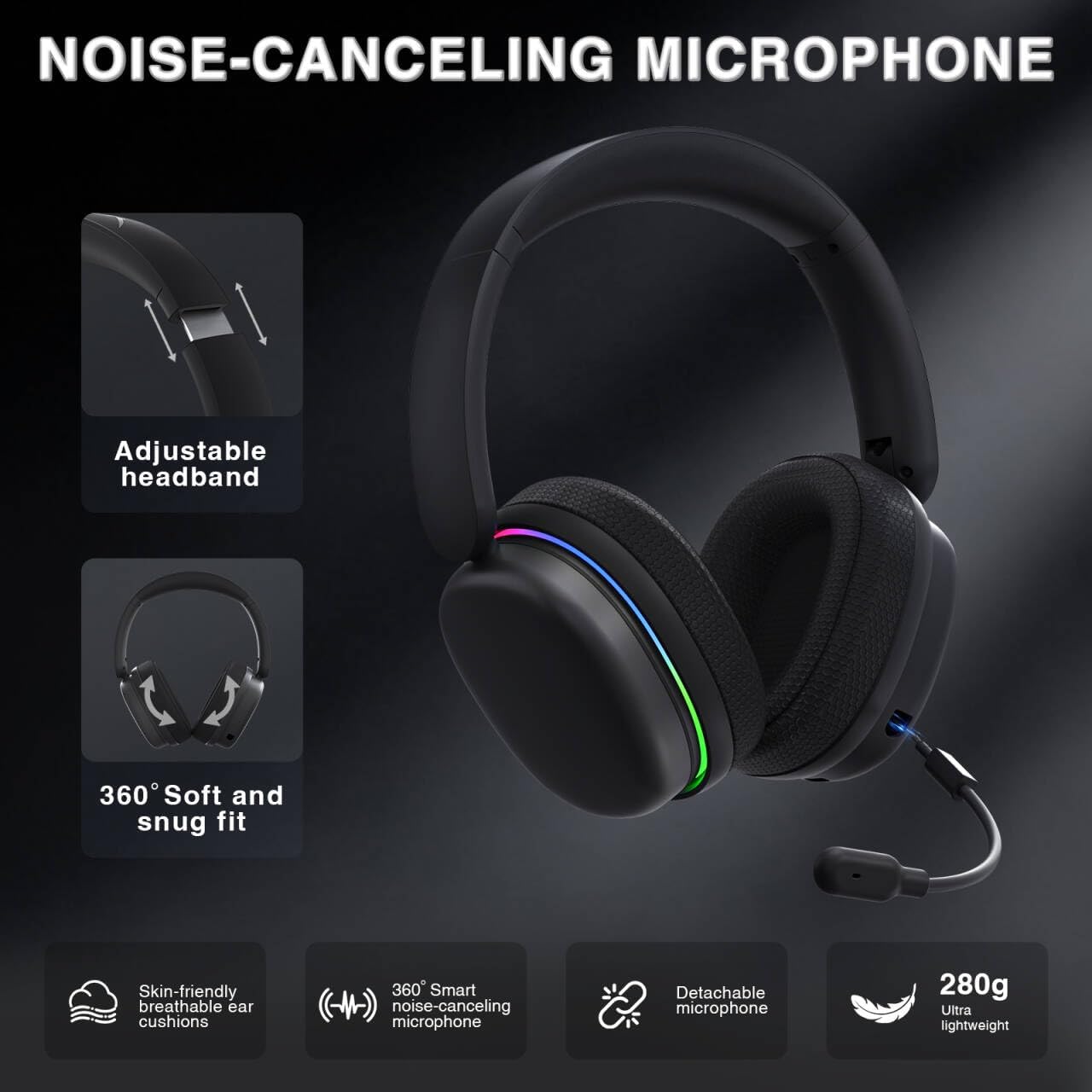
Image: The AULA G7 Pro headset highlighting its adjustable headband, soft and snug fit, skin-friendly breathable ear cushions, 360° smart noise-canceling microphone, detachable microphone, and ultra-lightweight 280g design.
4.2 Virtual 7.1 Surround Sound and EQ Software
Experience immersive audio with virtual 7.1 surround sound and customize your sound profile.
- バーチャル7.1サラウンドサウンド: Available in Windows 2.4G mode, this feature provides precise audio positioning for gaming.
- EQ Software: からドライバーをダウンロードしてインストールします soaidriver.com (Windows 2.4G mode only). The software allows for customizable EQ settings, dynamic bass boost, vocal enhancement, and voice morphing.
- インストールに関する注意: First, insert the 2.4G receiver into your computer, then install the driver. After entering the driver interface, right-click the icon on the left side of the screen to access the audio settings menu.
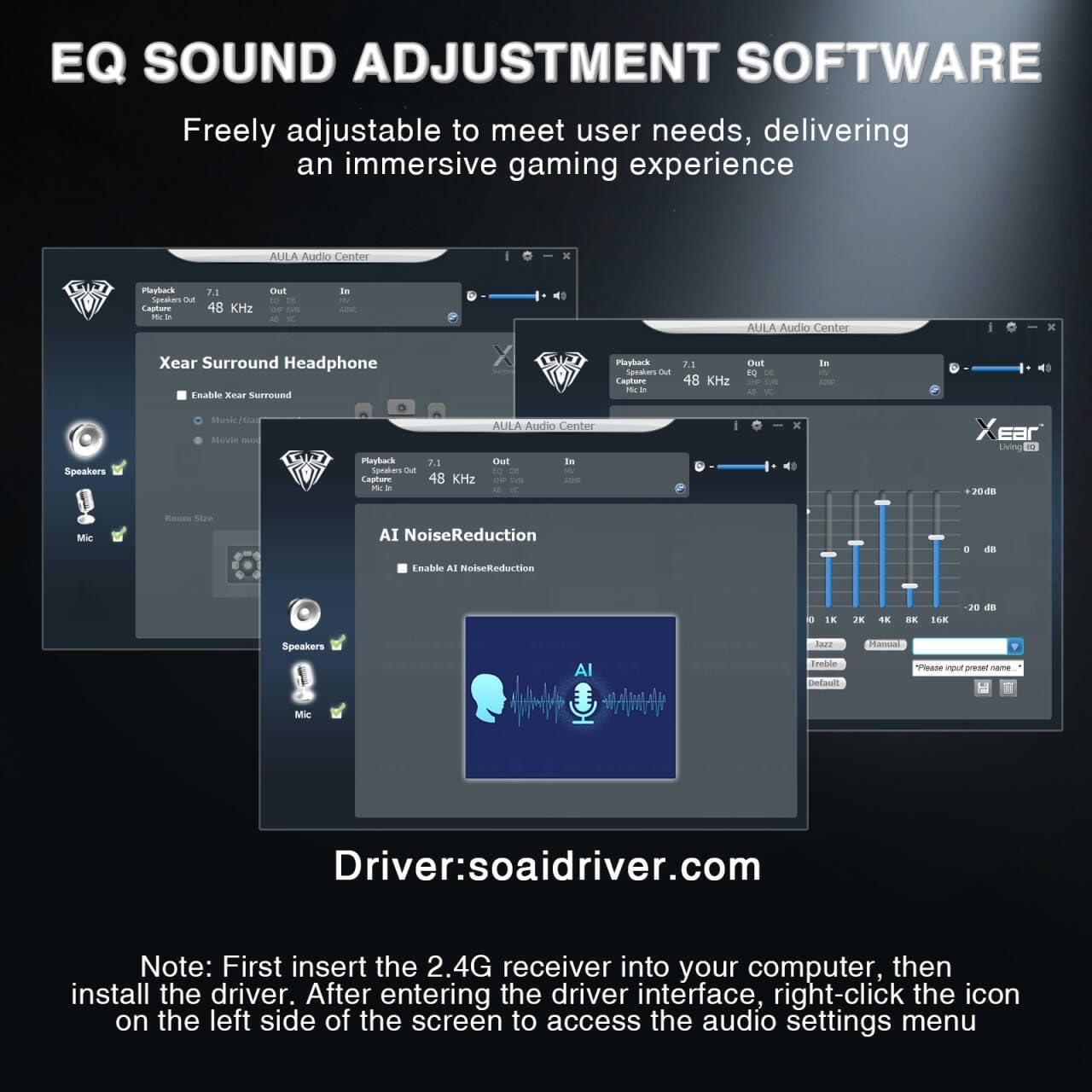
Image: Screenshots of the AULA Audio Center software interface, showing options for Xear Surround Headphone, AI Noise Reduction, and Equalizer settings for sound customization.
4.3 RGB照明
The headset features 16 million-color RGB lighting.
- RGB を切り替える: Press the RGB Lighting On/Off button twice to activate or deactivate the lighting.
- 同期: RGB lighting can synchronize with gaming peripherals for an immersive atmosphere.
5. 充電とバッテリー寿命
The AULA G7 Pro is equipped with a 1000mAh rechargeable battery.
- 充電: Connect the USB-C charging cable to the headset's charging port and the other end to a USB power source (e.g., computer, wall adapter). The indicator light will show charging status.
- バッテリー寿命: Up to 65 hours of playback with RGB lighting off, and approximately 20 hours with RGB lighting activated.
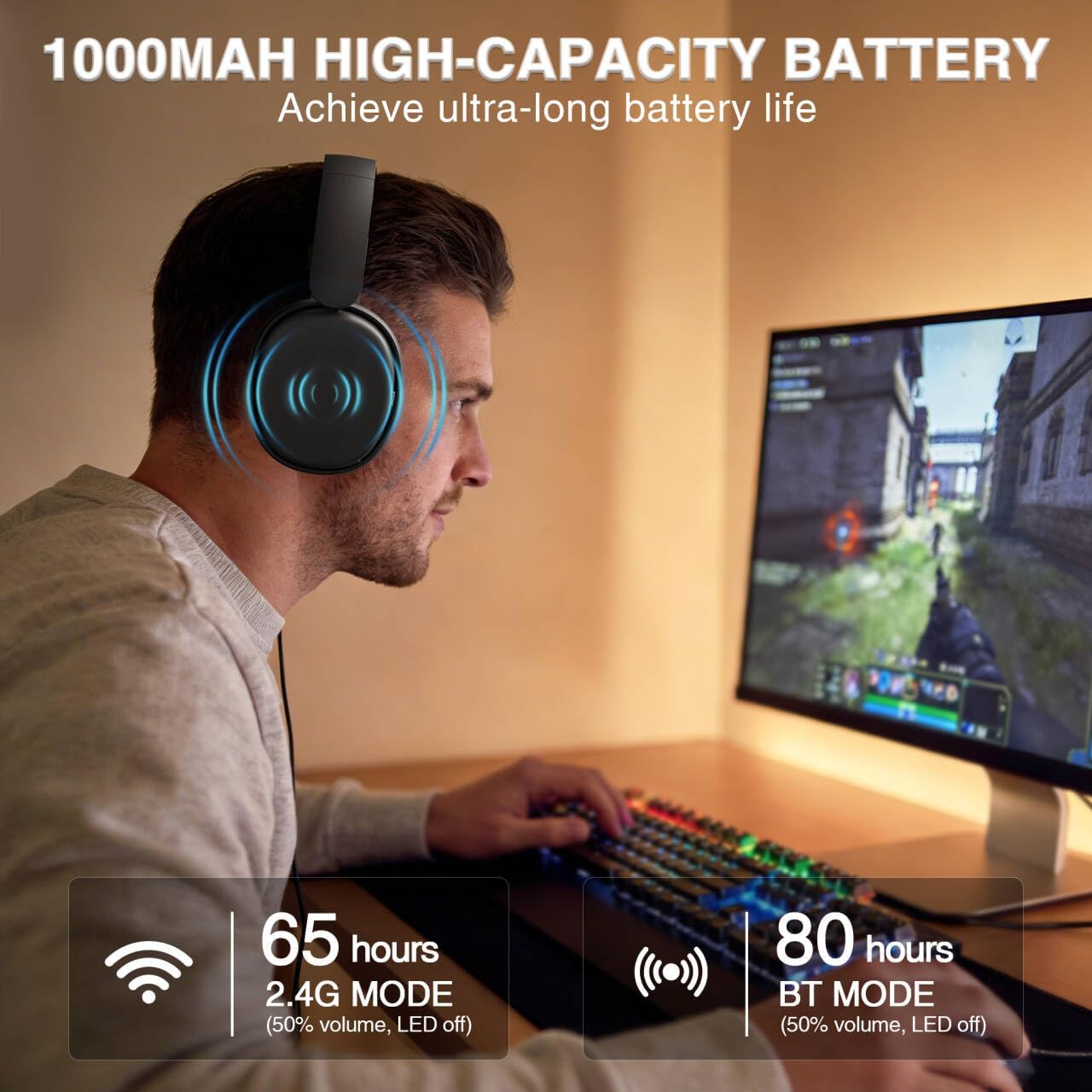
Image: A user wearing the AULA G7 Pro headset while gaming, illustrating the 65 hours of battery life in 2.4G mode (50% volume, LED off) and 80 hours in BT mode (50% volume, LED off).
6. 快適性とデザイン
The headset is designed for extended wear comfort.
- 軽量: Weighing 280g, the headset is designed to minimize pressure during long gaming sessions.
- 人間工学に基づいたフィット感: Features an ergonomic headband with protein leather padding and breathable mesh ear cushions.
- 調整可能: An 8-position adjustable steel frame and 360° acoustic chamber conform to facial contours, with micro-adjustable horizontal angles for a personalized fit.
7. 仕様
| 特徴 | 詳細 |
|---|---|
| ブランド | アウラ |
| モデル名 | G7 Pro |
| 接続技術 | 2.4G Wireless, BT5.3, Wired (3.5mm Jack) |
| Bluetoothバージョン | 5.3 |
| オーディオドライバーのサイズ | 40ミリメートル |
| インピーダンス | 32オーム |
| 騒音制御 | アクティブノイズキャンセリング(マイク) |
| バッテリー容量 | 1000mAh |
| バッテリー寿命(RGBオフ) | Up to 65 Hours (2.4G Mode), Up to 80 Hours (BT Mode) |
| 重さ | 280グラム |
| 対応デバイス | PC, PS5, PS4, Switch, Smartphones, Xbox (wired mode only) |
8。 トラブルシューティング
If you encounter issues with your AULA G7 Pro headset, refer to the following common solutions:
- 音が出ない:
- ヘッドセットの電源がオンになっており、充電されていることを確認します。
- Check that the correct audio output device is selected in your system settings.
- Verify the volume control wheel on the headset is not at minimum.
- For 2.4G/BT modes, ensure the headset is properly paired/connected. Try re-pairing if necessary.
- For wired mode, ensure the 3.5mm cable is fully inserted into both the headset and the device.
- マイクが機能しない:
- 取り外し可能なマイクがしっかりと取り付けられていることを確認してください。
- Check the microphone on/off toggle switch on the headset is in the 'on' position.
- システム設定で正しいマイク入力デバイスが選択されていることを確認します。
- オペレーティング システムまたは通信ソフトウェアでマイクがミュートされていないことを確認してください。
- 接続の問題 (2.4G/Bluetooth):
- Ensure the headset is within range of the receiver/device.
- 他のワイヤレス デバイスからの強い電磁干渉を避けてください。
- ヘッドセットと接続されたデバイスの両方を再起動してみてください。
- 2.4G の場合は、レシーバーを別の USB ポートに接続してみてください。
- 7.1 サラウンド サウンドが機能しない:
- Ensure you are in 2.4G wireless mode on a Windows PC.
- Verify that the AULA driver software is installed and configured correctly.
9. メンテナンス
ヘッドセットの寿命を延ばし、最適なパフォーマンスを確保するには、次のメンテナンス ガイドラインに従ってください。
- クリーニング: ヘッドセットのクリーニングには、柔らかく乾いた布をご使用ください。研磨剤入りの洗剤や溶剤は使用しないでください。
- ストレージ: ヘッドセットは、直射日光や極端な温度を避け、涼しく乾燥した場所に保管してください。
- ケーブルのお手入れ: 損傷を防ぐため、ケーブルを急激に曲げたり、過度に引っ張ったりしないでください。
- バッテリーのケア: バッテリー寿命を最大限に延ばすには、バッテリーを頻繁に完全に放電することは避けてください。長期間使用しない場合でも、ヘッドセットは定期的に充電してください。
10. 保証とサポート
10.1 保証情報
The AULA G7 Pro Wireless Gaming Headset comes with a 1年間保証 ご購入日から1年間有効です。本保証は、通常の使用における製造上の欠陥および仕上がりの品質を保証するものであり、誤用、事故、不正な改造、または通常の摩耗や損耗による損傷は保証の対象外となります。
10.2 カスタマーサポート
For technical assistance, warranty claims, or any questions regarding your AULA G7 Pro headset, please contact AULA customer support through the retailer where you purchased the product or visit the official AULA web連絡先情報のサイト。
Please have your purchase receipt and product model number (G7 Pro) ready when contacting support.