
1. はじめに
The Aputure Amaran Ray 60C is a compact and portable LED video light designed for professional photography and videography. It features OmniColor technology for accurate color reproduction, a wide CCT range from 1,800K to 20,000K, and flexible power options. This manual provides detailed instructions for setting up, operating, and maintaining your Amaran Ray 60C.
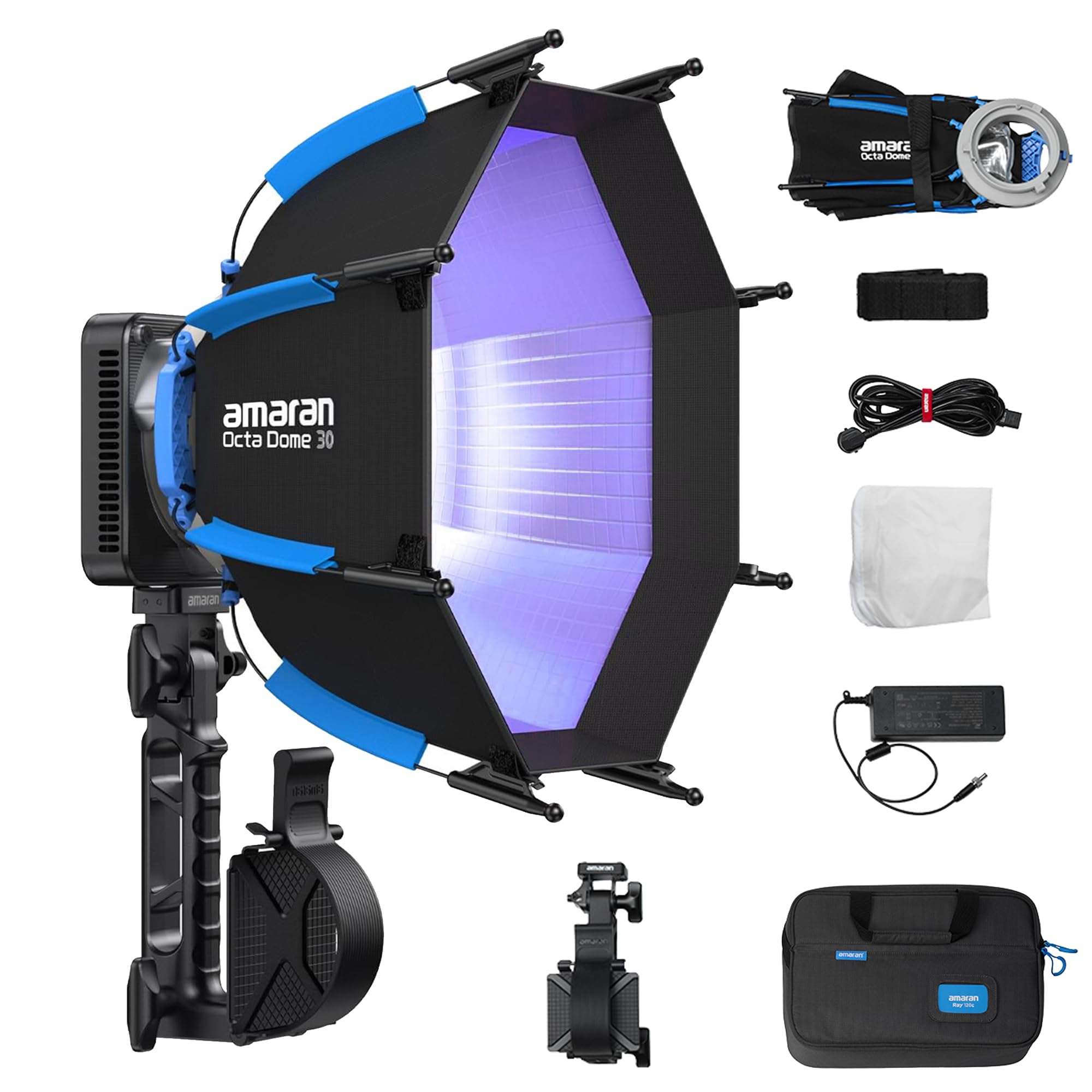
Image 1.1: Amaran Ray 60C LED Portable Video Light with included softbox and grip.
2 製品の特徴
- 高出力: Delivers up to 3,910 lux at 1m without accessories, providing significant brightness for various lighting scenarios.
- OmniColor Technology: Reproduces true-to-life colors with expanded red and blue ranges, achieving high SSI scores (87 Tungsten, 80 D56) for accurate color rendition.
- 広い色温度範囲: Adjustable CCT from 1,800K to 20,000K, allowing for precise color matching and creative lighting effects.
- 柔軟な電源オプション: Supports DC power adapter, amaran Ace E-Lock, and USB-C PD for versatile power solutions, suitable for both studio and on-location shoots.
- 直感的なコントロール: Features a FlowTurn knob for precise adjustments and quick navigation through settings.
- アプリの接続性: Seamless control via the amaran app with built-in NFC for quick pairing.
- IP54耐候性: Designed to withstand dust and splashes, enabling reliable performance in various environmental conditions.
- コンパクトで軽量なデザイン: Weighing only 528.5g (1.17lb), the lamp head is ultra-portable for easy setup, storage, and travel.

画像2.1: 以上view of Amaran Ray 60C key features.

Image 2.2: OmniColor technology details and brightness comparison.

Image 2.3: Professional wide color gamut and CCT adjustment capabilities.
3. 箱の中身
パッケージにすべてのコンポーネントが含まれていることを確認します。
- 1x amaran Ray 60c
- 1x amaran AC to DC 90W Power Adapter (0.5m cable)
- 1x amaran AC Power Cable (4m)
- 1x amaran Octa Dome 30 (Diffuser+Grid)
- 1x amaran Octa Dome 30 Diffusion Cloth
- 1x amaran Octa Dome 30 Light Control Grid
- 1x amaran Ace Lock to Baby Pin Adapter Grip
- 1x amaran Ray Carrying Bag

Image 3.1: All items included in the Amaran Ray 60C package.
4. セットアップ手順
4.1 開梱と初期検査
- キャリングバッグからすべてのコンポーネントを慎重に取り出します。
- Inspect the light fixture and accessories for any signs of damage. If any damage is found, contact your dealer immediately.
4.2 Attaching the Octa Dome 30 Softbox
- Unfold the Octa Dome 30 softbox.
- Align the mounting points of the softbox with the light fixture.
- Secure the softbox to the light fixture using the one-snap setup mechanism. Ensure it is firmly attached.
- Attach the diffusion cloth and grid to the softbox as desired for light shaping.

Image 4.1: One-snap setup for the Octa Dome 30 softbox.
4.3電源接続
- DCアダプターの使用: Connect the amaran AC to DC 90W Power Adapter to the light fixture's DC input, then plug the AC power cable into a wall outlet.
- Using USB-C PD: Connect a compatible USB-C PD power bank or charger to the USB-C PD port on the light fixture.
- Using amaran Ace E-Lock: Attach a compatible amaran Ace E-Lock battery (sold separately) to the designated port on the light fixture.

Image 4.2: Flexible power options for the Amaran Ray 60C.
5. 操作手順
5.1 電源オン/オフ
Press and hold the power button located on the light fixture to turn the unit on or off.
5.2 Adjusting Settings with FlowTurn Knob
The FlowTurn knob allows for precise control over various parameters:
- CCTモード: Rotate the knob to adjust the color temperature from 1,800K to 20,000K.
- HSI モード: Adjust Hue, Saturation, and Intensity.
- RGBモード: Fine-tune Red, Green, and Blue values.
- 輝度: Press the knob to select brightness adjustment, then rotate to change the intensity.
5.3 Using the amaran App
For advanced control and features, download the official amaran app from your device's app store.
- スマートフォンで NFC を有効にします。
- Open the amaran app.
- Tap your smartphone near the NFC tag on the light fixture to pair the device.
- Once paired, you can control CCT, HSI, RGB, brightness, and access various lighting effects (FX) directly from the app.
5.4 Special Lighting Effects (FX)
The Amaran Ray 60C includes 12 built-in lighting effects such as Fireworks, Cop Car, Faulty Bulb, TV, Lightning, Party Lights, Pulsing, Strobe, Explosion, Fire, Paparazzi, and Welding. These can be accessed and adjusted via the amaran app or the on-board controls.
6. メンテナンス
6.1 クリーニング
- クリーニングする前に、デバイスの電源がオフになっており、すべての電源から切断されていることを確認してください。
- Use a soft, dry cloth to wipe the exterior of the light fixture.
- 頑固な汚れには、軽くamp 中性洗剤を含ませた布で拭き、その後乾いた布で拭いてください。研磨剤入りの洗剤や溶剤の使用は避けてください。
- 適切な冷却を確保するために、通気口にほこりやごみが入らないようにしてください。
6.2 ストレージ
- Store the Amaran Ray 60C in its original carrying bag or a suitable protective case when not in use.
- 直射日光や極端な温度を避け、涼しく乾燥した場所に保管してください。
7。 トラブルシューティング
| 問題 | 考えられる原因 | 解決 |
|---|---|---|
| ライトが点灯しない | No power supply; Loose connection; Faulty power adapter/battery | Check power cable and adapter connection; Ensure battery is charged or replaced; Try a different power source. |
| Cannot connect to amaran app | NFC disabled; App not updated; Bluetooth issue | Ensure NFC is enabled on your phone; Update the amaran app; Restart the light and your phone. |
| 光出力が一定でない | Overheating; Firmware issue | Ensure proper ventilation; Check for firmware updates and install if available. |
| 動作中に異音がする | Fan obstruction; Component issue | Ensure fan vents are clear; If noise persists, contact customer support. |

Image 7.1: Amaran Ray 60C weather resistance and cooling system details.
8. 仕様
| 特徴 | 仕様 |
|---|---|
| モデル | Amaran Ray 60C |
| ワットtage | 60ワット |
| CCT範囲 | 1,800K - 20,000K |
| 接続性 | ブルートゥース |
| 電源入力 | DC 100-240V, USB-C PD, amaran Ace E-Lock |
| アイテム重量 | 7.04ポンド(パッケージの総重量) |
| Lamp ヘッド重量 | 528.5g / 1.17ポンド |
| パッケージ寸法 | 16.4 x 10.4 x 4.4インチ |
| 耐候性 | IP54定格 |
| メーカー | アプチャー |

Image 8.1: Compact dimensions and weight of the Amaran Ray 60C.
9. 保証とサポート
Aputure products typically come with a standard manufacturer's warranty. For specific warranty details, please refer to the warranty card included with your product or visit the official Aputure website. For technical support, troubleshooting assistance, or service inquiries, please contact Aputure customer support or your authorized dealer.
標準保証期間を超えて保証期間を延長できる追加保護プランをご購入いただける場合があります。オプションについては販売店にお問い合わせください。