
導入
The MACAP MI40 Pro is a high-performance commercial espresso grinder designed for demanding environments such as cafés and coffee bars. It features 65 mm flat tempered steel burrs and a powerful 600 W high-torque motor, ensuring fast and consistent grinding for superior espresso extraction. The intuitive 3.5" touchscreen display simplifies dose programming and real-time adjustments. This manual provides essential information for the safe and efficient operation, setup, and maintenance of your grinder.
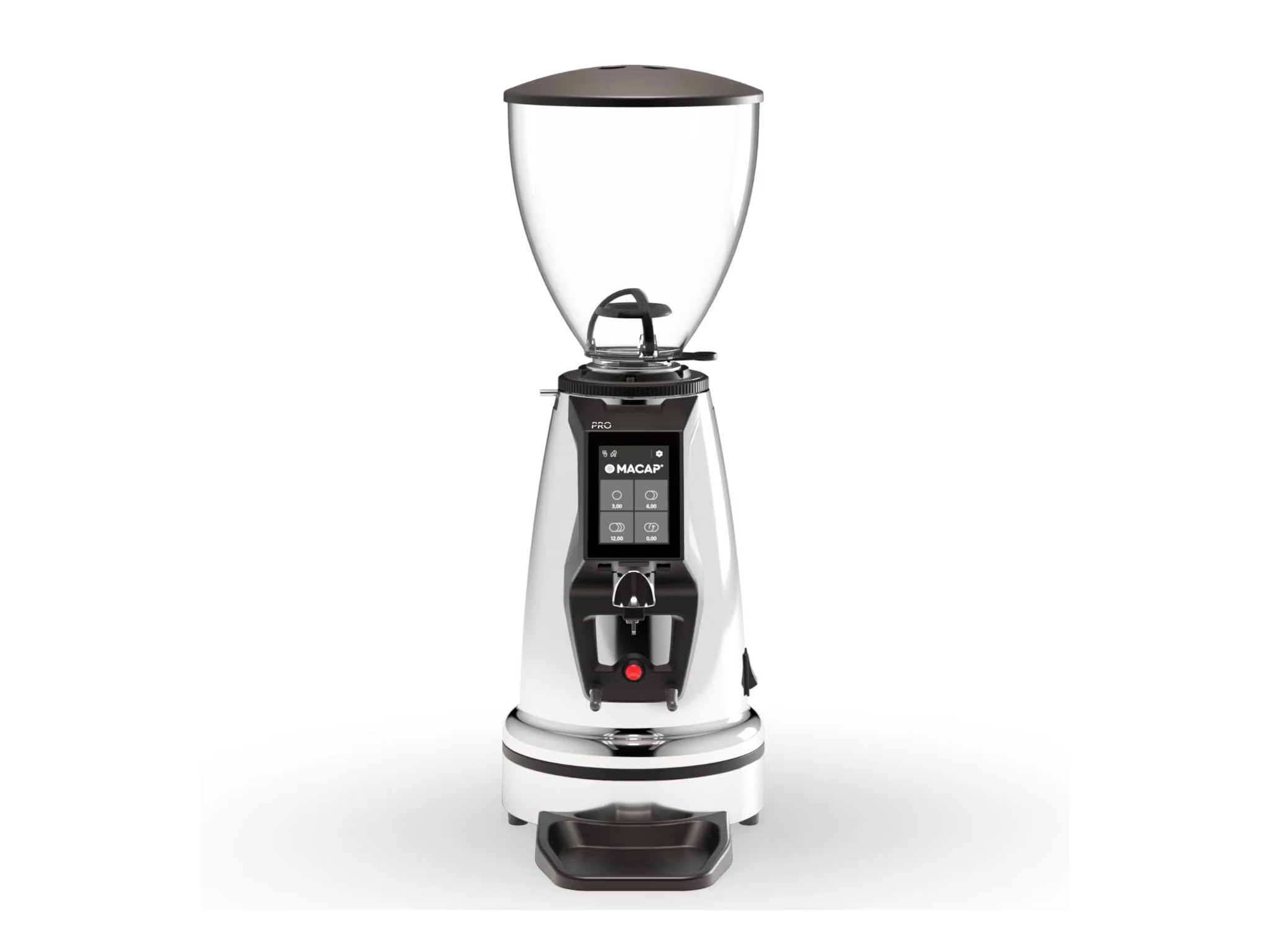
Image: MACAP MI40 Pro Commercial Espresso Grinder, showcasing its chrome exterior and overall design.
主な特徴:
- High-Performance Commercial Grinder: Built for cafés and coffee bars, the MI40 Pro delivers fast, consistent grinding with a powerful 600W motor.
- 65mmフラットバー: Large flat steel burrs provide uniform grind particle size for exceptional espresso extraction.
- 直感的なタッチスクリーンインターフェイス: A 3.5" color touchscreen with Macap HMI streamlines dose programming and real-time control.
- グラインド調整: Features a standard grind ring with zero-grind setting; optional stepless micrometric adjustment is available for ultra-fine control.
- Professional Workflow Features: Includes height-adjustable hands-free filter support, IP68 start button, anti-vibration metal fork, and a pull-out plate for improved workflow and cleanliness.
セットアップ手順
- 開梱: Carefully remove the grinder from its packaging. Retain all packaging materials for future transport or service.
- 配置: Position the grinder on a stable, level, and dry surface. Ensure adequate ventilation around the unit. Avoid placing it near heat sources or in direct sunlight.
- ホッパーアセンブリ: Place the bean hopper onto the grinder body, ensuring it is securely seated. The hopper should lock into place to prevent accidental removal during operation.
- 初期クリーニング: 初めて使用する前に、グラインダーの外側を洗剤で拭いてください。amp cloth. Ensure the burr chamber and coffee chute are free of any packing debris.
- 電源接続: Connect the power cord to a grounded 110 Volt AC outlet. Ensure the power switch is in the "OFF" position before plugging in.
操作手順
1.電源のオン/オフ
- To power on, flip the main power switch located on the grinder. The touchscreen display will illuminate.
- 電源を切るには、主電源スイッチを「OFF」の位置に切り替えます。
2. グラインド調整
The MI40 Pro features a grind adjustment ring. Rotate the ring to achieve the desired grind fineness. Finer grinds are typically required for espresso. The standard grind ring includes a zero-grind setting for calibration. If equipped with optional stepless micrometric adjustment, use the fine adjustment knob for precise control.
3. Dosing and Grinding
- 充填ホッパー: Pour fresh, roasted coffee beans into the hopper.
- Program Dose: Use the 3.5" touchscreen display to program your desired single or double shot dose. The intuitive Macap HMI allows for easy adjustment of grinding time.
- ポルタフィルターの位置: Place your portafilter onto the height-adjustable hands-free filter support.
- 研磨開始: Press the IP68-rated activation button with the portafilter. The grinder will dispense the programmed dose.
- モニター: Observe the grind consistency and adjust as necessary for optimal espresso extraction.
メンテナンス
Regular cleaning and maintenance ensure the longevity and optimal performance of your MACAP MI40 Pro grinder.
1.毎日の清掃
- ホッパー: Empty any remaining beans from the hopper. Wipe the inside of the hopper with a dry cloth.
- 外観: Wipe down the exterior surfaces of the grinder with a soft, damp 布で拭いてください。研磨剤入りの洗剤や溶剤は使用しないでください。
- Pull-out Plate: Remove and clean the pull-out plate located beneath the grinding area to collect any stray grounds.
2. Weekly / Bi-Weekly Cleaning (Burrs)
- 電源を切る: グラインダーが電源から外されていることを確認してください。
- ホッパーの取り外し: 豆ホッパーを取り外します。
- アクセスバー: Follow the manufacturer's instructions to safely access the grinding burrs. This typically involves removing the top burr carrier.
- クリーンバリ: Use a stiff brush or a vacuum cleaner to remove all coffee grounds and oils from the burrs and the burr chamber. Do not use water.
- 組み立て直す: Carefully reassemble the burr carrier and hopper, ensuring all components are securely in place.
トラブルシューティング
| 問題 | 考えられる原因 | 解決 |
|---|---|---|
| グラインダーが始動しません。 | No power; power switch off; safety interlock not engaged. | Check power cord connection. Ensure main power switch is ON. Verify hopper is correctly seated. |
| Inconsistent grind or no coffee dispensing. | Hopper empty; burrs clogged; grind setting too fine. | Refill hopper. Clean burrs and chute (refer to Maintenance). Adjust grind setting coarser. |
| Grinder is unusually loud or vibrating. | バリに異物が混入、部品が緩んでいる。 | Immediately power off and unplug. Inspect burr chamber for foreign objects. If problem persists, contact support. |
If you encounter issues not listed here or if solutions do not resolve the problem, please contact Macap customer support.
仕様
| モデル | MI40プロ |
| ブランド | Macap |
| 色 | クロム |
| 材料 | ステンレス鋼 |
| バリの種類 | 65mm Flat Tempered Steel Burrs |
| モーター出力 | 600ワット |
| 巻tage | 110ボルト |
| アイテム重量 | 19.6 ポンド |
| 寸法(長さ×幅×高さ) | 12.1インチ x 7.7インチ x 22インチ |
| ホッパー容量 | 2.65ポンド(約1.2kg) |
| 画面 | 3.5" Color Touchscreen with Macap HMI |
| アクティベーションボタン | IP68定格 |
保証とサポート
For warranty information and customer support, please refer to the documentation provided with your purchase or visit the official Macap webサイトでご確認ください。保証請求に備えて購入証明書を保管してください。
If you require technical assistance or have questions regarding the operation or maintenance of your MI40 Pro grinder, please contact Macap customer service through their official channels.