
導入
Thank you for choosing the Ulanzi MA66 Multi-functional Quick Release Tripod. This versatile accessory is designed to enhance your photography and videography experience with DJI Osmo Pocket 3 and Pocket 4 cameras. It offers multiple modes of operation, including tabletop stand, handheld grip, tripod, hanging, and magnetic attachment, providing flexibility for various shooting environments. Please read this manual carefully to ensure proper use and maintenance of your device.
製品終了view
The Ulanzi MA66 is a compact and lightweight accessory crafted from durable aluminum alloy. It integrates five distinct modes into a single unit, making it an indispensable tool for creators on the go.
主な特徴:
- 5-in-1 機能: Seamlessly switch between Tabletop Stand, Handheld Grip, Tripod, Hanging Mode, and Magnetic Stand.
- 強力な磁気アタッチメント: Equipped with powerful magnets for secure attachment to smooth metal surfaces.
- Uka & Arca-Swiss Quick Release System: Supports both Uka and Arca-Swiss quick release plates for rapid device changes.
- 210°角度調整: Flexible rotation allows for diverse shooting angles.
- 専用設計: Specifically designed for DJI Osmo Pocket 3 and Pocket 4, ensuring full access to buttons, screen rotation, joystick, and charging port.
- 軽量&ポータブル: Weighing approximately 75g, it is easy to carry and can be attached to backpack straps.
設定
カメラの取り付け:
- Ensure the Ulanzi MA66 is in its folded or desired configuration.
- Align the quick release plate on your DJI Osmo Pocket 3 or Pocket 4 with the corresponding slot on the MA66.
- Slide the camera onto the MA66 until it clicks securely into place. Verify that the camera is firmly attached before use.
Using the Quick Release System:
The MA66 supports both Uka and Arca-Swiss quick release systems. To detach, simply press the release mechanism and slide the camera off. To attach, align and slide until it locks. If the base does not attach correctly, adjust its orientation until it is firmly fixed.

Image: Demonstrates the Uka and Arca-Swiss quick release system for easy camera attachment and detachment.
動作モード
The Ulanzi MA66 offers five versatile operating modes to suit various shooting needs:
1. Tabletop Stand Mode:
Unfold the legs to create a stable base for placing your camera on flat surfaces like tables or desks. Ideal for video calls, live streaming, or stationary recording.

Image: Shows the MA66 in tabletop stand mode, supporting a camera on a desk.
2. Handheld Grip Mode:
Fold the legs together to form a comfortable handheld grip. This mode is perfect for vlogging, action shots, or any situation requiring mobile filming.

Image: Illustrates the MA66 being used as a handheld grip for dynamic shooting.
3. 三脚モード:
Extend the legs fully to use the MA66 as a mini tripod. This provides stability for time-lapses, long exposures, or group photos.
4. Hanging Mode:
Utilize the integrated hook to hang the device from railings, fences, or other suitable structures. This allows for unique POV shots and stable recording in unconventional locations. When using hanging mode, ensure all tripod feet are in full contact with a stable, flat support surface. Do not attach to moving objects (such as car windows).

Image: Shows the MA66 hanging from a tennis net, demonstrating its hanging mode functionality.
5. Magnetic Stand Mode:
The powerful magnets allow the MA66 to attach securely to smooth metal surfaces like shelves or refrigerators. This provides a stable, hands-free setup for creative angles. Ensure the magnetic attachment is used correctly for optimal stability.
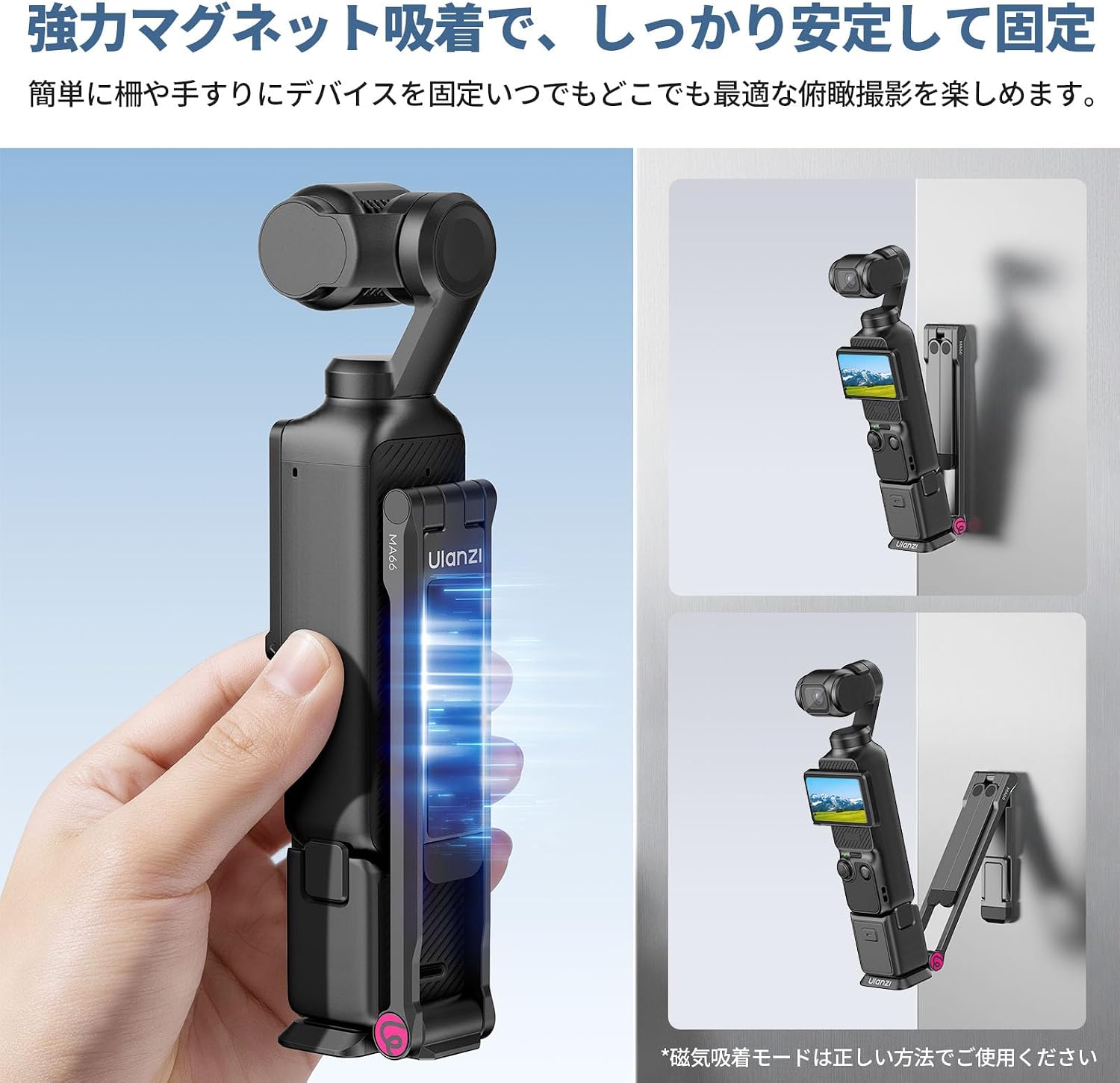
Image: Displays the MA66 attached magnetically to a metal surface, highlighting its strong magnetic hold.
角度調整:
The MA66 features a 210° free angle adjustment. The rotation is smooth, allowing you to easily find and lock your desired shooting angle. The design ensures that the charging port remains unobstructed.

Image: Illustrates the 210-degree angle adjustment capability and unobstructed charging port.
移植性:
The MA66 can be flexibly stored and easily retrieved. Its feet can be attached to a strap buckle, allowing for convenient carrying on backpack straps. This enables quick access and hands-free shooting while on the move.
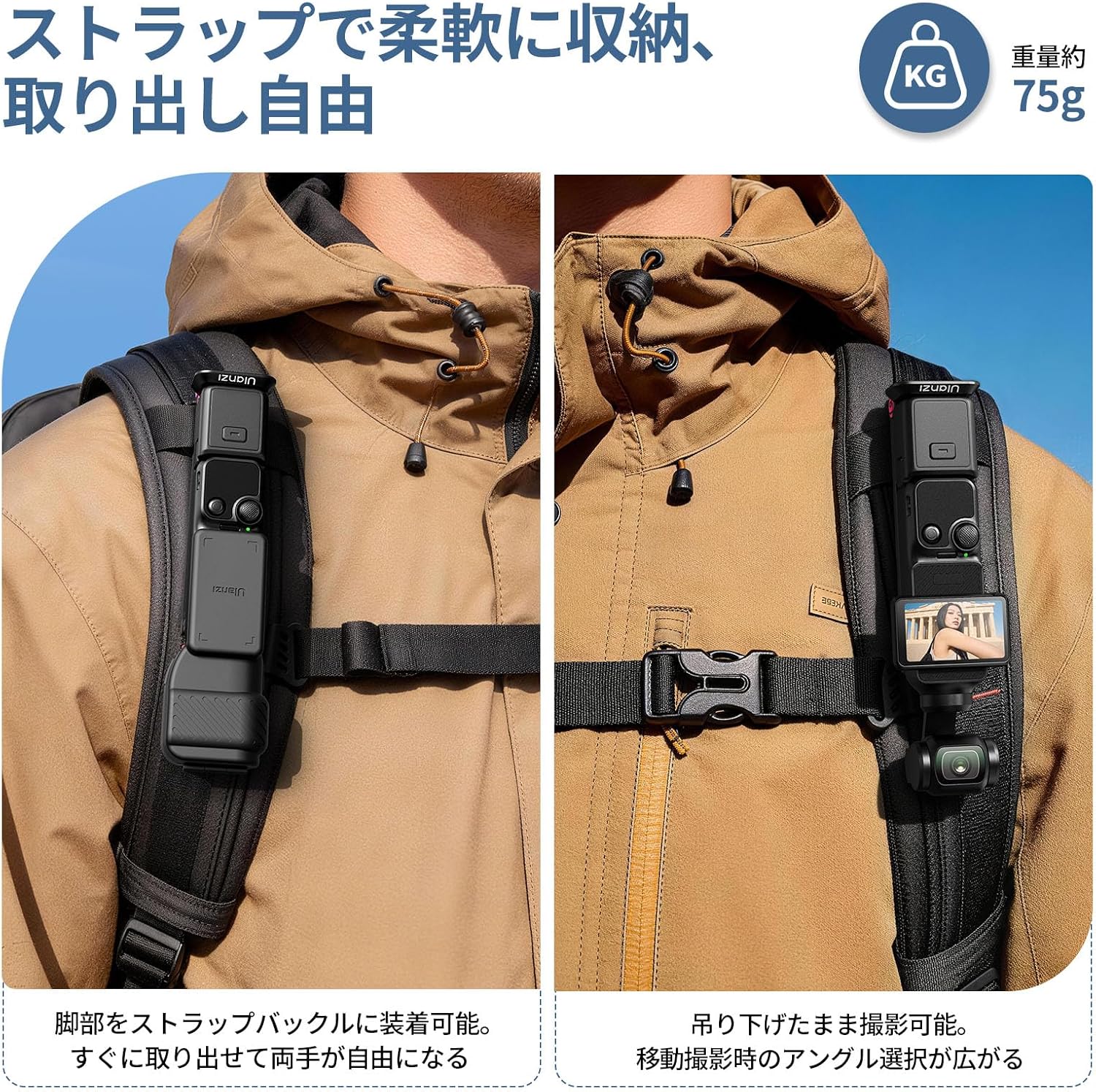
Image: Shows the MA66 attached to a backpack strap, demonstrating its portability and quick access feature.
メンテナンス
- クリーニング: 製品は柔らかく乾いた布で拭いてください。刺激の強い化学薬品や研磨剤の使用は避けてください。
- ストレージ: 三脚は直射日光や極端な温度を避け、涼しく乾燥した場所に保管してください。
- 検査: Periodically check all moving parts and connections for any signs of wear or damage.
- 過負荷を避ける: Do not exceed the maximum load capacity of 249.99g to prevent damage.
トラブルシューティング
- カメラがしっかりと取り付けられていない: Ensure the quick release plate is correctly aligned and fully inserted until it locks. Check for any obstructions.
- Magnetic Attachment Instability: Ensure the metal surface is smooth, flat, and clean. The magnetic force is strong but may not hold on uneven or painted surfaces. Always verify stability before leaving your camera unattended.
- Angle Adjustment Stiffness: The hinge is designed to be firm to maintain position. Apply gentle, consistent force to adjust the angle.
- 三脚の不安定さ: Ensure the legs are fully extended and placed on a flat, stable surface. The compact design is best suited for tabletop use; for outdoor or uneven terrain, exercise caution.
仕様
| ブランド | ウランジ |
| モデル番号 | MA66 (C110JP110) |
| 色 | 黒 |
| 対応デバイス | DJI Osmo Pocket 3, DJI Osmo Pocket 4 |
| 材料 | アルミニウム合金 |
| アイテム重量 | 75グラム |
| 重量制限 | 249.99グラム |
| 折りたたみ時のサイズ(奥行き×幅×高さ) | 38 x 11.5 x 121.8 ミリメートル |
| 雲台タイプ | ボールヘッド |
| 特集 | 多機能 |
| 保証 | 1年間のメーカー保証 |
保証とサポート
The Ulanzi MA66 Multi-functional Quick Release Tripod comes with a 1-year manufacturer warranty. If you encounter any issues with the product, please contact Ulanzi customer support. We aim to respond to inquiries within 24 hours.
For further assistance or to report a defect, please refer to the contact information provided with your purchase or visit the official Ulanzi webサイト。