
1. はじめに
The MoKo Wireless CarPlay Adapter seamlessly converts your car's existing wired CarPlay system into a wireless experience. This adapter is designed for quick auto-connection and stable performance, allowing you to enjoy navigation, music, calls, and Siri assistant without the need for cables. Its compact design and durable construction ensure a reliable and convenient driving experience.

Figure 1: Comparison of wired vs. wireless CarPlay setup, demonstrating reduced cable clutter.
2.製品オーバーview
The MoKo Wireless CarPlay Adapter features a compact form factor with a flexible nylon braided cable for enhanced durability. It includes an upgraded 2025 core chip for ultra-fast startup and low-latency connection. An LED indicator provides status feedback.
2.1 パッケージ内容
- MoKo Wireless CarPlay Adapter
- USB-C - USB-A アダプター(より幅広い互換性を実現)
- クイックスタートガイド

Figure 2: The MoKo Wireless CarPlay Adapter with its flexible nylon braided cable and LED indicator.

Figure 3: The adapter shown with both USB-A and USB-C connection options.
3. セットアップ手順
Setting up your MoKo Wireless CarPlay Adapter is a simple plug-and-play process. No complex installations or tools are required.
- プラグイン: Connect the MoKo Wireless CarPlay Adapter into your car's USB port that supports wired Apple CarPlay. Use the appropriate USB-A or USB-C connector.
- Bluetooth のペアリング: On your iPhone, go to Bluetooth settings and pair with the adapter (usually named 'Wireless-Adapter-XXXX'). Ensure your iPhone's Wi-Fi is also turned on.
- CarPlayに接続: Once paired, your car's display will prompt you to connect to CarPlay. Confirm the connection.
The adapter is designed to auto-connect to your iPhone when you start your car, significantly reducing connection time compared to traditional wired setups.
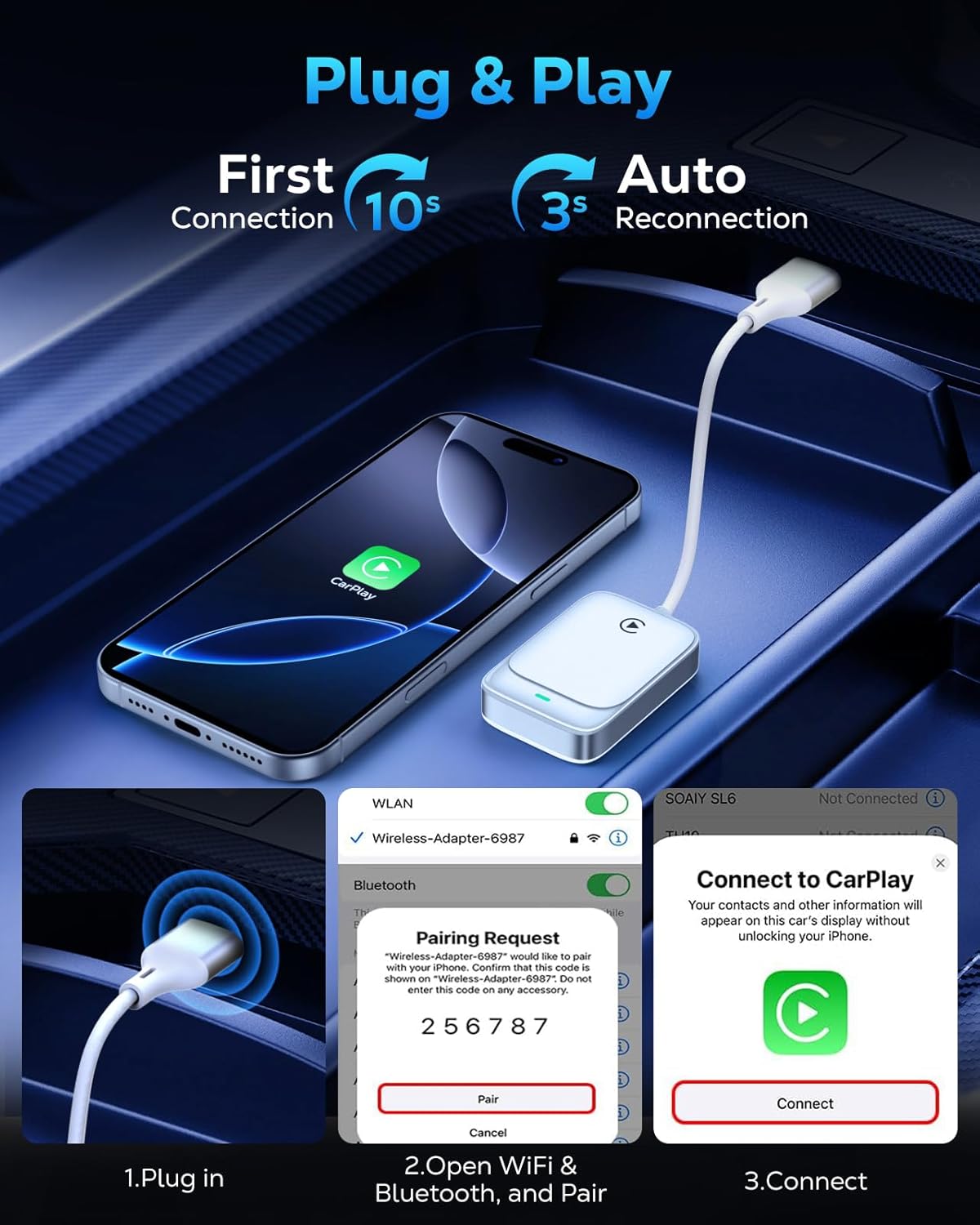
Figure 4: Visual guide for the three-step plug and play connection process.
3.1 セットアップビデオガイド
Video 1: This video demonstrates the seamless wireless CarPlay experience, including the unboxing and quick setup process of the MoKo Wireless CarPlay Adapter in a vehicle.
4. 操作手順
Once connected, the MoKo Wireless CarPlay Adapter allows you to utilize all standard CarPlay functions wirelessly, maintaining your car's original control methods.
4.1 コア機能
- ナビゲーション: Use Apple Maps or other compatible navigation apps directly on your car's display.
- 音楽再生: Stream music from your iPhone's library or favorite apps.
- Siri Assistant: Activate Siri for voice commands, hands-free messaging, and more.
- 電話: Make and receive calls safely using your car's infotainment system.

Figure 5: Display of various CarPlay functions available through the adapter.
4.2制御方法
The adapter supports your car's original control mechanisms for a familiar user experience:
- 音声アシスタント: ハンズフリー操作にはSiriをご利用ください。
- ステアリングホイールコントロール: Manage audio, calls, and navigation directly from your steering wheel.
- タッチスクリーンコントロール: Interact with CarPlay apps via your car's touch screen.
- OEMノブコントロール: Utilize your car's original equipment manufacturer (OEM) control knobs.

Figure 6: Illustration of different control methods supported by the adapter.
4.3 操作ビデオガイド
ビデオ2: このビデオでは、view of the MoKo Wireless CarPlay Adapter, demonstrating its features and how it enhances the in-car experience.
5. 互換性
The MoKo Wireless CarPlay Adapter offers broad compatibility with specific requirements:
- 車の互換性: Compatible with any car equipped with a factory-installed wired Apple CarPlay system.
- iPhone 互換性: Supports iPhone 6 and later models.
- iOSバージョン: iOS 10以上が必要です。
Note: This adapter is NOT compatible with vehicles that lack Apple CarPlay or with Android Auto systems. Please verify your car's specifications before purchase.
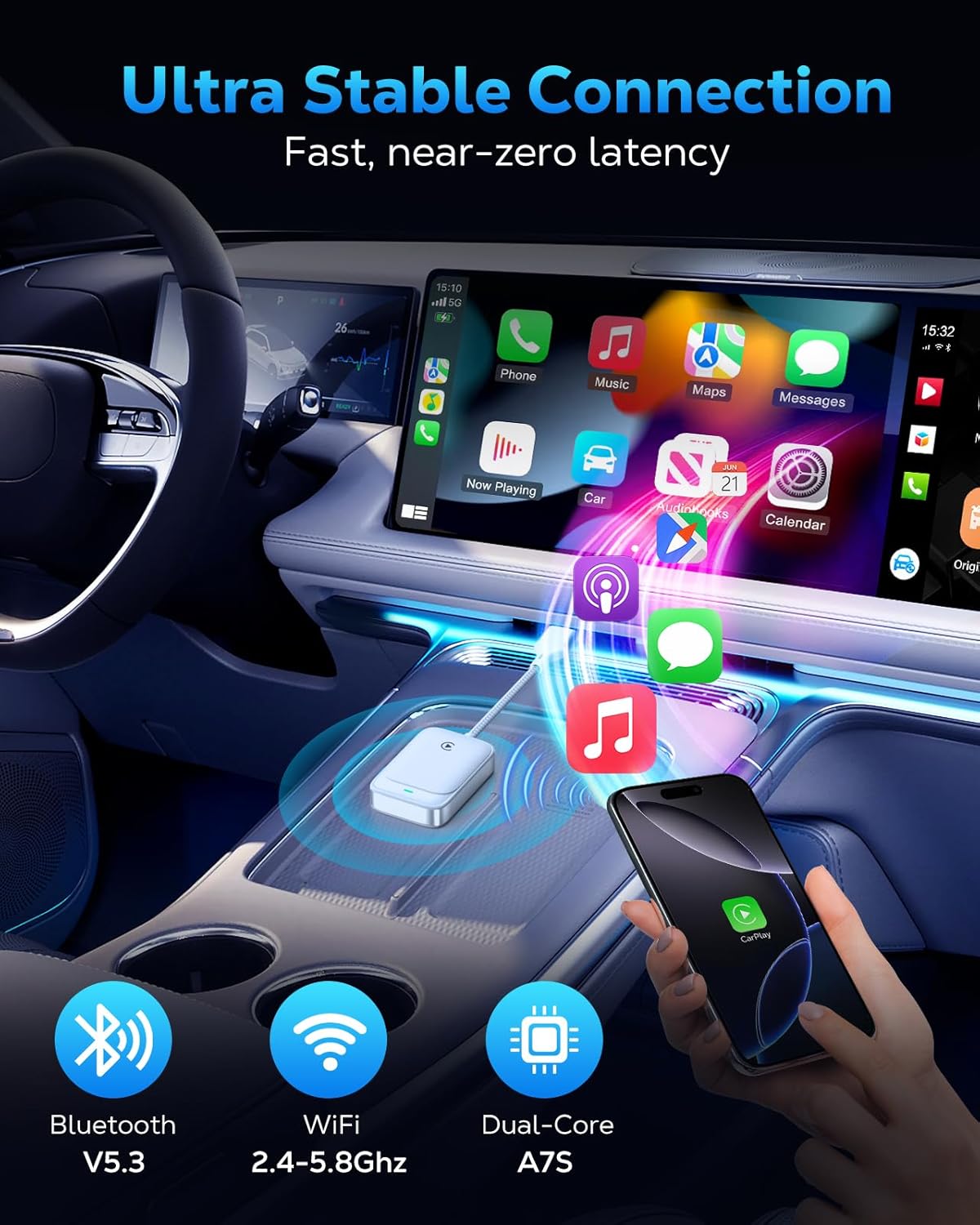
Figure 7: The adapter's advanced chip for stable and fast connection.
6。 トラブルシューティング
If you encounter issues with your MoKo Wireless CarPlay Adapter, consider the following common solutions:
- 接続の問題: If the adapter fails to connect or disconnects frequently, ensure your iPhone's Bluetooth and Wi-Fi are both enabled. Try restarting both your iPhone and your car's infotainment system.
- ファームウェアの更新: The adapter supports firmware updates for optimal functionality and to resolve potential issues. Refer to the official MoKo support website for instructions on how to check for and apply updates.
- 互換性チェック: Double-check that your vehicle has factory-installed wired Apple CarPlay and that your iPhone meets the iOS 10+ requirement.
For persistent issues, please refer to the detailed solutions in the included manual or contact our professional technical support team.
7. 仕様
| 特徴 | 詳細 |
|---|---|
| 製品寸法 | 7.6 x 1.34 x 0.47インチ |
| アイテム重量 | 0.74オンス |
| 接続性 | 5.8GHz WiFi, Bluetooth V5.3 |
| チップセット | 2025 Upgraded Core Chip (e.g., Cortex A7S) |
| 互換性 | Cars with factory wired Apple CarPlay, iPhone 6+ with iOS 10+ |
8. メンテナンス
To ensure the longevity and optimal performance of your MoKo Wireless CarPlay Adapter, follow these simple maintenance guidelines:
- 清潔に保ちます: アダプターは定期的に柔らかく乾いた布で拭き、ほこりやゴミを取り除いてください。液体クリーナーの使用は避けてください。
- 極端な温度を避ける: Do not expose the adapter to extreme heat or cold, as this can affect its internal components.
- 取り扱いにはご注意ください: While the braided cable is durable, avoid excessive bending or pulling on the cable and connectors to prevent damage.
- 安全な配置: Ensure the adapter is placed in a secure location within your vehicle to prevent it from being dislodged or damaged during driving.
9. サポート
MoKo is committed to providing excellent customer support. If you have any questions, encounter issues, or require technical assistance with your Wireless CarPlay Adapter, please do not hesitate to contact our professional technicians. We are always ready to help you.
For the latest firmware updates and support resources, please visit the official MoKo webサイトを参照するか、クイック スタート ガイドに記載されている連絡先情報を参照してください。