
1. 安全情報
このトレッドミルを使用する前に、すべての説明書をよくお読みください。このマニュアルは、今後の参考のために保管してください。
- 最大ユーザー重量: 最大重量容量 400 ポンド (181 kg) を超えないようにしてください。
- 配置: Place the treadmill on a solid, level surface with adequate clearance around it (at least 2 meters behind and 0.6 meters on each side).
- 子供とペット: Keep children and pets away from the treadmill during operation. Adult supervision is required at all times.
- 服装: 適切な運動着と運動靴を着用してください。可動部に巻き込まれる可能性のあるゆったりとした服装は避けてください。
- 緊急停止: Always attach the safety key clip to your clothing before starting a workout. In case of an emergency, pull the safety key to immediately stop the treadmill.
- 電源コード: Ensure the power cord is not pinched or damaged. Do not place the treadmill on the power cord.
- 健康状態: 特に既往症がある場合は、運動プログラムを開始する前に医師に相談してください。
- メンテナンス: 安全な操作を確保するために、このマニュアルに記載されているとおりに定期的にメンテナンスを実行してください。
2. パッケージ内容
組み立て前にすべてのコンポーネントが揃っていることを確認してください。
- FOUSAE X430 Treadmill Main Unit
- 電源コード
- 安全キー
- 組み立てツール(付属している場合)
- ユーザーマニュアル
3. セットアップと組み立て
The FOUSAE X430 Treadmill requires some assembly. Follow these steps for proper setup:
- 開梱: すべての部品をパッケージから慎重に取り出してください。梱包材は、将来の輸送や保管のために保管しておいてください。
- 基地の配置: トレッドミルのベースを平らで安定した面に置きます。
- 直立アセンブリ: Attach the uprights and console according to the diagrams in the included assembly guide. Ensure all bolts are securely tightened.
- 電源接続: 電源コードをアース付きコンセントに差し込みます。
- 安全キー: Familiarize yourself with the safety key and its placement on the console.

The treadmill features hydraulic automatic folding for easy storage and mobility wheels for convenient relocation.
4. 操作手順
4.1コントロールパネルオーバーview

The oversized LED screen displays key workout data including time, distance, speed, calories, incline, and pulse. Integrated pulse grips monitor heart rate.
The console features an LED display, control buttons for speed and incline, pulse grips, and a device holder.
4.2 ワークアウトの開始
- トレッドミルがコンセントに接続され、電源スイッチがオンになっていることを確認します。
- Attach the safety key clip to your clothing and place the magnetic end onto the designated area on the console.
- Step onto the treadmill belt, holding the handrails for stability.
- スタートボタンを押して開始します。ベルトが低速で動き始めます。
4.3 速度調整
Adjust the speed using the '+' and '-' buttons on the console. The treadmill offers a speed range from 0.6 MPH to 10 MPH.
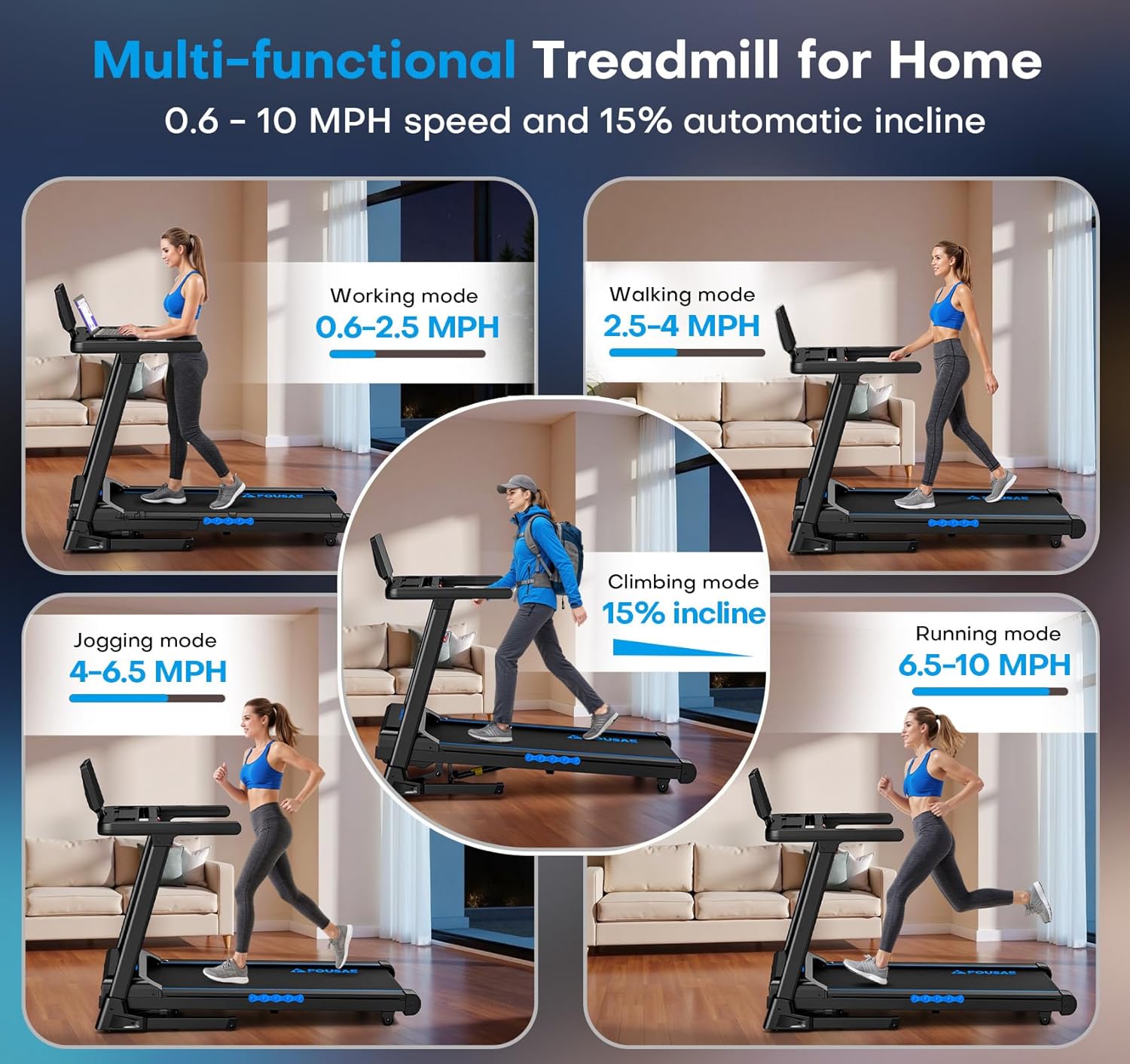
The treadmill supports various exercise modes from walking to running, with speeds up to 10 MPH.
4.4 傾斜調整
The treadmill features an automatic incline system, adjustable from 0% to 15%. Use the incline buttons on the console to change the incline level during your workout.

Automatic incline adjustment up to 15% allows for varied workout intensity and increased calorie expenditure.
4.5 Workout Programs and Modes
The treadmill includes 12 pre-set High-Intensity Interval Training (HIIT) programs and 3 countdown modes (distance, time, or calories) to customize your workout goals.

Utilize the 12 HIIT programs or set goals with the 3 countdown modes for diverse training sessions.
4.6 App Connectivity and Speakers
Connect your device via Bluetooth to popular fitness apps such as FITSHOW, KINOMAP, and Zwift for interactive workouts. The treadmill also features built-in speakers for audio playback.

Enjoy music through the built-in speakers and connect to fitness apps for an enhanced workout experience.
4.7 ワークアウトの停止
Press the STOP button on the console. The treadmill belt will gradually slow down and stop. Alternatively, pull the safety key for an immediate stop.
5. メンテナンス
定期的なメンテナンスにより、トレッドミルの寿命が長くなり、安全に動作することが保証されます。
- クリーニング: 使用後は毎回トレッドミルを拭いて清潔にしてくださいamp 汗やほこりを布で拭き取ってください。研磨剤入りの洗剤の使用は避けてください。
- ベルトの潤滑: Periodically check the running belt for proper lubrication. Refer to the specific instructions in your assembly guide for lubrication frequency and type of lubricant.
- ベルトの張力と位置合わせ: Inspect the running belt for proper tension and alignment. Adjust as needed following the instructions in your assembly guide. An improperly tensioned or aligned belt can affect performance and safety.
- 電源コードの検査: Regularly inspect the power cord for any signs of damage. If damaged, contact customer support for replacement.
6。 トラブルシューティング
If you encounter issues with your FOUSAE X430 Treadmill, refer to the following common problems and solutions:
| 問題 | 考えられる原因 | 解決 |
|---|---|---|
| トレッドミルが起動しない | Power cord not plugged in; Safety key not in place; Power switch OFF. | Ensure power cord is securely plugged in. Place safety key on console. Turn power switch ON. |
| ランニングベルトが滑ったり、もたついたり | ベルトの張りが緩すぎます。ベルトに潤滑油が必要です。 | Adjust belt tension according to manual. Lubricate the running belt. |
| 動作中に異音がする | Loose components; Motor issue; Belt friction. | Check all bolts and tighten if loose. Ensure belt is lubricated. If noise persists, contact customer support. |
| ディスプレイが機能しない | ケーブル接続が緩んでいる、コンソールが故障している。 | Check console cable connections. If issue persists, contact customer support. |
For issues not listed here or if solutions do not resolve the problem, please contact FOUSAE customer support.
7. 仕様

Powered by a 3.0 HP brushless motor, the treadmill supports up to 400 lbs and operates quietly.

The advanced cushioning system, including a double deck and multiple shock absorbers, reduces impact on joints.
| モデル名 | X430 |
| ブランド | FOUSAE |
| 製品寸法(奥行き×幅×高さ) | 134D x 114.5W x 66.5Hセンチメートル |
| アイテム重量 | 48キログラム |
| モーター | 3.0 HP Brushless Motor |
| 速度範囲 | 時速0.6~10マイル |
| 傾斜範囲 | 0 - 15% Automatic Incline |
| ランニングベルトの寸法 | 106 x 43 cm |
| 最大重量の推奨 | 400 ポンド |
| トレーニングプログラム | 12 HIIT Programs, 3 Countdown Modes |
| 接続性 | APP Compatible (FITSHOW, KINOMAP, Zwift), Bluetooth |
| 画面 | LED Digital Display (12.7 inch) |
| 衝撃吸収 | Double Deck, 8 Shock-Absorbing Columns |
| 騒音レベル | 40dB未満 |
| 材料 | アクリロニトリルブタジエンスチレン(ABS)、合金鋼 |
| 欧州連合 | 795973002440 |
8. 保証とサポート
保証: The FOUSAE X430 Treadmill comes with a 1-year warranty from the date of purchase. This warranty covers manufacturing defects under normal use.
カスタマーサポート: For any questions, technical assistance, or warranty claims, please contact the FOUSAE professional after-sales team. They are committed to responding within 18 hours.
For additional support or to initiate a return/replacement within 30 days of receipt, please refer to your purchase platform's customer service policies.
メーカー連絡先情報: FOUSAE