
導入
The SMSL DA100 is a compact yet powerful Class D audio amplifier designed to deliver high-fidelity sound for various home audio setups. Featuring dual TI TAS5827 digital amplifier chips, it provides clear audio with low distortion. This amplifier supports a 2.1 channel system with adjustable crossover points for both high and low pass frequencies, along with independent subwoofer volume control. Multiple connectivity options including Bluetooth 5.3, USB, Optical, HDMI ARC, and Line-in make it a versatile hub for your audio sources. Advanced EQ presets and phase control allow for personalized sound tuning.
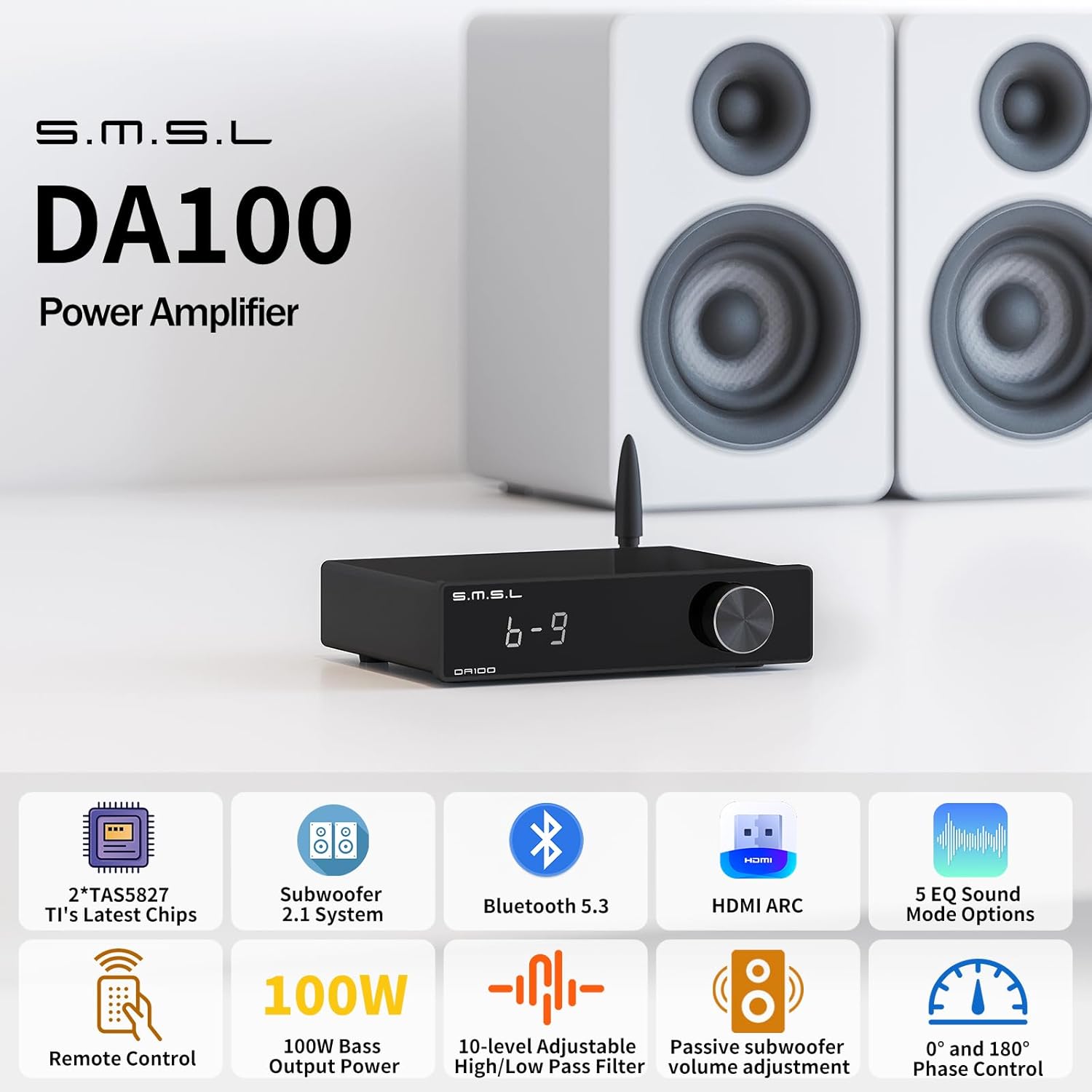
Figure 1: SMSL DA100 Audio Amplifier connected to a stereo speaker setup.
This manual provides detailed instructions for setting up, operating, and maintaining your DA100 amplifier, along with troubleshooting tips and technical specifications.
パッケージ内容
セットアップを進める前に、パッケージにすべてのアイテムが揃っていることを確認してください。
- 1x SMSL DA100 Ampリファイアー
- Bluetoothアンテナ×1
- 1x AC電源コード
- USBケーブル x 1
- HDMIケーブル x 1
- リモコン x 1
- ユーザーマニュアル x 1

Figure 2: Included accessories and components in the DA100 package.
設定
1. スピーカーとサブウーファーの接続
Connect your passive speakers to the speaker terminals on the rear panel. Ensure correct polarity (positive to positive, negative to negative). For a 2.1 channel setup, connect a passive subwoofer to the dedicated subwoofer output. Banana plugs are recommended for ease of connection to the speaker terminals.

Figure 3: Speaker and subwoofer connection points on the DA100.
2. 入力接続
The DA100 offers multiple input options:
- USB入力: Connect to a PC or other USB audio source using the provided USB cable. For Windows systems, installing the recommended driver may enhance performance.
- HDMI(ARC)入力: Connect to your TV's HDMI ARC port using the provided HDMI cable. This allows the amplifier's volume to synchronize with the TV for unified control. Ensure your TV supports HDMI ARC.
- 光入力: Connect to devices with an optical audio output. Supports audio up to 24-bit/192kHz.
- Line-in Input: Connect analog audio sources using a 3.5mm to RCA cable (not included).
- Bluetooth 5.3: For wireless audio streaming from smartphones, tablets, or other Bluetooth-enabled devices. Attach the Bluetooth antenna to the rear panel.

図4:以上view of available input connections on the DA100.

Figure 5: Connecting the DA100 to a TV via HDMI ARC.
3. 電源接続
AC 電源コードを amplifier's power input and then to a suitable power outlet. The amplifier will power on automatically or can be turned on using the remote control.
操作手順
1. 基本操作
The DA100 can be operated using the front panel knob or the included remote control.
- 電源オン/オフ: Use the power button on the remote or press and hold the front panel knob.
- 音量コントロール: Rotate the front panel knob or use the Volume +/- buttons on the remote.
- 入力選択: Press the MENU/OK button on the remote or short-press the front panel knob to cycle through input modes (Bluetooth, USB, HDMI ARC, Optical, Line-in).
- ミュート: リモコンのミュートボタンを押すと、音声が一時的に無音になります。

Figure 6: Functions of the SMSL DA100 remote control.
2.Bluetoothペアリング
Bluetoothデバイスを接続するには:
- Select Bluetooth as the input source on the DA100. The display will indicate Bluetooth mode.
- On your mobile device, search for available Bluetooth devices and select "SMSL DA100".
- ペアリングが完了すると、デバイスからの音声がワイヤレスでストリーミングされ、 amplifier。

図 7: ワイヤレス オーディオ ストリーミング用の Bluetooth 5.3 接続。
3. Sound Adjustments (EQ, Bass, Treble, Crossover)
The DA100 allows for extensive sound customization:
- EQ プリセット: の amplifier includes 5 EQ presets (Direct, Tabebuia, Bass, Super Bass, Rock, Soft). Use the FN button on the remote or navigate through the menu with the front knob to select an EQ mode.
- 低音/高音コントロール: Adjust bass and treble levels independently from -9 to +9. Short-press the knob when the device is powered on to access these settings.
- High/Low Pass Filter: For 2.1 channel setups, adjust the high-pass and low-pass crossover points (10 adjustable points) to optimize sound distribution between main speakers and the subwoofer.
- Subwoofer Phase Control: A subwoofer phase switch (0°/180°) helps ensure smooth bass integration and prevents cancellation issues.

Figure 8: EQ presets available on the DA100 amplifier。

Figure 9: Bass and Treble adjustment interface.
メンテナンス
To ensure the longevity and optimal performance of your SMSL DA100 ampライフライザーを使用する場合は、次のメンテナンス ガイドラインに従ってください。
- クリーニング: 柔らかく乾いた布を使用して、 amp液体クリーナーや研磨剤は仕上げを傷める可能性があるため、使用しないでください。
- 換気: 確実に amplifier is placed in a well-ventilated area. Do not block any ventilation openings.
- 使用しないときは電源を切ります: もし、 amplifier will not be used for an extended period, it is recommended to power it off and unplug it from the power outlet.
- 取り扱いにはご注意ください: 落としたり、 amp強い衝撃に強い。
トラブルシューティング
If you encounter issues with your SMSL DA100 amp問題が解決しない場合は、次の一般的なトラブルシューティング手順を参照してください。
| 問題 | 考えられる原因 | 解決 |
|---|---|---|
| 音声出力なし | Incorrect input selected; loose speaker connections; amplifier muted; source device not playing audio. | Verify the correct input is selected. Check all speaker and input cable connections. Ensure the amplifier is not muted. Confirm the source device is playing audio. |
| 音質が歪んでいる、または悪い | Input signal too high; damaged cables; incorrect EQ settings; speaker impedance mismatch. | Reduce the volume on the source device. Check and replace any damaged cables. Reset EQ settings to default or adjust them. Ensure speakers are compatible with the ampライファイアのインピーダンス。 |
| Bluetooth接続の問題 | デバイスがペアリング モードになっていません。範囲外です。干渉があります。 | Ensure the DA100 is in Bluetooth input mode. Move the device closer to the amplifier. Disconnect other Bluetooth devices to reduce interference. Try re-pairing the device. |
| リモコンが動作しない | Dead batteries; obstructed signal path; remote not pointed correctly. | Replace batteries in the remote control. Remove any obstacles between the remote and the amplifier. Point the remote directly at the amplifier の IR 受信機。 |
| Channel imbalance (one speaker louder than the other) | Faulty speaker cable; speaker issue; amplifier internal issue. | Swap speaker cables between left and right channels to determine if the cable is at fault. Test with different speakers if possible. If the issue persists, contact customer support. |
これらの解決策を試しても問題が解決しない場合は、カスタマー サポートに連絡してサポートを受けてください。
仕様

Figure 10: SMSL DA100 Technical Specifications.
| 特徴 | 詳細 |
|---|---|
| 入力 | Bluetooth, USB, HDMI (ARC), Optical, Line-in |
| Output Power (Main Channel) | 67W x 2 (4Ω, 2ch driven) |
| Output Power (Subwoofer) | 100W (2Ω, 1ch driven) |
| 入力感度 | -6dB |
| SNR (信号対雑音比) | 112デシベル |
| 周波数応答 | 20Hz-20kHz |
| THD + N(全高調波歪み+ノイズ) | 0.007% |
| チャンネル分離 | 104dB(1kHz) |
| Bass or Treble Gain | -9dB〜 + 9dB |
| 消費電力 | 36W |
| スタンバイ電力 | <0.5W |
| 寸法(幅x高さx奥行き) | 139 x 35.5 x 126mm |
| 重さ | 0.30kg |
保証とサポート
The SMSL DA100 amplifier is covered by a manufacturer's warranty. During the coverage period and under normal use, quality issues will be addressed with replacement or repair services, covering related costs. For specific warranty terms and conditions, please refer to the documentation included with your product or contact the seller, FINE MUSIC.
For technical support, troubleshooting assistance beyond this manual, or warranty claims, please contact FINE MUSIC customer service. Their team of experts can provide deep knowledge and experience in audio equipment to help resolve any issues you may encounter.
Contact information for support can typically be found on the seller's Amazon page or through the included warranty card.