
1. はじめに
The XTOOL IP500 is a professional diagnostic scan tool designed for Jeep, Dodge, and Chrysler vehicles. It offers comprehensive full system diagnostics, bi-directional control, and various special reset functions. This manual provides instructions for setting up, operating, maintaining, and troubleshooting your IP500 device.

Image 1.1: The XTOOL IP500 diagnostic tool, highlighting its key capabilities including bi-directional control, full system diagnostics, all services, and FCA CAN FD support.
2. セットアップ
2.1 パッケージ内容
開始する前に、すべてのコンポーネントが揃っていることを確認してください。
- XTOOL IP500 Main Unit
- OBD2 Main Cable
- 12+8 Adapter Cable (for 2018+ FCA vehicles)
- 電源アダプタ(該当する場合)
- ユーザーマニュアル(このドキュメント)
2.2デバイスの接続
- 車両の OBD2 ポートを見つけます。通常は運転席側のダッシュボードの下にあります。
- For most vehicles, connect the OBD2 Main Cable directly to the vehicle's OBD2 port and the IP500 device.
- For 2018 and newer FCA (Fiat Chrysler Automobiles) vehicles (Jeep, Dodge, Chrysler, RAM), use the included 12+8 Adapter Cable. Connect the 12-pin and 8-pin connectors to the vehicle's respective ports, then connect the OBD2 male connector of the adapter to the OBD2 female connector of the main cable, and finally to the IP500 device.
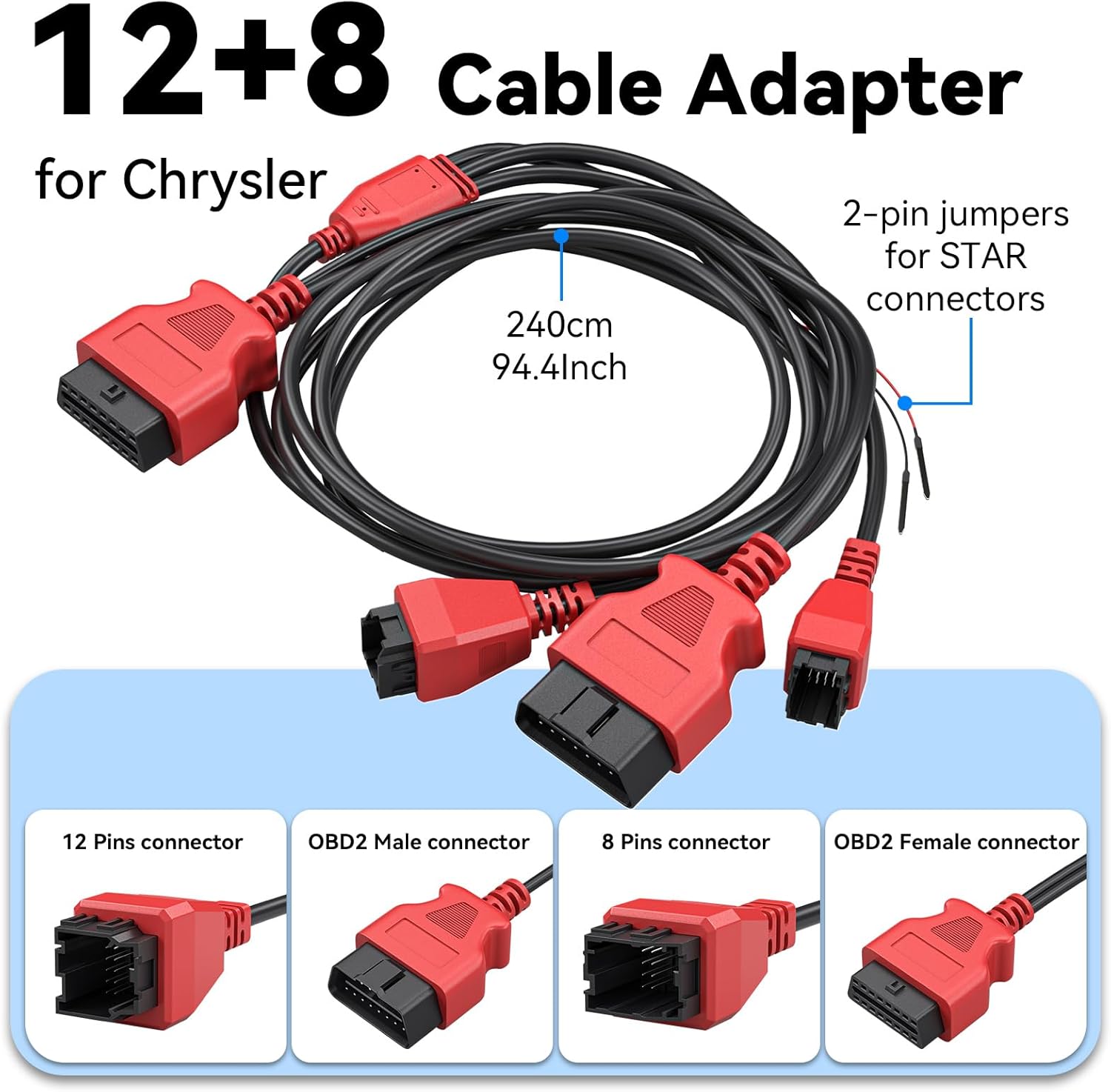
画像2.1: 詳細 view of the 12+8 Cable Adapter, illustrating its various connectors and overall length, essential for connecting to newer FCA vehicles.
2.3 Initial Power-On and Software Updates
- Once connected, the IP500 device should power on automatically. If not, press the power button.
- Follow the on-screen prompts to select your preferred language (23 languages supported).
- デバイスをWi-Fiネットワークに接続します。
- Navigate to the 'Updates' section on the main menu to download and install the latest software. Regular updates ensure optimal performance and vehicle compatibility.
3. 操作手順
3.1 メインメニューのナビゲーション
The IP500 features a 5.45" HD touchscreen for intuitive navigation. The main menu typically includes options such as 'Auto Scan', 'Diagnosis', 'OBD II', 'Special Function', 'Updates', and 'More'.
3.2 完全なシステム診断
This function allows you to access and diagnose all available electronic control modules within the vehicle. It supports comprehensive diagnostics for Fiat Group vehicles (Chrysler, Dodge, Jeep, RAM) from 1998 to 2024.
- Select 'Diagnosis' from the main menu.
- Choose the vehicle make and model.
- Perform an 'Auto Scan' or manually select specific systems (e.g., Engine, Transmission, ABS, Airbag, HVAC, Suspension, Headlamp, Audio, A/C).
- View live data streams, read and clear Diagnostic Trouble Codes (DTCs).

Image 3.1: The IP500 device displaying a diagnostic menu, with an overlay showing various vehicle systems it can diagnose, such as engine, airbag, and transmission.
3.3 Special Functions and Reset Services
The IP500 provides access to 18+ special functions for various vehicle maintenance and repair tasks, including those for 2018+ FCA vehicles using the 12+8 adapter.
- Select 'Special Function' from the main menu.
- Choose the desired service from the list. Common services include:
- EPBリセット: Electronic Parking Brake reset.
- SAS リセット: ステアリング角度センサーのキャリブレーション。
- BMSリセット: バッテリー管理システムをリセットしました。
- ヘッドライト調整: Adjusting headlight settings.
- インジェクターコーディング: Coding new injector values.
- スロットルマッチング: Throttle body relearn.
- ABSブリーディング: Performing ABS brake bleeding.
- ギアボックスマッチング: Transmission adaptation.
- サスペンションシステム: Suspension calibration.
- ウィンドウの初期化: Window motor relearn.
- Seat Matching: Seat position calibration.
- メンテナンスライトのリセット: Resetting service indicators.
- A/F Settings: Air/Fuel ratio adjustments.
- 輸送モード: Deactivating/activating transport mode.

Image 3.2: A visual representation of the 'ALL RESET SERVICES' menu on the IP500, showing various available functions for vehicle maintenance.
3.4 双方向制御(アクティブテスト)
This feature allows the IP500 to send commands to vehicle components and receive feedback, enabling active testing of actuators and sensors. This helps in quickly pinpointing issues.
- Select 'Diagnosis' and then navigate to the specific system.
- Look for 'Active Test' or 'Bi-Directional Control' options.
- Examples of components that can be tested include: Windows, Mirrors, Injectors, Door Locks, Braking systems, Wipers, Headlights, and Horns.

Image 3.3: The IP500 illustrating bi-directional control capabilities, showing how it can command and receive feedback from various vehicle components.
3.5 フルOBD2機能
The IP500 supports all 10 modes of OBD2 testing, providing essential diagnostic information for emissions-related issues.
- Select 'OBD II' from the main menu.
- 利用可能な機能は次のとおりです:
- コードを読む: Retrieve current, pending, and permanent DTCs.
- クリアコード: DTC を消去し、故障表示灯 (MIL) をオフにします。
- ライブデータ: View リアルタイム データ パラメータ。
- フリーズフレーム: View a snapshot of vehicle operating conditions when an emission-related fault occurs.
- I / M準備: 排出監視システムの準備状況を確認します。
- O2モニターテスト: O2センサー監視テストの結果を取得します。
- オンボードモニターテスト: 排出ガス関連のパワートレイン コンポーネントとシステムの結果を取得します。
- コンポーネントテスト: 車両の EVAP システムのリーク テストを開始します。
- 車両情報: 車両識別番号 (VIN)、キャリブレーション ID (CALID)、およびキャリブレーション検証番号 (CVN) を取得します。

Image 3.4: The IP500's interface showing the comprehensive range of OBD2 functions available for vehicle diagnostics.
3.6 FCA Secure Gateway Access
For 2018+ FCA vehicles equipped with a Secure Gateway Module (SGM), the 12+8 adapter cable provides direct diagnostic access without requiring an FCA AutoAuth subscription. This allows full diagnostic capabilities on these newer models.

Image 3.5: The IP500 demonstrating FCA Secure Gateway Access, indicating its compatibility with 2018+ Chrysler, Dodge, and Jeep vehicles.
4. メンテナンス
4.1デバイスのクリーニング
柔らかくてamp cloth to clean the device's screen and body. Avoid using abrasive cleaners or solvents that could damage the surface.
4.2ソフトウェアアップデート
Regularly check for and install software updates via Wi-Fi. These updates provide new vehicle coverage, bug fixes, and improved functionality. The IP500 offers free lifetime functional updates.
4.3 ストレージ
Store the device in a cool, dry place away from direct sunlight and extreme temperatures. Keep it in its protective case when not in use to prevent damage.
5。 トラブルシューティング
5.1 デバイスの電源が入らない
- Ensure the device is correctly connected to the vehicle's OBD2 port.
- 車のバッテリー容量を確認するtage; a low battery might prevent the device from powering up.
- Verify the OBD2 port fuse in the vehicle.
5.2 通信エラー
- Confirm the ignition is in the ON position (engine off).
- Ensure the correct vehicle make, model, and year are selected in the device menu.
- For 2018+ FCA vehicles, verify the 12+8 adapter is correctly installed.
- 車両固有の問題を除外するために、別の車両に接続してみてください。
5.3 ソフトウェアがフリーズしたりパフォーマンスが低下したりする
- デバイスを再起動します。
- ソフトウェアが最新であることを確認してください。
- Clear cache or temporary files if the option is available in device settings.
6. 仕様
| 特徴 | 説明 |
|---|---|
| プロセッサ | 1.2GHzデュアルコア |
| 画面 | 5.45インチHDタッチスクリーン |
| バッテリー | 3150mAh |
| ストレージ | 32GB |
| オペレーティング·システム | Androidベース |
| 車両補償範囲 | Fiat Group (Chrysler, Dodge, Jeep, RAM) 1998-2024; 2018+ FCA with 12+8 adapter |
| 言語 | 23言語に対応 |
| アップデート | Free Lifetime Functional Updates |
7. 保証とサポート
7.1 保証情報
For detailed warranty information, please refer to the official XTOOL website or contact your point of purchase. The device includes free lifetime functional updates, ensuring ongoing software support.
7.2 テクニカルサポート
If you encounter any issues or require technical assistance, please contact XTOOL customer support. Contact details can typically be found on the official XTOOL website or within the device's 'About' section.