
1. はじめに
The Wyze Smart Scale X is an advanced digital bathroom scale designed to provide a comprehensive overview of your body composition. It measures various metrics beyond just weight, helping you track your health and fitness journey effectively. This manual will guide you through the setup, operation, and maintenance of your Wyze Smart Scale X.

Image: A user interacting with the Wyze Smart Scale X and its companion app, showing body composition trends over time.
2. 箱の中身
- Wyze Smart Scale X (1)
- 1.5V AAA電池(4個)
- クイックスタートガイド(1)
3. セットアップ
- バッテリーの取り付け: Open the battery compartment on the underside of the scale and insert the four AAA batteries, ensuring correct polarity.
- Wyze アプリをダウンロード: 検索する "Wyze" in your smartphone's app store (Apple App Store or Google Play Store) and download the official Wyze app.
- Wyzeアカウントを作成/ログイン: Open the app and either create a new account or log in with your existing Wyze credentials.
- デバイスを追加: In the Wyze app, tap the "+" icon to add a new device. Select "Lifestyle" then "Wyze Scale Series" and choose "Wyze Scale X".
- ペアリング: Follow the on-screen instructions in the app to pair your scale via Bluetooth. Ensure your phone's Bluetooth is enabled and keep it near the scale during pairing.
- 個人情報: Enter your personal details (year of birth, height, gender) in the app. This information is crucial for accurate body composition measurements.
- 初期測定: Step onto the scale barefoot on a hard, flat surface to activate it and perform your first measurement.

Image: A user preparing to place the Wyze Smart Scale X on the floor for setup.
4. 操作手順
測定を行う
- 体重計は硬くて平らな面に置いてください。カーペットや凹凸のある床面は避けてください。
- 足が清潔で乾燥していることを確認してください。
- Step onto the scale barefoot, centering your feet on the ITO electrode areas.
- Stand still until your weight is displayed on the scale's LED screen.
- Keep the Wyze app open and near the scale for automatic data synchronization via Bluetooth.
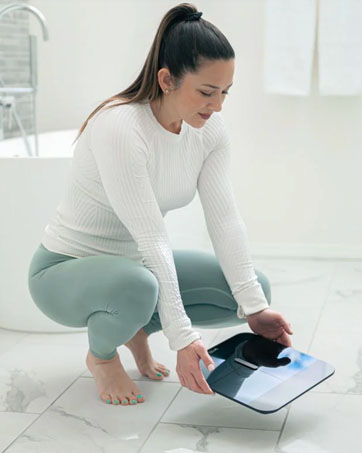
Image: A close-up of bare feet positioned on the Wyze Smart Scale X for a measurement.
指標を理解する
The Wyze Smart Scale X measures 13 essential body composition metrics:
- 重さ
- 体脂肪率tage
- ボディマス指数(BMI)
- 筋肉量
- 骨量
- 体水分率tage
- 除脂肪体重
- Protein Level
- 内臓脂肪
- 基礎代謝量(BMR)
- 代謝年齢
- Heart Rate (measured via Wyze App)

Image: The Wyze Smart Scale X showing its display and a visual representation of the 13 essential body metrics it tracks.
5. スペシャルモード
The Wyze Smart Scale X offers specialized modes for various users and situations:
- ベビーモード: Allows you to weigh an infant by first weighing yourself, then stepping on the scale while holding the baby. The scale calculates the baby's weight by subtracting your weight.
- ペットモード: Similar to Baby Mode, this allows you to weigh your pet.
- Luggage Mode: For weighing luggage or other items.
- Pregnancy Mode: Provides weight tracking for pregnant users.
- アスリートモード: Recommended for individuals who work out more than 10 hours a week, as it adjusts body composition algorithms for athletic body types.
For added safety, you can turn off all electrical currents used to measure body composition in these modes, ensuring only weight is measured.

Image: A father weighing his children using a special mode on the Wyze Smart Scale X, demonstrating its versatility for family use.
6. App Integration & Data Tracking
The Wyze Smart Scale X seamlessly integrates with the Wyze app and popular third-party health applications:
- Wyze アプリ: All your body composition data is stored and displayed in the Wyze app, allowing you to view trends over time, set goals, and track your progress.
- サードパーティ製アプリ: Sync your data with Apple Health, Health Connect, and Fitbit to consolidate your health information in one place.
The scale supports up to 8 users, automatically recognizing each individual and syncing their data to their respective profileアプリ内にあります。

Image: The Wyze Smart Scale X highlighting its compatibility with popular health apps like Fitbit, Apple Health, and Health Connect.
Video: An official introduction to the Wyze Scale X, showcasing its design, features, and app integration.
7. Heart Rate Measurement
The Wyze app provides a convenient way to measure your heart rate directly through your smartphone's camera, without needing the scale:
- Open the Wyze app and navigate to the Heart Rate measurement section.
- Grant camera access to the app when prompted.
- Gently place your finger on the main camera lens (not the flash) and hold it still.
- Use your other hand to cup the back of your phone so the light reflects towards the finger covering the camera lens.
- Hold still until the measurement is complete (typically less than a minute). The app will display and record your heart rate.
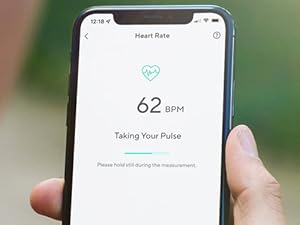
Image: A smartphone screen showing the Wyze app's heart rate measurement feature in progress.
8. メンテナンス
- クリーニング: The scale features a durable tempered glass surface, making it easy to clean. Use a soft, damp 表面を拭く際は布を使用してください。研磨剤入りの洗剤や刺激の強い化学薬品は使用しないでください。
- ストレージ: Store the scale in a dry place away from direct sunlight and extreme temperatures. Its thin design allows for easy storage, such as in a drawer.
- バッテリー交換: When the battery indicator appears on the display or in the app, replace all four AAA batteries with new ones.

Image: A user demonstrating how the slim design of the Wyze Smart Scale X allows for convenient storage in a drawer.
9。 トラブルシューティング
- 不正確な読み取り: Ensure the scale is placed on a hard, flat surface. Stand still with bare feet centered on the electrodes. Body composition data can be affected by surface levelness, standing posture, and foot contact.
- 体重計の電源が入らない: 電池が正しく装着され、消耗していないことを確認してください。必要に応じて電池を交換してください。
- アプリが同期されない: Verify that Bluetooth is enabled on your smartphone and the Wyze app has permission to access Bluetooth. Keep your phone close to the scale during measurements.
- 体組成データが表示されない: Ensure you are standing barefoot on the scale. The ITO electrodes require direct skin contact to measure body composition.
10. 仕様
| ブランド | ワイズ |
| モデル | WSCALX |
| 色 | 黒 |
| 最大重量容量 | 400 ポンド |
| 読み出し精度 | +/- 0.2ポンド |
| 表示タイプ | デジタルLED |
| 材質タイプ | ITO coated glass |
| アイテム重量 | 4 ポンド |
| 電源 | 1.5V AAA電池4本(付属) |
| 接続性 | ブルートゥース |

画像: 詳細な view of the Wyze Smart Scale X highlighting its tempered glass surface and ITO electrode coating for accurate measurements.
11. 保証とサポート
The Wyze Smart Scale X comes with a 1年間のメーカー保証. For technical support, warranty claims, or additional information, please visit the official Wyze support webサイトにアクセスするか、カスタマーサービスにお問い合わせください。
メーカー: Wyze Labs、Inc.
12. 重要な安全情報
The Wyze Smart Scale X uses Bio-electrical Impedance Analysis (BIA) technology. While generally safe, please note the following:
- Body composition data is for long-term trend tracking and should not be used for single medical comparisons or diagnoses. Consult a healthcare professional for medical advice.
- Measure barefoot on a hard, flat surface for the best consistency and accuracy of body composition data.
- Results may be affected by surface levelness, standing posture, and foot contact.
- If you have a pacemaker or other internal medical device, consult your doctor before using the scale, as the electrical currents used for BIA may interfere with these devices.
- Keep the scale dry to prevent electrical hazards.