
PULWTOP BD242A
PULWTOP BD242A 19-in-1 Triple Monitor Docking Station User Manual
モデル: BD242A
1. はじめに
This manual provides detailed instructions for the setup, operation, and maintenance of your PULWTOP BD242A 19-in-1 Triple Monitor Docking Station. Please read this manual thoroughly before using the product to ensure optimal performance and safety.

Figure 1: PULWTOP BD242A 19-in-1 Triple Monitor Docking Station
2 製品の特徴
- 19-in-1接続: Equipped with 3 HDMI ports, 2 DisplayPort ports, 1 USB-C 10Gbps data-only port, 1 USB-C 10Gbps port with 7.5W power, 2 USB-A 5Gbps ports with 7.5W power, 1 USB-A 2.0 port, SD/TF card slots, Gigabit Ethernet, 3.5mm audio jack, 2 USB-C PD output charging ports, PD IN port, USB-C to Host port, and DC input.
- Triple 4K Extended Display: Supports up to three 4K@60Hz monitors via HDMI and DisplayPort. Note: When 5 video ports are connected, 2 monitors will not display.
- 超高速データ転送: Offers up to 10Gbps data transfer speeds through USB-C ports and 5Gbps through USB-A ports.
- 電力供給: Includes a 72W DC power adapter for the dock. Supports up to 100W Power Delivery (PD) to your laptop via the 'PD IN' port (PD adapter not included). Two USB-C PD output ports provide up to 45W (single port) or 24W (dual ports) for charging peripherals.
- 幅広い互換性: Compatible with Thunderbolt 5/4/3, USB 4.0, and most USB-C/A laptops running macOS 11+, Windows 10+, or Chrome OS 100+.
- Space-Saving Dual Stand Design: Features an aluminum dual vertical stand for laptops (29mm slot) and phones/tablets (17mm slot) to optimize desk space.

図2:以上view of the docking station ports and features.
3. パッケージ内容
パッケージを開封したら、以下にリストされているすべてのアイテムが含まれていることを確認してください。
- パッケージボックス x 1
- 多言語ユーザーマニュアル x 1
- 1 x PULWTOP BD242A Docking Station
- 1 x 72W DC Power Adapter & Cable
- 1 x USB-C to C Cable with USB-A Adapter
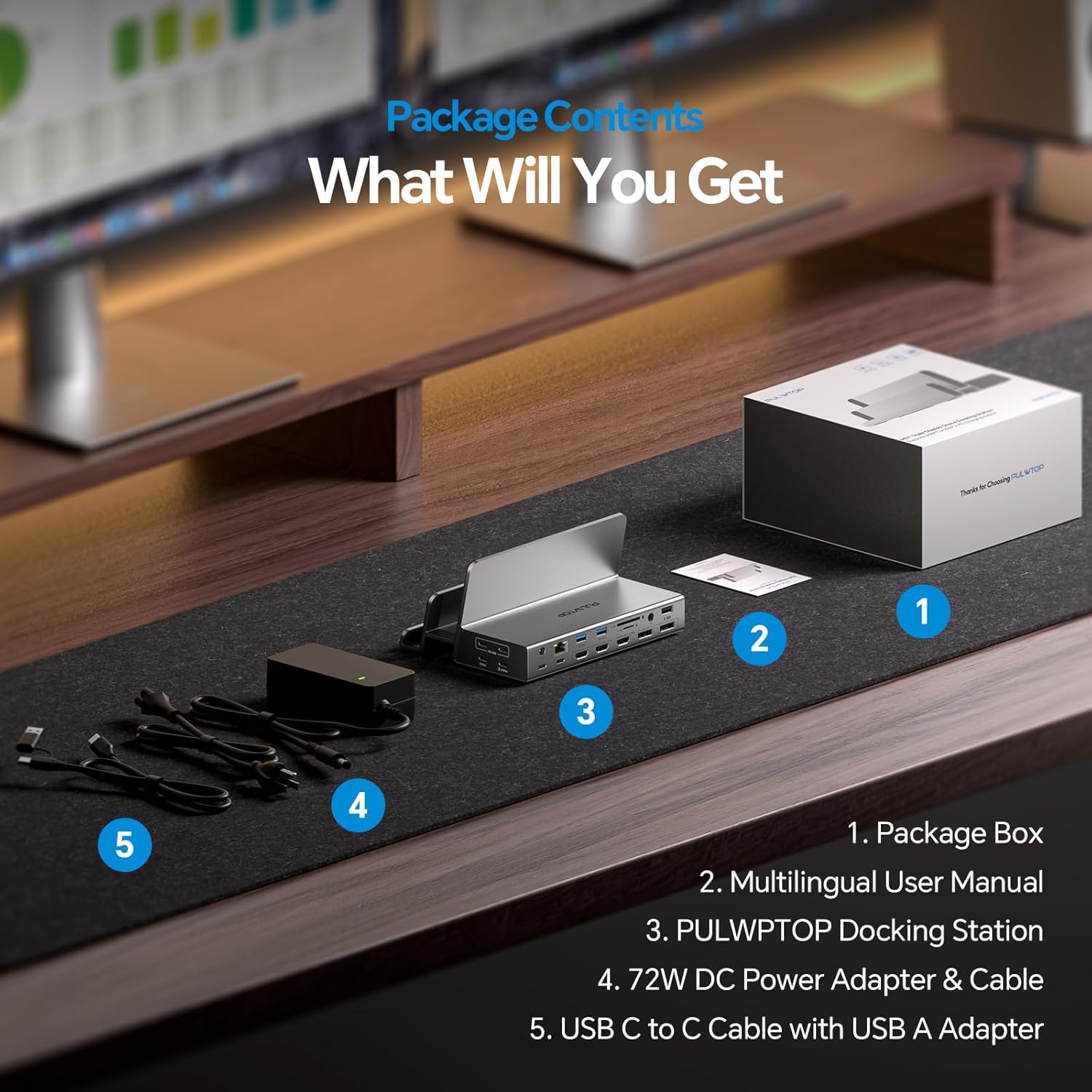
図 3: 製品パッケージに含まれるすべてのアイテム。
4. セットアップとインストール
4.1 ドライバのインストール
For triple display functionality, especially with macOS, installing the Silicon Motion Driver (SM770) is mandatory. Follow the steps below for your operating system:
Windowsの場合:
- Visit the official Silicon Motion webサイト: www.siliconmotion.com
- Navigate to 'Support' > 'Download Center'.
- Select 'Others' for Product Solution, then locate and download the 'SM770 Driver Download' for Windows 10/11.
- Double-click 'SMIUSBDisplaySW.exe' to start the installation.
- Follow the on-screen prompts, click 'Install', and wait for completion.
- Click 'Exit' once the installation is complete.
Video 1: Silicon Motion Driver Installation Guide for Windows OS.
macOSの場合:
- Visit the official Silicon Motion webサイト: www.siliconmotion.com
- Navigate to 'Support' > 'Download Center'.
- Select 'Others' for Product Solution, then locate and download the 'SM770 Driver Download' for macOS.
- Drag the 'macOS InstantView' application to your Applications folder.
- Open the software, then open 'System Settings'.
- Go to 'Privacy & Security' > 'Screen Recording' and enable the 'macOS InstantView' ボタン。
- You may need to quit and reopen the application for changes to take effect.
Video 2: Silicon Motion Driver Installation Guide for Mac OS.
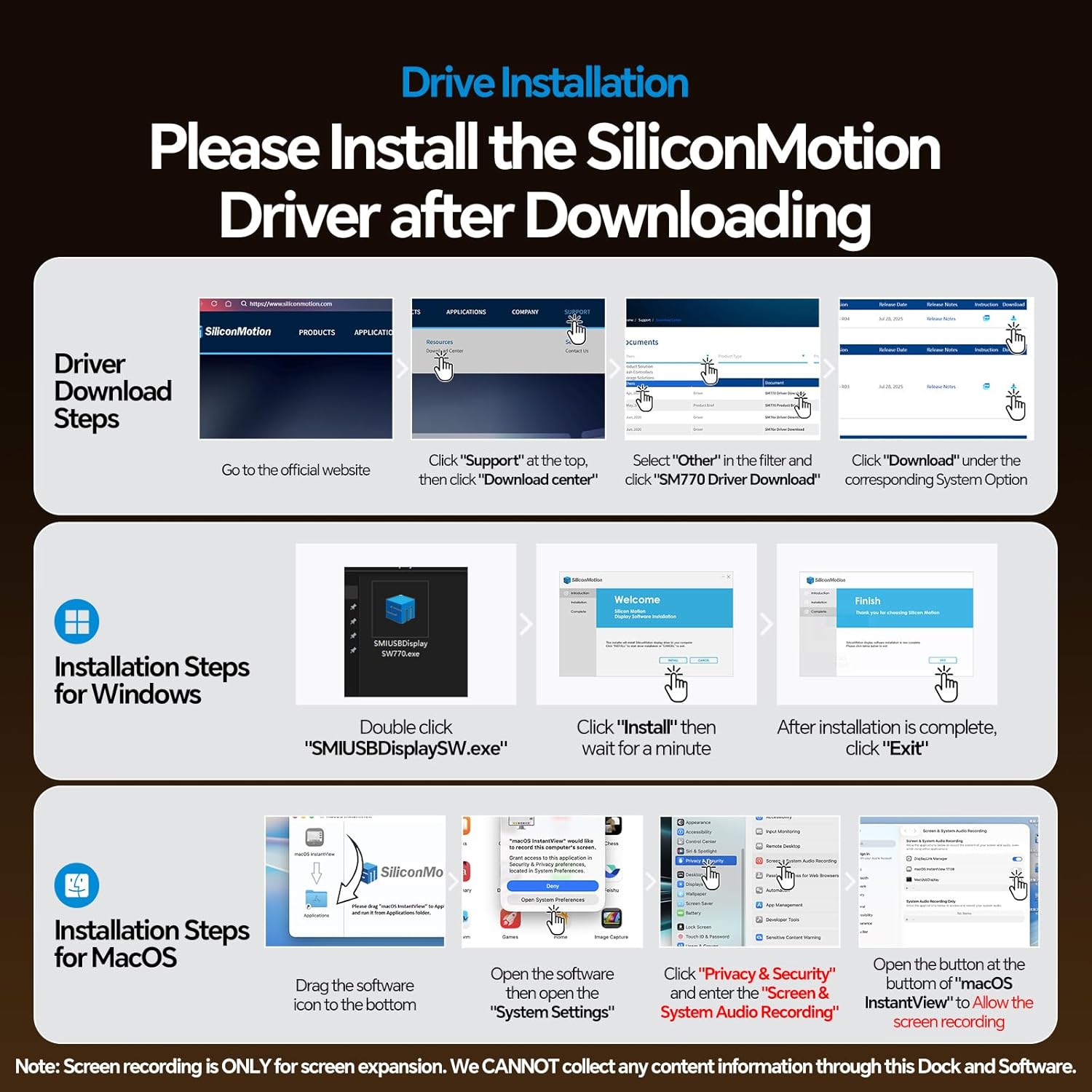
Figure 4: Visual guide for driver installation on Windows and macOS.
4.2ハードウェア接続
- ドックの電源を入れる: Connect the included 72W DC power adapter to the 'DC IN' port on the docking station. The dock must be powered for operation.
- ホストデバイスに接続します: Use the provided USB-C to C cable (with USB-A adapter if needed) to connect the 'USB-C to Host' port on the docking station to your laptop's USB-C or USB-A port.
- 外部モニターを接続する: Connect your monitors to the HDMI and/or DisplayPort outputs on the docking station. You can use any 3 of the 5 available video ports (3 HDMI, 2 DP) for triple display.
- 周辺機器を接続します。 Plug in your USB devices (keyboard, mouse, external drives), Ethernet cable, SD/TF cards, and audio devices to the corresponding ports on the docking station.
Video 3: Unboxing and initial setup of the docking station.

図5:例ample of a triple display setup with the docking station.
5. 操作手順
5.1 表示設定
After connecting your monitors and installing the necessary drivers, your operating system should automatically detect the external displays. You can configure display settings (extend, mirror, primary display) through your system's display settings.
5.2 Clamshell Mode (Laptop Lid Closed)
To use your laptop with the lid closed while connected to external monitors, ensure the following:
- A mouse must be connected to the dock to wake up the laptop.
- The 72W DC power adapter must be connected to power the dock.
- Your laptop's power settings must be configured to prevent it from going to sleep when the lid is closed and connected to external power.
5.3 充電機能
- Dock Power: The included 72W DC power adapter powers the docking station.
- ノートパソコンの充電: To charge your laptop, connect an additional PD adapter (not included) to the 'PD IN' port on the dock. This supports up to 100W charging for your laptop. Note: When using the dock with a USB-A laptop, the 'PD IN' port will not charge your laptop.
- 周辺機器の充電: The two USB-C PD output ports can charge smartphones, headsets, or other accessories with up to 45W (single port) or 24W (dual ports simultaneously).

Figure 6: Illustration of the charging capabilities for laptops and peripherals.
5.4データ転送
Utilize the high-speed USB-C (10Gbps) and USB-A (5Gbps) ports for rapid data transfer between your laptop and external storage devices or other peripherals.

Figure 7: High-speed data transfer ports on the docking station.
5.5 SD/TF Card Reader and Ethernet
The integrated SD and TF card slots support simultaneous reading and writing at speeds up to 104Mbps. The Gigabit Ethernet port provides a stable wired network connection up to 1000Mbps.

Figure 8: SD/TF card reader and Gigabit Ethernet port.
5.6 Dual Stand Functionality
The docking station features two vertical stand slots: a 29mm slot for laptops (MacBook Pro/Air and Windows laptops) and a 17mm slot for phones or tablets. This design helps organize your workspace and keeps devices upright.
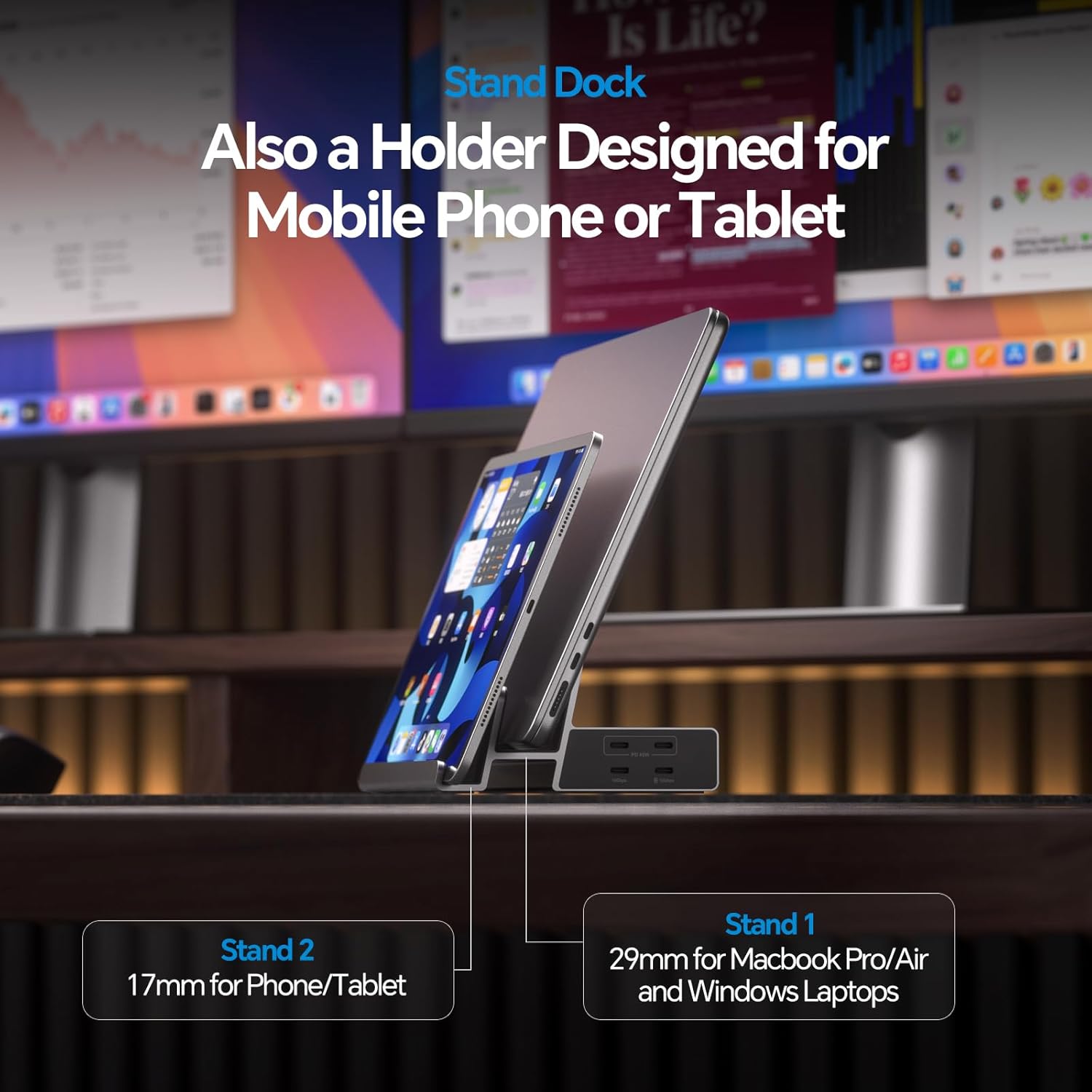
Figure 9: The dual stand design for laptops and mobile devices.
6. メンテナンス
- クリーニング: ドッキングステーションの清掃には、柔らかく乾いた布をご使用ください。液体クリーナーや研磨剤は使用しないでください。
- ストレージ: デバイスは直射日光や極端な温度を避け、涼しく乾燥した場所に保管してください。
- 取り扱い: Handle the docking station with care to prevent damage to ports or the aluminum casing.
7。 トラブルシューティング
- 外部モニターに表示されない:
- Ensure the Silicon Motion driver is correctly installed and 'Screen Recording' permission is granted for macOS. Refer to Section 4.1.
- Verify all cables (USB-C to Host, HDMI/DP) are securely connected.
- Confirm the docking station is powered by the 72W DC adapter.
- Check your laptop's display settings to ensure external monitors are detected and configured correctly (extend/mirror).
- Try restarting your laptop and reconnecting the dock.
- ノートパソコンが充電されない:
- Ensure a separate PD adapter (not included) is connected to the 'PD IN' port on the dock for laptop charging.
- ノートパソコンが USB-C Power Delivery をサポートしていることを確認してください。
- If using a USB-A laptop, the 'PD IN' port will not charge the laptop.
- USBデバイスが認識されない:
- Ensure the USB-C to Host cable is firmly connected to both the dock and your laptop.
- デバイスの問題を排除するために、USB デバイスをラップトップに直接接続してみてください。
- ドックに電力が供給されていることを確認します。
- 断続的な接続:
- すべてのケーブル接続に緩みがないか確認してください。
- Ensure your laptop's USB-C port is fully functional and supports the required protocols (DisplayPort Alt Mode, Power Delivery).
8. 仕様
| 特徴 | 説明 |
|---|---|
| 製品寸法 | 7.08 x 4.92 x 3.26 インチ (18 x 12.5 x 8.3 cm) |
| アイテム重量 | 1.23 ポンド (560 グラム) |
| 商品型番 | BD242A |
| ハードウェアインターフェイス | 3.5mm Audio, DisplayPort, HDMI, MicroSD, USB 2.0, USB 3.1 Type A, USB 3.2 Gen 2, Ethernet |
| USBポート合計 | 7 (2x USB-C 10Gbps, 2x USB-A 5Gbps, 1x USB-A 2.0, 2x USB-C PD Output) |
| ポート数 | 19 |
| 合計HDMIポート | 3 |
| Total DisplayPort Ports | 2 |
| 入力ボリュームtage | 24 ボルト (DC) |
| Max Laptop PD Charging | 100W (via optional PD adapter to 'PD IN' port) |
| Peripheral PD Output | 45W x 1 or 22W x 2 (via USB-C PD output ports) |
| 対応デバイス | Windows 10/11, macOS 10.15.x+, ChromeOS 100+, Thunderbolt 5/4/3, USB4.0, USB-C/A Laptops (e.g., Dell, Microsoft Surface, HP, Lenovo, Huawei, Google, LG, Samsung, Apple MacBook M1/M2/M3/M4/M5) |
9. 保証とサポート
For warranty information or technical support, please contact PULWTOP customer service:
- メールアドレス: Support@pulwtop.com
- Webサイト: www.pulwtop.com
- サービス時間: 月曜日~金曜日、午前9時~午後5時(EST)
Ask a question about this manual
Ask about setup, troubleshooting, compatibility, parts, safety, or missing instructions. Manuals+ will review the question and use this page’s manual context to help answer it.