
導入
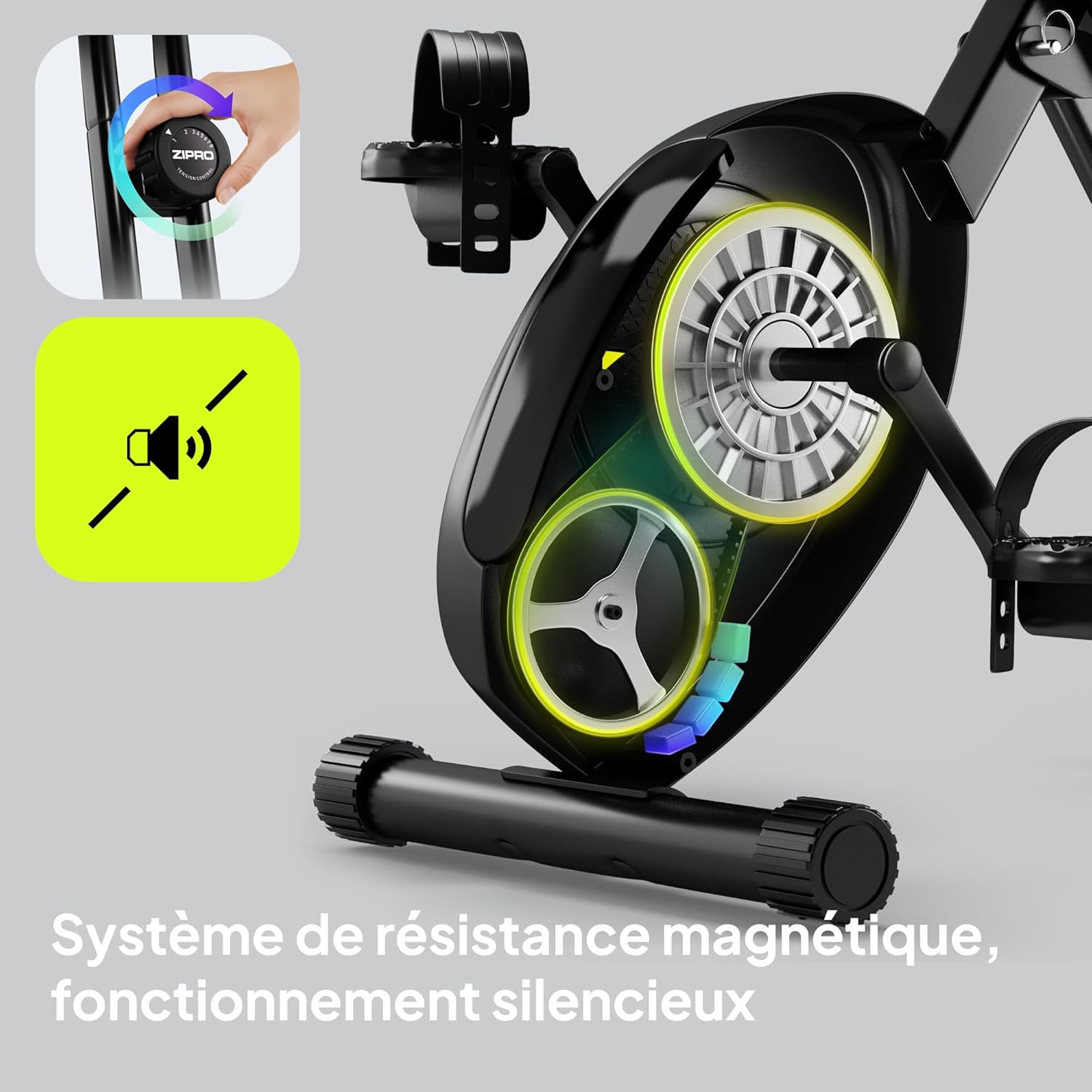
Thank you for choosing the ZIPRO Eclipse X Foldable Exercise Bike. This manual provides essential information for the safe and efficient use of your new fitness equipment. The Eclipse X is designed for comfortable home workouts, featuring a foldable structure, adjustable seat, and stable design. It integrates easily into small spaces and is simple to move. Its adjustable magnetic resistance system offers 8 levels, ensuring smooth and silent operation suitable for all fitness levels.
安全情報
組み立ておよびご使用の前に、すべての説明書をよくお読みください。このマニュアルは、今後の参考のために保管してください。
- 運動プログラムを開始する前に、医師に相談してください。
- 使用する前に、すべての部品がしっかりと固定されていることを確認してください。
- エクササイズバイクを平らで安定した場所に置きます。
- 動作中は子供やペットを装置に近づけないでください。
- 最大ユーザー体重 110 kg (242 ポンド) を超えないようにしてください。
- 適切な運動用の服装と靴を着用してください。
- 気分が悪くなったり、めまいがしたり、痛みを感じたりした場合は、直ちに運動を中止してください。
セットアップと組み立て
The ZIPRO Eclipse X is designed for easy setup. Follow these steps to prepare your bike for use.
1. 開梱
Carefully remove all components from the packaging. Check against the parts list (not provided in this manual, refer to your product's included guide) to ensure all items are present and undamaged.
2. 自転車を広げる
To unfold the bike, locate the folding mechanism (often a pin or lever near the main frame hinge). Release the mechanism and carefully extend the frame until it locks into the upright position. Ensure the locking pin is fully engaged for stability.


3. シートの調整
The seat height and distance are adjustable for optimal comfort. Loosen the adjustment knob located beneath the seat, slide the seat to your desired height and distance, and then securely tighten the knob. Ensure your knees have a slight bend at the bottom of the pedal stroke.


操作手順
1. コンソールの電源を入れる
The console is battery-powered. It will automatically turn on when you start pedaling or press any button. To conserve battery, it will automatically turn off after a period of inactivity.
2. Using the Console Display
The integrated computer display tracks your workout metrics:
- 時間: ワークアウトの継続時間。
- スピード: 現在のサイクリング速度。
- 距離: セッション中に移動した合計距離。
- カロリー: 推定消費カロリー。
- 脈: Heart rate measured via hand sensors on the handlebars.
Use the "MODE" button to cycle through display functions. "RESET" typically clears current workout data. "SET" may be used for setting target values.


3. 磁気抵抗の調整
The bike features 8 levels of magnetic resistance. Turn the resistance knob, located on the main frame, clockwise to increase resistance and counter-clockwise to decrease it. Start with a lower resistance and gradually increase as your fitness improves.

4. Using Pedal Straps
The non-slip pedals are equipped with adjustable straps. Place your feet on the pedals and tighten the straps to secure your feet, preventing them from slipping during your workout.
5. Bluetooth Connectivity and Phone Holder
The ZIPRO Eclipse X features Bluetooth connectivity, allowing for data management with compatible fitness applications. A phone holder is integrated into the console for convenience.

メンテナンス
定期的なメンテナンスにより、エクササイズバイクの寿命が長くなり、安全に操作できるようになります。
- クリーニング: 広告で自転車を拭くamp 使用後は毎回布で汗やほこりを拭き取ってください。研磨剤入りの洗剤は使用しないでください。
- 検査: すべてのボルト、ナット、可動部品の締め付け具合と摩耗を定期的に点検してください。緩んでいる留め具があれば締め直してください。
- 潤滑: 磁気抵抗システムは通常メンテナンスフリーです。メーカーから特に指示がない限り、内部部品に潤滑油を塗布しないでください。
- ストレージ: When not in use, fold the bike for compact storage. Ensure it is stored in a dry, cool place away from direct sunlight.


トラブルシューティング
一般的な問題とその解決策については、このセクションを参照してください。
| 問題 | 考えられる原因 | 解決 |
|---|---|---|
| コンソールが表示されない | 電池切れ、接続不良 | Replace batteries (AA or AAA, typically); Check console cable connections. |
| 動作中に異音がする | Loose parts; Friction from moving components | Check and tighten all bolts and nuts. Ensure no foreign objects are caught in the mechanism. |
| 抵抗は変化しない | 抵抗ケーブルが外れているか損傷している | Inspect the resistance cable connection to the knob and the flywheel. Contact support if damaged. |
| バイクが不安定に感じる | Not fully unfolded/locked; Uneven surface | Ensure the folding mechanism is fully engaged. Place the bike on a level surface. |
仕様
| 特徴 | 詳細 |
|---|---|
| モデル名 | Eclipse X |
| 商品型番 | 15248434 |
| ブランド | ジプロ |
| 色 | 黒 |
| 抵抗メカニズム | マグネティック(8レベル) |
| 駆動システム | ペダル |
| 材料 | PU (main material) |
| 最大ユーザー重量容量 | 110キログラム |
| Max Recommended User Height | 185センチメートル |
| 製品寸法(長さ x 幅 x 高さ) | 85.5 x 44.5 x 107.5 cm(展開時) |
| 折り畳まれたフットプリント | 0.5㎡未満 |
| アイテム重量 | 14.4キログラム |
| 電源 | バッテリー駆動(コンソール用) |
| 特集 | Bluetooth connectivity, Integrated transport wheels, Adjustable seat (height and distance), Foldable design |
| 推奨用途 | 屋内 |
| 原産国 | 中国 |
保証情報
The ZIPRO Eclipse X exercise bike comes with a standard manufacturer's warranty. Please refer to the warranty card included with your product for specific terms, conditions, and duration. Keep your proof of purchase for any warranty claims.
カスタマーサポート
For technical assistance, spare parts, or any questions regarding your ZIPRO Eclipse X exercise bike, please contact ZIPRO customer support. Contact details can typically be found on the manufacturer's web現場または梱包材に記載されています。
You may also visit the official ZIPRO webFAQ と追加リソースのサイト: www.zipro.pl (注:これはプレースホルダーです URL正しいサポートを確認してください web地点)。