
導入
This manual provides detailed instructions for the safe and efficient use of your ONN Blu-ray Player Model 100147615. Please read this manual thoroughly before operating the device and retain it for future reference. This player supports a wide range of disc formats including BD, BD-R, BD-RE, DVD-R/RW, DVD+R/RW, DVD-Video, VCD, CD, and CD-R/RW, and offers high-definition video output up to 1920x1080 pixels via HDMI V1.4.
重要な安全情報
警告: 火災や感電の危険を減らすため、この機器を雨や湿気にさらさないでください。
- Do not open the player casing. 内部にはユーザーが修理可能な部品はありません。修理はすべて資格のあるサービス担当者にご依頼ください。
- 適切な換気を確保してください。通気口を塞がないでください。
- Do not place the player near heat sources such as radiators, heat registers, stoves, or other apparatus (including amp熱を発生する装置。
- 特にプラグ、コンセント、および装置から出ている部分で、電源コードが踏まれたり挟まれたりしないように保護してください。
- 雷雨のときや長期間使用しない場合は、この装置のプラグを抜いてください。
- メーカー指定のアタッチメント/アクセサリのみを使用してください。
- This product utilizes a Class 1 Laser. Avoid direct exposure to the laser beam.
製品終了view
The ONN Blu-ray Player Model 100147615 is designed to provide high-quality video and audio playback for your home entertainment system. Below are the main components and what's included in the box.
パッケージ内容
- ONN Blu-ray Player
- HDMI Cable (6-foot)
- リモコン(電池付き)
- 電源アダプター
- ユーザーガイド(このドキュメント)
Player Components

図1: 前面 View of ONN Blu-ray Player. This image displays the front panel of the Blu-ray player, featuring the disc loading tray, power indicator, and control buttons.
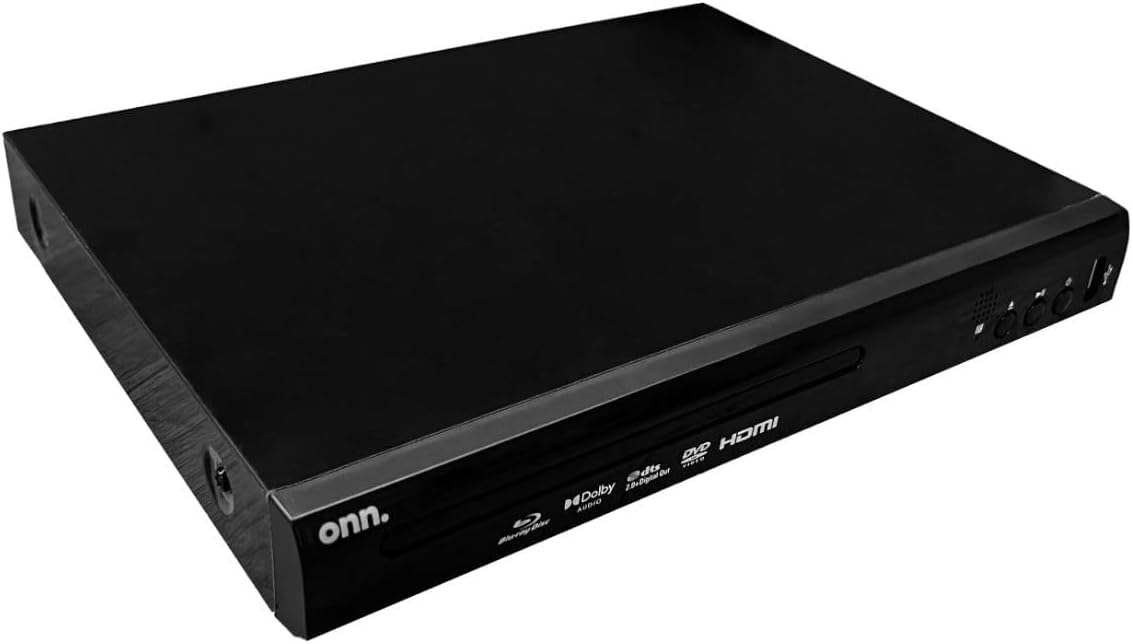
図2:背面 View of ONN Blu-ray Player. This image shows the back panel of the player, highlighting the HDMI output port and the DC power input.

図3: 斜めの前面 View. 視点 view of the player's front, showing brand and supported format logos.
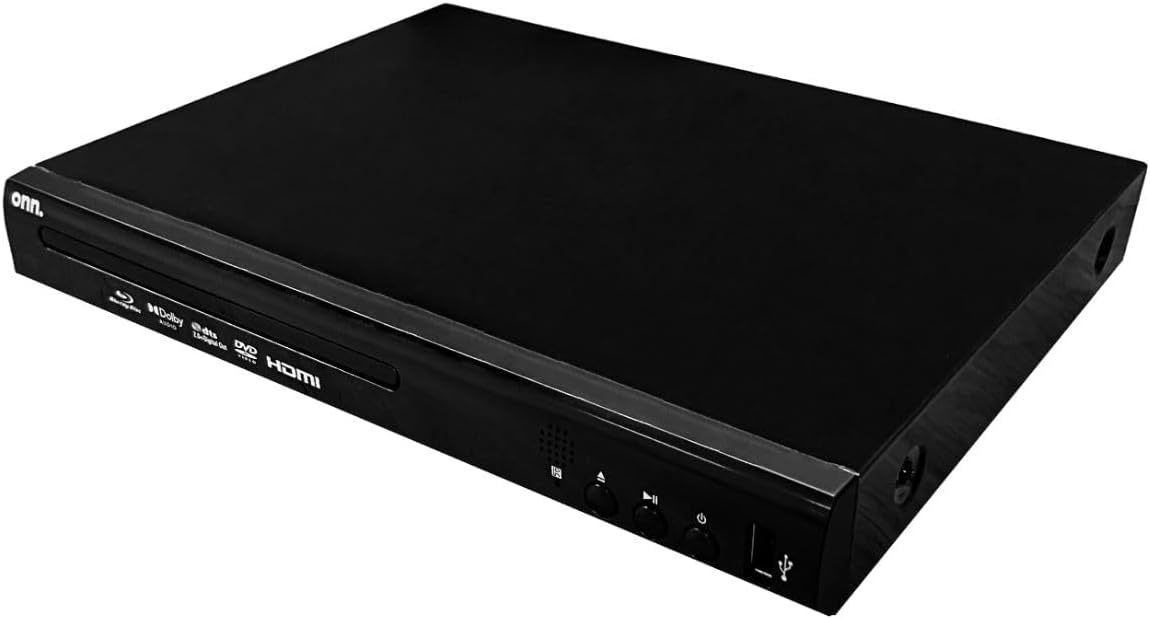
Figure 4: Top Angled View. オーバーヘッドアングル view of the Blu-ray player, showcasin洗練された黒のデザイン。
セットアップ手順
Follow these steps to set up your ONN Blu-ray Player:
- Place the Player: Position the Blu-ray player on a stable, flat surface near your television. Ensure there is adequate ventilation around the unit.
- テレビに接続する(HDMI):
Using the included HDMI cable, connect one end to the HDMI OUT port on the Blu-ray player (refer to Figure 2) and the other end to an available HDMI input port on your television.
注記: テレビが正しい HDMI 入力ソースに設定されていることを確認してください。
- 接続電源:
Connect the power adapter to the DC IN port on the back of the Blu-ray player (refer to Figure 2), then plug the adapter into a standard electrical outlet.
- リモコンの電池を取り付けます:
Open the battery compartment on the back of the remote control and insert the supplied battery, ensuring correct polarity (+/-).
- 電源オン:
Press the Power button on the front of the Blu-ray player or on the remote control to turn on the unit. The power indicator light will illuminate.
操作手順
ディスク再生
- ディスクを挿入: Press the Eject button (⌂) on the player or remote control to open the disc tray. Carefully place a Blu-ray disc, DVD, or CD onto the tray with the label side facing up. Press the Eject button again to close the tray.
- 再生を開始: The player will automatically detect the disc and begin playback. If a menu appears, use the arrow keys and OK button on the remote to navigate and select your desired content.
- 基本的なコントロール:
- 再生/一時停止: 再生/一時停止ボタンを押します(▶⏸)をクリックして再生を開始または一時停止します。
- 停止します。 停止ボタンを押します(■)再生を停止します。
- スキップ: Use the Skip Forward (⏭) or Skip Backward (⏮) buttons to jump between chapters or tracks.
- 早送り/巻き戻し: 早送り(⏩) または巻き戻し (⏪) buttons for high-speed scanning.
USBメディア再生
The player supports media playback from USB 2.0 devices (U DISK and USB HDD).
- USBデバイスを接続: Insert your USB flash drive or external hard drive into one of the USB ports on the front or side of the player (refer to Figure 1).
- USBコンテンツにアクセス: The player should automatically detect the USB device and display its contents. If not, use the remote control's Source or USB button (if available) to switch to USB input.
- ナビゲートしてプレイ: Use the remote control's arrow keys and OK button to browse folders and select files for playback. Supported video formats include H.264, VC1, MPEG1, MPEG-2, and MPEG4.
オーディオとビデオの設定
Access the player's setup menu using the remote control to adjust various audio and video settings, such as aspect ratio, resolution, and audio output modes (Dolby Digital, DTS).
メンテナンス
- ユニットのクリーニング:
Wipe the exterior of the player with a soft, dry cloth. Do not use liquid cleaners or aerosol sprays, as they may damage the finish or internal components.
- ディスクケア:
Handle discs by their edges to avoid fingerprints. Clean discs with a soft, lint-free cloth, wiping from the center outwards. Do not use abrasive cleaners or solvents.
- 換気:
Ensure that the ventilation openings on the player are not blocked to prevent overheating.
トラブルシューティング
If you encounter issues with your Blu-ray player, refer to the following common problems and solutions:
| 問題 | 考えられる原因 | 解決 |
|---|---|---|
| 電源なし | 電源コードが正しく接続されていない。電源コンセントが機能していない。 | Ensure the power adapter is securely connected to the player and the electrical outlet. Try a different outlet. |
| ビデオ出力なし | HDMI cable loose or incorrect input selected on TV. | Check HDMI cable connections at both the player and the TV. Select the correct HDMI input source on your television. |
| オーディオ出力なし | Audio settings incorrect; TV/receiver volume too low. | Check the audio settings in the player's menu. Increase the volume on your TV or audio receiver. |
| Disc tray won't open/close | Obstruction in disc tray; Player malfunction. | Ensure there is no obstruction. Power cycle the player (unplug, wait 30 seconds, plug back in). If the issue persists, contact support. |
| ディスクが再生されない | ディスクが汚れているか、傷が付いているか、または互換性のないフォーマットです。 | Clean the disc. Try a different disc. Ensure the disc format is supported by the player (BD, DVD, CD). |
| リモコンが動作しない | 電池が切れているか、正しく挿入されていない。リモコンとプレーヤーの間に障害物がある。 | Replace batteries, ensuring correct polarity. Remove any obstructions. Point the remote directly at the player's front panel. |
これらの解決策を試しても問題が解決しない場合は、サポート セクションを参照してさらにサポートを受けてください。
仕様
| モデル名 | 100147615 |
| ブランド | オン |
| メディアタイプ | ブルーレイディスク、DVD、CD |
| 対応ディスクフォーマット | BD、BD-R、BD-RE、DVD-R/RW、DVD+R/RW、DVD ビデオ、VCD、CD、CD-R/RW |
| サポートされているビデオ形式 | H.264, VC1, MPEG1, MPEG-2, MPEG4 |
| サポートされているオーディオ形式 | Dolby Digital, Dolby Digital Plus, Dolby TrueHD, DTS |
| ビデオ出力解像度 | Up to 1920x1080 pixels (1080p) |
| 接続技術 | HDMI V1.4 (with HDCP support) |
| ポート | 1x HDMI Out, 2x USB 2.0 (Type A) |
| 対応デバイス | テレビ |
| 色 | 黒 |
| アイテム重量 | 3ポンド |
| 寸法(長さ×幅×高さ) | 7.63インチ x 10.23インチ x 1.68インチ |
| 欧州連合 | 615764096857 |
保証情報
This ONN Blu-ray Player Model 100147615 comes with a 90-day Replacement Warranty from the date of purchase. Please retain your proof of purchase for warranty claims. The warranty covers manufacturing defects and malfunctions under normal use. It does not cover damage caused by misuse, accidents, unauthorized modifications, or improper installation.
カスタマーサポート
For technical assistance, troubleshooting beyond this manual, or warranty inquiries, please contact ONN customer support. Refer to the product packaging or the official ONN website for the most current contact information, including phone numbers and support portals.
注記: Always have your product model number (100147615) and proof of purchase ready when contacting support.


