
1. 重要な安全情報
設置およびご使用の前に、すべての説明書をよくお読みください。このマニュアルは、今後の参考のために保管してください。
- 2人による設置: Always use at least two people to lift and install the TV to prevent injury or damage.
- 壁掛け: Follow all wall mounting instructions precisely. Ensure the wall structure can support the TV's weight. If unsure, consult a professional.
- 障害物を避けてください: Do not drill into walls where electrical wiring or piping may be present.
- 安定した配置: If not wall-mounted, ensure the TV is placed on a stable, level surface to prevent tipping.
- 換気: 通気口を塞がないでください。テレビの周囲に十分なスペースを確保し、空気の流れを確保してください。
- 水分: Keep the TV away from water, moisture, and high humidity environments.
- 電源コード: 電源コードは踏まれたり挟まれたりしないよう保護してください。損傷した電源コードは使用しないでください。
- クリーニング: 清掃する前にテレビの電源プラグを抜いてください。柔らかく乾いた布を使用してください。液体洗剤やエアゾール洗剤は使用しないでください。
2. 含まれるもの
すべてのコンポーネントがボックス内にあることを確認します。
- Amazon Ember Artline TV (55-inch)
- Alexa音声リモコン強化版
- ウォールマウントキット
- 電源コード
- 単2電池XNUMX本
- クイックスタートガイド
- Amazon Ember Artline 55” Frame (four pieces) - Note: Frames ship separately and may arrive at a different time.

Image: Amazon Ember Artline 55-inch Fire TV with Ash frame.
3. セットアップとインストール
3.1. Preparing the TV for Wall Mount
Before mounting, ensure the TV is prepared correctly. You will need a number two Phillips screwdriver. Do not use an electric drill to prevent stripping the bolt holes.
- Lay the TV screen side down on a soft, clean surface to access the recessed cover on the back.
- Remove the recessed cover.
- Install the two mount bolts into the designated holes using a number two Phillips screwdriver.
Video: Instructions for wall mounting the Amazon Ember Artline TV. This video demonstrates the steps for preparing the TV and installing the wall mount hardware.
3.2.ウォールマウントの設置
You will need at least two people to complete this process. Ensure you have the included wall mounting template, bolts, screws, and anchors. Additionally, you will need an electric drill with a 3/16 inch drill bit, a #2 Phillips driver bit, a hammer, a pencil, and a level or level app. If mounting on wood studs, you'll need a 1/8 inch drill bit. If mounting on brick, you'll need a 5/16 inch drill bit and a stud finder for drywall.
- ロケーションプランニング:
- Consider the height of everyone using the TV. Place it at eye level for comfortable viewing。
- Find a mount location away from water or moisture.
- Avoid drilling holes over electrical wiring or piping.
- If installing on a brick wall, locate an area free of cracks.
- If your wall doesn't have proper stud spacing, contact a professional for installation.
- ブラケットの取り付け:
- Plan the location of the wall mount using the wall mounting template.
- Locate two studs using a stud finder (for drywall). Mark the center of each stud with a pencil.
- Place the mount against the wall and mark at least four screw holes. Use a level or level app to ensure the mount is straight.
- Drill pilot holes on each mark using an electric drill with the appropriate bit (1/8" for drywall, 5/16" for brick).
- If on drywall, anchors are not needed. If on brick, use a hammer to install the mount anchors in the holes.
- Attach the mount to the wall using the mount screws, an electric drill, and a #2 Phillips bit.
- Installing Magnet Plates:
- Attach the template to the wall using double-sided tape.
- Mark the locations for the four magnet plates on the wall, then remove the template.
- Drill pilot holes on each mark using an electric drill with a 3/16 inch bit.
- Install the magnet plate anchors using a hammer.
- Install the magnet plates into the anchors using the magnet plate screws and an electric drill with a #2 Phillips bit.
- Attaching the TV to the Mount:
- While attaching the TV, avoid pressing against the screen.
- Fully extend the TV bracket away from the wall and gently release the bolt latches.
- Place the four alignment stickers above the mount bolts on the back of the TV and the bolt latches on the mount. Fold the stickers up to see them more clearly.
- Hang the mount bolts on the mount hooks. Use the alignment stickers to guide you.
- Close the bolt latches, then push the TV flush with the wall to connect the magnets and magnet plates.
4. Operating Your Amazon Ember Artline Fire TV
4.1. Fire TVインターフェース
The Amazon Ember Artline features the new Fire TV experience (2026 release) with a modern design for fast access to entertainment. You can pin frequently used apps and browse dedicated content categories. Access hundreds of thousands of movies and TV episodes, including free, ad-supported content. Subscription fees may apply for certain services.

Image: The Fire TV interface displaying various streaming applications and content.
4.2. Alexa Voice Remote Enhanced
The included Alexa Voice Remote Enhanced allows for easy navigation and voice control. Talk naturally to find content, manage your smart home, or explore topics.
- 音声コントロール: Press and hold the voice button to use your voice commands.
- ナビゲーション: Use the directional pad to navigate menus and content.
- クイック アクセス ボタン: Dedicated buttons for popular streaming services (e.g., Prime Video, Netflix) provide instant access.
4.3. Ambient Experience and Art Mode
The Ember Artline functions as both an entertainment hub and a curated art gallery. It can display art, stream content, and manage your smart home. The matte screen reduces glare for an optimal viewing の経験。
- アートギャラリー: Access a gallery of over 2,000 free works of art.
- Personal Photos: Upload and display your own photos from the Amazon Photos App. Use Alexa to create slideshows or collages (e.g., "Play a slideshow of us biking in the mountains.").
- Match the Room: Upload photos of your space, and the TV will recommend art pieces that complement your decor.
- カスタムフレーム: Choose from ten available frame colors. Frames are easy to install and change.

Image: The Amazon Ember Artline TV seamlessly integrated into a living room, displaying a vibrant piece of art.
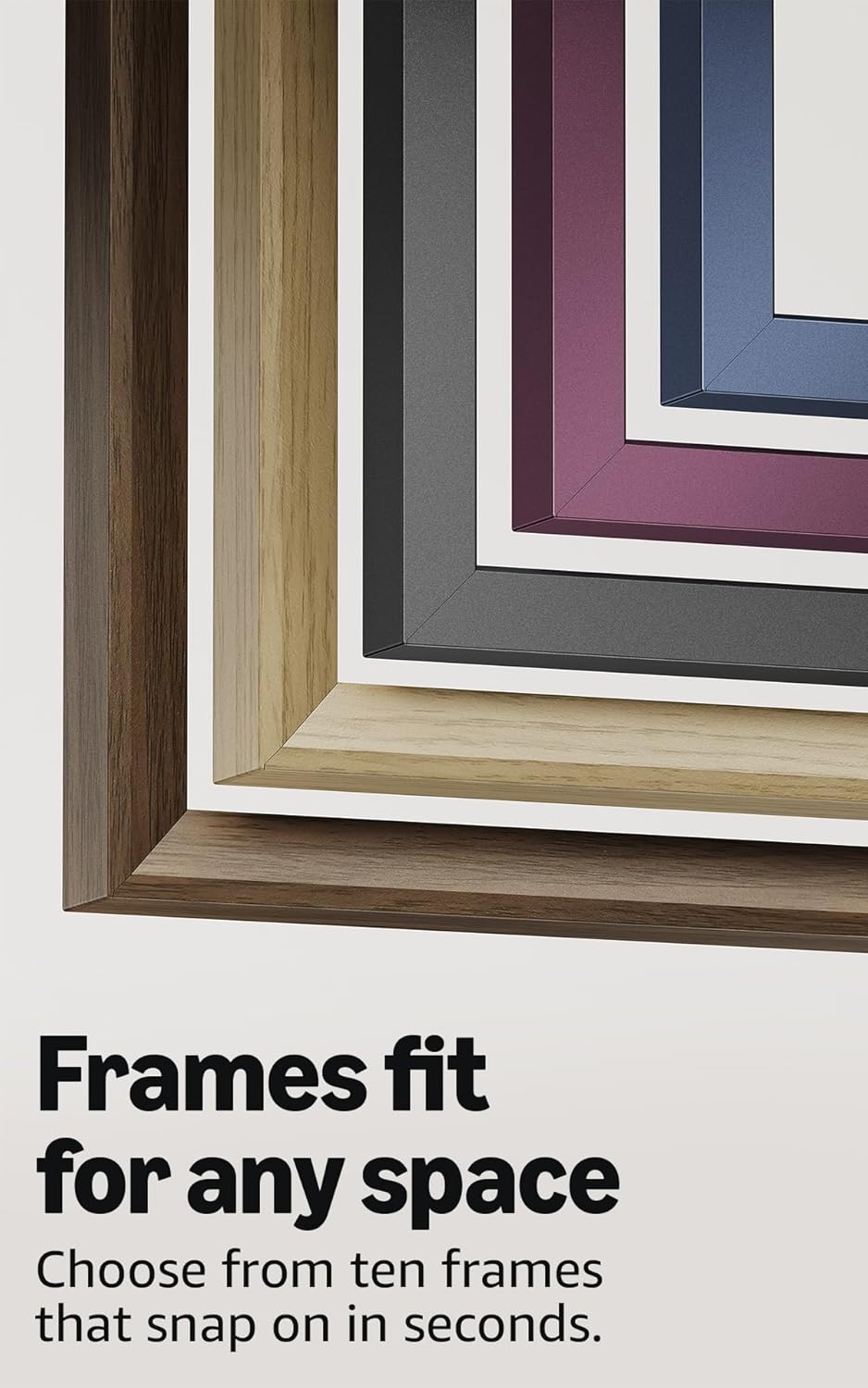
Image: A selection of different colored frames available for the Amazon Ember Artline TV, highlighting customization options.
4.4. Omnisense Technology (Motion Detection)
The custom Omnisense technology uses built-in sensors to detect your presence. The display will wake to show your favorite artwork or allow you to start watching content quickly. When you leave the area, the TV automatically turns off to save energy.

画像: 詳細な view of the Omnisense sensor, which enables motion detection for automatic display activation and power saving.
ビデオ: 終了view of the Amazon Fire TV 4K TV with Alexa Voice Remote, demonstrating initial setup, interface navigation, and motion detection features.
5. 仕様
| 特徴 | 詳細 |
|---|---|
| 解決 | 3840 x 2160 (4K UHD) |
| ハイダイナミックレンジ(HDR)形式 | HDR10, HLG, HDR10+ Adaptive, Dolby Vision |
| バックライトタイプ | 導かれた |
| リフレッシュレート | 60Hz |
| Screen finish | Matte, anti-glare |
| 画面サイズ | 55“ (Viewable display size: 54.6“) |
| HDMIポート | HDMI 2.0 x 3 + HDMI 2.1 x 1(eARC 対応) |
| Wifi & Ethernet connectivity | Wi-Fi 6 + 1 イーサネットポート |
| USB | 1 USB 3.0 |
| デジタル光オーディオ出力 | デジタル光オーディオポート 1 個 |
| 音声サポート | Yes, hands-free with Alexa, press and ask Alexa with the Fire TV Alexa Voice Remote Enhanced or the free Fire TV app. |
| オーディオサポート | ドルビーデジタルプラス(ドルビーエンコードオーディオのパススルー対応) |
| オーディオパワー | 10W + 10W |
| OS | ファイアOS |
| Product size (without frame) | 48.3” x 28.3” x 1.54” |
| 重量(フレームなし) | 39.9ポンド |
| SKU番号 | QL55M800A |
| VESA壁掛け規格 | 300mm x 400mm (Note: Included wall mount is non-VESA; TV is VESA compatible for separately purchased mounts.) |
| TV size with frame | 49.1” x 28.7” x 1.8” |
| TV weight with frame | 42.5ポンド |
6. アクセシビリティ機能
The Amazon Ember Artline Fire TV includes several accessibility features:
- 声View スクリーンリーダー: 視覚障害のあるユーザーが Fire TV のほとんどの機能にアクセスできるようにします。
- 画面拡大鏡: ユーザーが画面を拡大/縮小したり、画面をパンしたりできるようにします。
- テキストバナー: 画面上のテキストをコンパクトでカスタマイズ可能なバナーに統合します。
- クローズドキャプション: Available for videos and TV shows where supported.
- 音声解説: Provides verbal descriptions of on-screen actions, facial expressions, and scene changes (not available for all content).
- Bluetooth補聴器サポート: Supports audio streaming for select compatible Bluetooth hearing aids and devices for private listening. Compatible Bluetooth headphones are also supported.
7. ソフトウェアの更新とセキュリティ
このデバイスは、デバイスが最後に当社で新しいユニットとして購入可能になってから少なくとも XNUMX 年間、保証されたソフトウェア セキュリティ アップデートを受け取ります。 webサイト。デバイス固有の情報については、「コンテンツとデバイスの管理」をご覧ください。
8.保証とサービス
A 1-Year limited warranty and service are included with the Amazon Ember Artline TV. Optional 3-Year and 4-Year Extended Warranties are available for U.S. customers and are sold separately. Extended warranty excludes frame accessories. Use of Fire TV is subject to the terms found on the Amazon webサイト。
The Amazon Ember Artline 55” Frame includes a 90-day limited warranty and service.
9。 トラブルシューティング
If you encounter issues with your Amazon Ember Artline Fire TV, consider the following common troubleshooting steps:
- 電源なし: 電源コードがテレビと電源コンセントの両方にしっかりと接続されていることを確認します。
- 画像/音声なし:
- Check all cable connections (HDMI, optical audio).
- テレビで正しい入力ソースが選択されていることを確認します。
- テレビの電源プラグをコンセントから抜き、60 秒間待ってから再度差し込み、テレビを再起動します。
- リモコンが応答しない:
- Alexa 音声リモコンの AAA 電池を交換します。
- Re-pair the remote by holding the Home button for 10 seconds.
- ネットワーク接続の問題:
- Wi-Fi ルーターとモデムが正しく動作していることを確認してください。
- ルーターとモデムを再起動します。
- Go to the TV's Network settings to re-connect to your Wi-Fi network or try a wired Ethernet connection.
- Ambient Experience Not Activating:
- Ensure Omnisense technology is enabled in the TV settings.
- Check for any physical obstructions blocking the motion sensors.
- ソフトウェアのパフォーマンス: If the TV is slow or unresponsive, try restarting it. Ensure the TV's software is up to date.
For further assistance, refer to the online support resources or contact Amazon customer service.