
1. はじめに
This manual provides detailed instructions for the installation, operation, and maintenance of your Dasaita 13.3-inch Double Din Android 13 Car Stereo. Please read this manual thoroughly before using the product to ensure proper function and safety. Keep this manual for future reference.
2.製品オーバーview
2.1 主な特徴
- 車両互換性: Designed for double DIN frames (178x100mm), compatible with various vehicles including Nissan Qashqai and Subaru Forester.
- 強力なパフォーマンス: Octa-core Qualcomm 665 CPU, 8GB RAM, 256GB ROM, running Android 13 OS.
- ワイヤレス接続: Supports Wireless Apple CarPlay and wired/wireless Android Auto, Bluetooth 5.0, 5G WiFi, and 4G LTE via SIM card.
- 高解像度ディスプレイ: 13.3-inch QLED Full-fit capacitive touchscreen with 1920*1080P resolution.
- 高度なオーディオ: TDA7808内蔵 amplifier chip (23W RMS/50 peak x 4 channels), 4V audio output, DTS sound processing, and optical fiber output.
- Navigation & Safety: In-dash GPS navigation and built-in gyro sensor for Off-Road Inclinometer functions, monitoring roll and pitch angles.
- ユーザーインターフェース: Customizable UI, intelligent day/night mode switching, and split-screen functionality.
2.2 箱の中身
パッケージには次のコンポーネントが含まれています。
- Dasaita 13.3-inch Head Unit
- ユーザーマニュアル
- ツールキット
- Audio Output & Camera Input cables
- AUX In & Front Camera Input cables
- 2x USB ケーブル
- WiFiアンテナ
- SIM card cable
- GPSアンテナ
- 4Gアンテナ
- マイクロフォン
- 電源ケーブル
- USBアダプタ
- Canbus decoder (if applicable)

画像: 製品パッケージに含まれるすべてのコンポーネント。
3.インストールとセットアップ
3.1 Vehicle Compatibility and Fitment
The Dasaita 13.3-inch head unit is designed to fit standard double DIN openings (178x100mm). For vehicles with non-standard openings, an additional installation kit may be required. Specific cables and dash kits might be needed for certain vehicle models to retain OEM features.

画像: Examples of the head unit installed in different vehicle dashboards.

Image: Illustration of retaining OEM radio features and expanding content.
3.2 Physical Installation and Adjustable Screen
The head unit features an adjustable 13.3-inch floating screen. It can be moved vertically by ±2.5cm and tilted up/down or left/right by 30 degrees to optimize view角度を変える。
- Face down the head unit screen and remove the 4 securing screws.
- Lay the unit flat and remove the support bracket screws.
- Adjust the screen vertically by 2.5cm. Secure the bracket screws, then reinstall the screen fixing screws.

Image: Adjustable viewing angle options for the screen.

Image: Detailed steps for adjusting the screen's vertical position.
3.3 配線図
Refer to the universal wiring diagram for connecting the various components. Ensure all connections are secure before powering on the unit.

Image: Universal wiring diagram for the head unit.
3.4SIMカードのインストール
To enable 4G LTE connectivity, insert a 4G SIM card into the provided slot. Ensure the engine is turned off before inserting the SIM card.
- 車両のエンジンを停止します。
- Carefully insert the 4G SIM card into the designated slot. Only standard SIM cards are supported.
- After installation, navigate to Settings > Car Setting > Factory Setting > Find SIM card voice call and select "Yes" to enable 4G LTE phone call functionality.

Image: Instructions for inserting a 4G SIM card.

Image: Steps to enable 4G LTE phone calls.
4. 操作手順
4.1 ワイヤレスCarPlayとAndroid Auto
Connect your iPhone or Android device wirelessly via Bluetooth 5.0 for seamless integration with Apple CarPlay or Android Auto. Access navigation, make calls, send messages, and play music directly from your phone's interface on the head unit screen.
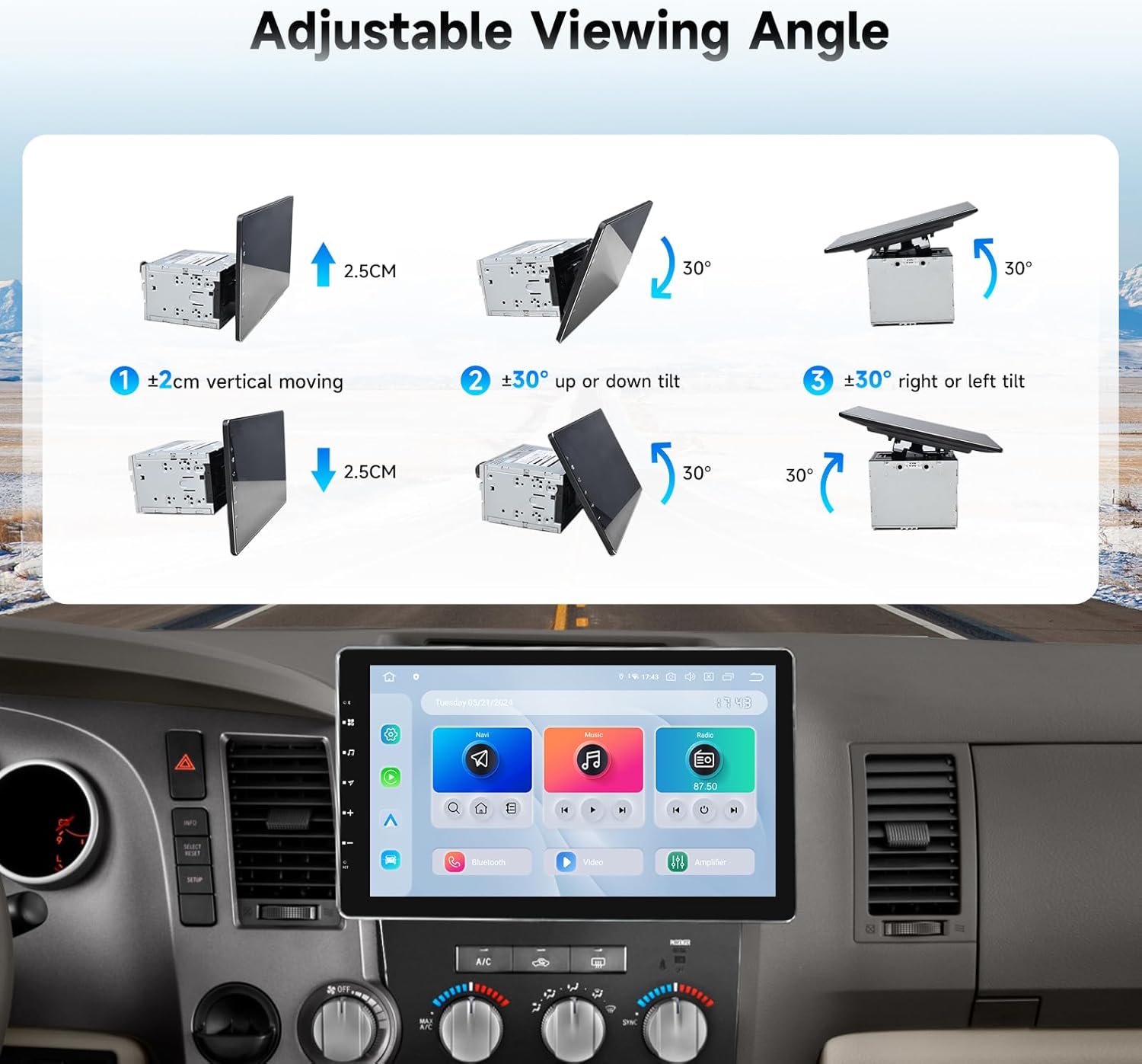
Image: Apple CarPlay and Android Auto interfaces.
4.2 DTS Sound Processing
The built-in DTS sound processor and TDA7808 amplifier chip deliver high-quality audio. Customize your sound experience by adjusting equalizer settings, delay times, and other audio parameters to match your preferences.

Image: DTS sound processor interface.
4.3 Off-Road Inclinometer Functions
The integrated gyro sensor provides real-time monitoring of your vehicle's roll and pitch angles. An alarm will sound if preset values are exceeded, enhancing driving safety, especially on uneven terrain.

Image: Off-Road Inclinometer display.
4.4 ユーザーインターフェースのカスタマイズ
The Android 13 OS allows for personalized customization of the user interface. You can rearrange app icons, set day or night modes, and utilize the split-screen function for multitasking.

Image: Intelligent Day and Night Mode Switching.

Image: User-Friendly Interface with customization options.
4.5 Screen Sharing and Mirroring
The head unit supports wireless TV projection and wired/wireless mirroring via the Zlink app. This allows you to display content from your smartphone directly onto the larger screen.
4.6 4G LTE Phone Calls
With a 4G SIM card installed and enabled, you can make and receive phone calls directly from the head unit. The quality of the call depends on the signal strength of your location.

Image: Bluetooth 5.0 for hands-free phone calls.
5. 仕様
| 特徴 | 仕様 |
|---|---|
| モデル番号 | HA2308 |
| 表示サイズ | 13.3インチ |
| 解決 | 1920*1080P |
| オペレーティング·システム | アンドロイド13 |
| CPU | Octa-core Qualcomm 665 |
| ラム | 8GB |
| ロム | 256GB |
| ブルートゥース | ブルートゥース5.0 |
| 接続性 | Bluetooth、USB、Wi-Fi、4G LTE |
| オーディオ出力モード | ステレオ |
| Ampリファイアチップ | TDA7808 (23W RMS/50 peak x 4 channels) |
| 特集 | Touchscreen, DTS, Gyro Sensor (Off-Road Inclinometer) |
| アイテム重量 | 13.2ポンド |
| 製品寸法 | 12.8 x 6 x 7.6インチ |

画像: 製品の寸法。
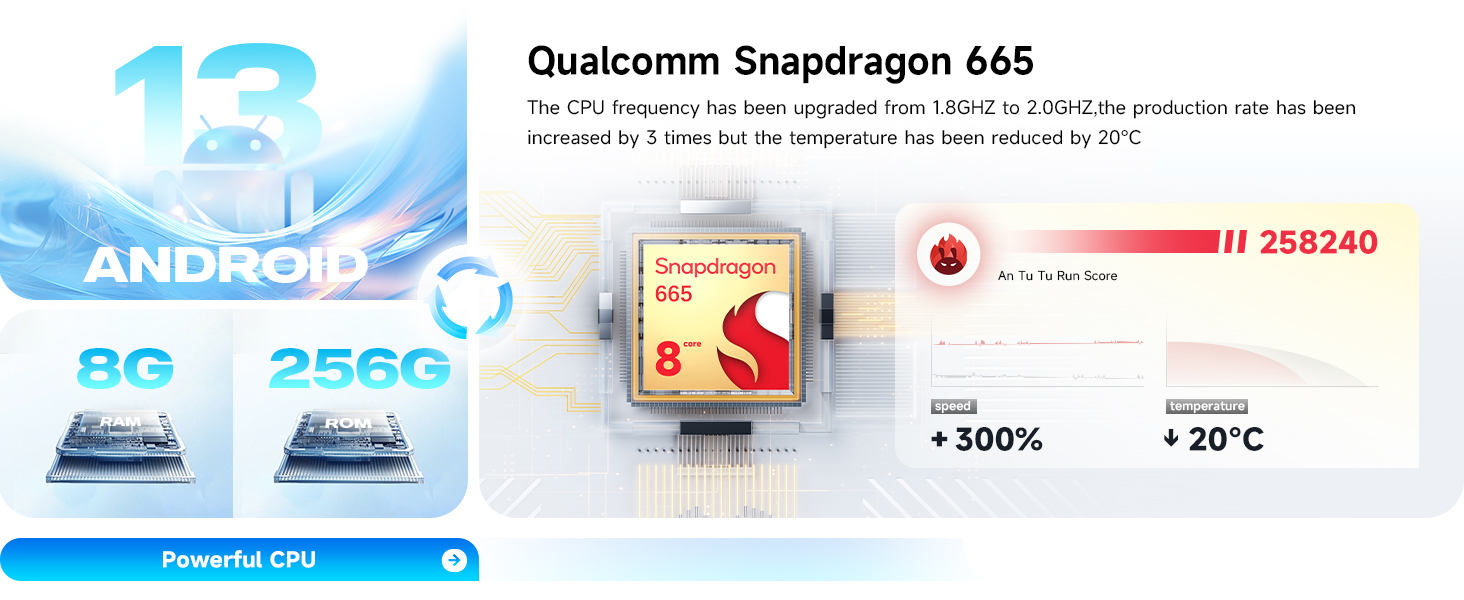
Image: Powerful CPU and memory specifications.
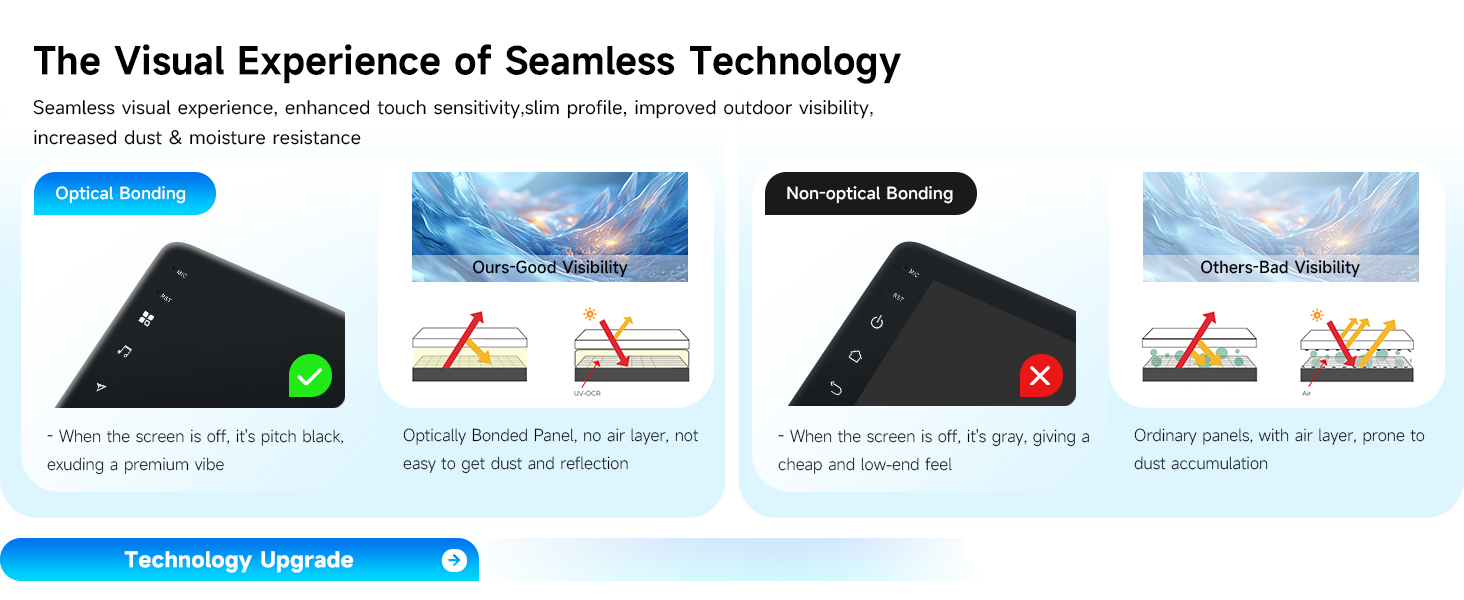
Image: High-definition fully laminated screen details.
6. メンテナンス
Dasaita カーステレオの寿命を延ばし、最適なパフォーマンスを確保するには、次のメンテナンス ガイドラインに従ってください。
- 画面のクリーニング: 柔らかく糸くずの出ない布でタッチスクリーンを優しく拭いてください。頑固な汚れには、軽くamp布を水またはスクリーンに安全なクリーナーで拭いてください。刺激の強い化学薬品や研磨剤は使用しないでください。
- ソフトウェアアップデート: システムが効率的に実行され、最新の機能とセキュリティ パッチが適用されていることを確認するために、ソフトウェア アップデートを定期的に確認してインストールしてください。
- 環境への配慮: ユニットを極端な温度、長時間の直射日光、過度の湿気にさらさないでください。
- ケーブル接続: すべてのケーブルがしっかりと接続され、損傷がないことを確認してください。接続が緩んでいると、断続的な問題が発生する可能性があります。
7.トラブルシューティングとサポート
7.1 よくある問題
- 電源なし: Check power cable connections and vehicle's fuse box.
- 音が出ない: Verify speaker connections, volume settings, and audio output mode.
- タッチスクリーンが反応しない: Try restarting the unit. If issues persist, contact support.
- GPS信号損失: GPSアンテナが正しく取り付けられ、クリアな視界があることを確認してください。 view 空の。
- CarPlay/Android Auto 接続の問題: Ensure Bluetooth is enabled on both devices and the phone is compatible. Try restarting both the phone and the head unit.
7.2 保証情報
This Dasaita product comes with a 1年間保証 from the date of purchase. Please retain your proof of purchase for warranty claims. The warranty covers manufacturing defects but does not cover damage caused by misuse, improper installation, or unauthorized modifications.
7.3 カスタマーサポート
If you encounter any issues or have questions not covered in this manual, please contact Dasaita Official Store customer support. You can typically find contact information on the seller's page or through your purchase platform.

Image: How to contact customer support.