
導入
Thank you for choosing the KAMRUI Hyper H2 Mini PC. This compact and powerful desktop computer is designed for a wide range of applications, from demanding office tasks and creative projects to home entertainment and light gaming. Equipped with an Intel Core i5-14450HX processor, 16GB DDR4 RAM, and a 512GB NVMe SSD, it offers robust performance and seamless multitasking capabilities. Its versatile connectivity options and triple 4K display support ensure a flexible and immersive user experience.
This manual provides essential information on setting up, operating, maintaining, and troubleshooting your KAMRUI Hyper H2 Mini PC. Please read it thoroughly to ensure optimal performance and longevity of your device.
箱の中身
Upon opening your KAMRUI Hyper H2 Mini PC package, please verify that all the following items are included:
- 1 x KAMRUI Hyper H2 Mini PC
- 1 x HDMIケーブル
- VESAマウント(ネジ付き)×1
- 電源アダプター x 1
- ユーザーマニュアル x 1

製品終了view
The KAMRUI Hyper H2 Mini PC is engineered for efficiency and connectivity. Its compact chassis houses a powerful Intel Core i5-14450HX processor, supported by a robust cooling system to ensure stable performance even under heavy workloads.
フロントパネルポート
- 1 x USB 3.2 Gen2 Type-C port (10Gbps data transfer, DisplayPort Alt Mode, 15W power delivery)
- 2 x USB 3.2 Gen2 Type-A ports (10Gbps)
- 1 x Audio Jack (3.5mm for headphones/microphone)
- 電源ボタン x 1
リアパネルのポート
- HDMI 1 ポート x 2.0
- ディスプレイポート 1.4b x 1
- RJ45 ギガビット イーサネット ポート x 1
- 4 x USB 3.2 Gen1 Type-A ports (5Gbps)
- 1 x DC電源入力

セットアップガイド
Follow these steps for initial setup of your KAMRUI Hyper H2 Mini PC:
- ディスプレイを接続する: Connect your monitor(s) to the Mini PC using the HDMI, DisplayPort, or USB-C port. For triple display setup, utilize all three available video outputs.
- 周辺機器を接続します。 キーボード、マウス、その他の USB デバイスを利用可能な USB ポートに接続します。
- ネットワークに接続する: For wired internet, connect an Ethernet cable to the RJ45 Gigabit Ethernet port. For wireless, ensure your Wi-Fi 6 network is available after initial boot.
- 接続電源: 電源アダプタをミニ PC の DC 入力ポートに差し込み、アダプタを電源コンセントに接続します。
- 電源オン: Press the power button on the front panel to turn on your Mini PC.
- 初期設定: Follow the on-screen instructions to complete the Windows 11 Pro setup, including language, network, and user account settings.
VESAマウントの取り付け
The included VESA mount allows you to attach the Mini PC to the back of a compatible monitor or TV, saving desk space and creating a clean setup.
- 付属のネジを使用して、VESA マウント ブラケットをモニターの背面に取り付けます。
- Slide the KAMRUI Hyper H2 Mini PC onto the mounted bracket until it clicks securely into place.
操作手順
基本操作
- 電源オン/オフ: Press the power button once to turn the device on or off. For a forced shutdown, press and hold the power button for 5-7 seconds.
- 再起動: Use the operating system's restart option for proper system reboots.
- スリープモード: The system will enter sleep mode after a period of inactivity or by selecting the sleep option in the OS.
マルチディスプレイ設定
The KAMRUI Hyper H2 supports up to three 4K@60Hz displays simultaneously, enhancing productivity and entertainment. Connect your displays to the HDMI, DisplayPort, and full-featured USB-C ports. Once connected, configure your display settings within the operating system (e.g., Extend, Duplicate, or Second screen only).

メンテナンスとアップグレード
冷却システム
The KAMRUI Hyper H2 features a premium thermal design with a dual-fan cooling system, full copper heat pipes, and a dedicated aluminum SSD heatsink. This ensures the CPU and storage remain cool, even under sustained heavy workloads. To maintain optimal cooling performance:
- 通気口を障害物がないようにして、適切な空気の流れを確保します。
- 圧縮空気を使用して、通気口のほこりを定期的に除去してください。

RAM and SSD Upgrades
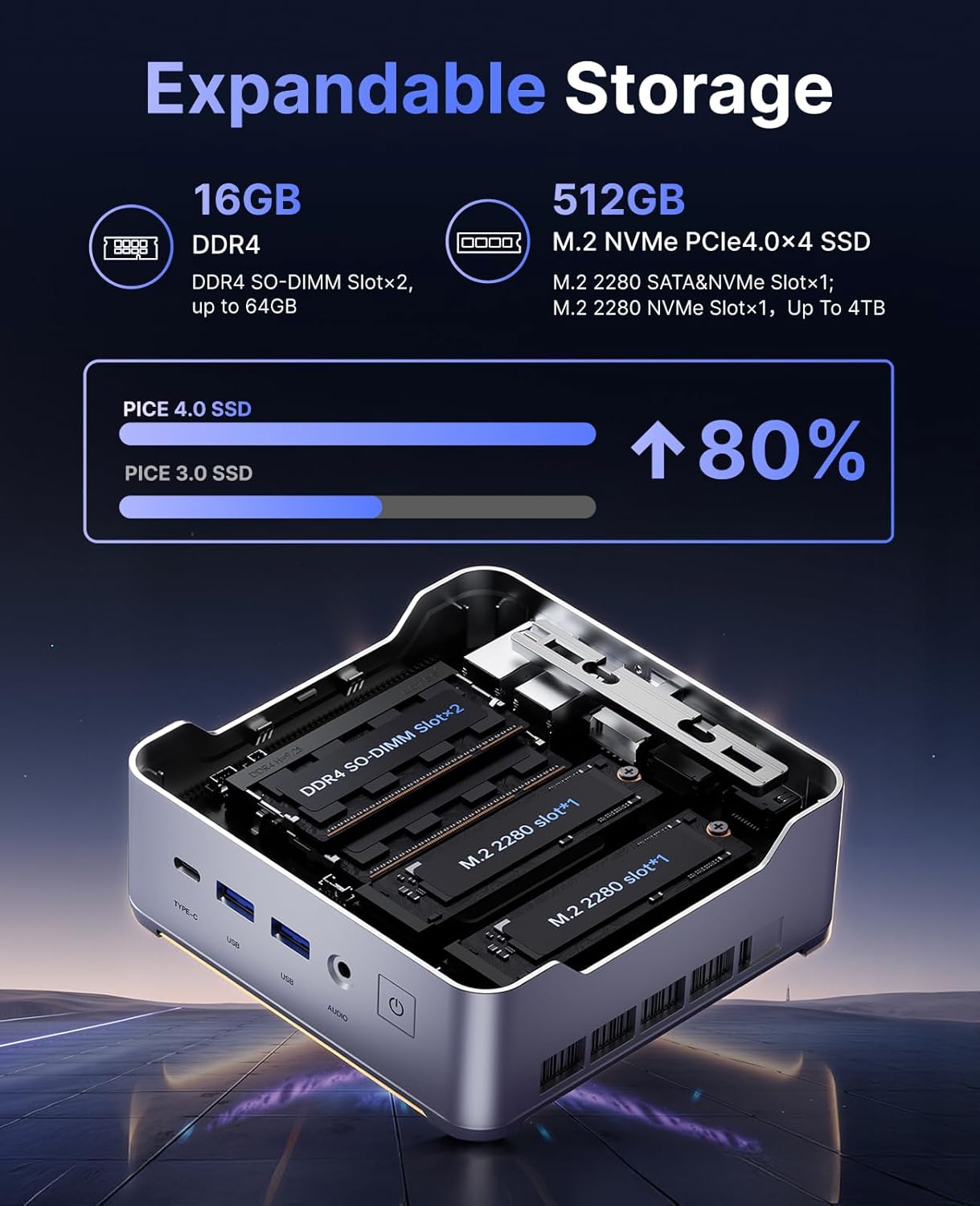
The KAMRUI Hyper H2 is designed for easy upgrades, allowing you to expand its memory and storage capacity. The Mini PC supports:
- ラム: Up to 2x 32GB DDR4 3200MHz/s SO-DIMM (total 64GB).
- SSD: Up to 2x 2TB NVMe SSD (M.2 2280 PCIe Gen4x4).
To access the RAM and SSD slots:
- Ensure the Mini PC is powered off and disconnected from all cables.
- Locate the small Phillips screw on the rear panel next to the lock/unlock switch. Remove this screw.
- Slide the lock switch to the unlock position. The top cover will lift slightly.
- トップカバーを慎重に取り外します。
- Unscrew the four Phillips screws holding the metal plate/cover.
- Gently lift the metal plate to reveal the RAM and NVMe SSD slots.
- Install or replace your RAM modules or NVMe SSDs as needed.
- Reassemble the Mini PC by reversing these steps, ensuring all screws are tightened and the cover is securely locked.
トラブルシューティング
If you encounter any issues with your KAMRUI Hyper H2 Mini PC, please refer to the following common solutions:
- 電源なし:
- 電源アダプタがミニ PC と正常な電源コンセントの両方にしっかりと接続されていることを確認します。
- 別のデバイスを接続して、電源コンセントが機能していることを確認します。
- 表示なし:
- Check all video cable connections (HDMI, DP, USB-C) between the Mini PC and your monitor(s).
- モニターの電源がオンになっており、正しい入力ソースに設定されていることを確認してください。
- 別のディスプレイに接続するか、別のビデオ ケーブルを使用してみてください。
- インターネット接続なし:
- 有線接続の場合は、イーサネット ケーブルが正しく接続され、ルーター/モデムが動作していることを確認してください。
- For Wi-Fi, check if Wi-Fi is enabled in Windows settings and ensure you are connected to the correct network with the right password.
- ルーター/モデムとミニ PC を再起動します。
- パフォーマンスが遅い:
- バックグラウンドで実行されている不要なアプリケーションを閉じます。
- オペレーティング システムとドライバーが最新であることを確認してください。
- 信頼できるウイルス対策ソフトウェアを使用して、マルウェアやウイルスがないかチェックします。
- Consider upgrading RAM or SSD if performance issues persist, especially with demanding tasks.
仕様
| 特徴 | 仕様 |
|---|---|
| プロセッサ | Intel Core i5-14450HX (10 Cores/16 Threads, up to 4.8GHz) |
| グラフィックス | Integrated UHD Graphics for 14th Gen Processors (max frequency 1.5GHz) |
| ラム | 16GB DDR4 (Expandable up to 64GB, 2x SO-DIMM slots) |
| ストレージ | 512GB NVMe PCIe 4.0 SSD (Expandable up to 2x 2TB NVMe SSD) |
| ビデオ出力 | Triple 4K@60Hz (HDMI 2.0, DP 1.4b, USB-C with DisplayPort Alt Mode) |
| ワイヤレス接続 | Wi-Fi 6(802.11ax)、Bluetooth 5.2 |
| 有線接続 | RJ45 ギガビット イーサネット ポート x 1 |
| USBポート | 1 x USB 3.2 Gen2 Type-C (10Gbps, DP Alt Mode, 15W PD) USB 3.2 Gen2 タイプA (10Gbps) x 2 USB 3.2 Gen1 タイプA (5Gbps) x 4 |
| オーディオ | 1 x3.5mmオーディオジャック |
| オペレーティング·システム | OS PRO |
| 寸法 | 6.46 x 6.42 x 4.53インチ(パッケージ) |
| アイテム重量 | 2.99ポンド |
保証とサポート
Your KAMRUI Hyper H2 Mini PC comes with a 12ヶ月保証 from the date of purchase, covering manufacturing defects and hardware malfunctions under normal use. For any technical assistance, troubleshooting, or warranty claims, please contact KAMRUI customer support.
KAMRUI offers 24時間カスタマーサポート to assist you with any queries or issues you may encounter. Please refer to the contact information provided in your product packaging or visit the official KAMRUI webサポート詳細のサイト。
追加のリソースと製品情報については、 KAMRUI Store on Amazon.