
1. はじめに
This manual provides essential information for the safe assembly, operation, and maintenance of your Jasion RetroVolt Pro Electric Bike. Please read this manual thoroughly before your first ride and retain it for future reference. Understanding your e-bike's features and functions is crucial for a safe and enjoyable experience.
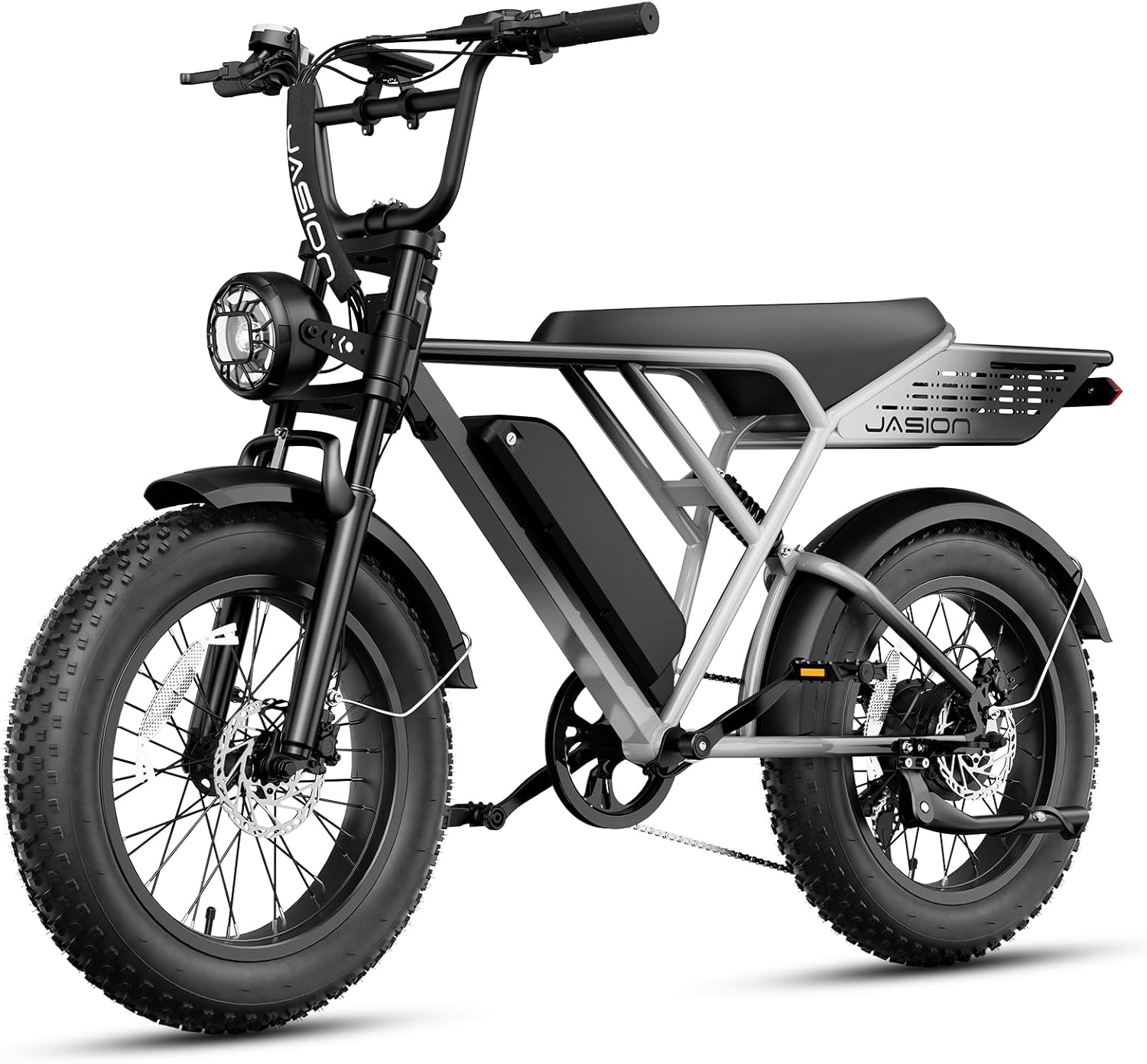
Image 1: The Jasion RetroVolt Pro Electric Bike, gray standard model, showcasing its robust frame, fat tires, and integrated battery.
2. 安全ガイドライン
Always prioritize safety. Wear a helmet and appropriate safety gear. Ensure all components are securely fastened before each ride. Familiarize yourself with local e-bike regulations. Avoid riding under the influence of alcohol or drugs. Regular maintenance is key to safe operation.
3. パッケージ内容
Upon unboxing, verify that all components are present and undamaged. If any items are missing or damaged, contact Jasion customer service at support@jasionbike.com.
Video 1: This unboxing video demonstrates the contents of the Jasion RetroVolt Pro package and initial setup steps. It shows the bike frame, wheels, pedals, charger, keys, and tools included.
含まれるもの:
- Electric Bike (main frame with rear wheel)
- 前輪
- バッテリー
- 充電器
- ペダル(左&右)
- フロントフェンダー
- ヘッドライト
- キー(x2)
- Stem Cover
- Tools (2x Wrenches, 5x Allen Key)
- マニュアルフライヤー
4. 組み立て手順
Follow these steps carefully to assemble your Jasion RetroVolt Pro Electric Bike. Refer to Video 1 for visual guidance.
4.1 前輪の取り付け
- Use a wrench to fix the vehicle body. Remove the fork protection rod.
- Remove the rubber plug from the disc brakes and the axle screws.
- Attach the front wheel to the fork, ensuring the brake is on the left side. Align with the safety hook and ensure gaskets are in place.
- Tighten the axle nuts and caps securely.
4.2 フロントフェンダーの取り付け
- Using tools from the accessories kit, remove the screws and anti-skid nuts on the front fork hanger and the screws on both sides of the front fork.
- Fix the front mudguard mounting bracket and its left/right support rods to the front fork with screws, tightening them securely.
4.3 Stem Installation
- Remove the screws on the stem's front cap with an Allen wrench.
- Place the handlebar on the head part and lock the seat tube front cap.
- Adjust the handlebar angle to align with the bike, then tighten the clamping screws below the stem.
4.4 ヘッドライトの取り付け
- Remove the front light's side screws and foam washers. Adjust the bracket to face outward, then position the headlight.
- Connect its cable to the bike's power cable.
4.5 Pedals Installation
- Locate the right and left pedals labeled "R" and "L."
- Thread them onto their respective cranks with an Allen wrench.
- Check chain alignment by rotating the crank backward.
4.6 Adjusting the Suspension Fork
- Adjust the rubber stoppers on both sides of the fork.
- Position the stoppers against the top tube to prevent scratching during turns.
5. 電動自転車の操作
5.1 バッテリーの取り付けと取り外し
To remove the battery, use the key to unlock it from the frame. To install, slide the battery into the frame until it clicks into place, then lock it with the key.
5.2 電源のオン/オフ
Ensure the battery is securely installed and turned on (if it has a separate power button). Press and hold the power button on the handlebar display to turn the e-bike system on or off.
5.3ディスプレイオーバーview
The full-color central display provides real-time information including speed, battery level, riding mode, and trip distance. Use the controls to navigate through different display options and adjust settings.

Image 2: The e-bike's LCD display showing current speed, battery status, and indicators for various riding modes.
5.4 ライディングモード
The Jasion RetroVolt Pro offers multiple riding modes to suit different preferences and terrains:
- スロットルモード: Provides power directly from the motor without pedaling.
- ペダルアシストシステム(PAS)モード: The motor assists your pedaling effort. Different PAS levels offer varying degrees of assistance.
- クルーズモード: 連続的なスロットル入力なしで設定速度を維持します。
- ウォーキングモード: Provides low-speed assistance for pushing the bike while walking.
- Pedaling Mode: モーターアシストのない従来の自転車のように自転車に乗ります。
Video 2: This video highlights the Jasion RetroVolt Pro's features, including its 2000W peak motor, 52V 20AH battery, dual suspension, 330 lbs max load capacity, cruise mode, 90-mile PAS range, 20"x4" fat tires, 35-38 MPH max speed, and hydraulic brakes.
5.5 バッテリーの充電
To charge the battery, connect the charger to a power outlet and then to the charging port on the battery. The indicator light on the charger will show the charging status. A full charge typically takes approximately 5 hours.

Image 3: This diagram illustrates the battery's intelligent thermal management system, IP65 waterproof rating, UL certification, and the 5-hour charging time.
6. メンテナンス
Regular maintenance ensures the longevity and performance of your e-bike. Key maintenance tasks include:
- タイヤ空気圧: Check and maintain recommended tire pressure before each ride.
- ブレーキ: Inspect brake pads and rotors for wear. Ensure hydraulic brakes are responsive.
- 鎖: チェーンを清潔に保ち、潤滑油を差してください。
- 留め具: すべてのナット、ボルト、クイックリリースの締め付け具合を定期的に確認してください。
- バッテリーのケア: Store the battery in a cool, dry place and charge it regularly, even when not in use, to prolong its lifespan.
- クリーニング: dでバイクを掃除してくださいamp 布で拭いてください。電気部品に直接高圧洗浄をかけないでください。
7。 トラブルシューティング
If you encounter issues with your Jasion RetroVolt Pro, refer to the following common troubleshooting tips:
- 電動自転車の電源が入らない: Check if the battery is fully charged, properly installed, and turned on. Ensure all cable connections are secure.
- モーターがアシストしない: Verify that the pedal-assist level is set above zero. Check for any error codes on the display.
- ブレーキが弱いように感じる: Inspect brake pads for wear and ensure hydraulic fluid levels are adequate. Consult a professional if issues persist.
- 異常なノイズ: Identify the source of the noise. It could be loose components, chain issues, or brake rubbing. Address promptly.
For more complex issues or if troubleshooting steps do not resolve the problem, please contact Jasion customer support.
8. 仕様
Key technical specifications for the Jasion RetroVolt Pro Electric Bike:
| 特徴 | 仕様 |
|---|---|
| バイクの種類 | 電動自転車 |
| モーター | 2000Wピークモーター |
| 最高速度 | 時速38マイル |
| バッテリー | 52V 20Ah 取り外し可能なバッテリー(1040ワット時) |
| Max Range (PAS 1) | 最大90マイル |
| ブレーキ | 油圧ディスクブレーキ |
| タイヤ | 20インチ x 4インチ ファットタイヤ |
| サスペンション | デュアルサスペンション |
| フレーム素材 | 高炭素鋼 |
| 速度の数 | 7 |
| 最大重量の推奨 | 330 ポンド |
| アイテムの寸法(LxWxH) | 29.92 x 29.92 x 70.87インチ |
| 特集 | Digital Display, Durable, Headlight, Cargo Rack |
| 防水等級 | IP65 |

Image 4: Detailed dimensions and capacity specifications for the Jasion RetroVolt Pro.
9. 保証とサポート
Jasion offers a 12-month limited warranty for the RetroVolt Pro Electric Bike. For warranty claims, technical assistance, or any product-related inquiries, please contact our customer support team.
連絡先:
- コールセンター: 1 (888) 825 6366 (午前 9 時~午後 6 時、月曜~金曜、EST)
- メールサポート: support@jasionbike.com
You can also visit the official Jasion store on Amazon for more information and accessories: Visit the Jasion Store