
1. はじめに
The Proster PST290 Pocket Wood Moisture Meter is a versatile and portable device designed for accurately measuring moisture content in various materials. It features detachable pins, 7 pre-calibrated material settings, a temperature gauge, and a clear color-coded LCD display. This manual provides detailed instructions for the proper use and maintenance of your moisture meter.
2. 箱の中身

This image displays all items included in the Proster PST290 package. You will find the moisture meter itself, two AAA batteries, a small screwdriver for the battery compartment, and two replacement pins for extended use.
- 1x Proster PST290 Moisture Meter
- 単2電池XNUMX本
- ドライバー x 1
- 2x Replacement Pins
- ユーザーマニュアル (本書) x 1
3 製品の特徴

This diagram highlights the user-friendly design and key functionalities of the Proster PST290 moisture meter, including temperature measurement, data hold, compact design, auto-off, and low battery indicator.
- Pocket-Sized & Portable: Compact, pen-shaped design for easy carrying.
- 取り外し可能なプローブ: Allows for easy replacement of pins, extending tool lifespan. A spare set is included.
- 7 Pre-Calibrated Modes: Provides accurate measurements for various woods (Oak, Pine, Maple, Beech, Spruce, Larch, Birch, Cherry, Walnut, Douglas Fir, Lauan) and building materials (cement mortar, anhydrous gypsum mortar, lime mortar, gypsum, brick).
- Color-Coded LCD: Large, easy-to-read LCD screen with a 3-color warning system (Green/Dry, Blue/Moderate, Red/Wet) for instant interpretation.
- データホールド機能: Locks the current reading on the screen.
- MAX/MIN関数: Tracks the highest and lowest moisture levels.
- Built-In Temperature Sensor: Measures ambient temperature in Celsius (℃) or Fahrenheit (℉).
- 自動オフ: 15 分間操作がないと自動的に電源がオフになり、バッテリー寿命が節約されます。
- 低バッテリー警告: Clear indicator for low battery status.
4. セットアップ
4.1 バッテリーの取り付け
The device requires two AAA batteries. Use the provided screwdriver to open the battery compartment cover located on the back of the meter. Insert the batteries according to the polarity markings inside the compartment, then securely close the cover.
4.2 Attaching/Replacing Pins
The moisture meter comes with detachable pins. To attach or replace pins, carefully screw them into the designated ports at the bottom of the device. Ensure they are firmly seated for accurate readings. A spare set of pins is included for future replacement.
5. 操作手順
5.1 電源オン/オフ
を押す 力 button (usually the top-most button) to turn the device on or off.
5.2 材料モードの選択

This image illustrates the 7 distinct calibration scales available on the meter, categorized for various wood types and building materials such as cement mortar, anhydrous gypsum mortar, lime mortar, gypsum, and brick. Each mode has a specific measurement range.
The PST290 offers 7 pre-calibrated modes for different materials. Press the モード button to cycle through these settings. Select the mode that corresponds to the material you are testing for accurate results.
- Modes 1-2 (Wood Measurement): Covers various wood types with ranges from 7.0-54.8% by weight.
- Modes 3-7 (Building Materials Measurement): Covers materials like cement mortar, gypsum, and brick with ranges from 0.0-22.1% by weight.
5.3測定を行う
This video demonstrates the process of taking a moisture measurement with the Proster PST290. Observe how the pins are inserted into the material and the reading is displayed on the screen.
After selecting the appropriate material mode, firmly insert the two pins into the material you wish to measure. Ensure both pins penetrate the surface adequately to get a stable reading. The moisture content will be displayed on the LCD screen.
5.4 Interpreting Readings (Color-Coded LCD)
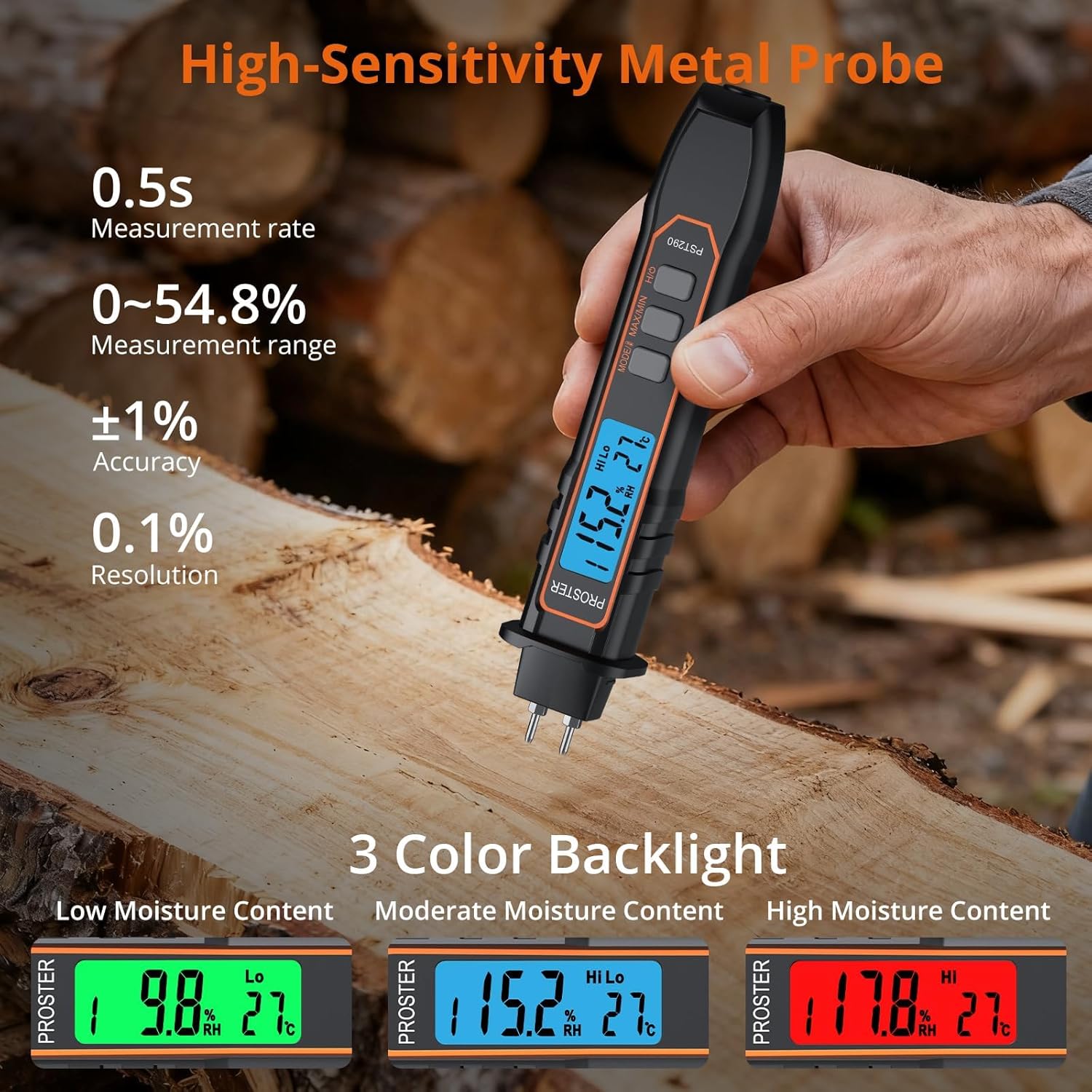
This image illustrates the meter's intuitive 3-color backlight system. A green screen indicates low moisture, blue indicates moderate moisture, and red signifies high moisture content, providing quick visual alerts.
The LCD backlight changes color to provide a quick visual indication of moisture levels:
- 緑: 水分含有量が低い(乾燥)ことを示します。
- 青: 適度な水分含有量を示します。
- 赤: 水分含有量が多い(湿っている)ことを示します。
5.5データ保持機能
を押す 所有 button (often combined with Power) to freeze the current reading on the display. Press it again to release the hold and resume live measurements.
5.6 MAX/MIN Function
を押す 最大/最小 ボタンを押す view the highest (MAX) or lowest (MIN) moisture reading recorded during a measurement session. This is useful for identifying moisture spread or variations.
5.7 Temperature Measurement & Unit Switch

This image demonstrates the meter's ability to measure and display ambient temperature, with the option to switch between Celsius and Fahrenheit units.
The meter displays ambient temperature. To switch between Celsius (℃) and Fahrenheit (℉), press and hold the モード/ユニット button (or the dedicated ℃/℉ button if present) for a few seconds until the unit changes.
5.8自動オフ
The device will automatically power off after approximately 15 minutes of inactivity to conserve battery life. This feature helps prevent accidental battery drain.
5.9 低バッテリー警告
When the battery level is low, a low battery icon will appear on the display. Replace the AAA batteries promptly to ensure continued accurate operation.
6. メンテナンス
6.1 ピンの交換
If the measurement pins become dull or damaged, they can be replaced using the spare set provided. Unscrew the old pins and carefully screw in the new ones. Always ensure the device is off before replacing pins.
6.2 クリーニング
Wipe the meter with a soft, dry cloth. Do not use abrasive cleaners or immerse the device in water. Keep the pins clean and free of debris for optimal performance.
6.3 ストレージ
When not in use, store the moisture meter in a dry, cool place, away from direct sunlight and extreme temperatures. If storing for an extended period, it is recommended to remove the batteries to prevent leakage.
7。 トラブルシューティング
7.1 No Display or Faint Display
- 電池が正しい極性で正しく取り付けられているかどうかを確認してください。
- 電池を新しい単4電池に交換してください。
- デバイスの電源がオンになっていることを確認します。
7.2 不正確な読み取り
- Ensure the correct material mode is selected for the item being tested.
- Make sure the pins are fully inserted into the material and making good contact.
- Clean the pins if they appear dirty or corroded.
- Replace the pins if they are dull or bent.
- Ensure the ambient temperature is within the operating range of the device.
7.3 デバイスが応答しない
- 電池を取り外して再度挿入してください。
- 問題が解決しない場合は、カスタマーサポートに連絡してください。
8. 仕様
| ブランド | プロスター |
| モデル番号 | 290 円 |
| 色 | 黒 |
| 推奨用途 | Woodworking, Water Damage Restoration, Construction, Home Renovation |
| 特集 | Auto Off, Data Lock, Color-Coded LCD, Multiple Modes, Temperature Sensor |
| 表示タイプ | 液晶 |
| フォームファクター | ハンドヘルド |
| Readout Accuracy (Moisture) | 0.1% |
| Readout Accuracy (Temperature) | 1℃ |
| アイテム重量 | 128グラム(4.5オンス) |
| 電源 | 単2電池XNUMX本(付属) |
| パッケージ寸法 | 8.11 x 2.05 x 1.3インチ |
9. 保証とサポート
Proster製品は信頼性と性能を重視して設計されています。保証情報、テクニカルサポート、またはサービスに関するお問い合わせは、製品パッケージに記載されている連絡先、またはProsterの公式ウェブサイトをご覧ください。 webサイトでご確認ください。保証請求の際は購入証明として領収書を保管してください。