
1. はじめに
This manual provides essential information for setting up, operating, and maintaining your ASUS NUC 15 Pro Mini Desktop Computer. This compact and powerful AI Mini PC features an Intel Series 2 Core Ultra 7 255H processor, Intel Arc 140T GPU, 32GB DDR5 RAM, and a 1TB PCIe SSD, running on Windows 11 Pro. It is designed for demanding tasks such as AI computing, video editing, 3D rendering, and gaming, offering 8K/Quad 4K HDR display support and advanced connectivity options like Thunderbolt 4 and WiFi 7.
2. パッケージ内容
パッケージにすべてのアイテムが含まれていることを確認します。
- ASUS NUC 15 Pro Mini PC
- ACアダプターと電源コード
- VESAマウント
- ワイヤレスキーボード
- ワイヤレスマウス
- ユーザーマニュアル(このドキュメント)
3.製品オーバーview
3.1 主な特徴
- プロセッサ: Intel Series 2 Core Ultra 7 255H (16 cores, 16 threads, up to 5.1 GHz, 24 MB Intel Smart Cache)
- グラフィック: 統合型 Intel Arc 140T GPU
- メモリ: 32GB DDR5 RAM(128GBまでアップグレード可能)
- ストレージ: 1TB PCIe 4.0 SSD (upgradeable to 48TB)
- オペレーティング·システム: ウィンドウズ11プロ
- ディスプレイサポート: Up to 8K or Quad 4K HDR via HDMI 2.1 and Thunderbolt 4
- 接続性: Wi-Fi 7, Bluetooth 5.4, 2.5G Gigabit Ethernet
- ポート: 1x USB 3.2 Gen2 x 2 Type-C, 3x USB 3.2 Gen2 Type-A, 1x USB 2.0 Gen2 Type-A, 2x HDMI 2.1, 2x Thunderbolt 4, 1x 2.5G Gigabit Ethernet
3.2 プロセッサとAIの機能
The Intel Series 2 Core Ultra 7 255H processor, with its 16 cores and 16 threads, provides robust performance for demanding applications. The integrated Intel Arc 140T GPU and built-in AI Acceleration Engine enhance AI computing, video editing, and 3D rendering tasks.

図3.2.1: 以上view of the Intel Core Ultra 7 255H processor specifications, highlighting 16 cores, 16 threads, 24 MB cache, 96 TOPS, and 5.1 GHz max turbo frequency.

図3.2.2: Illustration of the Neural Processing Unit (NPU) for on-device AI acceleration, supporting applications like Midjourney, DeepSeek, Photoshop, and Premiere Pro.
3.3 ポートと接続
The ASUS NUC 15 Pro offers a comprehensive array of ports for connecting various peripherals and displays.

図3.3.1: Diagram illustrating the various ports on the ASUS NUC 15 Pro, including USB 3.2 Gen2 x 2 Type-C, USB 3.2 Gen2 Type-A, USB 2.0 Type-A, HDMI 2.1, Thunderbolt 4, and 2.5G Ethernet.
4.セットアップガイド
4.1 初期接続
- ディスプレイを接続する: Connect your monitor(s) to the HDMI 2.1 or Thunderbolt 4 ports. The system supports up to four 4K HDR displays or one 8K display.
- 周辺機器を接続します。 Plug in the wireless keyboard and mouse receiver into an available USB port. Connect any other USB devices as needed.
- 接続電源: Connect the AC adapter to the DC-In port on the mini PC, then plug the power cord into an electrical outlet.
- ネットワーク接続: For wired internet, connect an Ethernet cable to the 2.5G Gigabit Ethernet port. For wireless internet, ensure your Wi-Fi network is available.
- 電源オン: デバイスの前面にある電源ボタンを押します。

図4.1.1: Visual representation of the ASUS NUC 15 Pro connected to multiple displays, demonstrating its support for quad 4K or 8K display configurations via HDMI and Thunderbolt ports.
4.2 オペレーティングシステムのセットアップ
Upon first boot, the Windows 11 Pro operating system will guide you through the initial setup process, including language selection, network configuration, and user account creation. Follow the on-screen instructions to complete the setup.
5. 操作手順
5.1 一般的な使用
Your ASUS NUC 15 Pro is ready for a wide range of applications, from everyday computing to intensive tasks.
- マルチタスク: Leverage the powerful Intel Core Ultra 7 processor for seamless multitasking across various applications.
- AI Computing: Utilize the integrated AI capabilities for enhanced performance in AI-driven software.
- 高解像度ディスプレイ: Connect multiple high-resolution monitors for an expansive workspace or immersive entertainment.
5.2 接続性
The mini PC offers advanced connectivity options for fast and reliable data transfer and network access.
- Wi-Fi 7: 高速ワイヤレスインターネットアクセス用。
- Bluetooth 5.4: For connecting wireless peripherals such as headphones, speakers, and game controllers.
- サンダーボルト4: Provides high-bandwidth connections for external GPUs, high-speed storage, and display output.
- 2.5Gイーサネット: 超高速有線ネットワーク接続用。

図5.2.1: Diagram highlighting the advanced connectivity features of the ASUS NUC 15 Pro, including Wi-Fi 7, Bluetooth 5.4, and 2.5G LAN for uninterrupted network performance.
5.3使用シナリオ
The ASUS NUC 15 Pro is versatile and suitable for various applications:
- Graphic Design / Video Processing: Utilize the powerful CPU and GPU for demanding creative tasks.
- ゲーム: Enjoy a smooth gaming experience with the Intel Arc 140T GPU.
- NAS (Network Attached Storage): Its compact size and connectivity make it suitable for home server applications.
- ホームシアター: Connect to your TV for 8K or 4K HDR media playback.

図5.3.1: Examples of how the ASUS NUC 15 Pro can be used, including graphic design, video processing, gaming, network attached storage (NAS), and as a home theater PC.
6. メンテナンスとアップグレード
6.1 メモリとストレージのアップグレード
The ASUS NUC 15 Pro features a tool-free design for easy upgrades of RAM and SSD.
- ラム: Supports 16GB–64GB DDR5 RAM, upgradeable to 128GB.
- SSD: Supports 512GB–2TB PCIe 4.0 SSDs, upgradeable to 48TB.
- 手順: Refer to the detailed instructions in the physical user manual for safe access and installation of components.
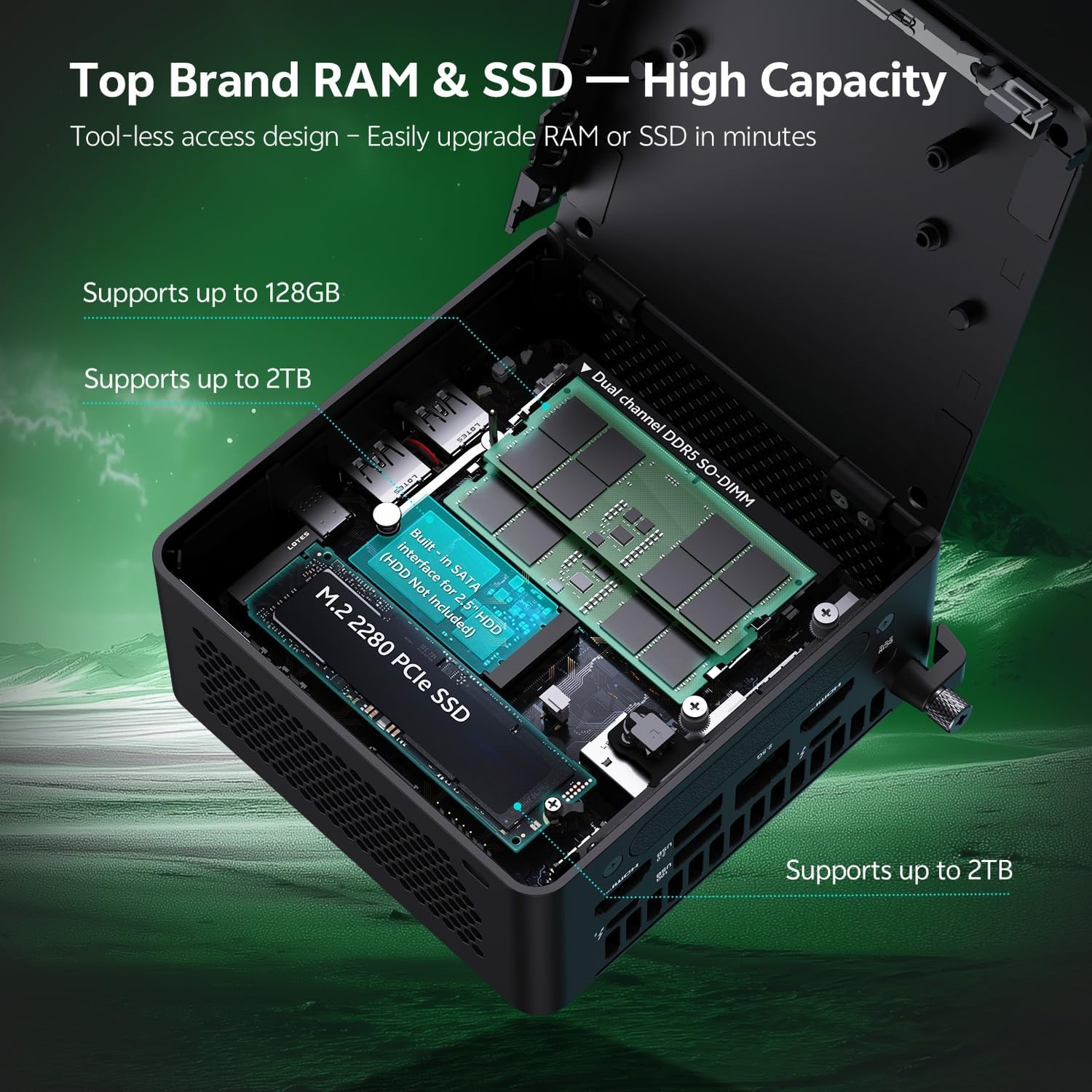
図6.1.1: Internal layout of the ASUS NUC 15 Pro, illustrating the dual-channel DDR5 SO-DIMM slots for RAM and the M.2 2280 PCIe SSD slot, both designed for tool-less access and upgrades.
6.2冷却システム
The device incorporates a Smart Silent Cooling System with dual heat pipes and a large fan to ensure efficient heat dissipation and stable performance.
- 過熱を防ぐために、ミニ PC の周囲に適切な換気を確保してください。
- Periodically clean dust from the vents using compressed air to maintain optimal cooling efficiency.

図6.2.1: 爆発した view diagram of the ASUS NUC 15 Pro's Smart Silent Cooling System, showing dual heat pipes and a large fan designed for efficient thermal management and multi-ventilation.
7。 トラブルシューティング
If you encounter issues with your ASUS NUC 15 Pro, refer to the following common troubleshooting steps:
- 電源なし:
- Ensure the AC adapter is securely connected to both the mini PC and a working power outlet.
- Verify the power cord is not damaged.
- 表示なし:
- Check that the display cable (HDMI or Thunderbolt) is firmly connected to both the mini PC and the monitor.
- モニターの電源がオンになっており、正しい入力ソースに設定されていることを確認します。
- 可能であれば、別のディスプレイ ケーブルまたはモニターを試してください。
- インターネット接続なし:
- 有線接続の場合は、イーサネット ケーブルとルーターの状態を確認してください。
- For Wi-Fi, ensure Wi-Fi is enabled in Windows settings and you are connected to the correct network.
- ルーター/モデムとミニ PC を再起動します。
- 周辺機器が応答しない:
- Ensure wireless keyboard/mouse receivers are properly inserted into a USB port.
- Check battery levels for wireless peripherals.
- Try connecting peripherals to different USB ports.
8. 仕様
| 特徴 | 詳細 |
|---|---|
| ブランド | エイスース |
| モデル名 | RNUC15HU7 |
| オペレーティング·システム | ウィンドウズ11プロ |
| CPUモデル | インテル Core ウルトラ 7 255H |
| CPU速度 | 最大5.1GHz |
| グラフィックスコプロセッサ | インテル Arc 140T GPU |
| RAMメモリインストールサイズ | 32 GB DDR5 (Upgradeable to 128 GB) |
| メモリストレージ容量 | 1 TB PCIe SSD (Upgradeable to 48 TB) |
| ハードウェアインターフェイス | HDMI, Thunderbolt 4, USB 2.0 Type A, USB 3.2 Gen 2 |
| 接続技術 | Bluetooth 5.4, Wi-Fi 7, Ethernet (2.5G) |
| ビデオ出力インターフェース | HDMI 2.1, Thunderbolt 4 |
| 商品の寸法 (長さ x 幅 x 高さ) | 4.6 x 4.4 x 2.1インチ |
| 重さ | 1.36ポンド |
| 色 | 黒 |
| 欧州連合 | 197105156340 |
9. 保証とサポート
9.1 保証情報
Your ASUS NUC 15 Pro Mini Desktop Computer comes with a 12-month warranty. This warranty covers manufacturing defects and issues arising from normal use. Please retain your proof of purchase for warranty claims.
Note: The manufacturer box is opened by professional engineers for customizing and testing. Factory defects and blemishes are significantly reduced by this in-depth inspection and testing process.
9.2 テクニカルサポート
For technical assistance, troubleshooting beyond this manual, or warranty inquiries, please contact ASUS customer support.
- ASUS公式サポートをご覧ください webドライバー、FAQ、連絡先情報に関するサイト。
- Have your product model (RNUC15HU7) and serial number ready when contacting support.