
1. はじめに
Thank you for choosing the SANOTO BY16 Instant Translator Earbuds. These earbuds combine real-time translation, hands-free calling, high-quality audio, and smart touch controls to facilitate communication across language barriers. This manual provides detailed instructions for setup, operation, and maintenance to ensure optimal performance.
2.製品オーバーview
2.1 主な特徴
- 4-in-1 Smart AI Translator Earbuds: Real-time translation, hands-free calls, exceptional speakers, and smart touch controls.
- 168言語サポート: Overcome communication barriers with real-time bilingual translation.
- 複数の翻訳モード: Simultaneous interpretation, hands-free mode, image translation (text scanning), video translation, and real-time translation.
- High-Fidelity Sound & ENC Noise Cancellation: Equipped with a 13mm professional diaphragm for effective distortion reduction, 3D sound effects, deep bass, and powerful ENC microphones for clear calls.
- バッテリー寿命の延長: 6-8 hours of continuous playback on a single charge, extended to 45 hours total with the elegant charging case.
- 使いやすい: Simple setup via a dedicated app and Bluetooth connection.
2.2 パッケージ内容
- SANOTO BY16 Instant Translator Earbuds
- 充電ケース
- ユーザーマニュアル
- 充電ケーブル
2.3製品コンポーネント
The SANOTO BY16 earbuds consist of two wireless earbuds and a charging case with an integrated display.

Image: SANOTO BY16 Earbuds and Charging Case with Display. The image shows the two earbuds placed inside their charging case, which features a small screen displaying various icons. This illustrates the main components of the product.
3.セットアップガイド
Follow these steps to set up your SANOTO BY16 Instant Translator Earbuds for first-time use:
- アプリをダウンロード: Scan the QR code provided in the user manual or search for "NebulaBuds" in your device's App Store (iOS) or Play Store (Android) to download the dedicated application.
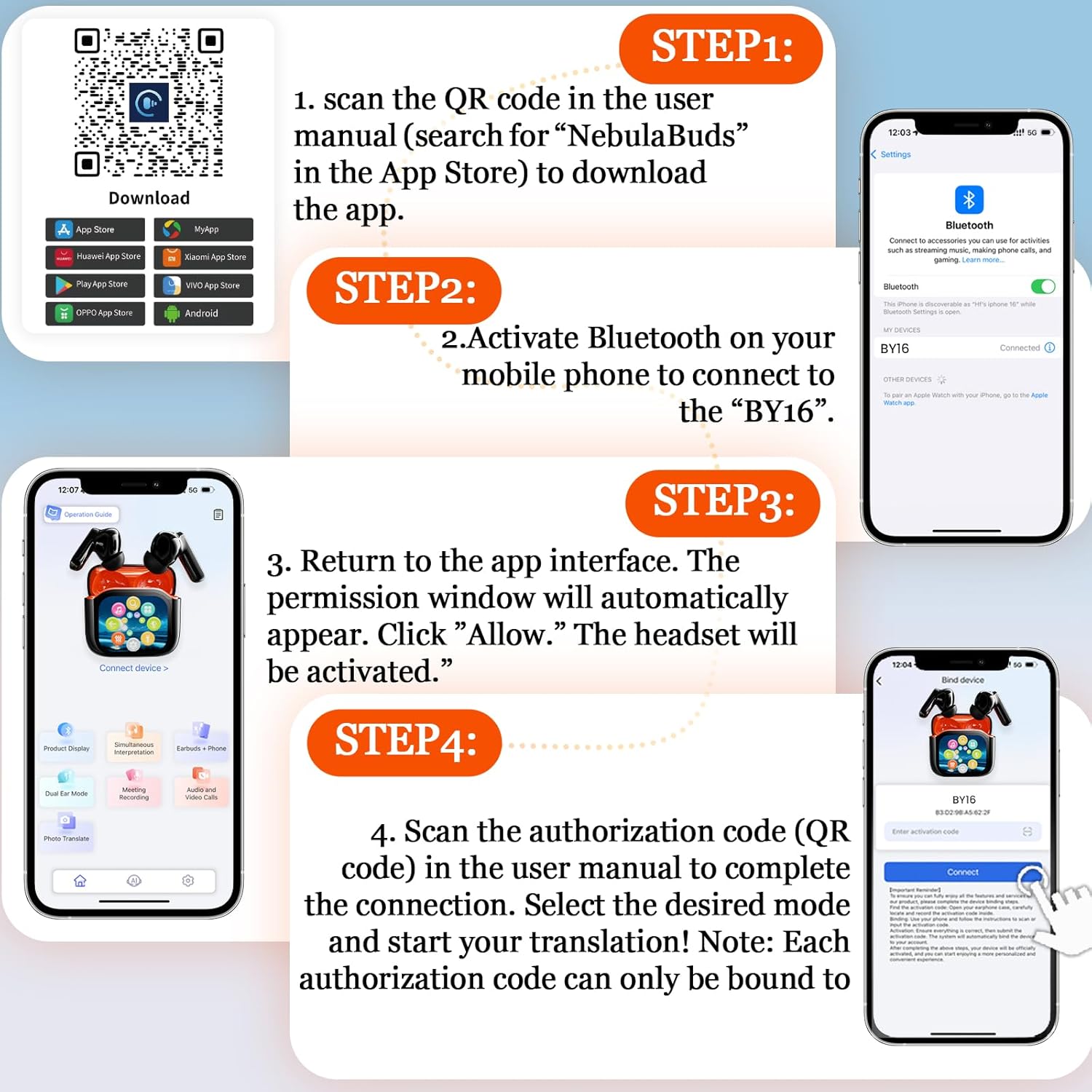
Image: App Download and Setup Steps for SANOTO BY16 Earbuds. This image illustrates the four main steps for setting up the earbuds: scanning a QR code to download the app, activating Bluetooth, granting app permissions, and scanning an authorization code for connection. A relevant link for app download is NebulaBuds App Download.
- Bluetooth を有効にする: On your smartphone, go to Bluetooth settings and activate Bluetooth.
- イヤホンを接続する: 検索する "BY16" in the list of available Bluetooth devices and select it to pair.
- アプリを開きます: Launch the NebulaBuds application. A permission window will automatically appear. Click "Allow" to activate the headset's features.
- 承認: Scan the authorization code (QR code) found in the user manual within the app to complete the connection. Note that each authorization code can only be bound to one device.
- モードの選択: Once connected, select your desired translation or audio mode within the app.
4. 操作手順
4.1 翻訳モード
The SANOTO BY16 earbuds offer various intelligent translation modes to suit different scenarios:
- 同時通訳: For real-time, continuous translation during conversations.
- ハンズフリーモード: Allows for translation without holding your phone.
- 画像翻訳: Scan text from images for translation.
- Video Translation: Translate spoken content from videos.
- リアルタイム翻訳: Direct translation for face-to-face communication.

Image: Face-to-Face Two-Way Translation with SANOTO BY16 Earbuds. This image shows two individuals communicating with the help of the earbuds, demonstrating the real-time, two-way translation feature on a smartphone screen.

Image: Real-time Translation Example with English and German. A person is shown studying, with a visual representation of English text being translated into German, highlighting the real-time translation capability.
4.2 タッチコントロール
The earbuds feature intuitive touch controls for managing calls, music, and translation functions:

Image: SANOTO BY16 Earbuds Touch Control Functions. This diagram illustrates various touch gestures on the earbuds and their corresponding actions, such as volume control, answering calls, skipping tracks, and activating translation modes.
- ボリュームアップ: Tap the screen (via app).
- ボリュームダウン: Tap the screen (via app).
- 前のトラック: 左のイヤホンをトリプルクリックします。
- 次のトラック: 右のイヤホンをトリプルクリックします。
- 通話に応答: Click either earbud.
- 再生/一時停止: どちらかのイヤホンをダブルクリックします。
- Reject Call / End Call: Long press L or R for 1.5 seconds.
- Activate Translation Mode: Long press L or R for 1.5 seconds (specific function may vary by app setting).
5. 充電
To charge your SANOTO BY16 earbuds and charging case:
- イヤホンを充電ケースに入れてください。正しく装着されていることを確認してください。
- 付属の充電ケーブルを使用して、充電ケースを電源に接続します。
- The charging case display will indicate the charging status.
- A full charge for the earbuds provides 6-8 hours of continuous use.
- 充電ケースを使用すると、バッテリーの総寿命が約 45 時間延長されます。
- The charging time for the earbuds is approximately 2 hours.

Image: SANOTO BY16 Earbuds Battery Life and Charging Information. This image highlights key performance metrics: 10m effective Bluetooth range, 2 hours charging time, and 6-8 hours of single earbud use time.
6. メンテナンス
適切なメンテナンスを行うことで、イヤホンの寿命が長くなり、最適なパフォーマンスが保証されます。
- クリーニング: イヤホンと充電ケースは、柔らかく乾いた布で定期的に拭いてください。研磨剤や刺激の強い化学薬品の使用は避けてください。
- ストレージ: 使用していないときは、ほこりや損傷から保護するために、イヤホンを充電ケースに保管してください。
- 耐水性: The earbuds are waterproof. However, avoid prolonged submersion or exposure to high-pressure water jets. Ensure they are dry before placing them back in the charging case or charging.
- 温度: イヤホンを極端な温度(高温または低温)や直射日光に長時間さらさないでください。
7。 トラブルシューティング
If you encounter issues with your SANOTO BY16 earbuds, try the following solutions:
| 問題 | 解決 |
|---|---|
| Earbuds not pairing/connecting to phone. |
|
| 翻訳が機能していないか不正確です。 |
|
| 音質が悪い、またはノイズが出る。 |
|
| イヤホンが充電されません。 |
|
8. 仕様
| 特徴 | 詳細 |
|---|---|
| モデル名 | BY16 |
| ブランド | サノト |
| 接続技術 | ワイヤレス(Bluetooth 5.4) |
| 耳の位置 | インイヤー |
| フォームファクター | 真のワイヤレス |
| ノイズキャンセリング | アクティブノイズキャンセレーション(ENC) |
| インピーダンス | 14.2オーム |
| 制御方法 | Application, Touch |
| 対応デバイス | Computer, Phone, Tablet |
| 耐水性レベル | 防水 |
| 材料 | アクリロニトリルブタジエンスチレン(ABS) |
| 片方のイヤホンの使用時間 | 6~8時間 |
| バッテリー総寿命(ケース付き) | 最大45時間 |
| 充電時間 | 約。 2 時間 (イヤホン) |
| 含まれるコンポーネント | ユーザーマニュアル |
| 特集 | Noise Cancellation, Quality Speakers, Touch Control |
9.保証とサポート
9.1 製造元の保証
The SANOTO BY16 Instant Translator Earbuds come with a 2年間のメーカー保証この保証は、通常の使用状況における材料および製造上の欠陥を対象としています。保証請求の際は、購入証明書を保管してください。
9.2 カスタマーサポート
For further assistance, technical support, or warranty inquiries, please refer to the contact information provided on the SANOTO official website or within the NebulaBuds application. You can also visit the SANOTO Brand Store on Amazon 詳細な製品情報については。