
導入
Welcome to the HP OmniDesk M03 AI Desktop PC. This manual provides essential information for setting up, operating, maintaining, and troubleshooting your new computer. The HP OmniDesk M03 is designed for performance and efficiency, featuring an Intel Core Ultra 7 265 processor with dedicated AI cores, 16GB DDR5 RAM, and a 2TB NVMe SSD, running on Windows 11 Home.
箱の中身
パッケージ内にすべてのコンポーネントが揃っていることを確認します。
- HP OmniDesk デスクトップ PC
- ワイヤレスキーボード
- ねずみ
- クイックセットアップガイド
- 電源ケーブル

Image: The HP OmniDesk M03 desktop PC, wireless keyboard, mouse, and power cable, illustrating the contents of the product box.
設定
1. 周辺機器の接続
Before powering on your PC, connect your monitor, keyboard, and mouse.
- モニター: Connect your monitor to the PC using an HDMI or DisplayPort cable. The ports are located on the rear of the PC.
- キーボードとマウス: The included keyboard and mouse are wireless. Insert batteries (if not pre-installed) and connect their USB receiver to an available USB port on the PC.
- 力: Connect the power cable to the PC's power input on the rear and then to a wall outlet.
- ネットワーク(オプション): For a wired internet connection, connect an Ethernet cable from your router to the RJ45 port on the rear of the PC.

Image: Rear panel of the HP OmniDesk M03, highlighting the DisplayPort, HDMI, USB, and Ethernet ports for connecting external devices.

画像: サイド view of the HP OmniDesk M03 AI Desktop PC, showing its compact tower design.
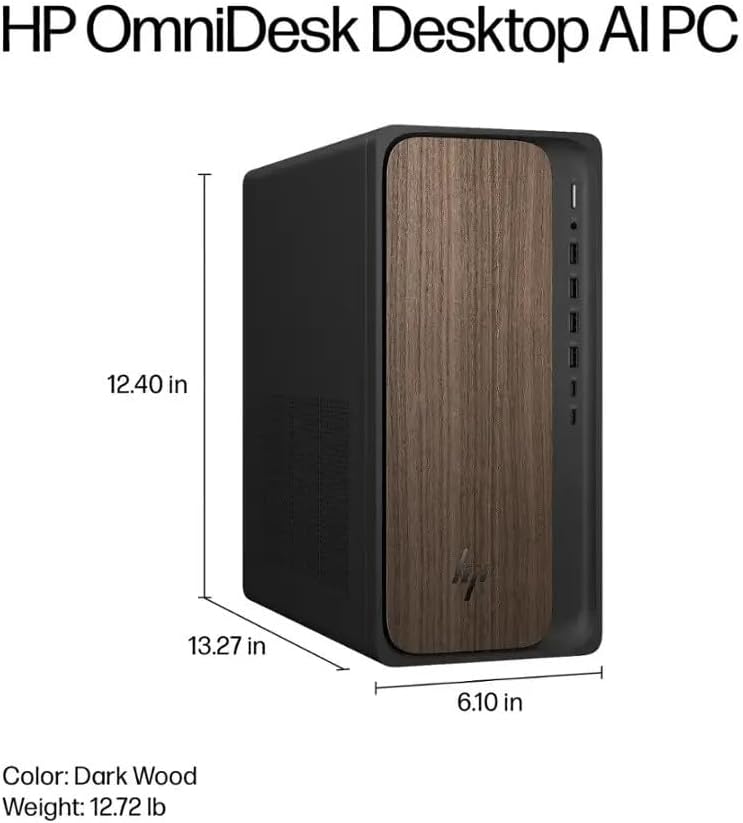
Image: Diagram illustrating the location and type of front and rear ports on the HP OmniDesk M03, including USB-A, USB-C, HDMI, DisplayPort, and audio jacks.
2. 電源投入と初期設定
すべての周辺機器が接続されたら:
- PCの前面にある電源ボタンを押します。
- Follow the on-screen instructions to complete the Windows 11 Home initial setup, including language selection, network connection (if not wired), account creation, and privacy settings.

画像: 正面 view of the HP OmniDesk M03, showing the power button at the top right and various USB ports below it.
PCの操作
Windows 11 ホーム
Your HP OmniDesk M03 comes pre-installed with Windows 11 Home. Familiarize yourself with the operating system's interface, Start menu, and settings. Microsoft provides extensive online resources for Windows 11 usage.
AI機能
The Intel Core Ultra 7 265 processor includes dedicated AI cores and Intel AI Boost, enhancing performance for AI-driven applications and features within Windows 11, such as AI Copilot. These features can assist with tasks, content creation, and system optimization.
接続性
- Wi-Fi 6(802.11ax): インターネットにアクセスするには、ワイヤレスネットワークに接続します。Windows 11のネットワーク設定からWi-Fi設定を管理します。
- Bluetooth 5.4: Pair wireless devices such as headphones, speakers, or additional input devices. Access Bluetooth settings via the Windows 11 settings menu.
- イーサネット: For a stable, high-speed wired connection, ensure an Ethernet cable is connected to the RJ45 port.
メンテナンス
Cleaning Your PC
- 外観: 柔らかく糸くずの出ない布で軽く拭き取ってください。amp外側は水または中性洗剤で拭いてください。刺激の強い化学薬品は使用しないでください。
- 通気口: 適切な空気の流れを確保し、過熱を防ぐために、圧縮空気を使用して換気グリルのほこりを定期的に除去してください。
- ポート: ポートにほこりやごみが付かないようにしてください。
ソフトウェアアップデート
Regularly update Windows 11 and device drivers to ensure optimal performance, security, and compatibility. Access Windows Update through the Settings menu.
データのバックアップ
データの損失を防ぐために、重要なデータを定期的に外付けドライブまたはクラウド ストレージにバックアップすることをお勧めします。
トラブルシューティング
このセクションでは、発生する可能性のある一般的な問題について説明します。
- 電源なし:
- 電源ケーブルが PC と壁のコンセントの両方にしっかりと接続されていることを確認します。
- 別のデバイスを接続して、壁のコンセントが機能していることを確認します。
- 表示なし:
- Check that the monitor is powered on and correctly connected to the PC via HDMI or DisplayPort.
- モニターで正しい入力ソースが選択されていることを確認してください。
- インターネット接続なし:
- Wi-Fi の場合、Wi-Fi アダプタが有効になっているかどうか、正しいパスワードを使用して正しいネットワークに接続されているかどうかを確認します。
- 有線接続の場合は、イーサネット ケーブルが正しく接続され、ルータが動作していることを確認してください。
- キーボード/マウスが応答しない:
- ワイヤレス デバイスのバッテリー レベルを確認します。
- Ensure the USB receiver is plugged into a functional USB port.
- Try restarting the PC.
より複雑な問題については、HPサポートを参照してください。 webサイトをご覧いただくか、カスタマーサービスにお問い合わせください。
仕様
Detailed technical specifications for the HP OmniDesk M03 AI Desktop PC:
| 成分 | 仕様 |
| プロセッサ | Intel Core Ultra 7 265 (20-Core, up to 5.3 GHz, Intel AI Boost) |
| オペレーティング·システム | Windows 11 Home (64 ビット) |
| メモリ(RAM) | 16GB DDR5 5600MHz |
| ストレージ | 2TB PCIe NVMe M.2 SSD |
| グラフィックス | 統合されたIntelグラフィックス |
| ビデオ出力 | HDMI 2.1 x 1、ディスプレイポート 1.4a x 1 |
| USBポート(前面) | 2x USB-A 5Gbps, 2x USB-A 10Gbps, 1x USB-C 5Gbps, 1x USB-C 10Gbps |
| USBポート(背面) | USB 4 タイプA x 2.0 |
| オーディオポート | 1x Headphone/Microphone Combo, 1x Line Input, 1x Line Output |
| ネットワーク | Wi-Fi 6 (802.11ax), Bluetooth 5.4, Gigabit Ethernet (RJ45) |
| 寸法(高さ×幅×奥行き) | 13.3インチ x 6.1インチ x 12.4インチ (33.8 cm x 15.5 cm x 31.5 cm) |
| 重さ | 11.77ポンド(5.34キログラム) |

Image: Diagram showing the height (13.27 inches), width (6.10 inches), and depth (12.40 inches) of the HP OmniDesk M03 desktop PC.
保証とサポート
保証情報
Your HP OmniDesk M03 AI Desktop PC comes with a 90日間の限定保証. This warranty covers defects in materials and workmanship under normal use. For detailed terms and conditions, please refer to the warranty documentation included with your product or visit the official HP support webサイト。
カスタマーサポート
For technical assistance, troubleshooting, or warranty claims, please contact HP Customer Support:
- オンラインサポート: 公式サイトをご覧ください HPサポート Webサイト ドライバー、マニュアル、トラブルシューティング ガイド。
- 電話サポート: Refer to the Quick Setup Guide or HP's web地域の連絡先番号のサイト。
サポートにお問い合わせの際は、製品モデル (M03) とシリアル番号をご用意ください。