
導入
The FREEWOLF K100 is a versatile 99-key wireless membrane keyboard designed for various computing environments. It offers three connectivity modes: Bluetooth, 2.4GHz wireless, and USB-C wired, ensuring compatibility with a wide range of devices including PCs, Macs, laptops, tablets, and phones. Key features include customizable RGB backlighting, a convenient multimedia control knob, durable PBT keycaps with side-printed legends, and a long-lasting 4000mAh battery.
製品の特徴
トライモード接続
Connect via Bluetooth (up to 3 devices), 2.4GHz wireless (with included receiver), or USB-C wired mode. Seamlessly switch between devices for enhanced productivity and gaming.

This image illustrates the three available connection modes: Bluetooth, 2.4GHz wireless, and USB-C wired, highlighting the flexibility for various devices.
RGBバックライト
Experience vibrant 16.8 million color RGB lighting with multiple dynamic effects. Customize your keyboard's appearance to match your setup or mood.

This image demonstrates the various RGB backlight effects and the key combinations used to control them, including switching modes, colors, brightness, and speed.
マルチメディアコントロールノブ
An intuitive rotary knob allows for quick volume adjustments (rotate) and instant muting (press). Dedicated media keys for play/pause, previous, and next track are also included.

この画像は詳細な view of the multimedia knob and its functions, including volume control and mute, alongside the dedicated media playback buttons.
Durable PBT Gradient Keycaps
Crafted from high-quality PBT material, these gradient keycaps resist shine, oil, and wear. Double-shot injection molding ensures legends never fade, with side-printed characters for a clean look and radiant backlighting.

This image highlights the gradient PBT keycaps, showcasing their side-printed legends and how they allow backlight to shine through for improved visibility.
4000mAh Battery & Smart Sleep Mode
A large 4000mAh rechargeable battery provides extended wireless usage. Intelligent sleep modes conserve power: backlight off after 2 minutes of inactivity, deep sleep after 30 minutes (2.4G/BT), and wired mode follows computer sleep.

This image details the keyboard's 4000mAh battery and its intelligent sleep features designed to maximize battery life during wireless operation.
Compact 99-Key Layout & Anti-Ghosting
The 99-key layout includes a crucial number pad while saving desk space. Full 26-key rollover (NKRO) ensures every keystroke is registered accurately, ideal for fast typing and gaming.
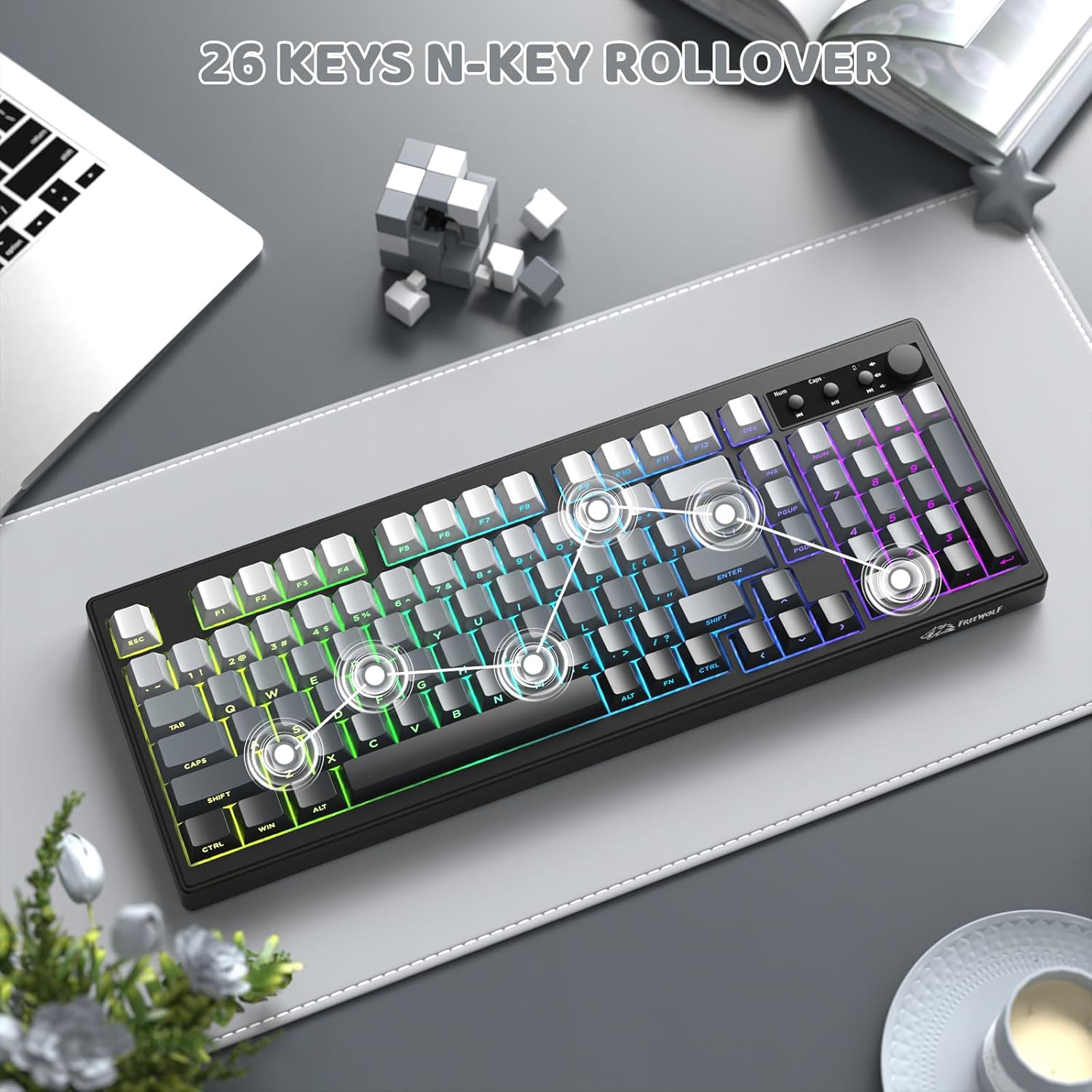
This image shows the compact 99-key layout of the keyboard, emphasizing its N-key rollover capability for precise input.
人間工学に基づいたデザイン
The keyboard features adjustable double leg braces, allowing you to set the typing angle for optimal comfort. A built-in slot securely stores the 2.4G USB receiver when not in use.

This image illustrates the adjustable feet for ergonomic positioning and the convenient storage slot for the 2.4G USB receiver.
セットアップ手順
- キーボードを開梱します。 Carefully remove the keyboard and all accessories from the packaging. Ensure all components are present: keyboard, USB-C cable, and 2.4GHz USB receiver.
- 初期充電: Connect the keyboard to a USB power source using the provided USB-C cable. The battery indicator light will show charging status. A full charge is recommended before first use.
- 接続モードを選択: Use the switch located on the back or side of the keyboard to select your desired connection mode:
- 2.4GHzワイヤレスモード:
- Locate the 2.4GHz USB receiver, typically stored in a slot on the keyboard's underside.
- レシーバーをコンピューターの使用可能な USB ポートに接続します。
- Switch the keyboard to 2.4G mode. The keyboard should connect automatically.
- Bluetoothモード:
- キーボードをBTモードに切り替えます。
- 押し続ける FN+2 (または FN+3, FN+4)を 3 ~ 5 秒間押し続けます。インジケーター ライトが点滅し、ペアリング モードを示す状態になります。
- On your device (PC, Mac, tablet, phone), go to Bluetooth settings and search for "K100 Keyboard" (or similar).
- Select the keyboard to pair. Repeat for up to three different Bluetooth devices using FN+2, FN+3, and FN+4.
- USB-C有線モード:
- キーボードのUSB-Cケーブルをコンピューターに接続します。
- Switch the keyboard to wired mode (if applicable, some keyboards automatically detect wired connection).
- システム互換性:
- プレス FN+W to switch to Windows system layout.
- プレス FN+M to switch to macOS system layout.
操作手順
RGB照明制御
- FN + INS: Switch between different RGB lighting effects.
- FN+DEL: Switch between solid RGB colors.
- FN + バックスペース: バックライトのオン/オフを切り替えます。
- FN + PgUp: バックライトの明るさを上げます。
- FN + PgDn: バックライトの明るさを下げます。
- FN + - / =: 照明効果の速度を調整します。
Multimedia Knob and Keys
- 回転ノブ: 音量を上げたり下げたり調整します。
- ノブを押す: オーディオをミュートまたはミュート解除します。
- 専用メディアキー: Use the buttons next to the knob for Play/Pause, Previous Track, and Next Track.
Sleep Mode Behavior
- ワイヤレスモード: Backlight turns off after 2 minutes of inactivity. The keyboard enters deep sleep (disconnected) after 30 minutes of inactivity. Wake by pressing any key.
- 有線モード: The keyboard's sleep behavior follows your connected computer's sleep settings.
メンテナンス
- キーボードの掃除: 柔らかく糸くずの出ない布で軽く拭き取ってください。ampened with water or a mild cleaning solution to wipe down the surface of the keyboard. Avoid excessive moisture.
- キーキャップのクリーニング: For deeper cleaning, keycaps can be carefully removed (using a keycap puller if available) and washed with mild soap and water. Ensure they are completely dry before reattaching.
- ほこりの除去: Use compressed air to remove dust and debris from between the keycaps and under the keyboard.
- ストレージ: 長期間使用しない場合は、キーボードを直射日光を避けて乾燥した涼しい場所に保管してください。
トラブルシューティング
- Keyboard not connecting via 2.4GHz wireless:
- Ensure the 2.4GHz USB receiver is securely plugged into a working USB port. Check that the keyboard is switched to 2.4G mode. Try re-pairing by unplugging and re-plugging the receiver, then restarting the keyboard.
- Bluetooth接続の問題:
- Make sure the keyboard is in BT mode and in pairing mode (indicator light flashing after holding FN+2/3/4). Ensure Bluetooth is enabled on your device and try removing and re-pairing the keyboard in your device's Bluetooth settings. Check the keyboard's battery level.
- RGB backlight not working or dim:
- プレス FN + バックスペース to ensure the backlight is turned on. Use FN + ページアップ to increase brightness. Check the battery level; low battery can affect backlight performance. If in wired mode, ensure the USB-C cable is fully connected.
- キーが反応しない、または入力が遅れる:
- Ensure the keyboard is fully charged. If using wireless modes, try moving closer to the receiver/device or switching to wired mode to rule out interference. Clean any debris from under the affected keys. For multiple keys, check the connection mode.
- マルチメディアノブが機能しない:
- Ensure the keyboard is properly connected. Try restarting the keyboard. Verify that no software conflicts are present on your operating system that might override multimedia controls.
仕様
| モデル | K100 |
| ブランド | フリーウルフ |
| 接続性 | Bluetooth、2.4GHzワイヤレス、USB-C有線 |
| キー数 | 99つのキー |
| キーボードタイプ | 膜 |
| バックライト | RGB(16.8万色) |
| キーキャップ | PBT Gradient, Side-Printed Legends |
| バッテリー容量 | 4000mAh |
| アンチゴースト | 26-Key Rollover (NKRO) |
| 寸法 | 16.06 x 5.79 x 1.50インチ(408mm x 147mm x 38mm) |
| アイテム重量 | 1.98ポンド |
| 互換性 | Windows、macOS |

This image provides a visual representation of the keyboard's dimensions, including length, width, and height.
製品終了view ビデオ
このビデオでは、view of the FREEWOLF K100 Wireless Membrane Keyboard, showcasing its design, RGB lighting, multimedia knob, and connectivity options.
保証とサポート
The FREEWOLF K100 keyboard comes with a standard manufacturer's warranty. For specific warranty details, return policies, or technical support, please refer to the documentation included with your purchase or contact FREEWOLF customer service directly through their official web製品を購入したサイトまたは小売店。