
1. はじめに
Thank you for choosing the Angrox Backlit Universal Remote Control for LG Smart TVs. This remote is designed to provide a seamless and enhanced television viewing experience, especially in low-light conditions. It serves as a direct replacement for your original LG TV remote, offering broad compatibility and ease of use without requiring complex setup procedures. This manual provides detailed instructions for setting up, operating, maintaining, and troubleshooting your new remote control.
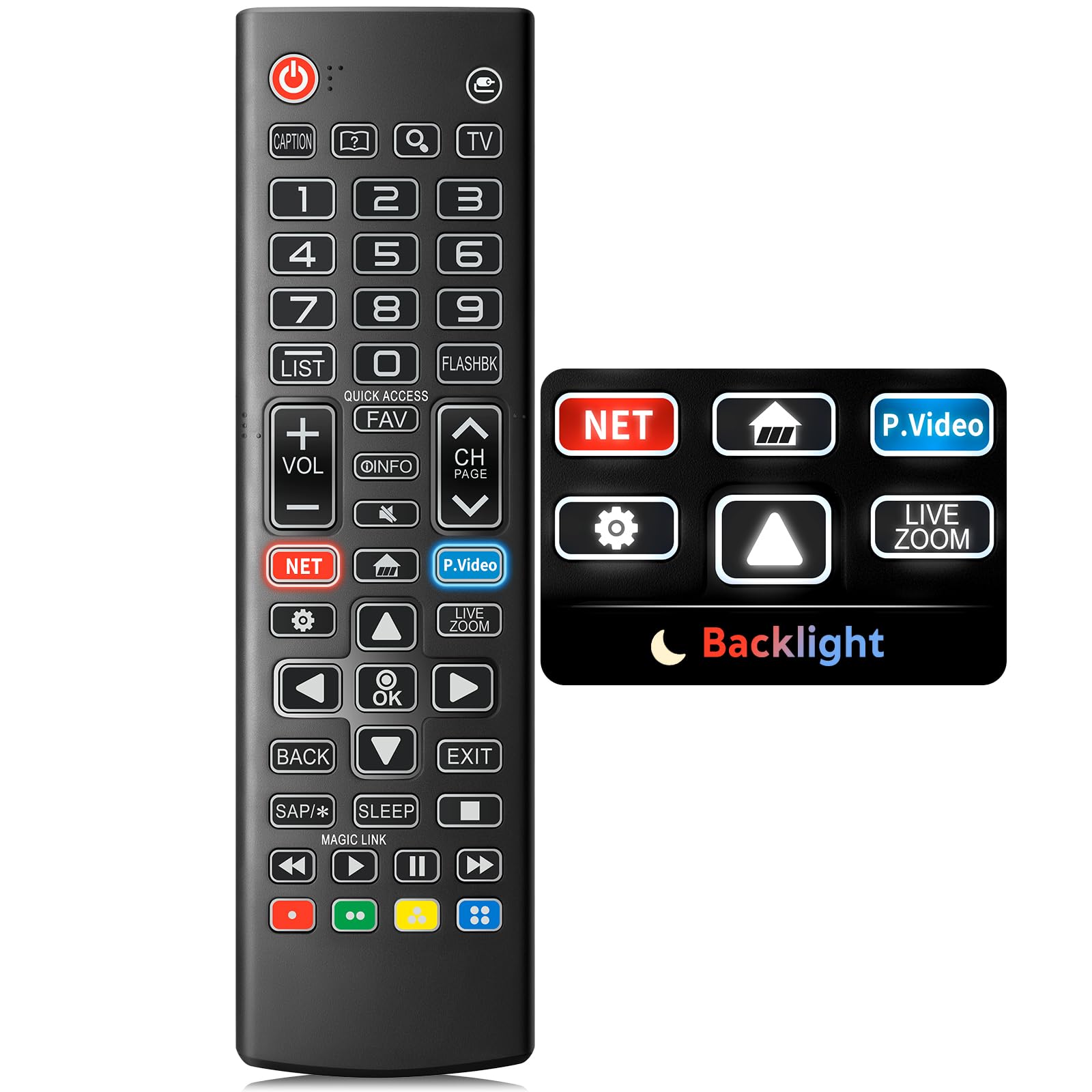
Image: The Angrox Backlit Universal Remote Control, a sleek black remote with clearly labeled buttons.
2. 主な特徴
- Easy Nighttime Operation: Features soft glow buttons that illuminate, allowing for clear visibility and use in dark environments without causing glare. The backlight activates with any button press and automatically turns off after 10 seconds of inactivity.
- ユニバーサル互換性: Designed as a direct replacement for LG TV remotes, compatible with all LG TV models. No programming or complex pairing is required; it works immediately out of the box.
- High-Quality Performance: Equipped with sensitive buttons and stable signal transmission for smooth and responsive operation.
- 人間工学に基づいたデザイン: Shaped to fit comfortably in the hand, reducing fatigue during extended use. The button layout is intuitive for users of all ages.
- 耐久性と信頼性: Constructed from high-quality, sturdy materials to withstand daily use and accidental drops, ensuring a long lifespan.

Image: A comparison showing the remote control with its backlight off and then with its buttons illuminated, highlighting the easy nighttime operation feature.

Image: The remote control displayed alongside various LG TV models (OLED, UHD, QNED, NanoCell), illustrating its broad compatibility.
3. セットアップ手順
3.1 バッテリーの取り付け
- リモコンの背面にある電池ボックスのカバーを見つけます。
- カバーを下方にスライドさせるか、ラッチを押してコンパートメントを開きます。
- 単4電池2本を挿入し、プラス(+)端子とマイナス(-)端子がコンパートメント内のインジケータと正しく揃っていることを確認します。
- 電池ボックスのカバーを、カチッと音がするまで元の位置に戻してしっかりと閉めます。
注記: Batteries are not included with the remote control. Please use new AAA alkaline batteries for optimal performance.

Image: A visual guide demonstrating the correct insertion of two AAA batteries into the remote control's battery compartment.
3.2 Initial Use (No Pairing Required)
The Angrox Backlit Universal Remote Control is designed for immediate use with LG Smart TVs. No pairing or programming steps are necessary. Once batteries are installed, the remote is ready to control your LG television.
4. 操作手順
This section details the functions of the buttons on your Angrox remote control.

Image: A comprehensive layout of the remote control, with labels pointing to each button and describing its primary function.
4.1 基本機能
- 力 (
 ): テレビの電源をオンまたはオフにします。
 - 入力 (): Changes the input source (e.g., HDMI 1, HDMI 2).
- 音量を上げる/下げる (VOL +/-): 音量レベルを調整します。
- チャンネルアップ/ダウン (CH Page): テレビのチャンネルを変更します。
- ミュート (): テレビの音声をミュートまたはミュート解除します。
- 数字ボタン(0-9): チャンネル番号やその他の数値入力を直接入力します。
- ナビゲーション ボタン (上/下/左/右): メニューやオプションをスクロールするために使用されます。
- OKボタン: Selects menu items or confirms your input.
4.2 特殊機能ボタン
- Netflix ボタン: Netflix アプリケーションを直接起動します。
- Amazonプライムビデオボタン: Amazon Prime Video アプリケーションを直接起動します。
- クイックアクセス: A feature that allows you to enter a specified app or Live TV directly by pressing and holding the number buttons.
- リスト: 保存済みプログラムリストにアクセスします。
- Flashback: 以前の状態に戻る viewed チャネルまたは入力。
- 情報: Displays information on the current program.
- Fav: お気に入りのチャンネルリストにアクセスします。
- Settings(): Accesses the Quick Settings menu.
- 戻る: 画面上の表示を消去してテレビに戻ります viewing。
- 出口: 現在のメニューを終了します。
- 寝る: Accesses the sleep timer.
- メディア コントロール ボタン (再生、一時停止、停止、早送り、巻き戻し): Controls media content playback.
4.3 バックライト機能
The remote control features a soft backlight for easy use in the dark. Simply press any button, and the backlight will turn on. It will automatically turn off after 10 seconds of inactivity to conserve battery life.
Video: A demonstration of the Angrox Backlit Remote for LG Smart TV, showcasing its easy nighttime use and responsive buttons. This video highlights the convenience of the backlit feature in dark environments.
5. 仕様
| ブランド | アングロックス |
| モデル名 | AKB75095307 |
| モデル番号 | AKB75095307 |
| 特集 | Backlit, Ergonomic, Lightweight, No Programming Required, Universal |
| 対応デバイス | Television (All LG TV models) |
| サポートされるデバイスの最大数 | 1 |
| 接続技術 | 赤外線 |
| ボタンの数量 | 30 |
| コントローラータイプ | ボタンコントロール |
| 最大範囲 | 10メートル(約33フィート) |
| 必要な電池の数 | 単2電池XNUMX本 |
| 電池のタイプ | アルカリ |
| 商品の寸法 (長さ x 幅 x 高さ) | 長さ9.25インチ x 幅1.89インチ x 高さ0.73インチ |
6。 トラブルシューティング
リモコンで問題が発生した場合は、次の一般的な解決策を参照してください。
- リモコンが応答しない:
- 電池が正しい極性 (+/-) で正しく挿入されていることを確認してください。
- 古い電池を新しい単4アルカリ電池と交換してください。
- リモコンとテレビの赤外線受信機の間に障害物がないか確認してください。
- Ensure you are within the maximum operating range (10 meters) of the TV.
- バックライトが機能しない:
- Verify battery power. Low batteries may affect backlight functionality.
- The backlight is designed to turn off after 10 seconds of inactivity. Press any button to reactivate it.
- Specific buttons not working (e.g., Netflix, Amazon Prime):
- Ensure your LG Smart TV is connected to the internet and the respective applications are installed and updated.
- Some smart TV features or app shortcuts may vary slightly depending on your TV's model and region.
- Remote feels sluggish or unresponsive:
- 電池を新しいものと交換してください。
- Clean the remote's infrared emitter (at the top) and the TV's IR receiver with a soft, dry cloth to ensure a clear signal path.
7. メンテナンス
To ensure the longevity and optimal performance of your Angrox remote control, follow these maintenance guidelines:
- クリーニング: Use a soft, dry cloth to clean the remote's surface. Avoid using liquid cleaners, aerosols, or harsh chemicals, as they may damage the remote.
- バッテリー交換: Replace batteries promptly when the remote's performance declines or if the backlight becomes dim. Remove batteries if the remote will not be used for an extended period to prevent leakage.
- ストレージ: リモコンは、直射日光、極端な温度、高湿度を避け、涼しく乾燥した場所に保管してください。
- ドロップを避ける: While durable, repeated drops can damage internal components. Handle the remote with care.
8.保証とサポート
8.1 保証情報
The Angrox Backlit Universal Remote Control (Model AKB75095307) is covered by a 90日間の保証 from the date of purchase. This warranty covers manufacturing defects and ensures the product functions as described under normal use. It does not cover damage caused by misuse, accidents, unauthorized modifications, or normal wear and tear.
8.2 カスタマーサポート
For any questions, technical assistance, or warranty claims, please contact Angrox customer support through the retailer where you purchased the product or visit the official Angrox store online. Please have your purchase receipt and product model number available when contacting support.