
導入
This manual provides detailed instructions for the installation, operation, and maintenance of your JAIOTlink Y03-W 2MP Security Camera. Please read this manual carefully before using the product to ensure proper setup and functionality. This camera is designed for both indoor and outdoor surveillance, offering features such as dual-band Wi-Fi connectivity, night vision, two-way audio, and motion detection.
箱の中身
パッケージにすべてのコンポーネントが含まれていることを確認します。
- Pet Camera body
- タイプCケーブル
- 取り付けネジセット
- インストールガイド(このマニュアル)
設定
1. 物理的な設置
The JAIOTlink Y03-W camera is designed for wall mounting. Choose a location that provides the desired view角度が調整可能で、電源コンセントに届く範囲内です。
- 取り付け位置を選択してください: Identify a suitable indoor or outdoor wall location. Ensure the camera has a clear line of sight to the area you wish to monitor.
- ドリル穴をマークする: Use the camera's base as a template to mark the positions for the mounting screws on the wall.
- ドリル穴: 印を付けた位置に下穴を開けます。必要に応じて、壁アンカーを挿入してしっかりと固定します。
- カメラを取り付ける: Secure the camera base to the wall using the provided mounting screws.
- 接続電源: Connect the Type-C cable to the camera and plug the other end into a compatible power adapter (not included) and then into a power outlet. The camera will power on.
2. アプリのインストールとWi-Fi接続
The camera operates with the EseeCloud app, supporting both 2.4G and 5G Wi-Fi networks for stronger signals and faster connections.
- EseeCloud アプリをダウンロード: 検索する "EseeCloud" in your smartphone's app store (iOS or Android) and download the application.
- アカウントを作成する: Open the EseeCloud app and follow the on-screen instructions to create a new user account or log in if you already have one.
- デバイスを追加: In the app, tap the "+" icon to add a new device. Select your camera model or scan the QR code usually found on the camera or its packaging.
- Wi-Fiに接続します: Follow the app's prompts to connect the camera to your home Wi-Fi network. Ensure your smartphone is connected to the same Wi-Fi network during the setup process. The camera supports both 2.4GHz and 5GHz bands.
- セットアップを完了します: Once connected, the camera will appear in your device list within the EseeCloud app. You can now view the live stream and configure settings.
3. Alexaとの統合
The JAIOTlink Y03-W camera is compatible with Amazon Alexa, allowing for voice control and live stream view互換性のある Alexa デバイスで使用できます。
- Alexaアプリを開きます: Ensure your Amazon Alexa device is set up and connected to your Amazon account.
- スキルを有効にする: In the Alexa app, go to "Skills & Games" and search for the "EseeCloud" skill. Enable the skill.
- アカウントをリンク: You will be prompted to link your EseeCloud account with your Amazon account. Enter your EseeCloud login credentials.
- デバイスの検出: After linking, ask Alexa to "Discover devices" or manually initiate device discovery in the Alexa app. Your JAIOTlink camera should be detected.
- 音声コマンド: You can now use voice commands such as "Alexa, show me the [camera name]" to view 互換性のある Alexa デバイス (例: Echo Show) のライブ フィード。
操作手順
1. Night Vision and Two-Way Audio
The camera features advanced night vision capabilities and two-way audio communication.
- ナイトビジョン: The camera automatically switches between infrared, color full, and smart night vision modes to provide clear images up to 33 feet in low-light conditions. You can adjust night vision settings within the EseeCloud app.
- 双方向オーディオ: Utilize the built-in microphone and speaker via the EseeCloud app to communicate with individuals near the camera. Tap the microphone icon in the live view to speak, and listen through the speaker.
2. Real-Time Motion Detection Alerts
The camera is equipped with motion detection to alert you to activity in its field of view.

図1: Motion Detection Alert on Smartphone. This image illustrates how the EseeCloud app notifies users of detected motion, showing a live screen view and options for siren and microphone activation.
- アラート: When motion is detected, the camera will automatically record a 10-15 second alert video to the cloud (kept for 24 hours) and send a notification to your EseeCloud app.
- カスタマイズ: You can adjust motion detection sensitivity and set specific detection zones within the app to minimize false alarms.
3.パン/チルトコントロール
カメラの viewing angle remotely through the EseeCloud app.
- 360°水平パン: The camera can rotate horizontally up to 360 degrees.
- 110°垂直傾斜: The camera can tilt vertically up to 110 degrees.
- アプリコントロール: Use the directional controls within the EseeCloud app's live view to adjust the camera's pan and tilt to monitor different areas of your room.
4.ストレージオプション
カメラは録画したデータを保存する柔軟なソリューションを提供します。
- ローカルストレージ(SDカード): The camera supports a Micro SD card (up to 256GB, not included) for 24/7 continuous recording. Insert the SD card into the designated slot on the camera.
- クラウドストレージ: Optional cloud storage is available for alert videos and continuous recording. Refer to the EseeCloud app for subscription details and options.
5. Multi-Device Management
Expand your surveillance coverage by connecting and managing multiple JAIOTlink cameras through the EseeCloud app.
- Add Multiple Cameras: Repeat the device setup process for each additional camera you wish to add.
- 統一 View: The EseeCloud app allows you to view and manage all your connected cameras from a single interface, providing comprehensive property protection.
メンテナンス
定期的なメンテナンスにより、セキュリティ カメラの最適なパフォーマンスと寿命が確保されます。
- クリーニング: カメラのレンズと本体は、柔らかく乾いた布で優しく拭いて、ほこりや汚れを取り除いてください。刺激の強い化学薬品や研磨剤入りの洗剤は使用しないでください。
- ファームウェアの更新: Periodically check the EseeCloud app for available firmware updates. Keeping your camera's firmware updated ensures you have the latest features and security enhancements.
- 電源サイクル: If the camera experiences connectivity issues or unresponsiveness, try unplugging it from the power source for 10 seconds and then plugging it back in.
トラブルシューティング
If you encounter issues with your JAIOTlink Y03-W camera, refer to the following common solutions:
| 問題 | 考えられる解決策 |
|---|---|
| カメラがWi-Fiに接続できない |
|
| 動き検出アラートなし |
|
| 画質が悪い |
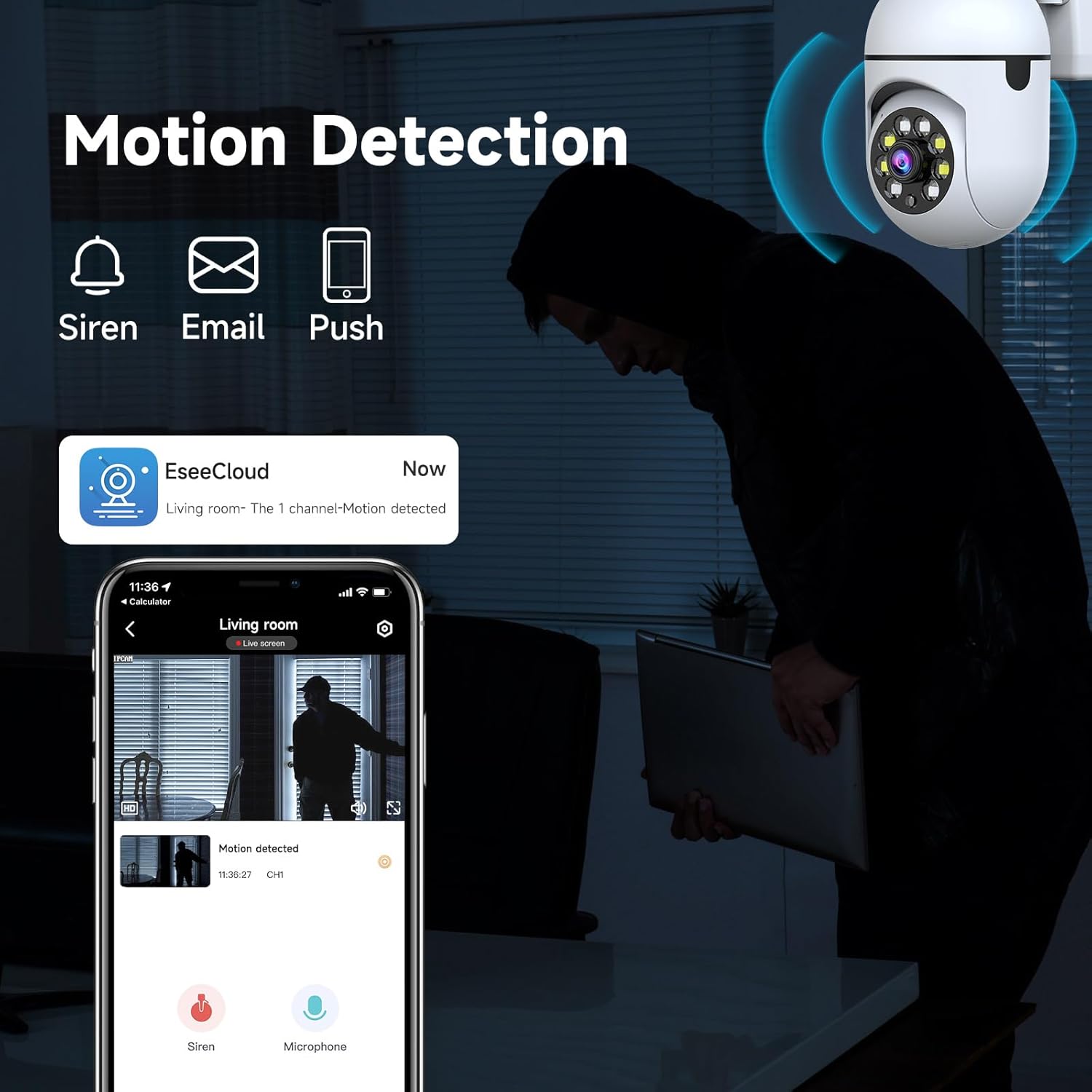 図2: Resolution Comparison. This image demonstrates the difference in detail between 720p and 1080p video, highlighting the improved clarity at higher resolutions. |
| 双方向オーディオが機能しない |
|
仕様
Technical details for the JAIOTlink Y03-W 2MP Security Camera:
- モデル: Y03-W
- 有効な静止画解像度: 2 MP
- ビデオキャプチャ解像度: 3MP (for video processing, effective still is 2MP)
- 屋内/屋外での使用: 屋内、屋外
- 接続プロトコル: Wi-Fi(2.4G/5Gデュアルバンド)
- 電源: コード付き電気 (5 ボルト)
- 取り付けタイプ: 壁掛け
- フォームファクター: ドーム
- View角度: 360 Degrees (Pan/Tilt control)
- ナイトビジョンの範囲: 33フィート
- フラッシュ メモリ タイプ: SD (up to 256 GB, not included)
- 対応デバイス: スマートフォン、Amazon Alexa
- 特別な機能: 2-Way Audio, Local Recording, Motion Sensor, PTZ Technology, Color Night Vision
- 商品の寸法 (長さ x 幅 x 高さ): 1 x 2 x 0.5インチ
- 商品の重量: 4.8オンス
保証とサポート
Your JAIOTlink Y03-W 2MP Security Camera comes with a reliable warranty and dedicated support.
- 保証: This product includes a 12-Month Reliable Warranty from the date of purchase.
- カスタマーサポート: For technical assistance, warranty claims, or any product-related inquiries, please contact our support team at E-Mingxun@outlook.com.