
導入
This manual provides essential information for the safe and effective operation of your Radioddity FS-T8 FRS Two-Way Radio. Please read this manual thoroughly before using the device and retain it for future reference. The Radioddity FS-T8 is a Family Radio Service (FRS) device designed for clear, long-range communication, suitable for various outdoor activities and family use.
パッケージ内容
Upon unpacking, please ensure all items listed below are present and in good condition. If any items are missing or damaged, please contact Radioddity customer support.
- 4 x Radioddity FS-T8 Two-Way Radios
- 充電式バッテリー 4 個 (2000mAh)
- USB-C充電ケーブル4本
- 4 xベルトクリップ
- ストラップ x 4
- 4 x Compasses
- 4 x Badges
- Sticker Sheets
- ユーザーマニュアル
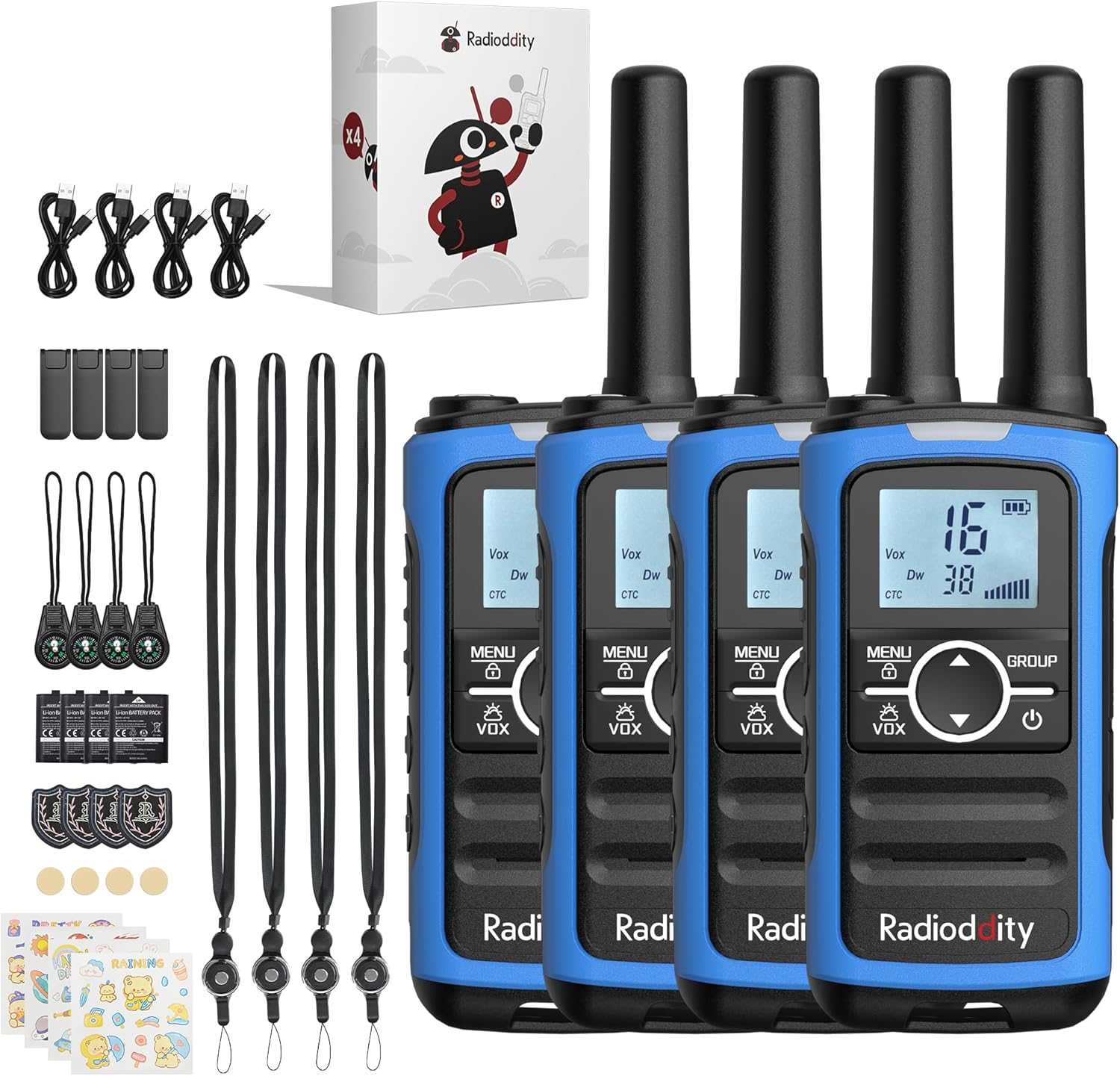
Image: A complete set of Radioddity FS-T8 walkie talkies and their accessories, laid out on a surface.
製品終了view
The Radioddity FS-T8 features a compact design with an easy-to-read backlit digital display. It includes essential functions for reliable communication and safety.

Image: A close-up of the Radioddity FS-T8 walkie talkie, highlighting its digital display and main control buttons.
設定
バッテリーの取り付けと充電
The FS-T8 radios come with 2000mAh rechargeable batteries. They are also compatible with 3xAA batteries (not included) for backup power.
- To install the rechargeable battery, remove the battery compartment cover on the back of the radio.
- Insert the 2000mAh rechargeable battery pack, ensuring correct polarity.
- 電池ボックスのカバーを取り付けます。
- To charge, connect the USB-C charging cable to the radio's USB-C port and a compatible 5V USB power adapter (not included). A full charge takes approximately 2 hours and provides up to 48 hours of continuous talk time.
- For AA battery use, open the compartment and insert 3xAA batteries, observing polarity.

Image: An illustration showing the USB-C charging port on the Radioddity FS-T8 and the option for both rechargeable and AA batteries.
アクセサリの取り付け
Each radio includes a belt clip and a lanyard for convenient carrying. The lanyard can be attached to either the top or bottom loop on the radio.
- ベルトクリップ: Slide the belt clip into the slot on the back of the radio until it clicks into place.
- ストラップ: Thread the lanyard loop through the desired attachment point (top or bottom) on the radio and secure it.
- コンパス: The included compass can be attached to the lanyard. Avoid attaching the compass directly to the radio's magnetic areas, as this may affect its accuracy.
操作手順
電源オン/オフ
ラジオの電源をオンまたはオフにするには、 力 button (usually marked with a power symbol) until the display lights up or turns off.
チャンネル選択
The FS-T8 features 22 FRS channels. To select a channel:
- を押す メニュー ボタンを一度押します。チャンネル番号が点滅します。
- 使用 Up or 下 矢印ボタンを使用して、希望のチャンネルを選択します。
- を押す メニュー button again to confirm your selection, or wait a few seconds for it to auto-confirm.
Group Call Function
The One-Key Group Call feature allows instant communication with all other FS-T8 radios within range, regardless of their current channel setting. This is ideal for ensuring everyone hears important messages.
- To initiate a group call, press and hold the グループ ボタン。
- マイクに向かってはっきりと話してください。
- リリース グループ 聞くためのボタン。

Image: A visual representation of the group call feature, demonstrating its ease of use in an outdoor family setting.
VOX(音声操作トランスミッション)
The VOX function allows for hands-free communication. When activated, the radio will transmit automatically when it detects your voice.
- To activate/deactivate VOX, press the メニュー VOXアイコンが点滅するまでボタンを複数回押します。
- 使用 Up or 下 arrow buttons to select a VOX sensitivity level (1-3, with 3 being most sensitive) or 'OFF'.
- プレス メニュー 確認します。
キーパッドロック
誤って設定を変更してしまうのを防ぐために、キーパッドをロックすることができます。
- キーパッドをロックするには、 メニュー ロックアイコンがディスプレイに表示されるまでボタンを押し続けます。
- ロックを解除するには、 メニュー ロックアイコンが消えるまでボタンをもう一度押します。
NOAA 天気チャンネル
Stay informed about hazardous weather conditions with the integrated NOAA weather channels.
- NOAAの天気チャンネルにアクセスするには、 メニュー button until the NOAA icon appears.
- 使用 Up or 下 arrow buttons to scan through the 11 available NOAA channels. The radio will automatically select the strongest signal.
- プレス メニュー to exit NOAA mode.

Image: The Radioddity FS-T8 showing its NOAA weather channel feature, providing critical weather alerts.
Flashlight and SOS Alert
The FS-T8 includes a built-in flashlight and an SOS alert function for emergencies.
- To turn on/off the flashlight, press the dedicated 懐中電灯 button on the side of the radio.
- To activate the SOS alert, press and hold the SOS button (often combined with the flashlight button or a separate dedicated button). The flashlight will flash in an SOS pattern, and an audible alert may sound.
範囲性能
The effective communication range varies based on terrain and obstructions:
- Up to 3 miles in open areas with minimal obstructions.
- Approximately 1 mile in semi-obstructed zones (e.g., light foliage, scattered buildings).
- Up to 547 yards in heavily obstructed urban environments.

Image: A graphic illustrating the varying communication ranges of the FS-T8 in different types of terrain.
メンテナンス
クリーニング
To maintain your radio's performance and appearance:
- ソフトでラジオを拭くdamp 布。
- 過酷な化学薬品や研磨剤入りのクリーナーは使用しないでください。
- 充電する前に、すべてのポートが乾いていることを確認してください。
バッテリーケア
- 初めて使用する前に、バッテリーを完全に充電してください。
- Avoid overcharging or completely draining the rechargeable batteries.
- 単三電池を使用する場合、ラジオを長期間使用しない場合は、液漏れを防ぐために電池を取り外してください。
トラブルシューティング
| 問題 | 考えられる原因 | 解決 |
|---|---|---|
| 電源なし | バッテリー残量が少ないか、正しく取り付けられていません。 | Charge the rechargeable battery or replace AA batteries. Ensure batteries are installed with correct polarity. |
| 他の無線機と通信できない | チャンネルまたはプライバシーコードが異なります。範囲外です。 | Ensure all radios are on the same channel and privacy code. Use the Group Call function. Move closer to other radios. |
| 音質が悪い | Weak signal. Obstructions. | Move to an area with fewer obstructions. Check battery level. |
| キーパッドが反応しない | キーパッドはロックされています。 | MENU ボタンを長押ししてキーパッドのロックを解除します。 |
仕様
| 特徴 | 詳細 |
|---|---|
| ブランド | ラジオディティ |
| モデル番号 | FS-T8 (QYWRFTB01) |
| 周波数範囲 | フランス |
| チャンネル数 | 22 |
| 通話範囲最大 | 3 Miles (unobstructed) |
| 電池のタイプ | 2000mAh Rechargeable (included), 3xAA (not included) |
| バッテリーの平均寿命 | 最大48時間 |
| 充電 | USB-C (5V only) |
| 特集 | Integrated Flashlight, NOAA Weather Channels, One-Key Group Call, SOS Alarm, VOX (Voice Operated Transmission), Keypad Lock, 131 Privacy Codes |
| 耐水性レベル | 耐水性はありません |
| 製品寸法 | 奥行き1.18インチ x 幅1.9インチ x 高さ5.9インチ |
| アイテム重量 | 0.3 ポンド |
| FCC ID | 2AN62-T8 |
保証
The Radioddity FS-T8 FRS Two-Way Radio comes with a 19-month warranty from the date of purchase. This warranty covers manufacturing defects and malfunctions under normal use. Please retain your proof of purchase for warranty claims. For detailed warranty terms and conditions, please visit the official Radioddity webサイトをご覧いただくか、カスタマー サポートにお問い合わせください。
サポート
For further assistance, technical support, or to inquire about replacement parts, please contact Radioddity customer service through the following channels:
- オンライン: Visit the official Radioddity webFAQ、サポート記事、お問い合わせフォームのサイト。
- メールアドレス: 製品のパッケージまたは公式 webカスタマー サポートのメール アドレスについては、サイトをご覧ください。
Please have your model number (FS-T8) and purchase information ready when contacting support.