
1. はじめにview
Thank you for choosing the EWEADN V102 Wired Keyboard. This 98-key compact keyboard is designed for both gaming and productivity, offering a blend of functionality, comfort, and dynamic aesthetics. It features a dedicated media knob, an integrated display screen, and customizable RGB backlighting. This manual provides essential information for setting up, operating, maintaining, and troubleshooting your new keyboard.
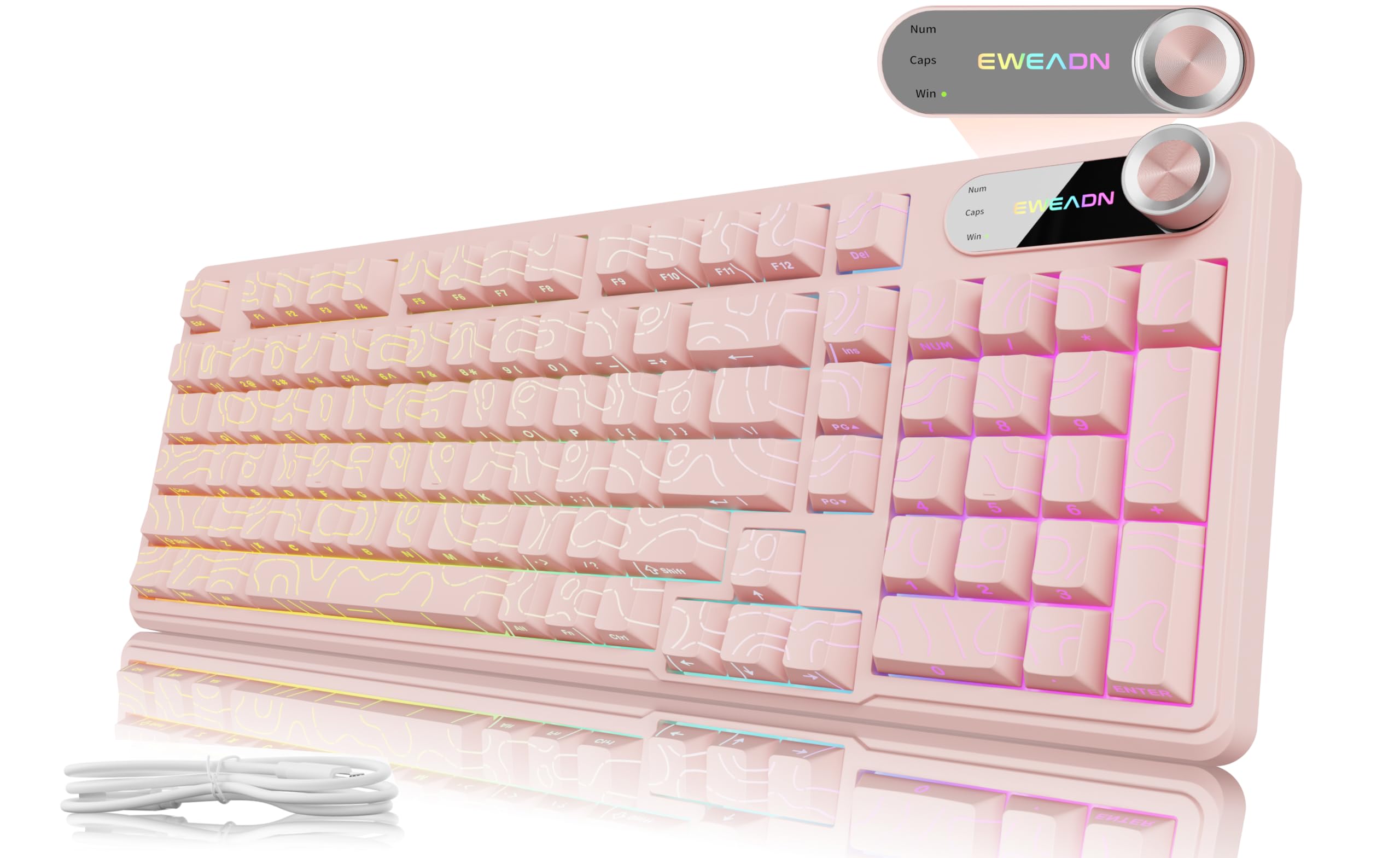
Figure 1: EWEADN V102 Wired Keyboard, Light Pink variant.
2. 箱の中身
パッケージの内容をチェックして、すべてのアイテムが揃っていることを確認してください。
- EWEADN V102 Keyboard x 1
- USB Type-Cケーブル x 1
- 取扱説明書 x 1

Figure 2: Included USB Type-C cable for keyboard connection.
3. セットアップ手順
- キーボードを接続します: Plug the USB Type-C cable into the port on the keyboard and the other end into an available USB port on your computer or device. The keyboard is plug-and-play, requiring no additional drivers for basic functionality.
- タイピング角度を調整: キーボードには2つのtage adjustable feet on the underside. Flip them out to achieve your preferred typing angle for enhanced comfort.
- システム互換性: The EWEADN V102 is compatible with Windows, Mac, Android, iOS, Xbox, PS4, and PS5. For Mac users, switch to Mac layout by pressing FN+S. For Windows, press FN+A.

Figure 3: Dual-System Connection for Windows and Mac layouts.

図 4: 人間工学に基づいた快適さを実現する調整可能なタイピング角度。
4. 操作手順
4.1. 専用ノブとディスプレイ画面
The smart rotary knob and built-in display screen provide intuitive control and real-time status updates:
- Backlight Mode Control: Press the knob once to cycle through 12 different RGB backlight modes.
- 明るさ調整: Rotate the knob to adjust the backlight brightness (5 levels).
- マルチメディアモード: 所有 FN + ノブ to switch to multimedia mode. In this mode, rotating the knob controls volume, and pressing it mutes/unmutes audio.
- 表示画面: The screen shows the EWEADN logo and indicators for Caps Lock, Num Lock, and Win Lock status.

Figure 5: Smart Screen Display showing keyboard status.

Figure 6: Multi-Function Control Knob for lighting and multimedia.
4.2. Dynamic RGB Backlighting
Customize your keyboard's lighting with these shortcuts:
- バックライトの切り替え: プレス FN + バックスペース to turn the backlight ON/OFF.
- 照明効果を変更する: プレス FN + イン to cycle through 12 stunning RGB lighting effects.
- 明るさを調整: プレス FN + PGUP 明るさを上げるには、 FN + PGDN 明るさを下げます(5段階)。
- 照明速度を調整する: プレス FN + "-" 速度を落とすには、 FN + "+" to increase speed (5 levels).

Figure 7: RGB Backlight controls and effects.
4.3. 98キーのコンパクトレイアウト
The 98% layout provides a full-featured experience, including a numeric keypad, while maintaining a compact footprint to save desk space.

Figure 8: Compact 98-key layout for efficiency.
5. メンテナンス
5.1. Spill Resistant Design
The EWEADN V102 keyboard features a spill-resistant design to protect against accidental liquid spills. In case of a spill, gently wipe the liquid off the surface and allow the keyboard to air dry completely before continued use. Avoid submerging the keyboard in water.

図 9: 耐久性を高める防滴設計。
6。 トラブルシューティング
If you encounter any issues with your EWEADN V102 keyboard, please refer to the following common troubleshooting steps:
- キーボードが応答しない: Ensure the USB Type-C cable is securely connected to both the keyboard and your device. Try plugging it into a different USB port.
- バックライトが機能しない: バックライトがオフになっているか確認するには FN + バックスペース明るさを調整する FN + PGUP/PGDN.
- キーレイアウトが正しくありません (Mac/Windows): Verify that the correct system layout is selected (FN+A Windowsの場合、 FN+S Mac 用)。
- ノブの機能: If the knob is not controlling lighting or multimedia as expected, ensure you are in the correct mode (press or hold FN + ノブ to switch).
- 断続的な接続: Ensure the cable is not damaged and try connecting directly to your device without any hubs or adapters.
If the problem persists after trying these steps, please contact EWEADN customer support for further assistance.
7. 仕様
| ブランド | イウィードン |
| モデル | バージョン102 |
| レイアウト | 98-Key Compact |
| 接続性 | 有線(USB Type-C) |
| バックライト | ダイナミック RGB (12 種類のエフェクト、5 種類の明るさレベル、5 種類の速度レベル) |
| 特集 | Dedicated Media Knob, Display Screen (Caps/Num/Win Lock), Spill Resistant, Adjustable Typing Angles |
| 対応デバイス | Laptop, PC (Windows, Mac, Android, iOS, Xbox, PS4, PS5) |
| アイテム重量 | 2.25ポンド |
| パッケージ寸法 | 17.56 x 6.97 x 2.36インチ |
| 材料 | プラスチック |
8. 保証とサポート
Your EWEADN V102 keyboard is covered by a return policy allowing returns or replacements within 30 days of purchase. For any product inquiries, technical support, or warranty claims, please contact EWEADN customer service.
- メールサポート: eweadnkeyboard@outlook.com
- オンラインサポート: Visit the EWEADN Store on Amazon and click 'Ask a question'.
Figure 10: EWEADN Customer Support Information.